

Saigonjeff
New member
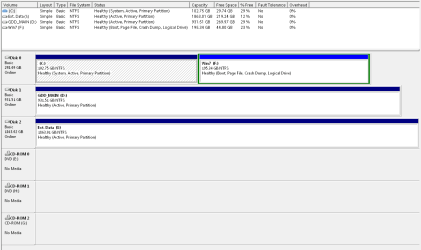
I need help to move My Windows 7 installation from Drive F to Drive C without loosing all my programs and settings.
I have been running XP on Drive C for what seems like forever, and I wanted to keep it until I was satisfied with the new Windows 7. As it turn out, I really like Win 7 and have not gone back to XP since.
I see no reason to keep the XP installation anymore, and I could really use the free disc space that remains after XP is gone. So Here is what I want to do...
Any Help would be appreciated
I have been running XP on Drive C for what seems like forever, and I wanted to keep it until I was satisfied with the new Windows 7. As it turn out, I really like Win 7 and have not gone back to XP since.
I see no reason to keep the XP installation anymore, and I could really use the free disc space that remains after XP is gone. So Here is what I want to do...
- Format Drive C
- Move Windows 7 from Drive F to Drive C
- Merge the remaining empty space on Drive F into Drive C
- Get rid of Drive F partition
Any Help would be appreciated
Attachments
My Computer
At a glance
Microsoft Windows 7 Professional 32-bit 7601 ...Intel(R) Core(TM)2 Duo CPU E7600 @ 3.06GHz4.00 GBATI Radeon HD 4600 Series
- Computer type
- PC/Desktop
- Computer Manufacturer/Model Number
- Custom Build
- OS
- Microsoft Windows 7 Professional 32-bit 7601 Multiprocessor Free Service Pack 1
- CPU
- Intel(R) Core(TM)2 Duo CPU E7600 @ 3.06GHz
- Motherboard
- Gigabyte Technology Co., Ltd. G41MT-D3P
- Memory
- 4.00 GB
- Graphics Card(s)
- ATI Radeon HD 4600 Series
- Sound Card
- (1) HD Webcam C525 (2) SB 5.1 VX (3) High Definition Aud
- Monitor(s) Displays
- Samsung T220 Widescreen LCD
- Screen Resolution
- 1680 x 1050 x 32 bits (4294967296 colors) @ 59 Hz
- Hard Drives
- (1) ST3320620AS ATA Device (2) WDC WD10EARS-00Y5B1 ATA Device
- Case
- CoolMaster eLite
- Keyboard
- Lexma Wireless
- Mouse
- Lexma Wirless
- Internet Speed
- ADSL
- Antivirus
- SuperAntiSpyware Pro
- Browser
- Chrome


