
Solved How to overclock Graphic Card (ATI Radeon HD 5670) ?

Trinty

New member
Power User
Local time
4:06 PM
Messages
144
Hello.

Like title says, I want to learn something about OC'ing graphic card.

Some months ago, I wanted to OC my CPU. I can't do it because my CPU is locked Sandy Bridge and my motherboard don't support OC'ing. Because I can't overclock CPU, I want to overclock other thing. That is GPU. I have ATI Radeon HD 5670 and I saw that people OC' it. How to OC it, I don't know so I ask.

Temperature of my GPU are stable. It is 38-45C and on Stress Test 58-65C (on "medium" fan speed).

In my ATI control center, I have Override option. I think that is for OC'ing.
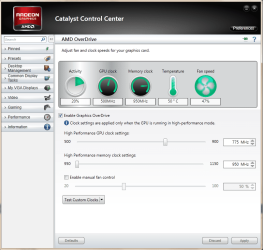
Untitled.png

Now : How to overclock GPU ? To use this software or other software ?
I see there is GPU speed, and GPU Memory Speed. How to "use" that ? When to edit speed and when to edit memory speed ?

Thank you very much (in advanced).

Trinty :)
 

My Computer My Computer

At a glance

Windows 7 Ultimate x64 - Service Pack 1Intel(R) Pentium(R) CPU G620 @ 2.60GHzTranscend Informations - 2*2048GB DDR3 @ 1066MHzATI Radeon HD 5670 - 1024MB DDR5 - Driver : 1...
Computer Manufacturer/Model Number
Trinty Self Build 2011
OS
Windows 7 Ultimate x64 - Service Pack 1
CPU
Intel(R) Pentium(R) CPU G620 @ 2.60GHz
Motherboard
ASUSTeK Computer INC. P8H61-M LX2
Memory
Transcend Informations - 2*2048GB DDR3 @ 1066MHz
Graphics Card(s)
ATI Radeon HD 5670 - 1024MB DDR5 - Driver : 19.04.2011
Sound Card
AMD High Definition Audio Device
Monitor(s) Displays
SAMSUNG SyncMaster 2220LM 22"
Screen Resolution
1680x1050
Hard Drives
SAMSUNG HD503HI ATA Device - 500GB
PSU
Don't know for now !
Case
Case MSI
Cooling
Stock
Keyboard
MS Industrial 2.4GHz Wirelees Keyboard
Mouse
MS Industrial 2.4GHz Wirelees Optical Mouse
Internet Speed
Download speed : 6,5Mbps / Upload speed : 1Mpbs
Other Info
BIOS version : BIOS Date: 02/05/10 19:13:52 Ver: 08.00.10
Prime95 (4h) : max. 65°C
DirectX 11 version.
Logitech G13 Advanced Gaming Keyboard.
Download FurMark. It analyzes your gpu under stress and what you do in catalyst is slightly up the settings then run FurMark for 30 secs or so to check stability. If it becomes unstable at some point your pc will restart, no harm done and settings will revert back. That's why you should write down your numbers incase this happens so you can find your peak settings.
NOTE: at the end run the 15minute test, that simulates a gaming session just as a final test.
 

My Computer My Computer

At a glance

Windows 7 Ultimate x64
OS
Windows 7 Ultimate x64
Download FurMark. It analyzes your gpu under stress and what you do in catalyst is slightly up the settings then run FurMark for 30 secs or so to check stability. If it becomes unstable at some point your pc will restart, no harm done and settings will revert back. That's why you should write down your numbers incase this happens so you can find your peak settings.

I know that. I already have FurMark and a lot of programs for testing my computer and other things.

I don't know what to change, edit... So I ask experienced members, who already did it or know something about it : What to change ?

There is GPU Clock and GPU Memory Speed. To try with GPU Clock first (or Memory speed) or to change it both for 1 degrees (5MHz) up.

And what if my system got unstable ? How to back all settings to default if I can't boot or something other ?

Thanks in advance.

Trinty :)
 

My Computer My Computer

At a glance

Windows 7 Ultimate x64 - Service Pack 1Intel(R) Pentium(R) CPU G620 @ 2.60GHzTranscend Informations - 2*2048GB DDR3 @ 1066MHzATI Radeon HD 5670 - 1024MB DDR5 - Driver : 1...
Computer Manufacturer/Model Number
Trinty Self Build 2011
OS
Windows 7 Ultimate x64 - Service Pack 1
CPU
Intel(R) Pentium(R) CPU G620 @ 2.60GHz
Motherboard
ASUSTeK Computer INC. P8H61-M LX2
Memory
Transcend Informations - 2*2048GB DDR3 @ 1066MHz
Graphics Card(s)
ATI Radeon HD 5670 - 1024MB DDR5 - Driver : 19.04.2011
Sound Card
AMD High Definition Audio Device
Monitor(s) Displays
SAMSUNG SyncMaster 2220LM 22"
Screen Resolution
1680x1050
Hard Drives
SAMSUNG HD503HI ATA Device - 500GB
PSU
Don't know for now !
Case
Case MSI
Cooling
Stock
Keyboard
MS Industrial 2.4GHz Wirelees Keyboard
Mouse
MS Industrial 2.4GHz Wirelees Optical Mouse
Internet Speed
Download speed : 6,5Mbps / Upload speed : 1Mpbs
Other Info
BIOS version : BIOS Date: 02/05/10 19:13:52 Ver: 08.00.10
Prime95 (4h) : max. 65°C
DirectX 11 version.
Logitech G13 Advanced Gaming Keyboard.
From my experience your not going to get that much of an FPS increase at all from overclocking, maybe like 3-5% higher running your card at max "safe" voltage settings and then clock it to the max that those voltages can take you, and we all know what happens when you run higher voltages, so IMO its not worth it.

But if you do want to overclock it, start with the base clock and increase it with like 5-10 mhz each time and when clock wont go higher start with memory.

And if its not stable the graphic drivers will most likely only crash, so you bring the clock down a notch and then reboot, and it should be fine
 

My Computer My Computer

At a glance

Windows 7 Home Premium x64Intel Core i7 860 (Lynnfield)Corsair Vengeance 9,9,9,24 1600Mhz 1.50v 2x4GAsus nVidia 560 GTX
Computer type
PC/Desktop
OS
Windows 7 Home Premium x64
CPU
Intel Core i7 860 (Lynnfield)
Motherboard
Asus P7P55D (LGA1156)
Memory
Corsair Vengeance 9,9,9,24 1600Mhz 1.50v 2x4G
Graphics Card(s)
Asus nVidia 560 GTX
Sound Card
Asus Xonar DG
Monitor(s) Displays
Acer P235H & NEC E201W
Screen Resolution
1920x1080 & 900x1600
Hard Drives
2
PSU
Corsair 650 Modular
Case
Corsair 800D
Cooling
Corsair H80 with Noctua fans
Keyboard
Ducky Shine
Mouse
tT Theron
Internet Speed
100/100
Browser
IE10
From my experience your not going to get that much of an FPS increase at all from overclocking, maybe like 3-5% higher running your card at max "safe" voltage settings and then clock it to the max that those voltages can take you, and we all know what happens when you run higher voltages, so IMO its not worth it.

But if you do want to overclock it, start with the base clock and increase it with like 5-10 mhz each time and when clock wont go higher start with memory.

And if its not stable the graphic drivers will most likely only crash, so you bring the clock down a notch and then reboot, and it should be fine

I want to do it for fun... :D Not for much more performances...
Only I want to know some basics about this type of OC'ing.

I forgot one thing. What about voltages ? How to change it, when to change it ? When I need to undervolt, when I need to overvolt ?
I don't know too much about voltages. If someone can write some basics about voltages I'll be very happy :)

I ask what if I can't boot, like when I overclock CPU, how to change speed again if I can't boot and open ATI Catalyst Center ???

Thank you very much, and thank you in advanced.

Trinty :)
 

My Computer My Computer

At a glance

Windows 7 Ultimate x64 - Service Pack 1Intel(R) Pentium(R) CPU G620 @ 2.60GHzTranscend Informations - 2*2048GB DDR3 @ 1066MHzATI Radeon HD 5670 - 1024MB DDR5 - Driver : 1...
Computer Manufacturer/Model Number
Trinty Self Build 2011
OS
Windows 7 Ultimate x64 - Service Pack 1
CPU
Intel(R) Pentium(R) CPU G620 @ 2.60GHz
Motherboard
ASUSTeK Computer INC. P8H61-M LX2
Memory
Transcend Informations - 2*2048GB DDR3 @ 1066MHz
Graphics Card(s)
ATI Radeon HD 5670 - 1024MB DDR5 - Driver : 19.04.2011
Sound Card
AMD High Definition Audio Device
Monitor(s) Displays
SAMSUNG SyncMaster 2220LM 22"
Screen Resolution
1680x1050
Hard Drives
SAMSUNG HD503HI ATA Device - 500GB
PSU
Don't know for now !
Case
Case MSI
Cooling
Stock
Keyboard
MS Industrial 2.4GHz Wirelees Keyboard
Mouse
MS Industrial 2.4GHz Wirelees Optical Mouse
Internet Speed
Download speed : 6,5Mbps / Upload speed : 1Mpbs
Other Info
BIOS version : BIOS Date: 02/05/10 19:13:52 Ver: 08.00.10
Prime95 (4h) : max. 65°C
DirectX 11 version.
Logitech G13 Advanced Gaming Keyboard.
Well if you increase the clock and memory speed your graphic card will need more power to be able to substain the higher clock rate, and the more voltage you have the higher the risk of making your cpu/graphic card's live for a shorter time but if your staying within the safe voltages that should not be to much a problem. And undervolt is the same as overclocking but reverse, less clock speed require less voltage

And if something goes horribly wrong and your computer wont start you need to clear CMOS, it stands in your motherboards manual how you do that.
 

My Computer My Computer

At a glance

Windows 7 Home Premium x64Intel Core i7 860 (Lynnfield)Corsair Vengeance 9,9,9,24 1600Mhz 1.50v 2x4GAsus nVidia 560 GTX
Computer type
PC/Desktop
OS
Windows 7 Home Premium x64
CPU
Intel Core i7 860 (Lynnfield)
Motherboard
Asus P7P55D (LGA1156)
Memory
Corsair Vengeance 9,9,9,24 1600Mhz 1.50v 2x4G
Graphics Card(s)
Asus nVidia 560 GTX
Sound Card
Asus Xonar DG
Monitor(s) Displays
Acer P235H & NEC E201W
Screen Resolution
1920x1080 & 900x1600
Hard Drives
2
PSU
Corsair 650 Modular
Case
Corsair 800D
Cooling
Corsair H80 with Noctua fans
Keyboard
Ducky Shine
Mouse
tT Theron
Internet Speed
100/100
Browser
IE10
Well if you increase the clock and memory speed your graphic card will need more power to be able to substain the higher clock rate, and the more voltage you have the higher the risk of making your cpu/graphic card's live for a shorter time but if your staying within the safe voltages that should not be to much a problem. And undervolt is the same as overclocking but reverse, less clock speed require less voltage

And if something goes horribly wrong and your computer wont start you need to clear CMOS, it stands in your motherboards manual how you do that.


What is that "safe" voltage for my Graphic Card ?
And how to change voltages on my Graphic Card ? There isn't any option in my BIOS (there isn't any voltage option in BIOS).

In my BIOS, I have "GPU Boost". What is that GPU Boost and how to use it ?

Thank you.

Trinty :)
 

My Computer My Computer

At a glance

Windows 7 Ultimate x64 - Service Pack 1Intel(R) Pentium(R) CPU G620 @ 2.60GHzTranscend Informations - 2*2048GB DDR3 @ 1066MHzATI Radeon HD 5670 - 1024MB DDR5 - Driver : 1...
Computer Manufacturer/Model Number
Trinty Self Build 2011
OS
Windows 7 Ultimate x64 - Service Pack 1
CPU
Intel(R) Pentium(R) CPU G620 @ 2.60GHz
Motherboard
ASUSTeK Computer INC. P8H61-M LX2
Memory
Transcend Informations - 2*2048GB DDR3 @ 1066MHz
Graphics Card(s)
ATI Radeon HD 5670 - 1024MB DDR5 - Driver : 19.04.2011
Sound Card
AMD High Definition Audio Device
Monitor(s) Displays
SAMSUNG SyncMaster 2220LM 22"
Screen Resolution
1680x1050
Hard Drives
SAMSUNG HD503HI ATA Device - 500GB
PSU
Don't know for now !
Case
Case MSI
Cooling
Stock
Keyboard
MS Industrial 2.4GHz Wirelees Keyboard
Mouse
MS Industrial 2.4GHz Wirelees Optical Mouse
Internet Speed
Download speed : 6,5Mbps / Upload speed : 1Mpbs
Other Info
BIOS version : BIOS Date: 02/05/10 19:13:52 Ver: 08.00.10
Prime95 (4h) : max. 65°C
DirectX 11 version.
Logitech G13 Advanced Gaming Keyboard.
You do not change GPU voltages in bios, and I am not sure about the Catalyst, but if you download MSI Afterburner its a bit easier at least for me with my nvidia card but what I know it should work with amd cards also, and not sure what voltage that is for that card, but for instance if I open MSI Afterburner and slide the voltage to the top it stops at 1087, which would be 1.09v and according to nvidia that is the max for that card so something like that should also happen with your card but dont slide it to max and press apply, because you only want to increase the voltage when you fail the tests.
 

My Computer My Computer

At a glance

Windows 7 Home Premium x64Intel Core i7 860 (Lynnfield)Corsair Vengeance 9,9,9,24 1600Mhz 1.50v 2x4GAsus nVidia 560 GTX
Computer type
PC/Desktop
OS
Windows 7 Home Premium x64
CPU
Intel Core i7 860 (Lynnfield)
Motherboard
Asus P7P55D (LGA1156)
Memory
Corsair Vengeance 9,9,9,24 1600Mhz 1.50v 2x4G
Graphics Card(s)
Asus nVidia 560 GTX
Sound Card
Asus Xonar DG
Monitor(s) Displays
Acer P235H & NEC E201W
Screen Resolution
1920x1080 & 900x1600
Hard Drives
2
PSU
Corsair 650 Modular
Case
Corsair 800D
Cooling
Corsair H80 with Noctua fans
Keyboard
Ducky Shine
Mouse
tT Theron
Internet Speed
100/100
Browser
IE10
Ok first off you are using a HD5670 that is a low end card

Best you will get is to boost memory clocks up a bit trying to get a bit more out of it probally isn't going to help you all that much I have had this card it runs most things at a decent setting and fram rate

trying to overvolt that card is a bad idea wasn't ment for that it was ment to play decent games with out lag or make them enjoyable enough for an average user

just pump the clocks up and fan a bit and it should give you the added boost the GPU booster in your Bios should be for the onboard only now if you happen to have a 2nd pci -e slot you can buy another HD5670 according to what i've read and crossfire them with out a bridge and boost your performance that of a HD5770 if anything
 

My Computer My Computer

At a glance

Windows 10 Home Premium 64bit sp1Intel I7-6700K @ 4.6 Ghz 1.344 volts everyday OC32GB G-Skill TridentZ 3200mhz 16-18-18-38 DDR4Sli Gigabyte Windforce GTX 980 G1
Computer type
PC/Desktop
Computer Manufacturer/Model Number
CoreI7-6700K MrFingerIII Special Builds
OS
Windows 10 Home Premium 64bit sp1
CPU
Intel I7-6700K @ 4.6 Ghz 1.344 volts everyday OC
Motherboard
Asrock Fatality K6 Z170 Socket 1151
Memory
32GB G-Skill TridentZ 3200mhz 16-18-18-38 DDR4
Graphics Card(s)
Sli Gigabyte Windforce GTX 980 G1
Sound Card
AC97 Creative Rage Tactic 3D Headphones Bluetooth
Monitor(s) Displays
27" Asus ROG Swift PG278Q G-Sync 48" Vizio Smart HD TV
Screen Resolution
2560x1440p 27"- 48" Currently Gaming at 2560x1440p Res 2K
Hard Drives
250GB Samsung Evo840SSD Seagate baracuda 500 GB WD Mybook 500Gb 1TB Seagate Barracuda
PSU
HX1050w Corsair Silver 80plus certified crosfire/sli
Case
Enthod Pro Full Tower
Cooling
Corsair H110i GT 280 mm High Performance WaterBlock
Keyboard
Logitech wireless keyboard
Mouse
Logitech wireless mouse
Internet Speed
Cox Cable 100+ mb
Antivirus
WebRoot Spysweeper with Antivirus
Browser
IE-10, Chrome, Opera
Other Info
My Other Rig is a AMD FX8320E @4.6Ghz 16GB Ballistic Sport Ram
Mobo Asrock Fatality 990FX 120GB OCZ SSD 1TB Seagate Barracuda Corsair H75 Cooling PSU Corsair CX750
GPU GTX Gigabyte 970G1
Back
Top