how to partition Toshiba Laptop with windows 7 preinstalled

Memory

New member
Local time
10:18 PM
Messages
5
Hello,
My friend bought a Toshiba laptop with 320GB harddrive and Intel i3 processor. It has windows 7 preinstalled.We used the recover mode and backed up the OS. The initial space (1.46 GB) contains the OS system files. We used the shrink option in Disk Management utility of the OS to shrink the C: drive to 140 GB which was the minimum amount of space, the C: drive could be shrunk to - could not go lower than that. We want to repartition the C: drive to 3 partitions (40, 50 , 50 GB). Is it a restriction of the OS - maybe bad design - that causes this glitch. If we install another OS (multiboot), can we repartition the C: drive.
If we format the whole drive, then it is possible to do whatever we like with the HDD - as in the case of a fresh harddrive. But the preinstalled OS will be gone for ever. Help us find a way out so that the preinstalled partition does not get erased and we can repartition the C: drive.
rgds,
your friend
 

My Computer My Computer

At a glance

Win XP
OS
Win XP

Attachments

  • Disk_Management_New_2tbHD.JPG
    Disk_Management_New_2tbHD.JPG
    108.7 KB · Views: 481

My Computer My Computer

At a glance

Win7 Enterprise, Win7 x86 (Ult 7600), Win7 x6...AMD fx8350 4ghz, AMD-32 2400mhz, AMD-64 3200m...2gb, 4gb on the Ult 7600, 4gb on Technet RTM,...Draw my own Graphics, several nVidia cards
Computer type
PC/Desktop
Computer Manufacturer/Model Number
Built them myself, Science Experiments !
OS
Win7 Enterprise, Win7 x86 (Ult 7600), Win7 x64 Ult 7600, TechNet RTM on AMD x64 (2.8Ghz)
CPU
AMD fx8350 4ghz, AMD-32 2400mhz, AMD-64 3200mhz, AMDx64 2.8G
Motherboard
SIS 755, ECS-K8M890M-M (Ult 7600), GigaByte & others
Memory
2gb, 4gb on the Ult 7600, 4gb on Technet RTM, 32gb on FX8350
Graphics Card(s)
Draw my own Graphics, several nVidia cards
Sound Card
on motherboard
Monitor(s) Displays
19" flat scr, 28" I-Inc widescr,22" Emprex Widescr, 23" Acer
Screen Resolution
1280 x 1024, 1440 x 900, 1920 x 1080
Hard Drives
6 pata Ide HD's & 2 Sata HD's
added 80gb external on Ult 7600 computer,
numerous extra 1tb, 2TB, 3Tb SATA HD's
A collection of ext HD Docks w/ HDs
PSU
430w, 550w, 600w, 700, 800, etc
Case
All Generic Full Towers
Cooling
Open Air & a few fans, some w/ colored LEDs
Keyboard
Compaq & Dell recycled from GoodWill
Mouse
Made in China Optical Wired Mouse
Internet Speed
Fast Cable InterNet
Antivirus
AVG Free on 24 different Desktops, NO Problems!
Browser
IE 8 is preferred, but use FireFox sometimes
Other Info
Linksys Routers, switches, & Hubs
Too Many USB Flash Drives to count, Biggest is 64GB !
Eight computers in my home network.
Sixteen computers at my business network.
Linked via TeamViewer !
Lots of old used spare computer parts everywhere!
While we wait for your Disk Mgmt screenshot, be sure to save a Win7 backup image externally so you have a path back to exactly where you are now if you need to start over.

The best tool for doing what Disk Mgmt cannot is free Partition Wizard bootable CD: Free Download Magic Partition Manager Software - Partition Wizard Online

If you'll tell us what is on each partition and what you'd like to end up with we can give you the steps.
 
Memory, as DocBrowns said, we really need a screenshot of your Disk Management. There are a lot of traps you can fall into (e.g. dynamic partitions). We would hate to see you get into trouble.
 

My Computer My Computer

At a glance

Vista, Windows7, Mint Mate, Zorin, Windows 8from 1.6GHz Duo to i7
Computer Manufacturer/Model Number
HP, Dell, Gateway, Toshiba - 4 laptops and 2 desktops
OS
Vista, Windows7, Mint Mate, Zorin, Windows 8
CPU
from 1.6GHz Duo to i7
Monitor(s) Displays
2x HP w2207
Hard Drives
5x HDD, 7x SSD, 12x Externals
Keyboard
with trackball - no mices
Mouse
Trackball mice
Internet Speed
DSL 6000
Since it is a Factory installed Toshiba Laptop, it will probably have the 2 hidden partitions already on the HD.
 

My Computer My Computer

At a glance

Win7 Enterprise, Win7 x86 (Ult 7600), Win7 x6...AMD fx8350 4ghz, AMD-32 2400mhz, AMD-64 3200m...2gb, 4gb on the Ult 7600, 4gb on Technet RTM,...Draw my own Graphics, several nVidia cards
Computer type
PC/Desktop
Computer Manufacturer/Model Number
Built them myself, Science Experiments !
OS
Win7 Enterprise, Win7 x86 (Ult 7600), Win7 x64 Ult 7600, TechNet RTM on AMD x64 (2.8Ghz)
CPU
AMD fx8350 4ghz, AMD-32 2400mhz, AMD-64 3200mhz, AMDx64 2.8G
Motherboard
SIS 755, ECS-K8M890M-M (Ult 7600), GigaByte & others
Memory
2gb, 4gb on the Ult 7600, 4gb on Technet RTM, 32gb on FX8350
Graphics Card(s)
Draw my own Graphics, several nVidia cards
Sound Card
on motherboard
Monitor(s) Displays
19" flat scr, 28" I-Inc widescr,22" Emprex Widescr, 23" Acer
Screen Resolution
1280 x 1024, 1440 x 900, 1920 x 1080
Hard Drives
6 pata Ide HD's & 2 Sata HD's
added 80gb external on Ult 7600 computer,
numerous extra 1tb, 2TB, 3Tb SATA HD's
A collection of ext HD Docks w/ HDs
PSU
430w, 550w, 600w, 700, 800, etc
Case
All Generic Full Towers
Cooling
Open Air & a few fans, some w/ colored LEDs
Keyboard
Compaq & Dell recycled from GoodWill
Mouse
Made in China Optical Wired Mouse
Internet Speed
Fast Cable InterNet
Antivirus
AVG Free on 24 different Desktops, NO Problems!
Browser
IE 8 is preferred, but use FireFox sometimes
Other Info
Linksys Routers, switches, & Hubs
Too Many USB Flash Drives to count, Biggest is 64GB !
Eight computers in my home network.
Sixteen computers at my business network.
Linked via TeamViewer !
Lots of old used spare computer parts everywhere!
My friend will come to my home within 2 hours ( he does not have internet connection at his hostel right now - has to take one very soon). Will upload the screen shots within 2 hours. And may thanks for your concern.

rgds,
your friend
 

My Computer My Computer

At a glance

Win XP
OS
Win XP
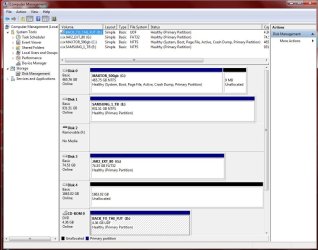
Here is the screenshot
Win7PartitionScreenshot


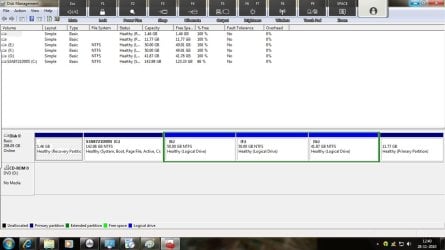
Initially, the C: drive had 280GB and don't know where the remaining 40 Gb is.. We shrank C: drive to 140Gb. The remaining 140 GB was further divided to 3 partitions(which can be deleted...)
 

My Computer My Computer

At a glance

Win XP
OS
Win XP
screenshot.jpg

the previous image was not clear. so i am enclosing a better one.
 

My Computer My Computer

At a glance

Win XP
OS
Win XP
Hello Memory, welcome to Seven Forums!


Now that you have the new Extended partition with the Logical drives created, what is it exactly you need to do, please be specific.
 

My Computer My Computer

At a glance

W 7 64-bit UltimateIntel Q9550 Yorkfield8GB Dominator 8500C5DATI : XFX 5870
Computer Manufacturer/Model Number
* BFK Customs *
OS
W 7 64-bit Ultimate
CPU
Intel Q9550 Yorkfield
Motherboard
ASUS P5Q Pro
Memory
8GB Dominator 8500C5D
Graphics Card(s)
ATI : XFX 5870
Sound Card
Realtek HD Audio 7-1
Monitor(s) Displays
1x 47" LCD HDMI & 3x 26" LCD HDMI
Screen Resolution
1920x1080P & 1920x1200
Hard Drives
1x 80GB Intel X25-M G2 SSD : 1x 500GB & 1x 640GB WD Caviar Black(s)
PSU
Corsair 620HX
Case
Cooler Master RC-690
Cooling
Tuniq Tower 120, 2x 140mm and 3x 120mm case fans
Keyboard
Microsoft 500
Mouse
Razer Diamondback 3G
Internet Speed
14 Mb/s
Other Info
1x Koutech 3Gb/s SATA HDD Hot Swap Rack
Can I repartition my C: drive to 40, 50 and 50 GB
 

My Computer My Computer

At a glance

Win XP
OS
Win XP
Can I repartition my C: drive to 40, 50 and 50 GB

No you have reached the partition limit imposed by Windows for a single Hard Disk Drive.

It is possible to have ...

Four (4) Primary partitions or

Three (3) Primary partitions and a single Extended partition, inside the Extended partition there can be as many Logical drives as there are available drive letters.
 

My Computer My Computer

At a glance

W 7 64-bit UltimateIntel Q9550 Yorkfield8GB Dominator 8500C5DATI : XFX 5870
Computer Manufacturer/Model Number
* BFK Customs *
OS
W 7 64-bit Ultimate
CPU
Intel Q9550 Yorkfield
Motherboard
ASUS P5Q Pro
Memory
8GB Dominator 8500C5D
Graphics Card(s)
ATI : XFX 5870
Sound Card
Realtek HD Audio 7-1
Monitor(s) Displays
1x 47" LCD HDMI & 3x 26" LCD HDMI
Screen Resolution
1920x1080P & 1920x1200
Hard Drives
1x 80GB Intel X25-M G2 SSD : 1x 500GB & 1x 640GB WD Caviar Black(s)
PSU
Corsair 620HX
Case
Cooler Master RC-690
Cooling
Tuniq Tower 120, 2x 140mm and 3x 120mm case fans
Keyboard
Microsoft 500
Mouse
Razer Diamondback 3G
Internet Speed
14 Mb/s
Other Info
1x Koutech 3Gb/s SATA HDD Hot Swap Rack
You have an empty Primary partition on the right side which can be deleted and open up space for another Primary.

So you can use free Partition Wizard bootable CD to rightclick>Resize C to see how much more it will shrink by dragging its right grey border to the left.

Next you can delete the 11.77 gb empty partition on the far right side to open up another Primary partition, create a New NTFS Primary partition in the shrink space you made from C.

Either add the deleted 11.77gb to G by rightclick>resizing it into the space, or rightclick resize the Extended Logical, hold it with a left click to slide the whole thing over to the right into the deleted space.

You can then create a new Logical in the Extended partition on the left side in addition to the Primary (since you said you wanted two) or just use a Logical or Primary there. To create a new logical in the extended's left side, rightclick to Resize it and drag the left grey border to the left to make space for a new partition.

http://www.sevenforums.com/tutorials/93322-partition-wizard-use-bootable-cd.html
 
Back
Top