How to Pin Network Icon to Quick Launch toolbar

recDNA

New member
Local time
10:40 AM
Messages
7
How to Pin Network Icon to Quick Launch toolbar -SOLVED

Hi - newbie here. I joined because I am a new Windows 7 64 bit user and am clueless. I was able to find out how to set up a quick launch toolbar and pin My Computer to it thanks to this forum! I have searched extensively bit haven't found an answer to this one:

How can I pin the Network Icon to the quick launch bar (that I successfully set up thanks to you guys)? I was able to create a desktop icon but when I drag it to the taskbar it only gives a "pin to show desktop" choice. No choice to pin to quick launch toobar (taskbar whatever it's called).

Thanks!
 
Last edited:

My Computer My Computer

At a glance

Windows 7 Home Premium 64 bitAthlon Neo duo core2 gigWhatever comes in this netbook.
Computer Manufacturer/Model Number
Toshiba T215 Netbook
OS
Windows 7 Home Premium 64 bit
CPU
Athlon Neo duo core
Motherboard
no idea
Memory
2 gig
Graphics Card(s)
Whatever comes in this netbook.
Sound Card
no idea
Monitor(s) Displays
backlit laptop
Hard Drives
300 gig
PSU
no idea
Case
none
Cooling
fan

My Computer My Computer

At a glance

Vista, Windows7, Mint Mate, Zorin, Windows 8from 1.6GHz Duo to i7
Computer Manufacturer/Model Number
HP, Dell, Gateway, Toshiba - 4 laptops and 2 desktops
OS
Vista, Windows7, Mint Mate, Zorin, Windows 8
CPU
from 1.6GHz Duo to i7
Monitor(s) Displays
2x HP w2207
Hard Drives
5x HDD, 7x SSD, 12x Externals
Keyboard
with trackball - no mices
Mouse
Trackball mice
Internet Speed
DSL 6000

Thanks but....Nothing there about the Network Icon but I assume you mean to create a folder called Quick Launch, put the network icon in it, create a new toolbar and link to the folder.

I have already set up an actual quick launch bar using help here that works like an actual quick launch bar. I used this for my folder

%userprofile%\AppData\Roaming\Microsoft\Internet Explorer\Quick Launch

and now I can just drag icons onto the quick launch bar. I'd like to be able to do that rather than creating a second toolbar on the same bar containing stuff from another folder.
 

My Computer My Computer

At a glance

Windows 7 Home Premium 64 bitAthlon Neo duo core2 gigWhatever comes in this netbook.
Computer Manufacturer/Model Number
Toshiba T215 Netbook
OS
Windows 7 Home Premium 64 bit
CPU
Athlon Neo duo core
Motherboard
no idea
Memory
2 gig
Graphics Card(s)
Whatever comes in this netbook.
Sound Card
no idea
Monitor(s) Displays
backlit laptop
Hard Drives
300 gig
PSU
no idea
Case
none
Cooling
fan

My Computer My Computer

At a glance

64-bit Windows 11 Pro for WorkstationsIntel i7-8700K OC'd to 5 GHz64 GB (4x16GB) G.SKILL TridentZ RGB DDR4 3600...ASUS ROG-STRIX-GTX1080TI-O11G-GAMING
Computer type
PC/Desktop
Computer Manufacturer/Model Number
Self built custom
OS
64-bit Windows 11 Pro for Workstations
CPU
Intel i7-8700K OC'd to 5 GHz
Motherboard
ASUS ROG Maximus XI Formula Z390
Memory
64 GB (4x16GB) G.SKILL TridentZ RGB DDR4 3600 MHz
Graphics Card(s)
ASUS ROG-STRIX-GTX1080TI-O11G-GAMING
Sound Card
Integrated
Monitor(s) Displays
2 x Samsung Odyssey G7 27"
Screen Resolution
2560x1440
Hard Drives
1TB Samsung 990 PRO M.2,
4TB Samsung 990 PRO PRO M.2,
TerraMaster F8 SSD Plus NAS
PSU
Seasonic Prime Titanium 850W
Case
Thermaltake Core P3
Cooling
Corsair Hydro H115i
Keyboard
Logitech wireless K800
Mouse
Logitech MX Master 4
Internet Speed
2 Gb/s Download and 100 Mb/s Upload
Antivirus
Malwarebyte Anti-Malware Premium
Browser
Google Chrome
Other Info
Logitech Z625 speaker system,
Logitech BRIO 4K Pro webcam,
HP Color LaserJet Pro MFP M477fdn,
APC SMART-UPS RT 1000 XL - SURT1000XLI,
Galaxy S23 Plus phone
Can I Pin Network Icon to my Quicklaunch this Way

When I try to drag my Network Shortcut Icon to the quicklaunch bar it tries to pin it to the Show Desktop Icon that is there. I can't get it to pin to the quicklaunch bar I created from a folder at

%userprofile%\AppData\Roaming\Microsoft\Internet Explorer\Quick Launch
 

My Computer My Computer

At a glance

Windows 7 Home Premium 64 bitAthlon Neo duo core2 gigWhatever comes in this netbook.
Computer Manufacturer/Model Number
Toshiba T215 Netbook
OS
Windows 7 Home Premium 64 bit
CPU
Athlon Neo duo core
Motherboard
no idea
Memory
2 gig
Graphics Card(s)
Whatever comes in this netbook.
Sound Card
no idea
Monitor(s) Displays
backlit laptop
Hard Drives
300 gig
PSU
no idea
Case
none
Cooling
fan
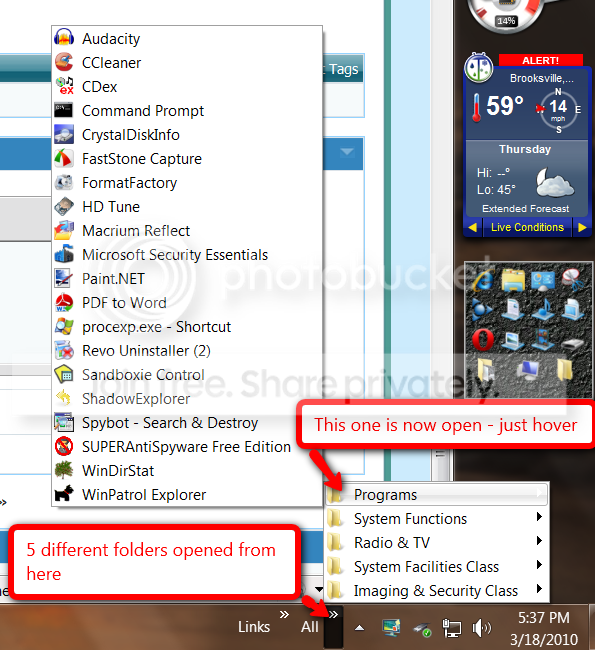
If you use the toolbars, you need not create multiple toolbars. You can have a whole selection of sub-folders in one toolbar - like this:

toolbar.png
 

My Computer My Computer

At a glance

Vista, Windows7, Mint Mate, Zorin, Windows 8from 1.6GHz Duo to i7
Computer Manufacturer/Model Number
HP, Dell, Gateway, Toshiba - 4 laptops and 2 desktops
OS
Vista, Windows7, Mint Mate, Zorin, Windows 8
CPU
from 1.6GHz Duo to i7
Monitor(s) Displays
2x HP w2207
Hard Drives
5x HDD, 7x SSD, 12x Externals
Keyboard
with trackball - no mices
Mouse
Trackball mice
Internet Speed
DSL 6000
When I try to drag my Network Shortcut Icon to the quicklaunch bar it tries to pin it to the Show Desktop Icon that is there. I can't get it to pin to the quicklaunch bar I created from a folder at

%userprofile%\AppData\Roaming\Microsoft\Internet Explorer\Quick Launch

You would just need to have the Network Shortcut from above in the Quick Launch folder, and it should show up in your Quick Launch toolbar on the taskbar.
 

My Computer My Computer

At a glance

64-bit Windows 11 Pro for WorkstationsIntel i7-8700K OC'd to 5 GHz64 GB (4x16GB) G.SKILL TridentZ RGB DDR4 3600...ASUS ROG-STRIX-GTX1080TI-O11G-GAMING
Computer type
PC/Desktop
Computer Manufacturer/Model Number
Self built custom
OS
64-bit Windows 11 Pro for Workstations
CPU
Intel i7-8700K OC'd to 5 GHz
Motherboard
ASUS ROG Maximus XI Formula Z390
Memory
64 GB (4x16GB) G.SKILL TridentZ RGB DDR4 3600 MHz
Graphics Card(s)
ASUS ROG-STRIX-GTX1080TI-O11G-GAMING
Sound Card
Integrated
Monitor(s) Displays
2 x Samsung Odyssey G7 27"
Screen Resolution
2560x1440
Hard Drives
1TB Samsung 990 PRO M.2,
4TB Samsung 990 PRO PRO M.2,
TerraMaster F8 SSD Plus NAS
PSU
Seasonic Prime Titanium 850W
Case
Thermaltake Core P3
Cooling
Corsair Hydro H115i
Keyboard
Logitech wireless K800
Mouse
Logitech MX Master 4
Internet Speed
2 Gb/s Download and 100 Mb/s Upload
Antivirus
Malwarebyte Anti-Malware Premium
Browser
Google Chrome
Other Info
Logitech Z625 speaker system,
Logitech BRIO 4K Pro webcam,
HP Color LaserJet Pro MFP M477fdn,
APC SMART-UPS RT 1000 XL - SURT1000XLI,
Galaxy S23 Plus phone
Is it not possible the way tutorials section taught us to put other icons there? We created a new shortcut, a link to where the item was was given like My Computer is here:
%SystemRoot%\explorer.exe shell:MyComputerFolder

Then we just change the icon to a computer for that shortcut and somehow that shortcut CAN be simply dragged to the quick launch bar without creating any new folders.

Is there a link like that that will work for Network Shortcut?

I just want the network icon on my existing quick launch bar so I can click on it and got to network like I used to in Vista. I don't want to have a folder lots of stuff to open or link to.

Is it impossible? It works for My Computer.
 

My Computer My Computer

At a glance

Windows 7 Home Premium 64 bitAthlon Neo duo core2 gigWhatever comes in this netbook.
Computer Manufacturer/Model Number
Toshiba T215 Netbook
OS
Windows 7 Home Premium 64 bit
CPU
Athlon Neo duo core
Motherboard
no idea
Memory
2 gig
Graphics Card(s)
Whatever comes in this netbook.
Sound Card
no idea
Monitor(s) Displays
backlit laptop
Hard Drives
300 gig
PSU
no idea
Case
none
Cooling
fan
Yes, you can move or create any shortcut that you like into the Quick Launch source folder below to have it show up in your Quick Launch taskbar toolbar that you enabled.

%userprofile%\AppData\Roaming\Microsoft\Internet Explorer\Quick Launch
 

My Computer My Computer

At a glance

64-bit Windows 11 Pro for WorkstationsIntel i7-8700K OC'd to 5 GHz64 GB (4x16GB) G.SKILL TridentZ RGB DDR4 3600...ASUS ROG-STRIX-GTX1080TI-O11G-GAMING
Computer type
PC/Desktop
Computer Manufacturer/Model Number
Self built custom
OS
64-bit Windows 11 Pro for Workstations
CPU
Intel i7-8700K OC'd to 5 GHz
Motherboard
ASUS ROG Maximus XI Formula Z390
Memory
64 GB (4x16GB) G.SKILL TridentZ RGB DDR4 3600 MHz
Graphics Card(s)
ASUS ROG-STRIX-GTX1080TI-O11G-GAMING
Sound Card
Integrated
Monitor(s) Displays
2 x Samsung Odyssey G7 27"
Screen Resolution
2560x1440
Hard Drives
1TB Samsung 990 PRO M.2,
4TB Samsung 990 PRO PRO M.2,
TerraMaster F8 SSD Plus NAS
PSU
Seasonic Prime Titanium 850W
Case
Thermaltake Core P3
Cooling
Corsair Hydro H115i
Keyboard
Logitech wireless K800
Mouse
Logitech MX Master 4
Internet Speed
2 Gb/s Download and 100 Mb/s Upload
Antivirus
Malwarebyte Anti-Malware Premium
Browser
Google Chrome
Other Info
Logitech Z625 speaker system,
Logitech BRIO 4K Pro webcam,
HP Color LaserJet Pro MFP M477fdn,
APC SMART-UPS RT 1000 XL - SURT1000XLI,
Galaxy S23 Plus phone
OK, my problem stems in part from poor terminology. I actually want to post items to the taskbar as shown on the left of the image below. I was able to get the network icon in the quick launch toolbar area on the right but I prefer it right on the taskbar on the left because the icons are big enough for me to see. I tried right clicking on a blank area of the quick launch to the right of the little dotted lines and choosing properties but the use small icons box is already unclicked. I can't make those icons big. I just want the big icons like the ones on the left. I don't want that second quick launch area on the right to even exist. Now I CAN and DID drag the network icon into that area on the right labled quick launch but I can't see it because it's too small. I also don't want TWO launch areas. I just want the one on the left.

Any ideas. See pic below If you click on it it gets bigger.

Desktop.png
 

My Computer My Computer

At a glance

Windows 7 Home Premium 64 bitAthlon Neo duo core2 gigWhatever comes in this netbook.
Computer Manufacturer/Model Number
Toshiba T215 Netbook
OS
Windows 7 Home Premium 64 bit
CPU
Athlon Neo duo core
Motherboard
no idea
Memory
2 gig
Graphics Card(s)
Whatever comes in this netbook.
Sound Card
no idea
Monitor(s) Displays
backlit laptop
Hard Drives
300 gig
PSU
no idea
Case
none
Cooling
fan
Ah, ok. You want it on the taskbar itself.

You can create the shortcut below, move it to where you want to store it at, then right click on it and click on Pin to taskbar to do so.

Network and Sharing Center Shortcut - Create
 

My Computer My Computer

At a glance

64-bit Windows 11 Pro for WorkstationsIntel i7-8700K OC'd to 5 GHz64 GB (4x16GB) G.SKILL TridentZ RGB DDR4 3600...ASUS ROG-STRIX-GTX1080TI-O11G-GAMING
Computer type
PC/Desktop
Computer Manufacturer/Model Number
Self built custom
OS
64-bit Windows 11 Pro for Workstations
CPU
Intel i7-8700K OC'd to 5 GHz
Motherboard
ASUS ROG Maximus XI Formula Z390
Memory
64 GB (4x16GB) G.SKILL TridentZ RGB DDR4 3600 MHz
Graphics Card(s)
ASUS ROG-STRIX-GTX1080TI-O11G-GAMING
Sound Card
Integrated
Monitor(s) Displays
2 x Samsung Odyssey G7 27"
Screen Resolution
2560x1440
Hard Drives
1TB Samsung 990 PRO M.2,
4TB Samsung 990 PRO PRO M.2,
TerraMaster F8 SSD Plus NAS
PSU
Seasonic Prime Titanium 850W
Case
Thermaltake Core P3
Cooling
Corsair Hydro H115i
Keyboard
Logitech wireless K800
Mouse
Logitech MX Master 4
Internet Speed
2 Gb/s Download and 100 Mb/s Upload
Antivirus
Malwarebyte Anti-Malware Premium
Browser
Google Chrome
Other Info
Logitech Z625 speaker system,
Logitech BRIO 4K Pro webcam,
HP Color LaserJet Pro MFP M477fdn,
APC SMART-UPS RT 1000 XL - SURT1000XLI,
Galaxy S23 Plus phone
Ah, ok. You want it on the taskbar itself.

You can create the shortcut below, move it to where you want to store it at, then right click on it and click on Pin to taskbar to do so.

Network and Sharing Center Shortcut - Create

Now we're on the right track however I want the Network link not the Network and Sharing Center

Also is it possible to make the icons in the quick launch area as big as those pinned to the taskbar?
 

My Computer My Computer

At a glance

Windows 7 Home Premium 64 bitAthlon Neo duo core2 gigWhatever comes in this netbook.
Computer Manufacturer/Model Number
Toshiba T215 Netbook
OS
Windows 7 Home Premium 64 bit
CPU
Athlon Neo duo core
Motherboard
no idea
Memory
2 gig
Graphics Card(s)
Whatever comes in this netbook.
Sound Card
no idea
Monitor(s) Displays
backlit laptop
Hard Drives
300 gig
PSU
no idea
Case
none
Cooling
fan

My Computer My Computer

At a glance

64-bit Windows 11 Pro for WorkstationsIntel i7-8700K OC'd to 5 GHz64 GB (4x16GB) G.SKILL TridentZ RGB DDR4 3600...ASUS ROG-STRIX-GTX1080TI-O11G-GAMING
Computer type
PC/Desktop
Computer Manufacturer/Model Number
Self built custom
OS
64-bit Windows 11 Pro for Workstations
CPU
Intel i7-8700K OC'd to 5 GHz
Motherboard
ASUS ROG Maximus XI Formula Z390
Memory
64 GB (4x16GB) G.SKILL TridentZ RGB DDR4 3600 MHz
Graphics Card(s)
ASUS ROG-STRIX-GTX1080TI-O11G-GAMING
Sound Card
Integrated
Monitor(s) Displays
2 x Samsung Odyssey G7 27"
Screen Resolution
2560x1440
Hard Drives
1TB Samsung 990 PRO M.2,
4TB Samsung 990 PRO PRO M.2,
TerraMaster F8 SSD Plus NAS
PSU
Seasonic Prime Titanium 850W
Case
Thermaltake Core P3
Cooling
Corsair Hydro H115i
Keyboard
Logitech wireless K800
Mouse
Logitech MX Master 4
Internet Speed
2 Gb/s Download and 100 Mb/s Upload
Antivirus
Malwarebyte Anti-Malware Premium
Browser
Google Chrome
Other Info
Logitech Z625 speaker system,
Logitech BRIO 4K Pro webcam,
HP Color LaserJet Pro MFP M477fdn,
APC SMART-UPS RT 1000 XL - SURT1000XLI,
Galaxy S23 Plus phone
It was the network folder I wanted. Trying it now.

Yup - that did the trick. "Pin to the Taskbar" is a new concept for me. In Vista that area was the quick launch area and the explorer windows that were open were to the right - not the left. I don't get the advantage of the change? For that matter, I've yet to find anything about Windows 7 that I like better than XP or Vista.

Thanks.
 

My Computer My Computer

At a glance

Windows 7 Home Premium 64 bitAthlon Neo duo core2 gigWhatever comes in this netbook.
Computer Manufacturer/Model Number
Toshiba T215 Netbook
OS
Windows 7 Home Premium 64 bit
CPU
Athlon Neo duo core
Motherboard
no idea
Memory
2 gig
Graphics Card(s)
Whatever comes in this netbook.
Sound Card
no idea
Monitor(s) Displays
backlit laptop
Hard Drives
300 gig
PSU
no idea
Case
none
Cooling
fan
You're welcome. :)
 

My Computer My Computer

At a glance

64-bit Windows 11 Pro for WorkstationsIntel i7-8700K OC'd to 5 GHz64 GB (4x16GB) G.SKILL TridentZ RGB DDR4 3600...ASUS ROG-STRIX-GTX1080TI-O11G-GAMING
Computer type
PC/Desktop
Computer Manufacturer/Model Number
Self built custom
OS
64-bit Windows 11 Pro for Workstations
CPU
Intel i7-8700K OC'd to 5 GHz
Motherboard
ASUS ROG Maximus XI Formula Z390
Memory
64 GB (4x16GB) G.SKILL TridentZ RGB DDR4 3600 MHz
Graphics Card(s)
ASUS ROG-STRIX-GTX1080TI-O11G-GAMING
Sound Card
Integrated
Monitor(s) Displays
2 x Samsung Odyssey G7 27"
Screen Resolution
2560x1440
Hard Drives
1TB Samsung 990 PRO M.2,
4TB Samsung 990 PRO PRO M.2,
TerraMaster F8 SSD Plus NAS
PSU
Seasonic Prime Titanium 850W
Case
Thermaltake Core P3
Cooling
Corsair Hydro H115i
Keyboard
Logitech wireless K800
Mouse
Logitech MX Master 4
Internet Speed
2 Gb/s Download and 100 Mb/s Upload
Antivirus
Malwarebyte Anti-Malware Premium
Browser
Google Chrome
Other Info
Logitech Z625 speaker system,
Logitech BRIO 4K Pro webcam,
HP Color LaserJet Pro MFP M477fdn,
APC SMART-UPS RT 1000 XL - SURT1000XLI,
Galaxy S23 Plus phone
Back
Top