How to re-mirror a drive to RAID

boumay

New member
Local time
12:23 PM
Messages
5
Hello,
I searched but I can't find the same issue. I know how to reconnect a drive in a Mirror raid when the previous has failed, then the system will copy all files and rebuild the Mirror.
But my problem is the following:

- I had on Mirror raid consisting of 2 identical drives, for data security.
- Yesterday, I put a new drive in the system (not for the Raid array, just a regular one for other purposes)
- I had to rearrange all the drives inside the pc and redo all the wiring and plugging.
- When I started Windows, it said one of my two raid drives was missing and that the redudancy failed. I thought the drive was dead but it wasn't.

- I actually right clicked on it in disk management and did a "reactivate volume", then the drive went back online and worked, it doesn't seem to be damaged at all and is marked at "healthy". I did a quick scandisk and everything is fine.

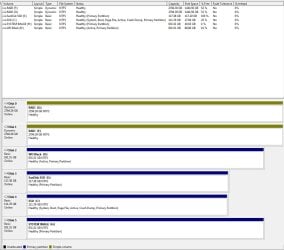
- Now my raid Mirror is broken, I have the 2 drives but they aren't connected together.
- They are still marked as "dynamic" while being separated.
- When I right-right on one of them I don't have any option to reconnect them into a Mirror. Extend volume" and "add a Mirror" are greyed out.

I seem to be stuck. Any idea of what should I do?

Thank you for helping.
 

My Computer My Computer

At a glance

Windows 7 Ultimate x64
Computer type
PC/Desktop
OS
Windows 7 Ultimate x64
We see nothing but problems here with RAID ever since Win7 beta. Not a single good report of RAID, almost daily reports of disasters. It isn't even redundant - the very first letter of it's name! - since users often lose everything when a drive fails or crashes.

You are best off to unRAID your drives and install Win7 to the fastest drive, or to an SSD which is the best upgrade you can possibly have - even better than buying a new PC without one. Then after install add back and format the other drive(s) for storage, data and the all important and reliable backup images taken just after install and setup and then regularly.

Then focus on doing a perfect Clean Reinstall Windows 7.

I wish I had better news for you, but it is not something I mess with because it only gets worse, never better, compared to the perfect installs we have helped millions get here.
 
Thank you for helping.
Actually, I didn't know about all these issues with win7 raid.
Anyway. I think I'll keep my 2 drives as they are (separated, no raid). For the moment they have the exact same files on them, but I think I'll manually add files on one and backup on the other.

I only have one problem left. It is that they are still "dynamic" and I know no way to turn them back to "basic" ones.
Do you have any suggestion?

Thank you again.
 

My Computer My Computer

At a glance

Windows 7 Ultimate x64
Computer type
PC/Desktop
OS
Windows 7 Ultimate x64
Thank you. I'll take a look at the link.
Here's a screenshot
 

Attachments

  • Capture.JPG
    Capture.JPG
    105 KB · Views: 1

My Computer My Computer

At a glance

Windows 7 Ultimate x64
Computer type
PC/Desktop
OS
Windows 7 Ultimate x64
I just had one simple question:

Is there any harm if I was to let those 2 drives as they are now (dynamic), and just use them as as if they were basic and separate ones?
 

My Computer My Computer

At a glance

Windows 7 Ultimate x64
Computer type
PC/Desktop
OS
Windows 7 Ultimate x64
I believe you have a software RAID there where a Dynamic partition is actually used the way it's meant to be - to span a single partition across multiple Hard Drives. How was it configured before?

We only really advise to Convert a Dynamic Disk to a Basic Disk when someone ignores the Disk Mgmt warning and tries to add a fifth Primary partition which auto-converts the disk to Dynamic. This is not that case. So I think you should leave it , but make sure the data is backed up externally or to the cloud using a method like Sync, Backup and Store your Files to the Cloud with OneDrive. If you do decide to reconvert those drives to Basic, double check that your data is all safely backed up because the conversion will likely be destructive.
 
Thank you :)
 

My Computer My Computer

At a glance

Windows 7 Ultimate x64
Computer type
PC/Desktop
OS
Windows 7 Ultimate x64
This post has me worried. I have two 1Gb identical drives for data (D Drive) in an Intel software RAID1 pairing. I have never tested what happens if I unplug a drive as if it's failed and plug another drive in to see it rebuilds the array. I am about to do a clean install of Win 7 64 bit pro and seeing the bave has me wondering if I should wait and use a proper hardware RAID1 with a proper Adaptec hardware RAID card with on card processing? I have never had to rely on this software RAID so I am now unsure how REDUNDANT it really is!! ;) Decisions... Help!
 

My Computer My Computer

At a glance

Win 7 Pro 64 BitIntel i5-4670K @ 3.4 GHz16 gigOn board
Computer type
PC/Desktop
Computer Manufacturer/Model Number
Custom
OS
Win 7 Pro 64 Bit
CPU
Intel i5-4670K @ 3.4 GHz
Motherboard
Gigabyte GA-Z97X-Gaming 3
Memory
16 gig
Graphics Card(s)
On board
Hard Drives
SSD C: Drive
2 off 1 gig SATA in software RAID1 as D: Drive
Antivirus
Avast
Browser
Firefox
We see nothing but problems here with RAID since Win7 was released. Every week, year after year, not a single good report on RAID but repeat problems and disaster. It is not even redundant (the first letter of it's name!) because everything is often lost if one drive fails. It provides no better performance, certainly not than that of an SSD which is the best upgrade one can have.

So I would unRAID the drives, do a Clean Reinstall Windows 7 to the fastest and use the other for storage and backup of the first drive. Even better buy an SSD. It can be just large enough for the OS since the data can be linked from the OS using options offered in User Folders - Change Default Location

I'm sorry if this isn't the answer you wanted, but I hope it helps. :geek:
 
Thanks for the post gregrocker, may I ask if these problems still occur if a user installs a proper hardware RAID card like an Adapatec one, with on card memory and processing to handle RAID without recourse to the OS BIOS? I still like the idea of RAID1 if it were robust. I assume a proper hardware RAID is isolated from whatever OS is in use? Many thanks.
 

My Computer My Computer

At a glance

Win 7 Pro 64 BitIntel i5-4670K @ 3.4 GHz16 gigOn board
Computer type
PC/Desktop
Computer Manufacturer/Model Number
Custom
OS
Win 7 Pro 64 Bit
CPU
Intel i5-4670K @ 3.4 GHz
Motherboard
Gigabyte GA-Z97X-Gaming 3
Memory
16 gig
Graphics Card(s)
On board
Hard Drives
SSD C: Drive
2 off 1 gig SATA in software RAID1 as D: Drive
Antivirus
Avast
Browser
Firefox
That I cannot answer as I do not and would not use RAID. Others here may have an opinion.

What advantage does RAID confer? The only true advantage I've seen here is where huge video files are needed to be edited, and drives are now large enough to handle that.
 
Back
Top