How to read data from a faulty HDD

I don't know if it has been suggested but P have you tried a bootable Ubuntu disk and just run the Ubuntu OS don't install it and I have used this method quite a few times now.

Just make a bootable disk set the BIOS to boot from the optical choose the run - not install and then access the drives that are attached.

Desktop | Ubuntu < check the options first

So I should download the Ubuntu software from the link, burn it to a empty DVD (witch i don't have @ the moment), shut down PC, connect the bad drive, set BIOS to boot from optical drive, run the installation to access the bad drive in order to see what is in there.

*I don't quite understand how to do this step, because it's the 1st time I come across Ubuntu... :o
I think that the data got lost anyway... :shock: :( But is there a chance of me getting the drive to work properly??? :rolleyes:
Sorry late reply P despite what has been said I have used a a Ubuntu boot to get stuff off of what seem to be dead drives before now and mate you only need a CD not a DVD.

Just make the disk and then boot as I said - on the Ubuntu screen there will be references to any drive attached or installed in the machine as it is an OS that is independent of any drives bar the optical you have to boot from.

Just make sure you pick the run and not install option when booting the disk.

An addition - screenshot
Do you think it works while the HDD is not able to be detected!
 

My Computer My Computer

At a glance

Windows 7 Ultimate x64core i7.
OS
Windows 7 Ultimate x64
CPU
core i7.
Well MM I have picked up non existent HDDs in the past and I have checked for them with DISKPART, My Computer, Device Manager and Partition Wizard etc etc in normal Windows OS runs.

Now whether I have just been lucky or have fluked it the fact remains that I have used Ubuntu on many occasions to get me out out of fixes where I cannot access the drive or cannot see it.

You are of course entitled to your opinion and views on my comments and I do take your point but as I have stated it has worked for me.

Now for the sake of trying it it isn't worth one just giving up and for the sake of burning a CD and keeping it for future use if nothing else one has got nothing to lose - would you agree??

Better to try and fail than fail to try:)
 

My Computer My Computer

At a glance

Desk1 7 Home Prem / Desk2 10 Pro / Main lap A...Desk1 i5 3750K / Laptop i7 GTX 860M / Desk2 i...Desk1 8GB (1866) / Desk2 16GB (1333) / Laptop...Desk 1& 2NVidia GTX 650 & Laptops on board Intel
Computer type
PC/Desktop
Computer Manufacturer/Model Number
Own build (new) Desk1 / Asus ROG Win 7 / Desk2 1st build
OS
Desk1 7 Home Prem / Desk2 10 Pro / Main lap Asus ROG 10 Pro 2 laptop Toshiba 7 Pro Asus P2520 7 & 10
CPU
Desk1 i5 3750K / Laptop i7 GTX 860M / Desk2 i5 2500
Motherboard
Desk1 Asus P877-V / Desk2 Gigabyte H67 UD3H / Laptop ?
Memory
Desk1 8GB (1866) / Desk2 16GB (1333) / Laptop 8Gb DDR3
Graphics Card(s)
Desk 1& 2NVidia GTX 650 & Laptops on board Intel
Sound Card
Desk 1 & 2 -XONAR DG Realtek High Def audio Laptop
Monitor(s) Displays
Desk 1 Benq HD 2450 / Desk2 Philips 24" / Laptop 17.5"
Screen Resolution
1920x1080 D1 & D2 & Laptop 1
Hard Drives
Desk1 Samsung 120GB 830 SSD
Asus ROG 256GB 850 Pro SSD
Desk2 Samsung 840 256 SSD
Toshiba 120GB EVO
PSU
Desk 1 Corsair HX 1050/ Laptop ? / Desk 2 Corsair HX 650
Case
Desk 1 Cooler HAF XM ? Toshiba laptop / Desk2 Coolermaster
Cooling
Fans on all Desk1 -2 Desk2 - all Coolermasters 5 Laptop ?
Keyboard
Desk 1 MS Sidewinder X6 Desk 2 MS Sidewinder X 4
Mouse
Desk 1&2 - Gigabyte MS 900 gamer - laptop - Logitec wireless
Internet Speed
ADSL2+
Other Info
One other Desktop (tester) and spare Toshba laptop both with SSD's
Running Kaspersky 2016 ISS on all machines config'd identically
Logitec audio stereo systems on each machine (x3)
Canon MG5250MFC
Router/modem TP-Link running WPA2SK
Well MM I have picked up non existent HDDs in the past and I have checked for them with DISKPART, My Computer, Device Manager and Partition Wizard etc etc in normal Windows OS runs.

Now whether I have just been lucky or have fluked it the fact remains that I have used Ubuntu on many occasions to get me out out of fixes where I cannot access the drive or cannot see it.

You are of course entitled to your opinion and views on my comments and I do take your point but as I have stated it has worked for me.

Now for the sake of trying it it isn't worth one just giving up and for the sake of burning a CD and keeping it for future use if nothing else one has got nothing to lose - would you agree??

Better to try and fail than fail to try:)

As you said, there is nothing to lose :D
I burned it to a disk and booted up, but Ubuntu doesn't recognize the 160 bad drive :p
I made a picture by my camera, but the batteries are dead, so I WILL post a picture tomorrow... seems to me like the data+disk are gone and dead 4ever...
 

My Computer My Computer

At a glance

Windows 7 x86 UltimateIntel Pentium 4 (3.2GHz) @3.6GHz3 GB DDR2 (2GB @800MHz + 1GB @533MHz)-3 inuvi...ATI Radeon HD 5450 1GB DDR3
Computer Manufacturer/Model Number
Me, Myself and I (:
OS
Windows 7 x86 Ultimate
CPU
Intel Pentium 4 (3.2GHz) @3.6GHz
Motherboard
Asus P5N-D SLI
Memory
3 GB DDR2 (2GB @800MHz + 1GB @533MHz)-3 inuvidual sticks
Graphics Card(s)
ATI Radeon HD 5450 1GB DDR3
Sound Card
Realtek HD Audio
Monitor(s) Displays
Philips Brilliance 170p 17" DVI/VGA
Screen Resolution
1280x1024 @60 Hz
Hard Drives
WDC WD400BD-08LRAO 40 GB Blue Caviar-Sata II
PSU
LC-Power LC6480S Scorpio-480W 18A@ +12V
Cooling
CPU~Arctic Freezer 7 Pro; 2 92mm case fans; HDD fan;
Keyboard
Logitec Usb
Mouse
Dell optical mouse Usb
Internet Speed
2 Mb/s
Other Info
SOLD MY PC 6 MONTHS AGO IN ORDER TO BUY A MOTORCYCLE :D I don't need a PC :D
All advises are good advises. But if you read whole thread you know for sure..... disk is unrepairable and totally faulty.
 

My Computer My Computer

At a glance

Microsoft Windows 7 Home Premium 64-bits 7601...Intel(R) Core(TM) i3 CPU M 370 @ 2.40GHz4,00 GBATI Mobility Radeon HD 5400 Series
Computer type
Laptop
Computer Manufacturer/Model Number
ACER ASPIRE 5742G
OS
Microsoft Windows 7 Home Premium 64-bits 7601 Multiprocessor Free Service Pack 1
CPU
Intel(R) Core(TM) i3 CPU M 370 @ 2.40GHz
Motherboard
Acer Aspire 5742G
Memory
4,00 GB
Graphics Card(s)
ATI Mobility Radeon HD 5400 Series
Sound Card
(1) AMD High Definition Audio Device (2) Realtek High Defi
Screen Resolution
1366 x 768 x 32 bits (4294967296 colors) @ 60 Hz
Hard Drives
WDC WD5000BEVT-22ZAT0
Yeah well Petko mate I guess if you took that drive apart you would see perhaps broken bits or even the control circuit PCB underneath may have scorch marks or such. Me I would fling another board on for the hell of it and see what happens but best left if you haven't got the time or gear.

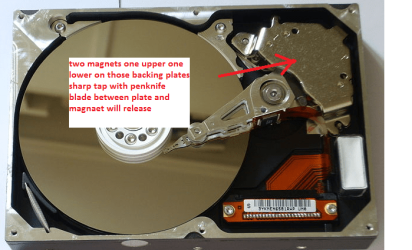
Inside the drive there are if you want them some static super magnets that the read arm uses to actuate - very useful in magnetising screwdrivers and with double sided tape to hold tools (small) to the shelves of your work area. You just need to be a precise in removing them DON'T use heat to losen the magnets off - it kills them.

The disks make super wind chimes too;)

Meant to mention hang on to that disk mate - very handy.;)
 

My Computer My Computer

At a glance

Desk1 7 Home Prem / Desk2 10 Pro / Main lap A...Desk1 i5 3750K / Laptop i7 GTX 860M / Desk2 i...Desk1 8GB (1866) / Desk2 16GB (1333) / Laptop...Desk 1& 2NVidia GTX 650 & Laptops on board Intel
Computer type
PC/Desktop
Computer Manufacturer/Model Number
Own build (new) Desk1 / Asus ROG Win 7 / Desk2 1st build
OS
Desk1 7 Home Prem / Desk2 10 Pro / Main lap Asus ROG 10 Pro 2 laptop Toshiba 7 Pro Asus P2520 7 & 10
CPU
Desk1 i5 3750K / Laptop i7 GTX 860M / Desk2 i5 2500
Motherboard
Desk1 Asus P877-V / Desk2 Gigabyte H67 UD3H / Laptop ?
Memory
Desk1 8GB (1866) / Desk2 16GB (1333) / Laptop 8Gb DDR3
Graphics Card(s)
Desk 1& 2NVidia GTX 650 & Laptops on board Intel
Sound Card
Desk 1 & 2 -XONAR DG Realtek High Def audio Laptop
Monitor(s) Displays
Desk 1 Benq HD 2450 / Desk2 Philips 24" / Laptop 17.5"
Screen Resolution
1920x1080 D1 & D2 & Laptop 1
Hard Drives
Desk1 Samsung 120GB 830 SSD
Asus ROG 256GB 850 Pro SSD
Desk2 Samsung 840 256 SSD
Toshiba 120GB EVO
PSU
Desk 1 Corsair HX 1050/ Laptop ? / Desk 2 Corsair HX 650
Case
Desk 1 Cooler HAF XM ? Toshiba laptop / Desk2 Coolermaster
Cooling
Fans on all Desk1 -2 Desk2 - all Coolermasters 5 Laptop ?
Keyboard
Desk 1 MS Sidewinder X6 Desk 2 MS Sidewinder X 4
Mouse
Desk 1&2 - Gigabyte MS 900 gamer - laptop - Logitec wireless
Internet Speed
ADSL2+
Other Info
One other Desktop (tester) and spare Toshba laptop both with SSD's
Running Kaspersky 2016 ISS on all machines config'd identically
Logitec audio stereo systems on each machine (x3)
Canon MG5250MFC
Router/modem TP-Link running WPA2SK
All advises are good advises. But if you read whole thread you know for sure..... disk is unrepairable and totally faulty.

Yea, I gave up the disk is going to be forgotten :p


Yeah well Petko mate I guess if you took that drive apart you would see perhaps broken bits or even the control circuit PCB underneath may have scorch marks or such. Me I would fling another board on for the hell of it and see what happens but best left if you haven't got the time or gear.

Inside the drive there are if you want them some static super magnets that the read arm uses to actuate - very useful in magnetising screwdrivers and with double sided tape to hold tools (small) to the shelves of your work area. You just need to be a precise in removing them DON'T use heat to losen the magnets off - it kills them.

The disks make super wind chimes too;)

Meant to mention hang on to that disk mate - very handy.;)

Thats what i wanted to do too :D
I was curious and Googled a little, and came a cross that the Hard drives disks(rotating part :p ) are out of titanium!!! :eek:
I would like to now if that is true...
Titanium is non magnetic so thats why i got confused... :confused:
 

My Computer My Computer

At a glance

Windows 7 x86 UltimateIntel Pentium 4 (3.2GHz) @3.6GHz3 GB DDR2 (2GB @800MHz + 1GB @533MHz)-3 inuvi...ATI Radeon HD 5450 1GB DDR3
Computer Manufacturer/Model Number
Me, Myself and I (:
OS
Windows 7 x86 Ultimate
CPU
Intel Pentium 4 (3.2GHz) @3.6GHz
Motherboard
Asus P5N-D SLI
Memory
3 GB DDR2 (2GB @800MHz + 1GB @533MHz)-3 inuvidual sticks
Graphics Card(s)
ATI Radeon HD 5450 1GB DDR3
Sound Card
Realtek HD Audio
Monitor(s) Displays
Philips Brilliance 170p 17" DVI/VGA
Screen Resolution
1280x1024 @60 Hz
Hard Drives
WDC WD400BD-08LRAO 40 GB Blue Caviar-Sata II
PSU
LC-Power LC6480S Scorpio-480W 18A@ +12V
Cooling
CPU~Arctic Freezer 7 Pro; 2 92mm case fans; HDD fan;
Keyboard
Logitec Usb
Mouse
Dell optical mouse Usb
Internet Speed
2 Mb/s
Other Info
SOLD MY PC 6 MONTHS AGO IN ORDER TO BUY A MOTORCYCLE :D I don't need a PC :D
Now I think the disks are or have been made of different materials and maybe even a hardened glass but whatever they are they would have a magentic coating on them or be an alloy of some magnetic element. I don't know for sure but it is worth some research.

Here is one ref as I thought they were Hard disk drive platter - Wikipedia, the free encyclopedia
 

Attachments

  • DISK7.PNG
    DISK7.PNG
    124.5 KB · Views: 4

My Computer My Computer

At a glance

Desk1 7 Home Prem / Desk2 10 Pro / Main lap A...Desk1 i5 3750K / Laptop i7 GTX 860M / Desk2 i...Desk1 8GB (1866) / Desk2 16GB (1333) / Laptop...Desk 1& 2NVidia GTX 650 & Laptops on board Intel
Computer type
PC/Desktop
Computer Manufacturer/Model Number
Own build (new) Desk1 / Asus ROG Win 7 / Desk2 1st build
OS
Desk1 7 Home Prem / Desk2 10 Pro / Main lap Asus ROG 10 Pro 2 laptop Toshiba 7 Pro Asus P2520 7 & 10
CPU
Desk1 i5 3750K / Laptop i7 GTX 860M / Desk2 i5 2500
Motherboard
Desk1 Asus P877-V / Desk2 Gigabyte H67 UD3H / Laptop ?
Memory
Desk1 8GB (1866) / Desk2 16GB (1333) / Laptop 8Gb DDR3
Graphics Card(s)
Desk 1& 2NVidia GTX 650 & Laptops on board Intel
Sound Card
Desk 1 & 2 -XONAR DG Realtek High Def audio Laptop
Monitor(s) Displays
Desk 1 Benq HD 2450 / Desk2 Philips 24" / Laptop 17.5"
Screen Resolution
1920x1080 D1 & D2 & Laptop 1
Hard Drives
Desk1 Samsung 120GB 830 SSD
Asus ROG 256GB 850 Pro SSD
Desk2 Samsung 840 256 SSD
Toshiba 120GB EVO
PSU
Desk 1 Corsair HX 1050/ Laptop ? / Desk 2 Corsair HX 650
Case
Desk 1 Cooler HAF XM ? Toshiba laptop / Desk2 Coolermaster
Cooling
Fans on all Desk1 -2 Desk2 - all Coolermasters 5 Laptop ?
Keyboard
Desk 1 MS Sidewinder X6 Desk 2 MS Sidewinder X 4
Mouse
Desk 1&2 - Gigabyte MS 900 gamer - laptop - Logitec wireless
Internet Speed
ADSL2+
Other Info
One other Desktop (tester) and spare Toshba laptop both with SSD's
Running Kaspersky 2016 ISS on all machines config'd identically
Logitec audio stereo systems on each machine (x3)
Canon MG5250MFC
Router/modem TP-Link running WPA2SK
Back
Top