How to recover data of Hard Disk with many bad sectors?

d4deep

New member
Local time
4:39 PM
Messages
6
Hii everyone.

I have a Western Digital blue 640 GB internal SATA HDD, which showed bad hard disk in startup repair. It does not shows in disk management or device manager when connected via USB port. But shows status as "online" in diskpart when connected via SATA port & when I enter startup tools using windows installation disk. The SMART test fails in BIOS when hard disk is connected internally. I want to recover the data of this hard disk because it is utmost important for me.

The hard disk is spinning normally and not making any clicking noise. Also, I checked via a software called 'Hard Disk Sentinel' that it has about 519 bad sectors & showed 0% health & 0 days remaining.
Is there any possibility of getting my data back? If yes, then how? I'm just a student, & the data recovery experts take a huge amount in recovering data. Please suggest all possible solutions for recovering data.

Thank You.
 

My Computer My Computer

At a glance

Windows 7 Ultimate 32 bit
Computer type
Laptop
Computer Manufacturer/Model Number
HP/Compaq
OS
Windows 7 Ultimate 32 bit
Utmost important data, along with the OS partition, is best backed up at least weekly if not bi-weekly onto trustworthy external media. Where are your backups? If no backups, a local recovery expert working in a serious-minded business-oriented computer fix-it place will probably be your best bet.
Have you ever used any kind of recovery software before? Rule one: whatever you decide to use must not write anything anywhere onto the hard-drive.
There are several very good recovery programs available:
MiniTool Power Data Recovery, Piriform's Recova, EaseUS Data Recovery, and many more. I have pay-for versions, however, you might get results with one or two free versions.
 

My Computer My Computer

At a glance

Windows 7 Professional 64-bitDesktop i5; Acers i5 & i7desktop 16GB; 1 Acer 8GB & 1 Acer 16GB
Computer type
PC/Desktop
Computer Manufacturer/Model Number
Antec desktop; Acer Aspire laptops
OS
Windows 7 Professional 64-bit
CPU
Desktop i5; Acers i5 & i7
Memory
desktop 16GB; 1 Acer 8GB & 1 Acer 16GB
Hard Drives
1TB split into 2 equal partitions [OS and data] usable by RJS
Internet Speed
AT&T DSL
Browser
FF, GChrome, msIE
Other Info
Windows 7 Firewall, Emsisoft AM/AV, MSE [scan-only], SpywareBlaster, Ruiware/BillP combine
Thank you for your reply sir. I used to backup my data in other partitions, since I didn't had any large external storage device.
Yes, I used easeus recovery (just to scan my data & see if it can be recovered) & remo recover software to recover back the data, but the hard disk gets disconnected automatically after few minutes when inserted for first time, & then doesn't show up in disk management or device manager when plugged again via USB port. So, I couldn't scan or recover any data. The main problem is this non detection of hard disk. But it shows status as "online" in diskpart when connected internally via SATA port. I've checked the connector & connecting cable by using another hard disk & found that they're ok. How do I make my hard disk detectable via USB port?
 

My Computer My Computer

At a glance

Windows 7 Ultimate 32 bit
Computer type
Laptop
Computer Manufacturer/Model Number
HP/Compaq
OS
Windows 7 Ultimate 32 bit
Others will have to come in with their advice, I don't know what to advise from here.
 

My Computer My Computer

At a glance

Windows 7 Professional 64-bitDesktop i5; Acers i5 & i7desktop 16GB; 1 Acer 8GB & 1 Acer 16GB
Computer type
PC/Desktop
Computer Manufacturer/Model Number
Antec desktop; Acer Aspire laptops
OS
Windows 7 Professional 64-bit
CPU
Desktop i5; Acers i5 & i7
Memory
desktop 16GB; 1 Acer 8GB & 1 Acer 16GB
Hard Drives
1TB split into 2 equal partitions [OS and data] usable by RJS
Internet Speed
AT&T DSL
Browser
FF, GChrome, msIE
Other Info
Windows 7 Firewall, Emsisoft AM/AV, MSE [scan-only], SpywareBlaster, Ruiware/BillP combine

My Computer My Computer

At a glance

Windows 7 Home Premium 32 bit
OS
Windows 7 Home Premium 32 bit
Thanks for your aid. But the drive isn't getting recognized via USB, neither in windows neither in BIOS. It only gets recognized when I connect it internally via SATA port, insert windows installation disk & open diskpart > list disk in cmd. At present, this is the only way I can see my hard drive. Shall I still try your method?

Also, if I quick format the hard disk using diskpart (to remove bad sectors), will it permanently delete all data in it? Or can I still be able to recover it using recovery softwares?

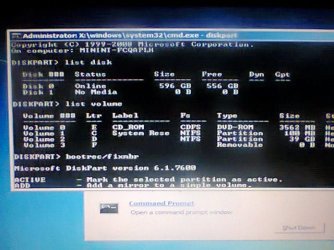
Here is what diskpart shows in diskpart. (see image attached)
 

Attachments

  • Photo0116.jpg
    Photo0116.jpg
    74.9 KB · Views: 20

My Computer My Computer

At a glance

Windows 7 Ultimate 32 bit
Computer type
Laptop
Computer Manufacturer/Model Number
HP/Compaq
OS
Windows 7 Ultimate 32 bit
I am afraid you haven't understood even a bit of what was told.

Create a bootable Lucid Puppy ( Live Linux) pendrive.( Backup all data in the pen drive since all data in it will be lost when Rufus formats and writes the Lucid Puppy ISO.)

http://www.sevenforums.com/hardware...ly-unrecognisable-hard-drive.html#post2936753

Did you create a Lucid Puppy pendrive as per the above procedure??

Leave your WD 640GB drive connected internally. There is no need to connect it through USB.

You will now boot from the Lucid Puppy pendrive instead of booting from Windows Installation CD

During the BIOS run press the appropriate key to bring the onetime boot menu and select USB pendrive to boot from. Your computer will now boot into Lucid Puppy and you will get the Lucid Puppy Desktop.

Check whether it shows your faulty 640GB internal drive apart from your System Drive.

If you are able to see the 640GB internal HDD, try to mount it and check whether you are able to access the folders/files to copy.

Go to the topic Recovering files from the non-bootable Internal Drive: in this thread Lucid Puppy way to recover files from a non-bootable computer on how-to. In your case it will be your WD 640GB internal drive. If you see and mount your 640GB internal drive in Lucid Puppy you can copy those folders to another external drive.
 

My Computer My Computer

At a glance

Windows 7 Home Premium 32 bit
OS
Windows 7 Home Premium 32 bit
Yes, I had created pen drive & was able to see the Lucid Puppy desktop. But as per your tutorial, I couldn't see my WD 640 GB hard drive to mount. May be because it didn't had any partitions.
I told you, it only becomes visible in diskpart in cmd, where it shows "online" and 596 GB of space. It's not having any partitions now. Since there are no partitions in the hard disk, can the data still be recovered? Plz guide me ahead.
 

My Computer My Computer

At a glance

Windows 7 Ultimate 32 bit
Computer type
Laptop
Computer Manufacturer/Model Number
HP/Compaq
OS
Windows 7 Ultimate 32 bit
OK, even with one single volume Lucid Puppy will show the drive if accessible. That Lucid Puppy did not show means that there is no other way to access the drive.

You may have to contact Western Digital Data Recovery partners if you want to recover the data.

Bad sectors generally cannot be fixed and made good though there are some programs like HDD regenerator which claim to do it.. .:) Personally I do not believe in all these software that claim they can repair bad sectors.

https://computer-maintenance.knoji.com/5-free-software-downloads-to-repair-hard-disk-bad-sectors/
 

My Computer My Computer

At a glance

Windows 7 Home Premium 32 bit
OS
Windows 7 Home Premium 32 bit
I tried it again to see if it can detect hard disk, & after a while, I was able to see a 100 MB system reserved partition, which was created earlier while installing windows, when the hard disk was usable. And if I create a new partition, it too will get displayed. But if I create it, it'll be an empty partition without any files in it, since it's showing 596 GB space (out of 640 GB) in diskpart, without any partitions. So, I think the hard disk is still recognizable, what can be my next step?
 

My Computer My Computer

At a glance

Windows 7 Ultimate 32 bit
Computer type
Laptop
Computer Manufacturer/Model Number
HP/Compaq
OS
Windows 7 Ultimate 32 bit
Have you ensure the USB /SATA cable are good, meaning not loose when inserted.

If you are using external box casing to slot in HDD and then connect by USB /SATA try another external box casing.

I encountered this a couple of days ago, and after getting a new USB casing, there is no problem.

Do note that HDD must be either horizontal or vertical, not at a angle.
 

My Computer My Computer

At a glance

Windows 7 x64
Computer type
Laptop
Computer Manufacturer/Model Number
Toshiba L630 and L735
OS
Windows 7 x64
Hard Drives
240 GB SSD
Yes, I've checked both the casing as well as the connecting cable. I went there from where I bought the casing. They inserted a new internal hard drive into the casing with same cable & that hard drive was showing in 'My Computer' as a new partition. So, the casing & cable are fine.
 

My Computer My Computer

At a glance

Windows 7 Ultimate 32 bit
Computer type
Laptop
Computer Manufacturer/Model Number
HP/Compaq
OS
Windows 7 Ultimate 32 bit
Back
Top