how to recover Sys.reg?

ProblemWindows7

New member
Local time
9:01 AM
Messages
1
Hello, I Have delete in root folder sys.reg, how to recover it? I need it
 

My Computer My Computer

Computer type
PC/Desktop
OS
windows 7 32 Bits
? i do not have a file or folder named sys.reg anywhere. where did you get it from?

to save trouble in future, try using an image backup system like macrium reflect or acronis trueimage.

if you have just deleted it and not overwritten it's disk locations, try right clicking the wastebasket icon on your desktop, select open, if the file is listed, right click it and select the option to restore the file.

you may also be able to reload a restore point (control panel - recovery) but be careful. as it will discard any changes since the last restore point while recovering and uneraseing the files.

 

My Computer My Computer

Computer type
PC/Desktop
Computer Manufacturer/Model Number
Custom build Nanu by 3SX
OS
Win 7 ultimate x64 sp1
CPU
Intel i7 4 core 3770k ivy bridge o/c to 4.2ghz
Motherboard
Asus p8z77-i Deluxe
Memory
16 GB
Graphics Card(s)
Nvidia geforce GTX650
Sound Card
Realtek on mb
Monitor(s) Displays
24in. lcd/led
Screen Resolution
1920x1080
Hard Drives
128GB Kingston SSD
500GB seagate maximus xt hybrid
500GB hitachi HD
500GB external WD Passport usb3
PSU
Silverstone 450 watt
Case
Silverstone FT03 Black Fortress
Cooling
Water cooler
Keyboard
Logitech wireless kbd/mouse mk300
Mouse
Logitech wireless kbd/mouse mk300
Internet Speed
8mb adsl (actuall speed is around 6mb)
Other Info
Asus DSL-N55U wireless router
SONY BC-5850H 6X BLURAY writer
OUTPOST Security Suite
Hi ProblemWindows 7,


I am afraid you haven't defined your problem precisely. That has exactly resulted in the query " what is that? I don't find it in my system"


That also has resulted in a most probably wrong suggestion to restore your system. System Restore while keeping User Data folders will not restore deleted user data folders and System folders won't get deleted without warning even if you manage to gain access to it.


So you need to define your problem by answering how that sys.reg folder came into existence and if it is a user data folder deleted, why you are not finding it in the Recycle bin.


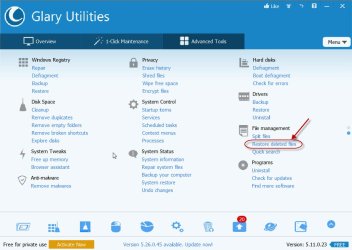
EDIT: If it is indeed a user data folder, download the portable (self-extracting) Glary Utilities 6169KB to a pendrive, Glary Utilities Builds - Clean Registry, Fix PC Errors, Protect Privacy | Glarysoft extract it to a pendrive and run Integrator_Portable.exe. Under File Management, click on Restore deleted files, scan your drive,check whether you can find the folder in good condition to copy it.Copy it to some other location/ folder and then move/copy it to the original location.
 

Attachments

  • 26-05-2015 13-41-06.jpg
    26-05-2015 13-41-06.jpg
    71.6 KB · Views: 0
Last edited:

My Computer My Computer

OS
Windows 7 Home Premium 32 bit
What I get from the question is that the .reg file is used to merge something/information into the Registry, a change or a modification, may be important to know what it was for. The letters sys are usually the extension for system files such as in C:\Windows\System32 or in C:\Windows\SysWOW64 and/or their subFolders.
 

My Computer My Computer

Computer type
PC/Desktop
Computer Manufacturer/Model Number
Customs, Dell, Gateway, HP, Toshiba, Acer, ASUS
OS
Windows 7 Ultimate 64-bit, Windows 8.1 64-bit, Mac OS X 10.10, Linux Mint 17, Windows 10 Pro TP
Keyboard
Microsoft
Mouse
Microsoft
Back
Top