How to remove Control Panel items by editing registry?

asdf123

New member
Hi.
I want to remove some control panel items (.cpl) from the Control Panel list.
I own a bit tweaked version of Windows 7 and I cant access gpedit, so I have to do it in the registry.
I've started to looking into

HKEY_LOCAL_MACHINE\SOFTWARE\Microsoft\Windows\CurrentVersion\ Panel\don’t load

and
HKEY_LOCAL_MACHINE\SOFTWARE\Microsoft\Windows\CurrentVersion\Explorer\ControlPanel\NameSpace

where I've deleted some of the entrys but they still show up in Control Panel.
Any ideas?
 

My Computer

OS
Windows 7 Pro 64-bit
Under the key HKEY_CURRENT_USER\Control Panel\ create a key and name it "don't load".

Now, under the key HKEY_CURRENT_USER\Control Panel\don't load, create a new string value and give it the name of the applet which you want to hide. Google for the applet names, they'll all have the extension .cpl. E.g. if you want to get rid of "Phone and Modem", the name will be "Modem.cpl".

Set the value of this string to "no".
 

My Computer

Computer Manufacturer/Model Number
Too many to describe...
OS
Windows 7 x64 pro/ Windows 7 x86 Pro/ XP SP3 x86
Under the key HKEY_CURRENT_USER\Control Panel\ create a key and name it "don't load".

Now, under the key HKEY_CURRENT_USER\Control Panel\don't load, create a new string value and give it the name of the applet which you want to hide. Google for the applet names, they'll all have the extension .cpl. E.g. if you want to get rid of "Phone and Modem", the name will be "Modem.cpl".

Set the value of this string to "no".


Thank You for the answer.
I will try that. Now the question is: how to know what .cpl corresponds to what. I've tried some research on the web but there is nothing that really agitate that.
And I've found a line:

HKEY_LOCAL_MACHINE\SOFTWARE\Microsoft\Windows\CurrentVersion\Control Panel\don't load

Is that the same thing? I'm quite confused.
 

My Computer

OS
Windows 7 Pro 64-bit
1) These pages have a long list of the .cpl names.

Create your own custom Windows Vista Control Panel | Microsoft Windows | TechRepublic.com

Add Or Remove Control Panel Applets in Windows 7 & Vista

2) I tried adding the dont load subkey to the HKLM key you mentioned (there was none initially. This is an XP machine i'm using right now, sorry), then added a string value for sysdm.cpl (system properties) but it didnt work. But doing it the HKCU way works. In any case, also see this article.

Restore Missing Items in Windows Vista Control Panel - How-To Geek
 

My Computer

Computer Manufacturer/Model Number
Too many to describe...
OS
Windows 7 x64 pro/ Windows 7 x86 Pro/ XP SP3 x86
That site also talks about HKCU. Did you try it? The HKCU thing works on my (XP) machine.
 

My Computer

Computer Manufacturer/Model Number
Too many to describe...
OS
Windows 7 x64 pro/ Windows 7 x86 Pro/ XP SP3 x86
You're in luck, I just wrote a program for adding custom stuff to the Control Panel not so long ago.. :)


Each Clsid (the long strings) listed under "HKLM\SOFTWARE\Microsoft\Windows\CurrentVersion\Explorer\ControlPanel\Namespace\" for the Control Panel will have a matching CLSID with the same string name listed under "HKEY_Classes_Root\CLSID", they each require the relevant keys removing from there also.

Did you make backups of the keys that you have already removed by any chance because it would be alot easier? (you don't need to re-apply the backups, just open them up in Notepad for the CLSID's)

If you havn't got the backups then you could try searching for each CPL's full name in the registry and check if each find falls under the "HKEY_Classes_Root\CLSID" tree. If they are under that key AND have "System.ApplicationName", "InfoTip", "Shell" and "DefaultIcon" as subkeys then these are typically the CPL's.

Hope this helps,
Sean.


(I'm sure you don't need me to say this but always backup when playing in the registry!)

EDIT: Just went through my favourites for the link, the info was taken from here when I wrote my app: http://msdn.microsoft.com/en-us/library/bb776843(VS.85).aspx
 
Last edited:

My Computer

Computer Manufacturer/Model Number
Self Built
OS
XP Pro SP3 x86/Vista SP2 x64/Win7 x64 Triple-boot
CPU
AMD64 X2 AM2 5000+
Motherboard
Asus MSN-X Plus
Memory
Corsair TWX 2Gb (2x1Gb) DDR2 800Mhz
Graphics Card(s)
PCI-X 2.0 Inno3D (NVidia) 9500GT 1Gb DDR2
Sound Card
Onboard Realtec ALC662-GR
Monitor(s) Displays
Relisys 17' CRT (model unknown)
Screen Resolution
1024x768
Hard Drives
750Gb Samsung 7200-3Gb/s 32Mb Cache SATA
PSU
500W
Cooling
Standard AMD CPU Fan, One side, front and rear case fan.
Keyboard
Microsoft Multimedia Keyboard
Mouse
Samsung Optical
Internet Speed
10M
Damn...
Thank you fot help.
I'm getting to work. The sad thing is I didnt made backups :-)

Edit: Is there a way to do this? There are lots of keys there.
 

My Computer

OS
Windows 7 Pro 64-bit
You could always try a recent System Restore Point to place the keys back that you removed if the search part of my solution takes too long.. ;)
 

My Computer

Computer Manufacturer/Model Number
Self Built
OS
XP Pro SP3 x86/Vista SP2 x64/Win7 x64 Triple-boot
CPU
AMD64 X2 AM2 5000+
Motherboard
Asus MSN-X Plus
Memory
Corsair TWX 2Gb (2x1Gb) DDR2 800Mhz
Graphics Card(s)
PCI-X 2.0 Inno3D (NVidia) 9500GT 1Gb DDR2
Sound Card
Onboard Realtec ALC662-GR
Monitor(s) Displays
Relisys 17' CRT (model unknown)
Screen Resolution
1024x768
Hard Drives
750Gb Samsung 7200-3Gb/s 32Mb Cache SATA
PSU
500W
Cooling
Standard AMD CPU Fan, One side, front and rear case fan.
Keyboard
Microsoft Multimedia Keyboard
Mouse
Samsung Optical
Internet Speed
10M
Haha, no restore point either. I'll have to do it the hard way and I hope it would work 100% :)

Edit: I have problems with deleting/editing some of the keys under "HKEY_Classes_Root\CLSID
 
Last edited:

My Computer

OS
Windows 7 Pro 64-bit
Ok,
First of all I've deleted some entrys in HKLM\SOFTWARE\Microsoft\Windows\CurrentVersion\Explorer\ControlPanel\Namespace\ and same strings that where in HKEY_Classes_Root\CLSID then I've had an issued with the (32-bit) appearing so I've removed the same entrys in HKEY_CLASSES_ROOT\Wow6432Node\CLSID\
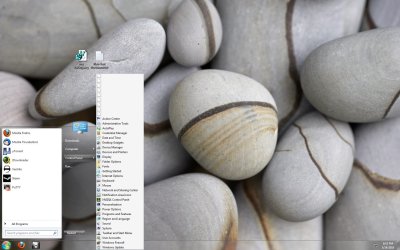
And now I have this:
 

Attachments

  • Untitled.jpg
    Untitled.jpg
    384 KB · Views: 841
Last edited:

My Computer

OS
Windows 7 Pro 64-bit
Back
Top