How to remove only "Selected Shortcut arrow"?

killer bee

New member
Power User
VIP
Local time
5:54 PM
Messages
406
Hello!
If you know how to remove only "Selected Shortcut arrow" in Windows7 please tell me. I have "Dropbox" shortcut in my desktop i want remove its arrow so if you know that please tell me. I don't remove my PC all shortcuts arrows.

;):o:p
 

My Computer

Computer Manufacturer/Model Number
Intel DG31PR (Intel Dual core 2.5 E5200 @ 2.5GHz)
OS
windows7 Ultimate SP1 x32bit
CPU
Intel
Motherboard
Intel DG31PR
Memory
Kinsgton 1GB an Transcend 2GB
Graphics Card(s)
Intel- onboard
Sound Card
Intel- onboard
Monitor(s) Displays
ViewSonic LCD Widescreen 19
Screen Resolution
1400x900
Hard Drives
Samsung 256GB
PSU
Legend
Case
Legend
Cooling
Intel
Keyboard
Seemo
Mouse
Prolink
Internet Speed
Download Speed-512Kbps, Upload Speed-128Kbps (ADSL wired)
Other Info
UPS- Prolink Pro650s
Router Prolink H5201
Sub Woofer - Creative 2.1
Last edited by a moderator:

My Computer

Computer type
PC/Desktop
OS
Windows 10 Home x64
CPU
INTEL Core i5-750 Quad-Core 3.37GHz
Motherboard
ASUS P7P55D
Memory
HyperX Fury Black Series 8GB (2 x 4GB) 1866Mhz
Graphics Card(s)
EVGA GeForce GTX 750 Superclocked 1GB 128-Bit GDDR5
Monitor(s) Displays
LG 32MA68HY 32" IPS
Screen Resolution
1920 x 1080
Hard Drives
Samsung 840 Evo 120GB, SEAGATE 500GB Barracuda® 7200.12, SATA 3 Gb/s, 7200 RPM, 16MB cache
PSU
ANTEC TruePower New TP-550, 80 PLUS, 550W
Case
ANTEC Three Hundred Illusion
Cooling
COOLER MASTER Hyper 212 Plus, 4 x 120mm 1 x 140mm Noctua's
Internet Speed
85 + Mbps
Antivirus
Avast
Browser
Vivaldi
I can't test this as I have all my arrows disabled. But try changing the icon manually.

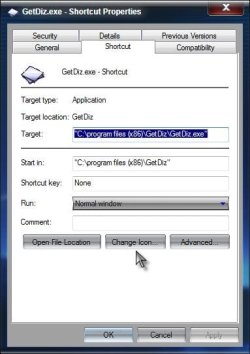
Right click the shortcut and choose properties

View attachment 105073

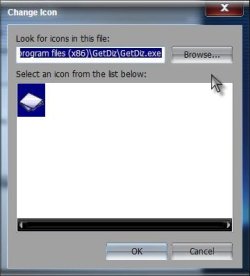
On shortcut tab choose change icon

View attachment 105074

Browse to the location where you saved your replacement icon

View attachment 105075 for instance

(save somewhere it will stay, my documents, pictures, etc.) and ok and/or apply your way out.

A Guy

Thanks for try to help me but its not work! by-the-way how do i add picture for shortcut?
 

My Computer

Computer Manufacturer/Model Number
Intel DG31PR (Intel Dual core 2.5 E5200 @ 2.5GHz)
OS
windows7 Ultimate SP1 x32bit
CPU
Intel
Motherboard
Intel DG31PR
Memory
Kinsgton 1GB an Transcend 2GB
Graphics Card(s)
Intel- onboard
Sound Card
Intel- onboard
Monitor(s) Displays
ViewSonic LCD Widescreen 19
Screen Resolution
1400x900
Hard Drives
Samsung 256GB
PSU
Legend
Case
Legend
Cooling
Intel
Keyboard
Seemo
Mouse
Prolink
Internet Speed
Download Speed-512Kbps, Upload Speed-128Kbps (ADSL wired)
Other Info
UPS- Prolink Pro650s
Router Prolink H5201
Sub Woofer - Creative 2.1
Back
Top