How to remove text from desktop icons??

Sunimar

New member
Power User
Local time
5:28 PM
Messages
206
Location
Mumbai
Hi friends,

i thought this might be simple but this seems to be more complicated. I want to remove text from desktop icons. I tried Alt+255 or Alt+0160 but nothing happened its just the same. I'm using a laptop so turned on the numlock (F11) & then the numbers on the keyboard & not the number keys.

How to get this right????
 

My Computer My Computer

Computer type
Laptop
OS
Windows 7 Ultimate
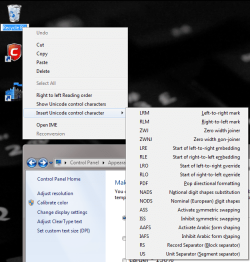
Click on the name of the desktop icons. Now, right click the editing box, and hover on "insert unicode character."

Select the top one once, twice, three times, etc... for each icon (do it a different number of times for each icon so they are "named" different things). They will show up without text. If you turn off auto arrange and align icons to a grid, you can cram them together, as well.
 

Attachments

  • Rename.png
    Rename.png
    61.5 KB · Views: 65

My Computer My Computer

Computer Manufacturer/Model Number
Pugh Technologies
OS
W7 Professional x64
CPU
AMD Athlon II X3 445 Rana 3.10 GHz
Motherboard
MSI 870A-G54
Memory
PNY XLR DDR3 1600 4x2GB
Graphics Card(s)
NVIDIA GeForce GTS 450 (fermi) 1GB GDDR5
Sound Card
Realtek ALC892 onboard
Monitor(s) Displays
ASUS VE205t, Viewsonic VX2035WM
Screen Resolution
1600x900, 1600x1050
Hard Drives
977GB Hitachi Hitachi HDS721010CLA332
244GB Western Digital WDC WD2500AAJS-65B4A0
488GB Western Digital WDC WD5000AAJS-00A8B0
488GB Western Digital WDC WD5000AAKS-00UU3A0
PSU
Antec EarthWatts EA650 650W
Case
ThermalTake Armor A90 Mid Tower
Cooling
3x 120mm in, 1x 120mm & 200mm out, self built hydro-cooler
Keyboard
Logitec 55
Mouse
Razer Deathadder
Internet Speed
20 Mbps D/L, 9 Mbps U/L
Well buddy i'm not getting that option "insert unicode character."
Here:
View attachment 109444

The adobe reader icon on that Alt+255 worked but then it isn't for other icons.
 
Last edited:

My Computer My Computer

Computer type
Laptop
OS
Windows 7 Ultimate
Try alt+225 twice for the next icon.

To get that option, you need to click the icon twice, to bring up the renaming box. Then right click inside the box.
 

My Computer My Computer

Computer Manufacturer/Model Number
Pugh Technologies
OS
W7 Professional x64
CPU
AMD Athlon II X3 445 Rana 3.10 GHz
Motherboard
MSI 870A-G54
Memory
PNY XLR DDR3 1600 4x2GB
Graphics Card(s)
NVIDIA GeForce GTS 450 (fermi) 1GB GDDR5
Sound Card
Realtek ALC892 onboard
Monitor(s) Displays
ASUS VE205t, Viewsonic VX2035WM
Screen Resolution
1600x900, 1600x1050
Hard Drives
977GB Hitachi Hitachi HDS721010CLA332
244GB Western Digital WDC WD2500AAJS-65B4A0
488GB Western Digital WDC WD5000AAJS-00A8B0
488GB Western Digital WDC WD5000AAKS-00UU3A0
PSU
Antec EarthWatts EA650 650W
Case
ThermalTake Armor A90 Mid Tower
Cooling
3x 120mm in, 1x 120mm & 200mm out, self built hydro-cooler
Keyboard
Logitec 55
Mouse
Razer Deathadder
Internet Speed
20 Mbps D/L, 9 Mbps U/L
Here finally this work in your style only....Thank you but what if there more icons than the name???
But its fixed as if now....
View attachment 109457
 
Last edited:

My Computer My Computer

Computer type
Laptop
OS
Windows 7 Ultimate
You can use at least the first four characters to create lots of combinations. I haven't tested the others, but I imagine it shouldn't cause too much trouble.

That looks pretty freaking awesome, by the way.
 

My Computer My Computer

Computer Manufacturer/Model Number
Pugh Technologies
OS
W7 Professional x64
CPU
AMD Athlon II X3 445 Rana 3.10 GHz
Motherboard
MSI 870A-G54
Memory
PNY XLR DDR3 1600 4x2GB
Graphics Card(s)
NVIDIA GeForce GTS 450 (fermi) 1GB GDDR5
Sound Card
Realtek ALC892 onboard
Monitor(s) Displays
ASUS VE205t, Viewsonic VX2035WM
Screen Resolution
1600x900, 1600x1050
Hard Drives
977GB Hitachi Hitachi HDS721010CLA332
244GB Western Digital WDC WD2500AAJS-65B4A0
488GB Western Digital WDC WD5000AAJS-00A8B0
488GB Western Digital WDC WD5000AAKS-00UU3A0
PSU
Antec EarthWatts EA650 650W
Case
ThermalTake Armor A90 Mid Tower
Cooling
3x 120mm in, 1x 120mm & 200mm out, self built hydro-cooler
Keyboard
Logitec 55
Mouse
Razer Deathadder
Internet Speed
20 Mbps D/L, 9 Mbps U/L
Back
Top