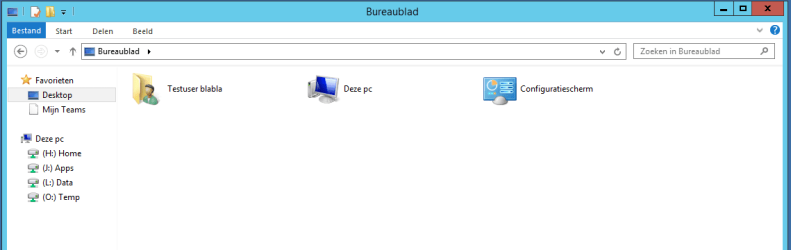
D djseppie New member Local time 12:48 PM Messages 7 Nov 5, 2015 #1 Can anyone tell me how to remove the user folder entry from the desktop by editing the registry? I'm creating a base image and want to remove this entry using group policy preferences. Attachments 2015-11-05_08h04_26.png 10.3 KB · Views: 1 My Computer OSWindows 7 Ultimate x64
Can anyone tell me how to remove the user folder entry from the desktop by editing the registry? I'm creating a base image and want to remove this entry using group policy preferences.
D derekimo New member SF Team Local time 3:48 AM Messages 16,779 Location Shasta County Nov 5, 2015 #2 This what you are looking for? http://www.sevenforums.com/tutorials/48123-user-folder-add-remove-navigation-pane.html It says navigation pane but also removes the user desktop icon. Or this, http://www.sevenforums.com/tutorials/919-desktop-icons-add-remove.html There are some reg files you can check them out. My Computer Computer typePC/DesktopComputer Manufacturer/Model NumberSelf BuiltOSWin 10 Pro x64CPUIntel I5-2500K @3.3GHzMotherboardAsrock P67 Extreme4Memory16GB G.Skill Ripjaws X (4x4GB)Graphics Card(s)EVGA GeForce 750 Ti SC 2GBSound CardASUS Xonar DG 5.1 Channels 24-bit 96KHz PCI Interface SoundMonitor(s) Displaysauria eq2367Screen Resolution1920 x 1080Hard Drives250GB Samsung 850 EVO SSD 1TB WD Blue 1TB HitachiPSUSeaSonic X 650W 80 Plus GoldCaseCorsair Obsidian 750DCoolingCorsair H60, Three 140mm case fansKeyboardLogitech Wireless Keyboard K520MouseLogitech Wireless Mouse M310Internet SpeedWave Broadband ~ 100 dn 5 upAntivirusWindows Defender, Malwarebytes PremiumBrowserEdge, IE11, ChromeOther InfoLaptop specs: HP g7-1365dx / CPU: AMD A6-3420M APU with Radeon(tm) HD Graphics / RAM: Crucial 8Gb (2x4Gb) / SSD: Crucial M4-CT128M4SSD2 ATA Device/ FW 000F / GFX: AMD Radeon HD 6520G / OS: Windows 10 Pro x64
This what you are looking for? http://www.sevenforums.com/tutorials/48123-user-folder-add-remove-navigation-pane.html It says navigation pane but also removes the user desktop icon. Or this, http://www.sevenforums.com/tutorials/919-desktop-icons-add-remove.html There are some reg files you can check them out.
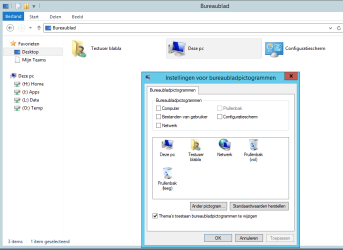
D djseppie New member Thread Starter Local time 12:48 PM Messages 7 Nov 5, 2015 #3 The problem is that whatever I choose the icon stays right where it is.. Attachments 2015-11-05_09h12_54.png 20 KB · Views: 1 My Computer OSWindows 7 Ultimate x64