how to remove windows server 2012R2 from dualboot setup?

chamjiee

Banned
Local time
1:06 PM
Messages
58
hi
i have dual boot 7 and server 2012r2 . i changed windows 7 mode to ahci using this article :devil: . only to discover that i cannot convert the server to ahci . the only solution was to uininstall srver 2012r2 adn tehn install it again .. :cry:

now using easybcd i removed the boot entry for server 2012r2 .. but i cannot delete the files/data of server.
i cannot delet the windows // program files// users etc folders .. i get permission error ..

i cannot format the entire partition as it has a lot of data and i have no spare hard/partition/space to swap the data there and format it ..

so how to selectivly remove it ?

any script or method ?
 

My Computer

Computer type
PC/Desktop
Computer Manufacturer/Model Number
Dell Optiplex 755
OS
Windows 7 Ultimate x64 SP1 Dual Boot with Windows Serve 2012 R2
CPU
E6550
Motherboard
Q35
Memory
8GB
Graphics Card(s)
ATI Radeon 2400 Pro
Sound Card
Intel HD Audio Stereo
Monitor(s) Displays
1
Screen Resolution
1280 x 1024
Hard Drives
250GB SATAIII
PSU
Stock 280 Watt
Case
Stock Desktop Case
Cooling
Stock
Keyboard
Microsoft Ergonomic keyboard usb
Mouse
Microsoft Mouse
Internet Speed
1Mbps Down/ 256 Kbps up
Antivirus
None
Browser
Opera
Do you have server on a separate partion or just 1?
 

My Computer

OS
Linux
on a seperate partitions..
 

My Computer

Computer type
PC/Desktop
Computer Manufacturer/Model Number
Dell Optiplex 755
OS
Windows 7 Ultimate x64 SP1 Dual Boot with Windows Serve 2012 R2
CPU
E6550
Motherboard
Q35
Memory
8GB
Graphics Card(s)
ATI Radeon 2400 Pro
Sound Card
Intel HD Audio Stereo
Monitor(s) Displays
1
Screen Resolution
1280 x 1024
Hard Drives
250GB SATAIII
PSU
Stock 280 Watt
Case
Stock Desktop Case
Cooling
Stock
Keyboard
Microsoft Ergonomic keyboard usb
Mouse
Microsoft Mouse
Internet Speed
1Mbps Down/ 256 Kbps up
Antivirus
None
Browser
Opera
The correct way to delete an OS is to delete its partition after assuring the System boot files are on another partition.

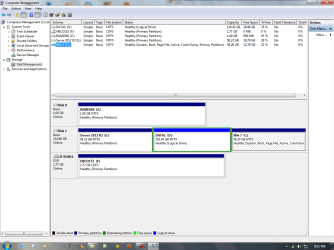
Please post back a screenshot of Disk Management - Post a Screen Capture Image
so we can give you the easiest steps.

It is not acceptable to remove an OS piecemeal as it leaves boot code which can interfere. Your files should be backed up anyway so make sure the backup is current and you'll be ready to delete the Server partition once we confirm the boot files are safe.
 
Thanks all.
I managed to get rid of it.
I had both OSs on different positions.
I booted into 7 and using easy bcd removed the entry for server.
My windows 7 partition was having all bout files and the active partition.

So m next step was to delete the files which would give me permission error.
I first took ownership of the directories then. Deleted them..


So far I haven't rebooted my system. As i am downloading latest preview of server. After I download it and make a boot usb of it. I will reboot and hope fully I won't face any issue however if do them it would be x easily resolved after installing server.


Will report back
 

My Computer

Computer type
PC/Desktop
Computer Manufacturer/Model Number
Dell Optiplex 755
OS
Windows 7 Ultimate x64 SP1 Dual Boot with Windows Serve 2012 R2
CPU
E6550
Motherboard
Q35
Memory
8GB
Graphics Card(s)
ATI Radeon 2400 Pro
Sound Card
Intel HD Audio Stereo
Monitor(s) Displays
1
Screen Resolution
1280 x 1024
Hard Drives
250GB SATAIII
PSU
Stock 280 Watt
Case
Stock Desktop Case
Cooling
Stock
Keyboard
Microsoft Ergonomic keyboard usb
Mouse
Microsoft Mouse
Internet Speed
1Mbps Down/ 256 Kbps up
Antivirus
None
Browser
Opera
This is why I asked for the screenshot of Disk Management - Post a Screen Capture Image
so you wouldn't recklessly ruin your boot by trying to delete the OS incorrectly.

So why would you ask for help here and then just ignore the same help we've given to thousands of others which has worked every time?

Is it because you also recklessly don't intend to back up your files on the Server partition which needs to be deleted to do this right?

If you intend to reinstall Server exactly where do you plan to put it if you don't have an empty partition you've deleted first? If you install it over the old Server partition without backing up your files it will overwrite everything.

Post the screenshot or don't waste your and our time any longer.
 
@gregrocker
thanks for your words

i am not a nerd and before posting here did my homework.
i already sorted out the boot issue .. the only issue that made me post here was how to delete the files for which i had no permission .. and i clearlely asked it.


sadly everyone overlooked my realy problem. and gave me generic solutions which i already have pulled them off of google.
no answer lied with in the specific constraints of mine.. i.e. no access to backup..


so how to selectivly remove it ?


now that i have deleted the installtation files/folders of old server212r2. and created enough empty space . i re installed the servere there..


while backup is good but the best solution is one that is done withn mentioned constraints.
i hope this thread might help someone who is faced with similar issue.
thanks all for helping me.
 

My Computer

Computer type
PC/Desktop
Computer Manufacturer/Model Number
Dell Optiplex 755
OS
Windows 7 Ultimate x64 SP1 Dual Boot with Windows Serve 2012 R2
CPU
E6550
Motherboard
Q35
Memory
8GB
Graphics Card(s)
ATI Radeon 2400 Pro
Sound Card
Intel HD Audio Stereo
Monitor(s) Displays
1
Screen Resolution
1280 x 1024
Hard Drives
250GB SATAIII
PSU
Stock 280 Watt
Case
Stock Desktop Case
Cooling
Stock
Keyboard
Microsoft Ergonomic keyboard usb
Mouse
Microsoft Mouse
Internet Speed
1Mbps Down/ 256 Kbps up
Antivirus
None
Browser
Opera
This thread does NOT help someone faced with a similar issue. You continue to insist that deleting an OS piecemeal is acceptable and it is NOT. It is the worst possible solution.

I will repeat since you can't seem to get it and even want to spread your misinformation: An OS is correctly uninstalled by deleting its partition in Disk Mgmt. To get it even cleaner you can wipe the HD with Diskpart Clean Command.

In this case there was another OS Dual Booted on the HD and you said you had files on the server partition so couldn't delete it. This is not an excuse since one should have their files backed up at all times.

Then you said you reinstalled Server after yanking it out in pieces while leaving the boot code and likely hidden files on its partition. If you reinstalled to the same partition it overwrote your data, so why not delete the partition to do it correctly?
 
This thread does NOT help someone faced with a similar issue. You continue to insist that deleting an OS piecemeal is acceptable and it is NOT. It is the worst possible solution.

I will repeat since you can't seem to get it and even want to spread your misinformation: An OS is correctly uninstalled by deleting its partition in Disk Mgmt. To get it even cleaner you can wipe the HD with Diskpart Clean Command.

In this case there was another OS Dual Booted on the HD and you said you had files on the server partition so couldn't delete it. This is not an excuse since one should have their files backed up at all times.

Then you said you reinstalled Server after yanking it out in pieces while leaving the boot code and likely hidden files on its partition. If you reinstalled to the same partition it overwrote your data, so why not delete the partition to do it correctly?
:party:
no data is over written .

budy it did solved my issue .. i am hokay dorry and kicking the feshly installed server 2012,,

i did it all correctly .. rather then just fully deleting a partition/or formating it .. i selectively deleted it .. as this partition (labelled server) besides server installation had my data in it .


my boot,active partition the winows 7 partition. and the server was only active partition.

looking at above pic i would like to listen what could be the difference or ill affect of selectivly deleting all non needed files vs deleting a partition.
(or for that instance i deleted all folders except those that contained my data . there was one folder in the root dir of server which contained all my data . i deleted all folders from that server partitions except that folder )

edit:
i am positn the step from above of my message with few spelling corrections highlighted

Thanks all.
I managed to get rid of it.
I had both OSs on different positions. //actually meant partitions
I booted into 7 and using easy bcd removed the entry for server.
My windows 7 partition was having all boot files and the active partition.

So m next step was to delete the files which would give me permission error.
I first took ownership of the directories then. Deleted them..


So far I haven't rebooted my system. As i am downloading latest preview of server. After I download it and make a boot usb of it. I will reboot and hope fully I won't face any issue however if do them it would be x easily resolved after installing server.

Will report back
the report back is that all is well..
 

Attachments

  • diskmgmt_grego.png
    diskmgmt_grego.png
    46 KB · Views: 4

My Computer

Computer type
PC/Desktop
Computer Manufacturer/Model Number
Dell Optiplex 755
OS
Windows 7 Ultimate x64 SP1 Dual Boot with Windows Serve 2012 R2
CPU
E6550
Motherboard
Q35
Memory
8GB
Graphics Card(s)
ATI Radeon 2400 Pro
Sound Card
Intel HD Audio Stereo
Monitor(s) Displays
1
Screen Resolution
1280 x 1024
Hard Drives
250GB SATAIII
PSU
Stock 280 Watt
Case
Stock Desktop Case
Cooling
Stock
Keyboard
Microsoft Ergonomic keyboard usb
Mouse
Microsoft Mouse
Internet Speed
1Mbps Down/ 256 Kbps up
Antivirus
None
Browser
Opera
The correct procedure based on your Disk mgmt screenshot would have been to delete F, boot the server installer to create a new partition there, format and install Server.

You have a separate partition for your data, and all data should be backed up anyway against HD failure. Anything less is reckless. Use an external HD, another internal HD, or a modern cloud method such as Sync, Backup and Store your Files to the Cloud with Skydrive - Windows 7 Help Forums

Why would you delete an OS piecemeal from F when you can correctly delete F in Disk Mgmt instead? It isn't the System partition which is Dual Booting both OS's so it would do so easily.

I have already explained that there is boot code and hidden files which you leave behind if you delete an OS in pieces like that.

If you reinstalled Server to F with the data still on it, how did your data avoid being overwritten? Windows.old folder is not a backup solution more recklessness.
 
The correct procedure based on your Disk mgmt screenshot would have been to delete F, boot the server installer to create a new partition there, format and install Server.

You have a separate partition for your data, and all data should be backed up anyway against HD failure. Anything less is reckless. Use an external HD, another internal HD, or a modern cloud method such as Sync, Backup and Store your Files to the Cloud with Skydrive - Windows 7 Help Forums

Why would you delete an OS piecemeal from F when you can correctly delete F in Disk Mgmt instead? It isn't the System partition which is Dual Booting both OS's so it would do so easily.

I have already explained that there is boot code and hidden files which you leave behind if you delete an OS in pieces like that.

If you reinstalled Server to F with the data still on it, how did your data avoid being overwritten? Windows.old folder is not a backup solution more recklessness.

Yes I installed it with my data in it and it was there after installation no harm to that.

And why would it be..

Also where can I see the boot code left by the piece wise removal?

Tell me the commands to see the boot code left by this piece wise removal.

I have mentioned earlier that used easy bcd to remove the entry for server.
 

My Computer

Computer type
PC/Desktop
Computer Manufacturer/Model Number
Dell Optiplex 755
OS
Windows 7 Ultimate x64 SP1 Dual Boot with Windows Serve 2012 R2
CPU
E6550
Motherboard
Q35
Memory
8GB
Graphics Card(s)
ATI Radeon 2400 Pro
Sound Card
Intel HD Audio Stereo
Monitor(s) Displays
1
Screen Resolution
1280 x 1024
Hard Drives
250GB SATAIII
PSU
Stock 280 Watt
Case
Stock Desktop Case
Cooling
Stock
Keyboard
Microsoft Ergonomic keyboard usb
Mouse
Microsoft Mouse
Internet Speed
1Mbps Down/ 256 Kbps up
Antivirus
None
Browser
Opera
I'm not going to debate Best Practices with someone who doesn't even back up their data.

The correct way to delete an OS is to delete its partition.

The data should always be backed up.

If you pull an OS out by pieces it will leave boot code and may leave hidden files. It is never correct and only a last resort.

If you install an OS over data it will overwrite the data. At best you could hope for a windows.old folder if the partition isn't formatted first, but that is a risky backup method for the lazy.
 
Back
Top