Solved How to remove xp from dual boot with Windows 7

rogerfour

New member
Local time
1:31 AM
Messages
50
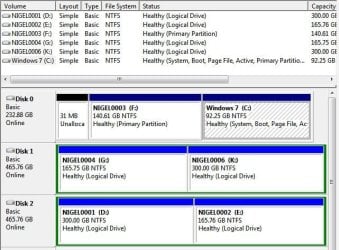
Hello all, I need to do this as per thread title and just wanted to make sure exactly what to do in the easiest way possible. Please see my disk management picture.

Ths system is currently set up by using easyBCD to go straight to windows 7 see below:

There are a total of 2 entries listed in the bootloader.

Default: Windows 7
Timeout: 5 seconds
EasyBCD Boot Device: I:\

Entry #1
Name: Windows 7
BCD ID: {current}
Drive: C:\
Bootloader Path: \Windows\system32\winload.exe

Entry #2
Name: Windows XP Pro
BCD ID: {3d0dd6c4-cbb4-11de-a029-0019663bbbba}
Drive: I:\
Bootloader Path: \NTLDR

I: is the active partition with C: being the logical where Win 7 resides. F: is a data area to remain unharmed.
There are no files whatsoever on I: that interests me and I hope to reclaim that area and give it to either C: or F:
I have been meaning to do this for a very long time now. Please assist with this problem.
Thanks
 

Attachments
  • Snap1.jpg
    Snap1.jpg
    46.8 KB · Views: 80

My Computer My Computer

At a glance

Win 7 Ultimate x86Pentium 4 631 cedar mill 3.00Ghz - OC to 3.62x1gig Kingston pc2 5300
Computer Manufacturer/Model Number
Home brew
OS
Win 7 Ultimate x86
CPU
Pentium 4 631 cedar mill 3.00Ghz - OC to 3.6
Motherboard
Conroe 1333-D667 intel
Memory
2x1gig Kingston pc2 5300
Hard Drives
1x250Gb Western Digital WD2500 sata
2x500Gb Seagate ST3500 sata
PSU
800 watts
Cooling
Pentium 4 cpu fan + 3 case fans
Internet Speed
8mb
Make a Windows 7 repair disc b4 you do anything.
Unless of course, you have the windows 7 install disc.
 

My Computer My Computer

At a glance

Windows 7 Ultimate 64BitC2D E82008GB PNY PC2-6400BFG 9600GT x 2
Computer Manufacturer/Model Number
Myself
OS
Windows 7 Ultimate 64Bit
CPU
C2D E8200
Motherboard
XFX 750i
Memory
8GB PNY PC2-6400
Graphics Card(s)
BFG 9600GT x 2
Sound Card
Stock XFX Optical
Monitor(s) Displays
Gateway 22" HD Display
Hard Drives
C: 1 TB G: 500 GB H: 500 GB
PSU
Ultra LSP 550 Pro Lifetime Series
Case
Xion2
Cooling
ThermalTake
zomby88 have both repair and install
 

My Computer My Computer

At a glance

Win 7 Ultimate x86Pentium 4 631 cedar mill 3.00Ghz - OC to 3.62x1gig Kingston pc2 5300
Computer Manufacturer/Model Number
Home brew
OS
Win 7 Ultimate x86
CPU
Pentium 4 631 cedar mill 3.00Ghz - OC to 3.6
Motherboard
Conroe 1333-D667 intel
Memory
2x1gig Kingston pc2 5300
Hard Drives
1x250Gb Western Digital WD2500 sata
2x500Gb Seagate ST3500 sata
PSU
800 watts
Cooling
Pentium 4 cpu fan + 3 case fans
Internet Speed
8mb
The System boot files are on I. C needs to be marked Active so that the System boot files can be written to it booting Win7 DVD Repair console or Repair CD to run Startup Repair 3 Separate Times.

But first C and F must be converted to Primary partitions so that they can be marked Active. Boot free Partition Wizard bootable CD, rightclick C to Modify>Convert to Primary, OK. Repeat with F. Then rightclick C to Modify>Set to Active. Click on Win7 HD to highlight it, from Disk tab select Rebuild MBR which may preclude the need to run the Repairs from DVD/CD. Apply all steps, reboot to see if Repairs are needed.

Once Win7 boots on its own and holds the System Active flags, you can boot back into PW CD to rightclick I to Delete it, then resize F into its space or create a new Partition there. PW can even Resize>slide F intact over to right to Move C there but you may need to Rebuild MBR or run Repairs again.

Back up your files first.
 
Hi Gregrocker, Nice to see you again.
I did everything okay up to the point where I tried to select rebuild MBR from the disk tab - but they are all greyed out.
It will not allow any selection from the disk tab. At this point all 3 partitions are primary and only Windows 7 shows active - I can select and highlight okay.
So I undid everything and here I am again. Do you know why that happened ?
 

My Computer My Computer

At a glance

Win 7 Ultimate x86Pentium 4 631 cedar mill 3.00Ghz - OC to 3.62x1gig Kingston pc2 5300
Computer Manufacturer/Model Number
Home brew
OS
Win 7 Ultimate x86
CPU
Pentium 4 631 cedar mill 3.00Ghz - OC to 3.6
Motherboard
Conroe 1333-D667 intel
Memory
2x1gig Kingston pc2 5300
Hard Drives
1x250Gb Western Digital WD2500 sata
2x500Gb Seagate ST3500 sata
PSU
800 watts
Cooling
Pentium 4 cpu fan + 3 case fans
Internet Speed
8mb
In order to get Rebuild MBR you must click on the Win7 HD to highlight it first.

If Rebuild MBR doesn't work then as stated boot the DVD REpair console or REpair CD to run Startup Repair up to 3 separate times with reboots until it writes the System boot files to Active Win7 partition and starts.

Read the Startup Repair 3 Separate Times tutorial linked so you understand the process better.
 

My Computer My Computer

At a glance

Windows 7 Ultimate 64BitGenuineIntel Intel(R) Core(TM) DuoCore T2400 ...2.00 GBMobile Intel(R) 945 Express Chipset
Computer Manufacturer/Model Number
Lenovo ThinkPad T60
OS
Windows 7 Ultimate 64Bit
CPU
GenuineIntel Intel(R) Core(TM) DuoCore T2400 @ 1.83GHz
Motherboard
Intel(R) 82801G (ICH7 Family)
Memory
2.00 GB
Graphics Card(s)
Mobile Intel(R) 945 Express Chipset
Sound Card
SoundMAX Integrated Digital HD Audio
Monitor(s) Displays
ThinkPad Display
Screen Resolution
1400x1050
Hard Drives
100Gb SATA
Keyboard
Standard Keyboard
Mouse
HID-compliant Mouse
Internet Speed
Cable Broadband - 54Mbps
Other Info
Intel(R) PRO/1000 PL Network Connection
11a/b/g Wireless LAN Mini PCI Express Adapter
Greg, (I did highlight Win 7 HD)

But first C and F must be converted to Primary partitions so that they can be marked Active. Boot free Partition Wizard bootable CD, rightclick C to Modify>Convert to Primary, OK. Repeat with F. Then rightclick C to Modify>Set to Active. (Do I have to apply the above steps at this point before I click on win 7 HD to highlight ? maybe this is why it doesn't allow the rebuild MBR option ?) Click on Windows 7 HD to highlight it, from Disk tab select Rebuild MBR which may preclude the need to run the Repairs from DVD/CD. Apply all steps, reboot to see if Repairs are needed.

if the answer is no to above - I will proceed with the 3times repair thingy - but I will still have to apply these steps for PW to complete and make the Win 7 partition active before I reboot right ?
 

My Computer My Computer

At a glance

Win 7 Ultimate x86Pentium 4 631 cedar mill 3.00Ghz - OC to 3.62x1gig Kingston pc2 5300
Computer Manufacturer/Model Number
Home brew
OS
Win 7 Ultimate x86
CPU
Pentium 4 631 cedar mill 3.00Ghz - OC to 3.6
Motherboard
Conroe 1333-D667 intel
Memory
2x1gig Kingston pc2 5300
Hard Drives
1x250Gb Western Digital WD2500 sata
2x500Gb Seagate ST3500 sata
PSU
800 watts
Cooling
Pentium 4 cpu fan + 3 case fans
Internet Speed
8mb
Well of course you have to do the steps in order, not skip to the last one in the sequence and then wonder why it isn't working.

If you have additional questions feel free to ask them to get each step done in order.
 
sorry, was trying to do it step by step following word for word.... didn't want to mess up.... my bad.
 

My Computer My Computer

At a glance

Win 7 Ultimate x86Pentium 4 631 cedar mill 3.00Ghz - OC to 3.62x1gig Kingston pc2 5300
Computer Manufacturer/Model Number
Home brew
OS
Win 7 Ultimate x86
CPU
Pentium 4 631 cedar mill 3.00Ghz - OC to 3.6
Motherboard
Conroe 1333-D667 intel
Memory
2x1gig Kingston pc2 5300
Hard Drives
1x250Gb Western Digital WD2500 sata
2x500Gb Seagate ST3500 sata
PSU
800 watts
Cooling
Pentium 4 cpu fan + 3 case fans
Internet Speed
8mb
Greg, Tried it tonight, set c and f to primary and then made c active - applied the changes then highlighted win 7 HD and went to the disk tab but it still will not allow me to do anything. All the selections are greyed out. So I reset everything in reverse and I am back again to dual boot. Guess XP is trying to tell me something :D Oh well...... Any other recommended partitioning software ? I will get another CD tomorrow and burn PW again just in case something is not right.
 

My Computer My Computer

At a glance

Win 7 Ultimate x86Pentium 4 631 cedar mill 3.00Ghz - OC to 3.62x1gig Kingston pc2 5300
Computer Manufacturer/Model Number
Home brew
OS
Win 7 Ultimate x86
CPU
Pentium 4 631 cedar mill 3.00Ghz - OC to 3.6
Motherboard
Conroe 1333-D667 intel
Memory
2x1gig Kingston pc2 5300
Hard Drives
1x250Gb Western Digital WD2500 sata
2x500Gb Seagate ST3500 sata
PSU
800 watts
Cooling
Pentium 4 cpu fan + 3 case fans
Internet Speed
8mb
Greg, Burned another PW7 cd this morning and the same thing happened - no joy with the rebuild of MBR.
It just won't allow me to do any function on the disk tab after highlighting Windows 7 HD. (Primary & Active)
Puzzled.
 

My Computer My Computer

At a glance

Win 7 Ultimate x86Pentium 4 631 cedar mill 3.00Ghz - OC to 3.62x1gig Kingston pc2 5300
Computer Manufacturer/Model Number
Home brew
OS
Win 7 Ultimate x86
CPU
Pentium 4 631 cedar mill 3.00Ghz - OC to 3.6
Motherboard
Conroe 1333-D667 intel
Memory
2x1gig Kingston pc2 5300
Hard Drives
1x250Gb Western Digital WD2500 sata
2x500Gb Seagate ST3500 sata
PSU
800 watts
Cooling
Pentium 4 cpu fan + 3 case fans
Internet Speed
8mb
Did you run Startup Repair up to 3 separate times with reboots to write the System Boot files to the Win7 partition once you made it Primary and marked Active? This is how it normally is done - the Rebuild MBR step is just a possible shortcut and doesn't always work.

Since you apparently missed it here is the very first tutorial I posted: Startup Repair - Run 3 Separate Times
 
No need to use Easy BCD, just open System Configuration via msconfig (Start>Run), click boot tab, then click onto your XP OS, click Delete.
Done. :)
Hope this help.
 

My Computer My Computer

At a glance

Windows 7 UltimateCore i7 2720 QM8 GBNVIDIA Quadro 2000
Computer Manufacturer/Model Number
Thinkpad
OS
Windows 7 Ultimate
CPU
Core i7 2720 QM
Motherboard
Intel
Memory
8 GB
Graphics Card(s)
NVIDIA Quadro 2000
Sound Card
Realtek
Monitor(s) Displays
16.5"
Screen Resolution
1600x900
Hard Drives
500 GB SATA
Internet Speed
25MB/s
Other Info
Love it
Thanks Greg, Happy Happy - All went well. :D ......3 times certainly does the trick.
Thanks to all members for their input.
 

My Computer My Computer

At a glance

Win 7 Ultimate x86Pentium 4 631 cedar mill 3.00Ghz - OC to 3.62x1gig Kingston pc2 5300
Computer Manufacturer/Model Number
Home brew
OS
Win 7 Ultimate x86
CPU
Pentium 4 631 cedar mill 3.00Ghz - OC to 3.6
Motherboard
Conroe 1333-D667 intel
Memory
2x1gig Kingston pc2 5300
Hard Drives
1x250Gb Western Digital WD2500 sata
2x500Gb Seagate ST3500 sata
PSU
800 watts
Cooling
Pentium 4 cpu fan + 3 case fans
Internet Speed
8mb
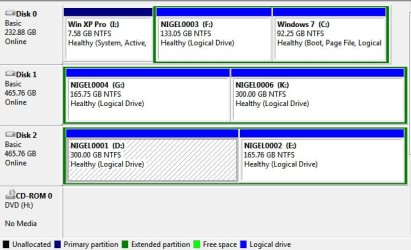
Hi Greg - I would like another adjustment to my system. I would like to move Win 7 C: to the front of the drive (Left) and make F: into 2 partitions, the first one immediately to the right of and after the Win 7 partition maybe 20Gb to install Win 8 just curious to see how it works and the balance as a free data drive. What would be the safest and sure method to do this? Also what happens to the 31Mb that is sitting at the very beginning is it ignored ? I don't know why that small piece is sitting there ?
At the moment F: partition is formatted and blank and ready to go.
Can PW do this for me ? or do I have to use Acronis or something ?
You mentioned before something about sliding the partition across ? Can I also slide the 31Mb ? ....or, If I delete the F: partition, will the 31Mb merge with the unpartitioned space that F: will leave ?
Thanks for guidance once again.
I thought I would continue this thread - am I doing it right according to forum rules ?
 

My Computer My Computer

At a glance

Win 7 Ultimate x86Pentium 4 631 cedar mill 3.00Ghz - OC to 3.62x1gig Kingston pc2 5300
Computer Manufacturer/Model Number
Home brew
OS
Win 7 Ultimate x86
CPU
Pentium 4 631 cedar mill 3.00Ghz - OC to 3.6
Motherboard
Conroe 1333-D667 intel
Memory
2x1gig Kingston pc2 5300
Hard Drives
1x250Gb Western Digital WD2500 sata
2x500Gb Seagate ST3500 sata
PSU
800 watts
Cooling
Pentium 4 cpu fan + 3 case fans
Internet Speed
8mb
greg I forgot to send the image here it is
 

Attachments

  • Capture.JPG
    Capture.JPG
    67.2 KB · Views: 10

My Computer My Computer

At a glance

Win 7 Ultimate x86Pentium 4 631 cedar mill 3.00Ghz - OC to 3.62x1gig Kingston pc2 5300
Computer Manufacturer/Model Number
Home brew
OS
Win 7 Ultimate x86
CPU
Pentium 4 631 cedar mill 3.00Ghz - OC to 3.6
Motherboard
Conroe 1333-D667 intel
Memory
2x1gig Kingston pc2 5300
Hard Drives
1x250Gb Western Digital WD2500 sata
2x500Gb Seagate ST3500 sata
PSU
800 watts
Cooling
Pentium 4 cpu fan + 3 case fans
Internet Speed
8mb
Quite simple actually since you say F is formatted and therefore empty.

Backup a Win7 System Image or at least your files. Backup Complete Computer - Create an Image Backup

Boot free Partition Wizard bootable CD, rightclick F to Delete, click OK.

Now rightclick C to Resize, drag left grey border all the way to the left edge of HD, then drag right grey border to the left to make room for the two new partitions you want to the right of C, click OK.

Now rightclick in the Unallocated Space to Create New NTFS Primary partition for Win8 of the size desired, label it, click OK. Do the same for the Data partition, OK, Apply all steps.

Boot the Win8 installer to install to the partition you made for it.
 
Thanks - Let you know how it works out.
 

My Computer My Computer

At a glance

Win 7 Ultimate x86Pentium 4 631 cedar mill 3.00Ghz - OC to 3.62x1gig Kingston pc2 5300
Computer Manufacturer/Model Number
Home brew
OS
Win 7 Ultimate x86
CPU
Pentium 4 631 cedar mill 3.00Ghz - OC to 3.6
Motherboard
Conroe 1333-D667 intel
Memory
2x1gig Kingston pc2 5300
Hard Drives
1x250Gb Western Digital WD2500 sata
2x500Gb Seagate ST3500 sata
PSU
800 watts
Cooling
Pentium 4 cpu fan + 3 case fans
Internet Speed
8mb
Back
Top