How to repair Windows Live mail 2011

edit the post, go to advanced and remove the attachment. you can edit the original in Paint and use the eraser tool to remove personal info.

If you're going to report the other tabs, just do that in a new post. Again, erase personal info before attaching any screenshots.

Thanks for the reminder Jerry.
 

My Computer My Computer

At a glance

x64 (6.3.9600) Win8.1 Pro & soon dual boot x6...AMD A6-3420M APU with Radeon(tm) HD Graphics6.00 GBAMD Radeon(TM) HD 6520G
Computer type
Laptop
Computer Manufacturer/Model Number
HP Pavilion dv6-6c10us
OS
x64 (6.3.9600) Win8.1 Pro & soon dual boot x64 (6.1.7601) Win7_SP1 HomePrem
CPU
AMD A6-3420M APU with Radeon(tm) HD Graphics
Motherboard
Hewlett-Packard 1805
Memory
6.00 GB
Graphics Card(s)
AMD Radeon(TM) HD 6520G
Sound Card
(1) AMD High Definition Audio Device (2) IDT High Definiti
Monitor(s) Displays
HP W2072a 20" LCD (1600 x 900) @ 60 Hz
Screen Resolution
1366 x 768 x 32 bits (4294967296 colors) @ 60 Hz
Hard Drives
ST640LM0 00 HM641JI SATA Disk Device
Keyboard
Logitech k520 wireless KB
Mouse
Logitech m320 wireless mouse (bundled with KB)
Internet Speed
15/5 | 54 MB Wireless 'n'
Antivirus
Realtime: Defender or Avast | On-demand: Malwarebytes, ESET
Browser
IE 11 on Win8, IE 10 on win 7
Other Info
Media: [Gimp, Audacity, VLC] || Comm: [WEmail 2012, Skype] || Productivity: [OpenOffice,| Textpad] || Utils: [Sysinternals, cCleaner, Speccy, Defraggler]
Have not had time to try fixes yet. Will get other screen shots tomorrow. Have narrowed it down to, it only happens after I have sent an email. It is trying to send 4 for times, and can not complete it. I have 5 accounts listed under accounts, all the same one. How do I get rid of all but one?
 

My Computer My Computer

At a glance

Windows 7 Home Premium 32bit
OS
Windows 7 Home Premium 32bit
1) Make the new account (CoxSSL) as I described in post# 18.

2) in ALL other accounts - untick "include this account when sending and receiving" on all accounts (general tab of the account property page), except the new one (CoxSSL). This will prevent any new mail being sent or attempts to retrieve mail from the server.

3) Try sending eMail to yourself, this should eventually round trip back to you and you've tested send and receive with the CoxSSL account.
   Note
All of your eMail on the Server should download to the new CoxSSL account you created because you had "Leave eMail on Server" ticked. I don't know how much mail is there or how long you were using that option. anyway - there might be a lot of email coming down.

4) if you still see multiple accounts sending / receiving, go back to step 2

when you get to the point where only CoxSSL is sending and receiving, you can move forward. I can't help you much if the old accounts are active. And they must be inactive to complete the next steps.


   Warning
If the old accounts are still sending/receiving, there is a chance that new mail will not be backed up. This isn't much of an issue in your case because you have "Leave on server" ticked. This is a caution for others who might read these instructions and who do NOT leave their mail on the server.

The next thing you'll want to do is move any mail from the other old accounts into a new folder. The easiest and perhaps safest way to collect items in the other accounts is to create a new folder in Storage, call it CoxStore

do the following for the old accounts only, not the new account.

Move all items that you want to save into Storage -> CoxStore1. WLM might complain about duplicates when you do the same for subsequent accounts, or WLM will move the items and keep the association to the old account. I'm not sure. If WLM complains about dups, create a new folder in Storage called CoxStore2 and move the items into it. Continue moving old eMail items from the old account inbox until there are no more items to move.

Finally, create a new folder in Storage called OldOutbox and move any eMail from the real Outbox to Storage -> OldOutbox
At the end of this you could have one folder in Storage with ALL of your old Email, or you might have CoxStore1 through CoxStore5 folders, each containing eMail from the respective old folders.

You might want to check if there's anything in the drafts folders and move them to Storage (create a drafts folder under each CoxStoreX and move the old drafts to the respective Storage drafts.

Don't worry about junk mail or deleted items.

When you're satisfied that you have "backed up" your old eMail, delete All of the old accounts. But keep the new account CoxSSL

Your WLM folder should look like this (I used abbreviated folder names for CoxSSL account)

CoxSLL
---Inbox
---Sent
---Deleted
---Drafts
---Junk

Outbox

Storage
---CoxStore1
---OldOutbox

or

Storage
---CoxStore1
---CoxStore2
---CoxStore3
---CoxStore4
---CoxStore5
---OldOutbox

At this point you have a very clean WLM structure, albeit a bunch of old eMail to sort through. That's fairly easy to do, but let's get the ship righted first.

 

My Computer My Computer

At a glance

x64 (6.3.9600) Win8.1 Pro & soon dual boot x6...AMD A6-3420M APU with Radeon(tm) HD Graphics6.00 GBAMD Radeon(TM) HD 6520G
Computer type
Laptop
Computer Manufacturer/Model Number
HP Pavilion dv6-6c10us
OS
x64 (6.3.9600) Win8.1 Pro & soon dual boot x64 (6.1.7601) Win7_SP1 HomePrem
CPU
AMD A6-3420M APU with Radeon(tm) HD Graphics
Motherboard
Hewlett-Packard 1805
Memory
6.00 GB
Graphics Card(s)
AMD Radeon(TM) HD 6520G
Sound Card
(1) AMD High Definition Audio Device (2) IDT High Definiti
Monitor(s) Displays
HP W2072a 20" LCD (1600 x 900) @ 60 Hz
Screen Resolution
1366 x 768 x 32 bits (4294967296 colors) @ 60 Hz
Hard Drives
ST640LM0 00 HM641JI SATA Disk Device
Keyboard
Logitech k520 wireless KB
Mouse
Logitech m320 wireless mouse (bundled with KB)
Internet Speed
15/5 | 54 MB Wireless 'n'
Antivirus
Realtime: Defender or Avast | On-demand: Malwarebytes, ESET
Browser
IE 11 on Win8, IE 10 on win 7
Other Info
Media: [Gimp, Audacity, VLC] || Comm: [WEmail 2012, Skype] || Productivity: [OpenOffice,| Textpad] || Utils: [Sysinternals, cCleaner, Speccy, Defraggler]
Will the storage folders I have already created still be there with their contents? Also,my old account name is my email address, with the new one being CoxSSL, will my existing email account still be good? Do not want to have to change email addresses.
 

My Computer My Computer

At a glance

Windows 7 Home Premium 32bit
OS
Windows 7 Home Premium 32bit
Yes, all storage folders previously created will still be there. What I described was creating new folders and a new account.

Your old account name is only a name that tells how to get to the servers and how to log on using your eMail ID.

The new CoxSSL account will contain the same information (eMail address, etc) but use a different protocol to get to the servers. So yes - you're eMail address will still be good and will still be the same.

One advantage to this is that a new WLM folder structure is created when new accounts are configured. Each account has it's own folder area with the same tree structure (inbox, drafts, sent, etc.). By creating the new folder structure, you're guaranteed that you don't have any mail items in that structure that might cause WLM to hiccup.

The only thing you want to make sure is that the old accounts clear the "include this account when..."
That way the only account that should be sending / receiving is the new one: CoxSSL. you can actually name the new account anything you want, but use CoxSSL for now - i will always reference CoxSSL when I post. That's the only account you really need.

Let me know what you've done so far - thanks.
 

My Computer My Computer

At a glance

x64 (6.3.9600) Win8.1 Pro & soon dual boot x6...AMD A6-3420M APU with Radeon(tm) HD Graphics6.00 GBAMD Radeon(TM) HD 6520G
Computer type
Laptop
Computer Manufacturer/Model Number
HP Pavilion dv6-6c10us
OS
x64 (6.3.9600) Win8.1 Pro & soon dual boot x64 (6.1.7601) Win7_SP1 HomePrem
CPU
AMD A6-3420M APU with Radeon(tm) HD Graphics
Motherboard
Hewlett-Packard 1805
Memory
6.00 GB
Graphics Card(s)
AMD Radeon(TM) HD 6520G
Sound Card
(1) AMD High Definition Audio Device (2) IDT High Definiti
Monitor(s) Displays
HP W2072a 20" LCD (1600 x 900) @ 60 Hz
Screen Resolution
1366 x 768 x 32 bits (4294967296 colors) @ 60 Hz
Hard Drives
ST640LM0 00 HM641JI SATA Disk Device
Keyboard
Logitech k520 wireless KB
Mouse
Logitech m320 wireless mouse (bundled with KB)
Internet Speed
15/5 | 54 MB Wireless 'n'
Antivirus
Realtime: Defender or Avast | On-demand: Malwarebytes, ESET
Browser
IE 11 on Win8, IE 10 on win 7
Other Info
Media: [Gimp, Audacity, VLC] || Comm: [WEmail 2012, Skype] || Productivity: [OpenOffice,| Textpad] || Utils: [Sysinternals, cCleaner, Speccy, Defraggler]
Wlm 2011

Here the additional screen shots of properties as well as one of the message I get when I try to open WLV, after I have sent an email.
 
Last edited:

My Computer My Computer

At a glance

Windows 7 Home Premium 32bit
OS
Windows 7 Home Premium 32bit
Ok, once you create the new CoxSSL account and untick include for the old accounts, let me know.

The screen shots still contain personal information - dang! Missed the title bar, but you got everything else.
Just go to advanced, manage attachments and delete the screen shots - no need to reload.

Once this is all squared away, I recommend upgrading to WLM 2012 - it's far less buggy than 2011.
 

My Computer My Computer

At a glance

x64 (6.3.9600) Win8.1 Pro & soon dual boot x6...AMD A6-3420M APU with Radeon(tm) HD Graphics6.00 GBAMD Radeon(TM) HD 6520G
Computer type
Laptop
Computer Manufacturer/Model Number
HP Pavilion dv6-6c10us
OS
x64 (6.3.9600) Win8.1 Pro & soon dual boot x64 (6.1.7601) Win7_SP1 HomePrem
CPU
AMD A6-3420M APU with Radeon(tm) HD Graphics
Motherboard
Hewlett-Packard 1805
Memory
6.00 GB
Graphics Card(s)
AMD Radeon(TM) HD 6520G
Sound Card
(1) AMD High Definition Audio Device (2) IDT High Definiti
Monitor(s) Displays
HP W2072a 20" LCD (1600 x 900) @ 60 Hz
Screen Resolution
1366 x 768 x 32 bits (4294967296 colors) @ 60 Hz
Hard Drives
ST640LM0 00 HM641JI SATA Disk Device
Keyboard
Logitech k520 wireless KB
Mouse
Logitech m320 wireless mouse (bundled with KB)
Internet Speed
15/5 | 54 MB Wireless 'n'
Antivirus
Realtime: Defender or Avast | On-demand: Malwarebytes, ESET
Browser
IE 11 on Win8, IE 10 on win 7
Other Info
Media: [Gimp, Audacity, VLC] || Comm: [WEmail 2012, Skype] || Productivity: [OpenOffice,| Textpad] || Utils: [Sysinternals, cCleaner, Speccy, Defraggler]
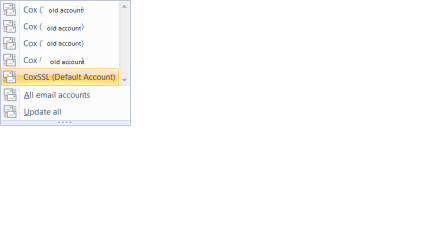
Created new account CoxSSL as suggested but where do I find a list of all accounts to edit them? Only place I see them is when I select send/receive. It still shows my old account 4 times (only had one). Can not select them to do anything with them.
 

My Computer My Computer

At a glance

Windows 7 Home Premium 32bit
OS
Windows 7 Home Premium 32bit
Do you see the old account, the new account, Outbox, Storage, etc?

If you only see the old account - change that one (do not include when sending/receiving)

Post a screenshot of your main WLM window - use the eraser in Paint to remove personal information (your eMail, name, any other sensitive info caught in the snapshot.
   Tip
Alt+PrtScrn = capture active window
Open Paint
paste the captured window
erase personal info
save
attach to your post (Paperclip)
 

My Computer My Computer

At a glance

x64 (6.3.9600) Win8.1 Pro & soon dual boot x6...AMD A6-3420M APU with Radeon(tm) HD Graphics6.00 GBAMD Radeon(TM) HD 6520G
Computer type
Laptop
Computer Manufacturer/Model Number
HP Pavilion dv6-6c10us
OS
x64 (6.3.9600) Win8.1 Pro & soon dual boot x64 (6.1.7601) Win7_SP1 HomePrem
CPU
AMD A6-3420M APU with Radeon(tm) HD Graphics
Motherboard
Hewlett-Packard 1805
Memory
6.00 GB
Graphics Card(s)
AMD Radeon(TM) HD 6520G
Sound Card
(1) AMD High Definition Audio Device (2) IDT High Definiti
Monitor(s) Displays
HP W2072a 20" LCD (1600 x 900) @ 60 Hz
Screen Resolution
1366 x 768 x 32 bits (4294967296 colors) @ 60 Hz
Hard Drives
ST640LM0 00 HM641JI SATA Disk Device
Keyboard
Logitech k520 wireless KB
Mouse
Logitech m320 wireless mouse (bundled with KB)
Internet Speed
15/5 | 54 MB Wireless 'n'
Antivirus
Realtime: Defender or Avast | On-demand: Malwarebytes, ESET
Browser
IE 11 on Win8, IE 10 on win 7
Other Info
Media: [Gimp, Audacity, VLC] || Comm: [WEmail 2012, Skype] || Productivity: [OpenOffice,| Textpad] || Utils: [Sysinternals, cCleaner, Speccy, Defraggler]
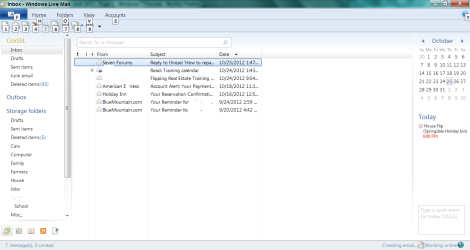
Here is the main WLM screen and the send/receive screen
 

Attachments

  • WLM.png
    WLM.png
    43.8 KB · Views: 4
  • WLM1.png
    WLM1.png
    5.9 KB · Views: 2

My Computer My Computer

At a glance

Windows 7 Home Premium 32bit
OS
Windows 7 Home Premium 32bit
ok, so the 2nd snapshot is WLM checking the servers, which you cleverly hid sensitive info , right?

I'll try to figure out a way to clean up the old accounts. I want to make sure that you are using the new account and that it is working fine, that you copied what mail you wanted to save into folders under teh Storage folder before I suggest anything.

I other words, is WLM behaving and is the old email in a safe place?

Search your user for CoxSSL and open the folder location. Post a screenshot.
There should be multiple folders there, including CoxSSL.
You might have to change your folder view to include "system protected" files so you can view the objects.

Thanks

edit: You had to have the old account somewhere, right? Where did it go? Is it just off screen or was it deleted? It's fine if you deleted it, it just dawned on me that it wasn't showning in your image.
 
Last edited:

My Computer My Computer

At a glance

x64 (6.3.9600) Win8.1 Pro & soon dual boot x6...AMD A6-3420M APU with Radeon(tm) HD Graphics6.00 GBAMD Radeon(TM) HD 6520G
Computer type
Laptop
Computer Manufacturer/Model Number
HP Pavilion dv6-6c10us
OS
x64 (6.3.9600) Win8.1 Pro & soon dual boot x64 (6.1.7601) Win7_SP1 HomePrem
CPU
AMD A6-3420M APU with Radeon(tm) HD Graphics
Motherboard
Hewlett-Packard 1805
Memory
6.00 GB
Graphics Card(s)
AMD Radeon(TM) HD 6520G
Sound Card
(1) AMD High Definition Audio Device (2) IDT High Definiti
Monitor(s) Displays
HP W2072a 20" LCD (1600 x 900) @ 60 Hz
Screen Resolution
1366 x 768 x 32 bits (4294967296 colors) @ 60 Hz
Hard Drives
ST640LM0 00 HM641JI SATA Disk Device
Keyboard
Logitech k520 wireless KB
Mouse
Logitech m320 wireless mouse (bundled with KB)
Internet Speed
15/5 | 54 MB Wireless 'n'
Antivirus
Realtime: Defender or Avast | On-demand: Malwarebytes, ESET
Browser
IE 11 on Win8, IE 10 on win 7
Other Info
Media: [Gimp, Audacity, VLC] || Comm: [WEmail 2012, Skype] || Productivity: [OpenOffice,| Textpad] || Utils: [Sysinternals, cCleaner, Speccy, Defraggler]
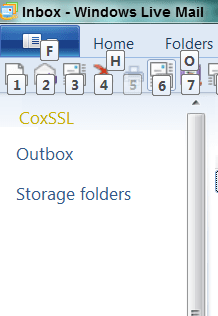
I need to see just the accounts - you can crop the list and calendar pane.
Please also collapse the accounts and storage folders - make it so I can see teh entire navigation pane showing all accounts and I stop trying to use the scroll bar in your image =:>

Thanks
 

Attachments

  • WLM.png
    WLM.png
    8.4 KB · Views: 80

My Computer My Computer

At a glance

x64 (6.3.9600) Win8.1 Pro & soon dual boot x6...AMD A6-3420M APU with Radeon(tm) HD Graphics6.00 GBAMD Radeon(TM) HD 6520G
Computer type
Laptop
Computer Manufacturer/Model Number
HP Pavilion dv6-6c10us
OS
x64 (6.3.9600) Win8.1 Pro & soon dual boot x64 (6.1.7601) Win7_SP1 HomePrem
CPU
AMD A6-3420M APU with Radeon(tm) HD Graphics
Motherboard
Hewlett-Packard 1805
Memory
6.00 GB
Graphics Card(s)
AMD Radeon(TM) HD 6520G
Sound Card
(1) AMD High Definition Audio Device (2) IDT High Definiti
Monitor(s) Displays
HP W2072a 20" LCD (1600 x 900) @ 60 Hz
Screen Resolution
1366 x 768 x 32 bits (4294967296 colors) @ 60 Hz
Hard Drives
ST640LM0 00 HM641JI SATA Disk Device
Keyboard
Logitech k520 wireless KB
Mouse
Logitech m320 wireless mouse (bundled with KB)
Internet Speed
15/5 | 54 MB Wireless 'n'
Antivirus
Realtime: Defender or Avast | On-demand: Malwarebytes, ESET
Browser
IE 11 on Win8, IE 10 on win 7
Other Info
Media: [Gimp, Audacity, VLC] || Comm: [WEmail 2012, Skype] || Productivity: [OpenOffice,| Textpad] || Utils: [Sysinternals, cCleaner, Speccy, Defraggler]
Where do I search for the CoxSSl users? I changed the name on the old account. Everything seems to be working. I had to set the SMTP at 25 (that is what it was before). It is just checking the one old account 4 time as well as the new SSL one. Can not find a list with old accounts or new ones anywhere.
 

My Computer My Computer

At a glance

Windows 7 Home Premium 32bit
OS
Windows 7 Home Premium 32bit
Here you go
 

Attachments

  • WLM3.png
    WLM3.png
    23.8 KB · Views: 5

My Computer My Computer

At a glance

Windows 7 Home Premium 32bit
OS
Windows 7 Home Premium 32bit
You missed the point of that exercise. Creating a NEW account allows you to get rid of the old account which would stop the extraneous server checks.

You're welcome to start over at post# 18 - create the new WLM account and delete the old WLM account, making sure you copy the eMail over to Storage folders first. It looks as though you already copy mail to Storage, so all you really need to copy is the stuff in your Inbox.

I've already walked you through most of the steps that would solve this - you chose not to follow the advice. That's ok, but not saying you weren't going to do something is not ok. I wouldn't have wasted your time.

The choice is yours, the information is there. I'll check back next week to see what decision you made and if you need further assitance.
 

My Computer My Computer

At a glance

x64 (6.3.9600) Win8.1 Pro & soon dual boot x6...AMD A6-3420M APU with Radeon(tm) HD Graphics6.00 GBAMD Radeon(TM) HD 6520G
Computer type
Laptop
Computer Manufacturer/Model Number
HP Pavilion dv6-6c10us
OS
x64 (6.3.9600) Win8.1 Pro & soon dual boot x64 (6.1.7601) Win7_SP1 HomePrem
CPU
AMD A6-3420M APU with Radeon(tm) HD Graphics
Motherboard
Hewlett-Packard 1805
Memory
6.00 GB
Graphics Card(s)
AMD Radeon(TM) HD 6520G
Sound Card
(1) AMD High Definition Audio Device (2) IDT High Definiti
Monitor(s) Displays
HP W2072a 20" LCD (1600 x 900) @ 60 Hz
Screen Resolution
1366 x 768 x 32 bits (4294967296 colors) @ 60 Hz
Hard Drives
ST640LM0 00 HM641JI SATA Disk Device
Keyboard
Logitech k520 wireless KB
Mouse
Logitech m320 wireless mouse (bundled with KB)
Internet Speed
15/5 | 54 MB Wireless 'n'
Antivirus
Realtime: Defender or Avast | On-demand: Malwarebytes, ESET
Browser
IE 11 on Win8, IE 10 on win 7
Other Info
Media: [Gimp, Audacity, VLC] || Comm: [WEmail 2012, Skype] || Productivity: [OpenOffice,| Textpad] || Utils: [Sysinternals, cCleaner, Speccy, Defraggler]
Sorry, did not mean to piss you off. Followed the instructions the best I could. As I mentioned, I know just enough to be dangerous. No where near as knowledgeable as you. When you meant set up a new account, did you mean change what is under 'properties' or under 'add Windows Live account'?
 

My Computer My Computer

At a glance

Windows 7 Home Premium 32bit
OS
Windows 7 Home Premium 32bit
I help lots of folks, most follow the advice given, some decide to take another path - I don't get upset about that.

When I said set up a new account I meant set up a new WLM account. To make that easier for you, I rewrote the information from post 18 in this post. Follow these instructions and you should be good-to-go.

  1. Create a new account in Windows Live Mail
    @ Add E-Mail account
  2. On the first dialog window
    • tick the checkbox for Manually configure server settings for e-mail account
    • enter your eMail address, password, and display name
    • click next
  3. On the Servers dialog window
    • Select POP3 as the Server type
    • enter: pop.cox.net as the incoming server
    • enter: smtp.cox.net as the outgoing server
    • tick the checkbox for My outgoing server requires authentication
    • tick both checkboxes (SMTP and POP3) This server requires Secure connection
    • SMTP port- 465
      Nowhere in the Cox documentation does it say to use port 25 - so don't. Instead use 465 with SSL ticked.
    • POP3 port- 995
      Note: The dialog "helps" you when you click the SSL boxes - it sets what it thinks they should be. You have to type in the values that I provided (from Cox documentation)
      Cox makes a distinction that the POP3 port should be 110 without SSL if you're on Cox net and 995 with SSL if your not on Cox net.

      Say you have a laptop and you go to the library and you want to check your mail - you have to reconfigure your account? That's just dumb!

      Set it up 995 with SSL and try it - there's no reaon it won't work. If it doesn't work - switch it.
    • Server timeout - 1 minute should be long enough
    • tick - Leave a copy on the server
    • click next and you should be done
Now, change the old CoxSSL account, the old account that you renamed to CoxSSL
- untick the checkbox Include this acount when sending and receiving

Send a test eMail to yourself using the account you just set up. If you left mail on the server before, it will all come down now.


Follow the above or not - your choice. I read my posts and some of it might have been unclear - I'm giving you the benefit of doubt here. In any case, I've cleaned up the instructions and 'm done.
 

My Computer My Computer

At a glance

x64 (6.3.9600) Win8.1 Pro & soon dual boot x6...AMD A6-3420M APU with Radeon(tm) HD Graphics6.00 GBAMD Radeon(TM) HD 6520G
Computer type
Laptop
Computer Manufacturer/Model Number
HP Pavilion dv6-6c10us
OS
x64 (6.3.9600) Win8.1 Pro & soon dual boot x64 (6.1.7601) Win7_SP1 HomePrem
CPU
AMD A6-3420M APU with Radeon(tm) HD Graphics
Motherboard
Hewlett-Packard 1805
Memory
6.00 GB
Graphics Card(s)
AMD Radeon(TM) HD 6520G
Sound Card
(1) AMD High Definition Audio Device (2) IDT High Definiti
Monitor(s) Displays
HP W2072a 20" LCD (1600 x 900) @ 60 Hz
Screen Resolution
1366 x 768 x 32 bits (4294967296 colors) @ 60 Hz
Hard Drives
ST640LM0 00 HM641JI SATA Disk Device
Keyboard
Logitech k520 wireless KB
Mouse
Logitech m320 wireless mouse (bundled with KB)
Internet Speed
15/5 | 54 MB Wireless 'n'
Antivirus
Realtime: Defender or Avast | On-demand: Malwarebytes, ESET
Browser
IE 11 on Win8, IE 10 on win 7
Other Info
Media: [Gimp, Audacity, VLC] || Comm: [WEmail 2012, Skype] || Productivity: [OpenOffice,| Textpad] || Utils: [Sysinternals, cCleaner, Speccy, Defraggler]
Thanks, Leaving to go out of town. Will work on it when I get back Monday and let you know how it goes.
 

My Computer My Computer

At a glance

Windows 7 Home Premium 32bit
OS
Windows 7 Home Premium 32bit
Back
Top