How to replace user32.dll?

GRoston

New member
Power User
VIP
Local time
2:28 PM
Messages
374
I won't bore everyone with the reason why (but I can if you really want to know), but I want to replace the user32.dll files in the System32 and SysWOW64 directories with the ones in the erdnt\cache64/erdnt\cache86 folders.

I copied the erdnt files to the desktop, renamed them to old<dir>_user32.dll, and then moved them into the System32 and SysWOW64 folders. I know that these are protected files, so I rebooted into safe mode and cd’ed to the System32 folder. My plan was to delete the user32.dll file (yes, I first copied it someplace safe) and then rename the old<dir> file. However, when I tried to deleted user32.dll, I was told “Access denied”. Now what can I try?
 

My Computer

Computer type
PC/Desktop
OS
Windows 7 x64 Pro
CPU
Core i7 860 @ 3.8 GHz
Motherboard
MSI P55-GD80
Memory
16 GB F3-12800CL7D (DDR3 1600 7-7-7-24)
Graphics Card(s)
Sapphire Vapor-X 100283VXL Radeon HD 5770
Monitor(s) Displays
NEC LCD3090WQXi-BK
instead of safe mode, boot into winpe which runs as system.

at admin cmd prompt type:
reagentc /boottore
(then press enter)

reboot. That should boot into winre.
 

My Computers

System One System Two

  • Computer type
    PC/Desktop
    OS
    7 X64
    CPU
    i5 8400
    Motherboard
    gigabyte b365m ds3h
    Memory
    2x8gb 3200mhz
    Hard Drives
    various
    PSU
    pure power 11 400w cm
    Case
    Coolermaster
    Cooling
    cryorig m9i
  • Computer type
    PC/Desktop
    OS
    7x64
    CPU
    g5400
    Motherboard
    ga b365m ds3h
    Memory
    8gb ddr4 2400
    PSU
    xfx pro 450w
SIW2: Thanks. I just tried that, but upon rebooting I saw a message like 'media missing' and the computer did not go into winpe mode.
 

My Computer

Computer type
PC/Desktop
OS
Windows 7 x64 Pro
CPU
Core i7 860 @ 3.8 GHz
Motherboard
MSI P55-GD80
Memory
16 GB F3-12800CL7D (DDR3 1600 7-7-7-24)
Graphics Card(s)
Sapphire Vapor-X 100283VXL Radeon HD 5770
Monitor(s) Displays
NEC LCD3090WQXi-BK
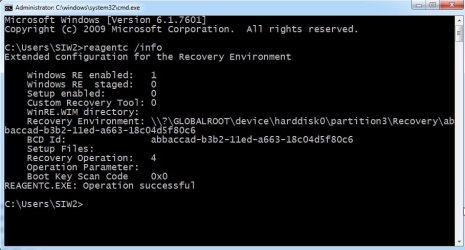
you had better check that winre is enabled and where it should be.

reagentc /info


reagentc-info.jpg

if it is not enabled, try:

reagentc /enable

- - - Updated - - -

If winre has gone missing, it can easily be replaced from the installation media or by using a custom bootable wim file.
 

My Computers

System One System Two

  • Computer type
    PC/Desktop
    OS
    7 X64
    CPU
    i5 8400
    Motherboard
    gigabyte b365m ds3h
    Memory
    2x8gb 3200mhz
    Hard Drives
    various
    PSU
    pure power 11 400w cm
    Case
    Coolermaster
    Cooling
    cryorig m9i
  • Computer type
    PC/Desktop
    OS
    7x64
    CPU
    g5400
    Motherboard
    ga b365m ds3h
    Memory
    8gb ddr4 2400
    PSU
    xfx pro 450w
It is enabled - I just saw the exact same stuff you posted
 

My Computer

Computer type
PC/Desktop
OS
Windows 7 x64 Pro
CPU
Core i7 860 @ 3.8 GHz
Motherboard
MSI P55-GD80
Memory
16 GB F3-12800CL7D (DDR3 1600 7-7-7-24)
Graphics Card(s)
Sapphire Vapor-X 100283VXL Radeon HD 5770
Monitor(s) Displays
NEC LCD3090WQXi-BK
have a look and make sure winre.wim is where indicated
 

My Computers

System One System Two

  • Computer type
    PC/Desktop
    OS
    7 X64
    CPU
    i5 8400
    Motherboard
    gigabyte b365m ds3h
    Memory
    2x8gb 3200mhz
    Hard Drives
    various
    PSU
    pure power 11 400w cm
    Case
    Coolermaster
    Cooling
    cryorig m9i
  • Computer type
    PC/Desktop
    OS
    7x64
    CPU
    g5400
    Motherboard
    ga b365m ds3h
    Memory
    8gb ddr4 2400
    PSU
    xfx pro 450w
I just searched the directory C:\Windows and the file winre.wim is not to be found. Also, there is nothing shown for 'Recovery environment' when I do reagentc /info.
 

My Computer

Computer type
PC/Desktop
OS
Windows 7 x64 Pro
CPU
Core i7 860 @ 3.8 GHz
Motherboard
MSI P55-GD80
Memory
16 GB F3-12800CL7D (DDR3 1600 7-7-7-24)
Graphics Card(s)
Sapphire Vapor-X 100283VXL Radeon HD 5770
Monitor(s) Displays
NEC LCD3090WQXi-BK
To replace critical system files you can't simply do it from within Windows, as it'll always be loaded. In particular user32.dll is used to draw windows and user controls, so that cmd window or even Windows Explorer is shown to you courtesy of user32.dll, so it'll be in use, so you can't replace it.

You must do it from another OS. Any kind wll do. The Windows installer CD/USB is good enough for this, as it'll be many of the "portable" Linuxes out there.

Out of curiosity, I would really want to know why do you want to mess with such a file :p
 

My Computer

Computer type
Laptop
Computer Manufacturer/Model Number
Toshiba Sattelite A665-S6092
OS
Windows 7 Ultimate x64
CPU
Intel Core i7-740QM
Memory
8 GB DDR3
Graphics Card(s)
NVIDIA GeForce 330GT
Screen Resolution
1366x768
Hard Drives
Samsung 840 SSD 500GB
1TB USB3 external HD
Cooling
Coolermaster Notepal U3 notebook cooling pad
Internet Speed
3mbps ASDL
Antivirus
ClamWin 0.98.7
Browser
Opera 12.17 x86 (main), Firefox 38 (sec), IE11 (last resort)
Alejandro85 - When I do some very basic stuff with Visio, it crashes. When I looked in the Event Viewer at the crash, it indicates a problem with user32.dll. This problem never used to happen so I am wondering if an older version of user32.dll may address the issue.
 

My Computer

Computer type
PC/Desktop
OS
Windows 7 x64 Pro
CPU
Core i7 860 @ 3.8 GHz
Motherboard
MSI P55-GD80
Memory
16 GB F3-12800CL7D (DDR3 1600 7-7-7-24)
Graphics Card(s)
Sapphire Vapor-X 100283VXL Radeon HD 5770
Monitor(s) Displays
NEC LCD3090WQXi-BK
Back
Top