
How to Resolve: domain_not_set.invalid

tjg79

New member
Power User
VIP
Local time
9:11 PM
Messages
512
I get this indication on my APC Smart UPS application when I have the include domain name option checked. I recall resolving this issue before, but that was a few years ago and I've forgotten what I did. I don't think anything is not working, but that this is just a text label that was applied by default. This is a new clean install of Win 7 Pro x64. I haven't loaded any applications except for a few utilities, because I want to get any and all OS issues resolved first. This Win 7 desktop system is connect to a DSL modem by wire on a Homegroup network.

Does anyone know where this text is located and how to clear it or resolve the issue?

Thank you for your assistance.

Regards
 

My Computer

Computer type
PC/Desktop
Computer Manufacturer/Model Number
Custom Build
OS
Windows 7 Professional x64 SP1
CPU
Intel i7-980x @ 3.6GHz
Motherboard
Intel DX58SO
Memory
Corsair 12GB DDR3 RAM (3x4GB)
Graphics Card(s)
EVGA NVIDIA GeForce GTX 760 SC
Sound Card
Intel High Definition 7.1 Audio Subsystem - Realtek ALC889
Monitor(s) Displays
Dual Display - LG Electronics Flatron L227WTG
Screen Resolution
1680 x 1050 60Hz 32-bit
Hard Drives
2 Seagate Constellation ST1000NM0033 1TB SATA 6Gb/s HDDs configured as Intel SATA Array 0, RST RAID 1, Vol. 0 (C:\) & Vol. 1 (D:\), & 2 Seagate Barracuda ST500DM002 500GB SATA 6Gb/s HDDs configured as Intel SATA Array 1 RST RAID 1, Vol. 0 (E:\)
PSU
Corsair HX850W
Case
Antec P182
Cooling
Stock Intel i7-980x Cooling Solution + 4 120mm Case Fans
Keyboard
Microsoft Wireless Multimedia Keyboard 1.1
Mouse
Microsoft Standard Wireless Optical Mouse
Internet Speed
DSL - 3.0 Mb/s download 768 Kb/s upload
Antivirus
ESET Smart Security 12, Defender & SuperAntiSpyware Pro
Browser
Firefox Quantum 64-bit
Other Info
Optical Drives: Pioneer DVR-216R & TSSTcorp SH-S223Q, Anker USB 3.0 PCI-E Card, Hauppauge WinTV-HVR 2250 Dual TV Tuner Board for Windows Media Center, Bose Companion 3 Series II multimedia speaker system, APC Smart-UPS SMT1500
Why not just uncheck it? You are not part of a domain anyway.
 

My Computer

Computer type
PC/Desktop
Computer Manufacturer/Model Number
Custom Build
OS
Windows 7 Ultimate x64 SP1
CPU
AMD Phenom 2 1090T
Motherboard
Gigabyte GA-890FXA-UD5
Memory
2x8GB Kingston HyperX Fury Black 1600Mhz Unganged
Graphics Card(s)
MSI GTX 970 Gaming 4G
Sound Card
Realtek On-Board HD 7.1 Audio / Logitech G35
Monitor(s) Displays
3xAcer GD245HQ
Screen Resolution
1920x1080
Hard Drives
Samsung 850 Pro 512GB SSD - OS /
WD Caviar Black SATA 3 - 1 TBx2 - Dynamic RAID 0 /
WD Caviar Green SATA 2 - 640GBx2 - Dynamic RAID 0 /
WD Caviar Green SATA 2 - 640GB - Internal Backup /
Seagate Barracude SATA 3 - 3TB - External Backup/ Sync
PSU
HighPower 1000W
Case
Cooler Master HAF 932
Cooling
Noctua NH-D14
Keyboard
Logitech G19
Mouse
Logitech G500
Internet Speed
100/4 Mbit Cable (100GB quota)
Antivirus
ZoneAlarm Extreme Security / MBAM Pro / MBAE Free / SAS Free
Browser
IE 11 - Firefox - Chrome
Other Info
Logitech F710/ G27/ G940/ Z5500 // TrackIR 5 // Nvidia 3D Surround Vision
Why not just uncheck it? You are not part of a domain anyway.

That is the solution for the APC software, but I was looking for a total fix. I see this domain_not_set.invalid in several locations. I believe there is a way to clear this indication from the entire system.

Regards
 

My Computer

Computer type
PC/Desktop
Computer Manufacturer/Model Number
Custom Build
OS
Windows 7 Professional x64 SP1
CPU
Intel i7-980x @ 3.6GHz
Motherboard
Intel DX58SO
Memory
Corsair 12GB DDR3 RAM (3x4GB)
Graphics Card(s)
EVGA NVIDIA GeForce GTX 760 SC
Sound Card
Intel High Definition 7.1 Audio Subsystem - Realtek ALC889
Monitor(s) Displays
Dual Display - LG Electronics Flatron L227WTG
Screen Resolution
1680 x 1050 60Hz 32-bit
Hard Drives
2 Seagate Constellation ST1000NM0033 1TB SATA 6Gb/s HDDs configured as Intel SATA Array 0, RST RAID 1, Vol. 0 (C:\) & Vol. 1 (D:\), & 2 Seagate Barracuda ST500DM002 500GB SATA 6Gb/s HDDs configured as Intel SATA Array 1 RST RAID 1, Vol. 0 (E:\)
PSU
Corsair HX850W
Case
Antec P182
Cooling
Stock Intel i7-980x Cooling Solution + 4 120mm Case Fans
Keyboard
Microsoft Wireless Multimedia Keyboard 1.1
Mouse
Microsoft Standard Wireless Optical Mouse
Internet Speed
DSL - 3.0 Mb/s download 768 Kb/s upload
Antivirus
ESET Smart Security 12, Defender & SuperAntiSpyware Pro
Browser
Firefox Quantum 64-bit
Other Info
Optical Drives: Pioneer DVR-216R & TSSTcorp SH-S223Q, Anker USB 3.0 PCI-E Card, Hauppauge WinTV-HVR 2250 Dual TV Tuner Board for Windows Media Center, Bose Companion 3 Series II multimedia speaker system, APC Smart-UPS SMT1500
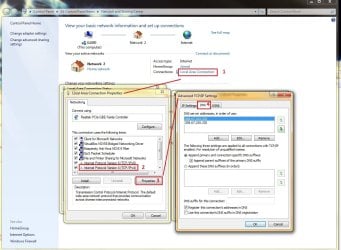
I see, understood it as a problem with UPS software only.

Is the DNS settings in connection properties - TCP/IPv4 - advanced - DNS set correctly? Perhaps defaults were changed or maybe a setting in your router is causing this? Do you have another PC to cross reference? Check the options other than the DNS IPs (mine are for OpenDNS).

DNS advanced settings.jpg
 

My Computer

Computer type
PC/Desktop
Computer Manufacturer/Model Number
Custom Build
OS
Windows 7 Ultimate x64 SP1
CPU
AMD Phenom 2 1090T
Motherboard
Gigabyte GA-890FXA-UD5
Memory
2x8GB Kingston HyperX Fury Black 1600Mhz Unganged
Graphics Card(s)
MSI GTX 970 Gaming 4G
Sound Card
Realtek On-Board HD 7.1 Audio / Logitech G35
Monitor(s) Displays
3xAcer GD245HQ
Screen Resolution
1920x1080
Hard Drives
Samsung 850 Pro 512GB SSD - OS /
WD Caviar Black SATA 3 - 1 TBx2 - Dynamic RAID 0 /
WD Caviar Green SATA 2 - 640GBx2 - Dynamic RAID 0 /
WD Caviar Green SATA 2 - 640GB - Internal Backup /
Seagate Barracude SATA 3 - 3TB - External Backup/ Sync
PSU
HighPower 1000W
Case
Cooler Master HAF 932
Cooling
Noctua NH-D14
Keyboard
Logitech G19
Mouse
Logitech G500
Internet Speed
100/4 Mbit Cable (100GB quota)
Antivirus
ZoneAlarm Extreme Security / MBAM Pro / MBAE Free / SAS Free
Browser
IE 11 - Firefox - Chrome
Other Info
Logitech F710/ G27/ G940/ Z5500 // TrackIR 5 // Nvidia 3D Surround Vision
Back
Top