Solved How to resolve new hardware red status signal?

ineuw

New member
Member
VIP
Local time
4:25 AM
Messages
152
Decided to go low end since I am not a gamer, and purchased a GIGABYTE GA-B250-HD3 MB with an Intel Pentium Processor G4560, and a Ballistix Sport LT 8GB Single DDR4 2400 (Gray). Assembled the system without any hardship since this is not my first hardware assembly. On the first try, the MB CPU status light flashed on once, and then nothing. Disconnected the drives, removed the DDR4 memory, tried it and the same thing happened again. Removed the CPU itself and the same thing happened again. The power supply is a 1 year old EVGA 500 watt unit, and is in good working condition. How can I test and determine the problem?
 

My Computer My Computer

At a glance

Microsoft Windows 10 Pro 64-bit8th generation Intel(R) Pentium G5600 3.9GHz16 GB DDR4 Kingston HyperXOn board Intel UHD Graphics 1GB shared
Computer type
PC/Desktop
Computer Manufacturer/Model Number
Custom built
OS
Microsoft Windows 10 Pro 64-bit
CPU
8th generation Intel(R) Pentium G5600 3.9GHz
Motherboard
ASRock B360 Pro 4 8th Generation
Memory
16 GB DDR4 Kingston HyperX
Graphics Card(s)
On board Intel UHD Graphics 1GB shared
Sound Card
On board Realtek HD ALC892
Monitor(s) Displays
LG 22 in LCD
Screen Resolution
1536 x 864 x 32 bits (4294967296 colors) @ 59 Hz
Hard Drives
(1) SanDisk SDSSDHII120G ATA Device
(2) ST1000DM003-1SB10C ATA Device
(3) ST500DM002-1BD142 ATA Device
PSU
Antec 650 Watt PSU
Case
Antec mid size tower
Cooling
120mm fan
Keyboard
Generic 105 keys
Mouse
Generic JeTech
Internet Speed
50 megabits
Antivirus
Avast and daily Malwarebytes scan
Browser
Cyberfox 52.9.1
This may sound stupidly obvious, and I don't mean it to be insulting, but did you remember to plug in the motherboard's CPU power connector (Also known as P4)?
 

My Computer My Computer

At a glance

Win 7 Pro x64/Win 10 Pro x64 dual bootAMD FX 8350 Vishera @ 420016 GB Mushkin Blackline DDR3-2400 @ 1866 (9-1...XFX Radeon R9 280 Double D Black Edition
Computer type
PC/Desktop
Computer Manufacturer/Model Number
Mellon Labs (custom build)
OS
Win 7 Pro x64/Win 10 Pro x64 dual boot
CPU
AMD FX 8350 Vishera @ 4200
Motherboard
ASUS M5A97 R2.0
Memory
16 GB Mushkin Blackline DDR3-2400 @ 1866 (9-10-10-10-31)
Graphics Card(s)
XFX Radeon R9 280 Double D Black Edition
Sound Card
Realtek HD Audio on MB. Sounds great.
Monitor(s) Displays
Acer 24", Acer 22"
Screen Resolution
3840 x 1080
Hard Drives
1 x Mushkin Chronos 120 GB SSD (Win 10)
1 x Samsung 850 EVO 250 GB SSD (Win 7)
1 x WD 1TB SATA Blue
1 x WD 1TB SATA Green
PSU
Corsair TX-750
Case
CoolerMaster HAF 912+
Cooling
Coolermaster Seidon 240M Liquid AIO. 6 case fans
Keyboard
Logitech G710+
Mouse
Logitech G500s
Internet Speed
Much better since I got fiber, but still way overpriced.
Antivirus
MSE, Malware Bytes for scanning
Browser
Firefox
Other Info
Corsair VOID USB headphones.

A Mellon Labs X-1 - LCD Smartie driven system status display.

Brought to you by the letter E
This may sound stupidly obvious, and I don't mean it to be insulting, but did you remember to plug in the motherboard's CPU power connector (Also known as P4)?

You are not insulting and there is no such a thing as a stupid question. After all, I didn't provide detailed info.

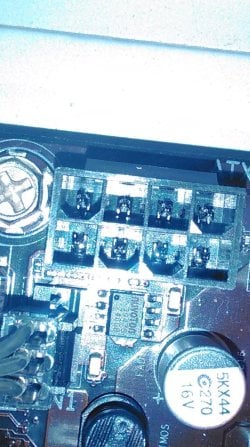
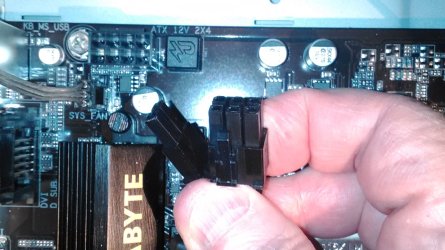
Yes, the 24 pin power supply and 6 pins of the PCIE 8 (6+2) power connection are both connected. But the two on the left, f the PCIE don't fit so I left it as is. Please see attached images. I assume that the PCIE powers the CPU. Without this connection, the status light would not work.

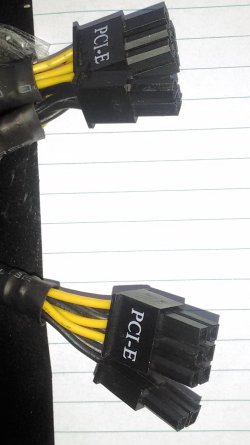
I am not sure what these two leftover connections from the PSU are. There are two sets of these connectors. They are identical, and I assume that 2nd is for a PCIE Express video card which would not apply to me. Nevertheless I am unclear about the two empty sockets on the left. The power supply is a 500 Watt EVGA, purchased two years ago, and I assume that the connectors are up to date.
 

Attachments

  • Motherboard female 8 sockets 6 on right OK.jpg
    Motherboard female 8 sockets 6 on right OK.jpg
    215.8 KB · Views: 0
  • Male power connector from the PSU 8 (6+2) .jpg
    Male power connector from the PSU 8 (6+2) .jpg
    251.7 KB · Views: 1

My Computer My Computer

At a glance

Microsoft Windows 10 Pro 64-bit8th generation Intel(R) Pentium G5600 3.9GHz16 GB DDR4 Kingston HyperXOn board Intel UHD Graphics 1GB shared
Computer type
PC/Desktop
Computer Manufacturer/Model Number
Custom built
OS
Microsoft Windows 10 Pro 64-bit
CPU
8th generation Intel(R) Pentium G5600 3.9GHz
Motherboard
ASRock B360 Pro 4 8th Generation
Memory
16 GB DDR4 Kingston HyperX
Graphics Card(s)
On board Intel UHD Graphics 1GB shared
Sound Card
On board Realtek HD ALC892
Monitor(s) Displays
LG 22 in LCD
Screen Resolution
1536 x 864 x 32 bits (4294967296 colors) @ 59 Hz
Hard Drives
(1) SanDisk SDSSDHII120G ATA Device
(2) ST1000DM003-1SB10C ATA Device
(3) ST500DM002-1BD142 ATA Device
PSU
Antec 650 Watt PSU
Case
Antec mid size tower
Cooling
120mm fan
Keyboard
Generic 105 keys
Mouse
Generic JeTech
Internet Speed
50 megabits
Antivirus
Avast and daily Malwarebytes scan
Browser
Cyberfox 52.9.1
When a LED lamp shows, it means that the corresponding device is not working. So you have to determine why the CPU is not working.
Well the answer appears to be in your photographs. The socket shown is not a pcie socket, it is an ATX 2x4 12V, and it supplies volts to the CPU. You can see the "ATX 12V 2X4" print on the edge of the motherboard next to the socket, confirming that youd found the right connection. Your holding the right connector in picture 2, you just have to gently get the 6+2 pin connector into the 8 pin header. The 6+2 pin will only go in one way because of the shape of the cavities. Insert the 6 pin in first before getting the orientation of the remaining 2 pin connector lined up.
The pcie connector would normally be found on the graphics card, where it connects directly to the power supply.
 

My Computer My Computer

At a glance

Windows 7 x64, Vista x64, 8.1 smartphoneIntel E8400 65W 64-bitDDR2 2 x 2GB, 1GB x 2XFX Radeon HD5750
Computer type
PC/Desktop
OS
Windows 7 x64, Vista x64, 8.1 smartphone
CPU
Intel E8400 65W 64-bit
Motherboard
Gigabyte EP45-UD3LR
Memory
DDR2 2 x 2GB, 1GB x 2
Graphics Card(s)
XFX Radeon HD5750
Sound Card
AMD High Definition Audio; Realtek High Definition Audio
Monitor(s) Displays
iiyama prolite X2377HDS
Screen Resolution
1920 x 1080
Hard Drives
500GB 7200 rpm Seagate ST3500413AS 16MB, 500GB 5400 rpm Toshiba MQ02ABF050H 32MB, 200GB 7200 rpm Seagate ST3200820AS 8MB, 2TB 7200 rpm Western Digital WD20EZRX 64MB
PSU
Enermax Liberty Modular
Case
Antec P193 Midi Tower
Keyboard
Mionix ZIBAL 60
Mouse
Razer USB 2.0 Diamondback Mouse or Huion Graphics Tablet
Browser
Internet Explorer, Lunascape, Firefox, Opera, Avast Safezone
The case power on switch is a pulse contact. if it remains on, it will turn the computer on then off.
 

My Computers My Computers

  • At a glance

    Windows 7 HP 64i5 6600K - 800MHz to 4200MHz4+4G GSkill DDR4 3000IG - Intel 530
    Computer type
    PC/Desktop
    Computer Manufacturer/Model Number
    custom build
    OS
    Windows 7 HP 64
    CPU
    i5 6600K - 800MHz to 4200MHz
    Motherboard
    GA-Z170-HD3P
    Memory
    4+4G GSkill DDR4 3000
    Graphics Card(s)
    IG - Intel 530
    Monitor(s) Displays
    Samsung 226BW
    Screen Resolution
    1680x1050
    Hard Drives
    (1) -1 SM951 – 128GB M.2 AHCI PCIe SSD drive for Windows 7 and Lubuntu
    (2) -1 WD SATA 3 - 1T for Data
    (3) -1 WD SATA 3 - 1T for backup
    PSU
    Thermaltake 450W TR2 gold
    Keyboard
    Old and good Chicony mechanical keyboard
    Mouse
    Logitech mX performance - 9 buttons (had to disable some)
    Internet Speed
    500Mb/s
    Browser
    Firefox 64
    Other Info
    TinyWall firewall
  • At a glance

    Windows 7 Proi7-4500U 800MHz to 3.0GHz(4+4)G DDR3 1600IG intel 4400 + NVIDIA GeForce GT 745M
    Computer type
    Laptop
    System Manufacturer/Model Number
    Asus Q550LF
    OS
    Windows 7 Pro
    CPU
    i7-4500U 800MHz to 3.0GHz
    Motherboard
    Asus Q550LF
    Memory
    (4+4)G DDR3 1600
    Graphics Card(s)
    IG intel 4400 + NVIDIA GeForce GT 745M
    Sound Card
    Realtek
    Monitor(s) Displays
    LG Display LP156WF4-SPH1
    Screen Resolution
    1920 x 1080
    Hard Drives
    BX500 120G SSD for Windows and programs +
    1T HDD for data
    Internet Speed
    500 Mb/s
    Browser
    Firefox
    Other Info
    TinyWall firewall
iko22, you are 100% right and thanks for taking the time to help, but the problem seems to be the male connector of the PSUy. If you look at the images closely, the +2 male connector is the opposite of the socket configuration of the mobo, while the +6 connector fits perfectly. Not knowing what and who was at fault. I wrote & sent the images to both the mobo and the PSU manufacturer, and left it to them to figure out what went wrong. In the meanwhile, I returned my purchases and starting all over by looking for a new up to date PSU.
 

My Computer My Computer

At a glance

Microsoft Windows 10 Pro 64-bit8th generation Intel(R) Pentium G5600 3.9GHz16 GB DDR4 Kingston HyperXOn board Intel UHD Graphics 1GB shared
Computer type
PC/Desktop
Computer Manufacturer/Model Number
Custom built
OS
Microsoft Windows 10 Pro 64-bit
CPU
8th generation Intel(R) Pentium G5600 3.9GHz
Motherboard
ASRock B360 Pro 4 8th Generation
Memory
16 GB DDR4 Kingston HyperX
Graphics Card(s)
On board Intel UHD Graphics 1GB shared
Sound Card
On board Realtek HD ALC892
Monitor(s) Displays
LG 22 in LCD
Screen Resolution
1536 x 864 x 32 bits (4294967296 colors) @ 59 Hz
Hard Drives
(1) SanDisk SDSSDHII120G ATA Device
(2) ST1000DM003-1SB10C ATA Device
(3) ST500DM002-1BD142 ATA Device
PSU
Antec 650 Watt PSU
Case
Antec mid size tower
Cooling
120mm fan
Keyboard
Generic 105 keys
Mouse
Generic JeTech
Internet Speed
50 megabits
Antivirus
Avast and daily Malwarebytes scan
Browser
Cyberfox 52.9.1
Please see the attached image of the PSU male connectors. As for the front panel swithch, I am aware how it makes and breaks contact.:D
 

Attachments

  • PCI-E connectors of the PSU.jpg
    PCI-E connectors of the PSU.jpg
    170.4 KB · Views: 0

My Computer My Computer

At a glance

Microsoft Windows 10 Pro 64-bit8th generation Intel(R) Pentium G5600 3.9GHz16 GB DDR4 Kingston HyperXOn board Intel UHD Graphics 1GB shared
Computer type
PC/Desktop
Computer Manufacturer/Model Number
Custom built
OS
Microsoft Windows 10 Pro 64-bit
CPU
8th generation Intel(R) Pentium G5600 3.9GHz
Motherboard
ASRock B360 Pro 4 8th Generation
Memory
16 GB DDR4 Kingston HyperX
Graphics Card(s)
On board Intel UHD Graphics 1GB shared
Sound Card
On board Realtek HD ALC892
Monitor(s) Displays
LG 22 in LCD
Screen Resolution
1536 x 864 x 32 bits (4294967296 colors) @ 59 Hz
Hard Drives
(1) SanDisk SDSSDHII120G ATA Device
(2) ST1000DM003-1SB10C ATA Device
(3) ST500DM002-1BD142 ATA Device
PSU
Antec 650 Watt PSU
Case
Antec mid size tower
Cooling
120mm fan
Keyboard
Generic 105 keys
Mouse
Generic JeTech
Internet Speed
50 megabits
Antivirus
Avast and daily Malwarebytes scan
Browser
Cyberfox 52.9.1
Just to summarize, I contacted EVGA and emailed them the images. It seems that they made a BIG mistake because the second connector should have been the correct one for the motherboard as stated on their tech. specs. I wonder how many customers noticed this. Irregardless, I replaced it with an Antec 650 watt ATX12V/EPS12V PSU.
 

My Computer My Computer

At a glance

Microsoft Windows 10 Pro 64-bit8th generation Intel(R) Pentium G5600 3.9GHz16 GB DDR4 Kingston HyperXOn board Intel UHD Graphics 1GB shared
Computer type
PC/Desktop
Computer Manufacturer/Model Number
Custom built
OS
Microsoft Windows 10 Pro 64-bit
CPU
8th generation Intel(R) Pentium G5600 3.9GHz
Motherboard
ASRock B360 Pro 4 8th Generation
Memory
16 GB DDR4 Kingston HyperX
Graphics Card(s)
On board Intel UHD Graphics 1GB shared
Sound Card
On board Realtek HD ALC892
Monitor(s) Displays
LG 22 in LCD
Screen Resolution
1536 x 864 x 32 bits (4294967296 colors) @ 59 Hz
Hard Drives
(1) SanDisk SDSSDHII120G ATA Device
(2) ST1000DM003-1SB10C ATA Device
(3) ST500DM002-1BD142 ATA Device
PSU
Antec 650 Watt PSU
Case
Antec mid size tower
Cooling
120mm fan
Keyboard
Generic 105 keys
Mouse
Generic JeTech
Internet Speed
50 megabits
Antivirus
Avast and daily Malwarebytes scan
Browser
Cyberfox 52.9.1
Back
Top