How to restore my DELL lappie to the factory image?

Today I contacted Dell Support and told them that I am unable to do the Dell Factory Image Restore. The Service Associate wanted me to remove the battery, the power adapter and keep pressing the power switch for 30 seconds, reconnect everything thereafter and try. That did not resolve the problem.

Then he has asked me to take it to the Service Center who will reinstall the OS. I told him that reinstalling the OS is not the issue. As a user I should be able to do the factory image restore whenever I want to and that capability should be ensured. He said the service center should be able to do it.

So there it rests.:) ( Good thing that I have the complete day 1 hard disk backup by Paragon)
 

My Computer My Computer

At a glance

Windows 7 Home Premium 32 bit
OS
Windows 7 Home Premium 32 bit
Update:

On and off I was trying to experiment with my Dell laptop/netbook. I downloaded Dell DataSafe Local Backup.

In the first step it pronounced " Congratulations - Passed - your computer has passed. Go to Easy Step 2 and download the software" :)

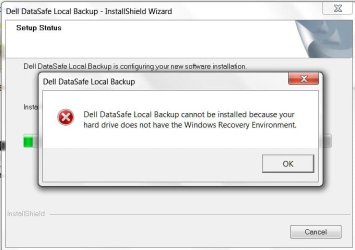
But during the install process, it threw out a message "no Windows Recovery Environment" and retracted. :(

01nowinre.jpg

A day or two later, I downloaded the Dell Support Center Software and installed it. It is a skinned, customised OEM version of PC Doctor for Windows PC-Doctor, Inc. - Computer Hardware Diagnostic Software .

PCDoctor.jpg

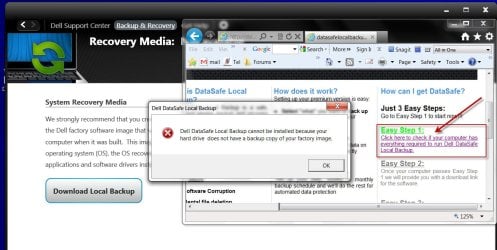
Playing around with it I found a tab in it' goading me to download Dell DataSafe Local Backup. Now no congratulations. In the very first step itself it proclaimed
"No Factory Image found" and did not allow me to download.

02nobupimage.jpg

All this when there is a 15GB recovery partition and a 1GB winre.wim image. Beyond my comprehension. :geek:

Following my call to Dell Technical Support, another Dell Tech. Support executive from DELL India Headquarters called me two or three days back, took my address and has now sent me a Windows 7 Home Premium 64 bit Reinstallation DVD. He couldn't say why the recovery partition has gone dumb.

Problem remains unresolved.:)
 

My Computer My Computer

At a glance

Windows 7 Home Premium 32 bit
OS
Windows 7 Home Premium 32 bit
Just curious: have you at any time re-sized or moved partitions on that machine, or restored a disk image?

I'm wondering because I seem to recall reading about recovery partitions being 'keyed' to a particular location on the drive (in front of OS or behind).
 

My Computer My Computer

At a glance

Windows 7 64 Bit Home Premium SP1i7-3820GSkill F3-14900CL9Q - 16GBEVGA GeForce GTX660 - Driver 352.86
Computer type
PC/Desktop
Computer Manufacturer/Model Number
Home Built - Jan 2013
OS
Windows 7 64 Bit Home Premium SP1
CPU
i7-3820
Motherboard
Asus P9X79-PRO - Bios 4608
Memory
GSkill F3-14900CL9Q - 16GB
Graphics Card(s)
EVGA GeForce GTX660 - Driver 352.86
Sound Card
On board Realtek ALC898
Monitor(s) Displays
Acer S271HL
Screen Resolution
1920 x 1080
Hard Drives
#1- Samsung 840 Pro Series
#2- Western Digital WD1002FAEX Sata3 Black
#3- Western Digital WD1002FAEX Sata3 Black
PSU
Corsair CMPSU-850TX-V2 - 850 watt (by Seasonic)
Case
Corsair Obsidian 550D
Cooling
Standard 3 120mm case fans, Cooler Master Hyper 212 EVO
Keyboard
MS KC-0405
Mouse
Intellimouse 5-button
Internet Speed
56 Mbits/Sec (on a good day)
Antivirus
Avast & Malwarebytes
Browser
Firefox
Other Info
Asus DVD - DRW-24B1ST 24X
Nope TVeblen. (same question asked by Tech Support :D)

As I had mentioned in a previous post, I have the day 1 image of the complete HDD immediately after first switch on and the initial Windows setup, taken with Paragon. I had restored my lappie to that day 1 image and tried F8 restore. That precludes any possibility of any thing getting corrupted/ modified by later usage in anyway.
 

My Computer My Computer

At a glance

Windows 7 Home Premium 32 bit
OS
Windows 7 Home Premium 32 bit
Have you thought any more about following the steps outlined in the link I gave in post #16?
 

My Computer My Computer

At a glance

Windows 7 Home Premium 64 BitIntel(R) Core(TM)2 Quad CPU Q9550 @ 2.83GHz6.00 GB Hundai HMT125U6BFR8C-H9ATI Radeon HD 4850
Computer Manufacturer/Model Number
HP Pavilion e9110t
OS
Windows 7 Home Premium 64 Bit
CPU
Intel(R) Core(TM)2 Quad CPU Q9550 @ 2.83GHz
Motherboard
Pegatron IPIEL-LA3
Memory
6.00 GB Hundai HMT125U6BFR8C-H9
Graphics Card(s)
ATI Radeon HD 4850
Sound Card
Realtek High Definition Audio/ATI High Definition Audio
Monitor(s) Displays
Acer AL2216W
Screen Resolution
1680x1050
Hard Drives
Hitachi HDP725050GLA360 ATA Device 500 GB
PSU
Unknown/installed by HP
Case
HP generic case
Cooling
Intel Stock Cooling
Keyboard
HP Keyboard
Mouse
HP Mouse
Internet Speed
Download: 19.15 Mbps Upload: 1.67 Mbps
Other Info
Network Adapter Realtek RTL8168D/8111D Family PCI-E Gigabit Ethernet NIC (NDIS 6.20)
Network Adapter 802.11n Wireless PCI Express Card LAN Adapter
^ I am still reading and rereading the reference you had given and try to make sense out of it :).

My own thinking in this case is Dell has somehow goofed and the system came with a non-working Factory Image Restore. This is actually a dual-boot system with Ubuntu light on it. It is the first system to come with the experimental Ubuntu light released only to OEMs by Canonical. While incorporating the additional partition, Dell could have somehow missed to modify the BCD to take this into account.

Well, I see another thread here http://www.sevenforums.com/general-...not-accessible-after-resizing-partitions.html trying to sort out a resized partition issue. My system may have a similar issue. Dell resized the OS partition to accomodate Ubuntu light but did nothing else and so the Factory Restore does not work.

This is only my guess and I am not definitely going 24X7 researching into this or try to make a recovery CD with the .wim image with uncertain end results.

I am now veering towards a complete reinstall doing away with the Dell Utility Partition and the useless 15GB Recovery partiton - if and when the need arises. May be I have to do away with the 5GB Ubuntu light also. (Ubuntu Light is available for download in Dell support site for Dell systems)
 

My Computer My Computer

At a glance

Windows 7 Home Premium 32 bit
OS
Windows 7 Home Premium 32 bit
^ I am still reading and rereading the reference you had given and try to make sense out of it :).

My own thinking in this case is Dell has somehow goofed and the system came with a non-working Factory Image Restore. This is actually a dual-boot system with Ubuntu light on it. It is the first system to come with the experimental Ubuntu light released only to OEMs by Canonical. While incorporating the additional partition, Dell could have somehow missed to modify the BCD to take this into account.

Well, I see another thread here http://www.sevenforums.com/general-...not-accessible-after-resizing-partitions.html trying to sort out a resized partition issue. My system may have a similar issue. Dell resized the OS partition to accomodate Ubuntu light but did nothing else and so the Factory Restore does not work.

This is only my guess and I am not definitely going 24X7 researching into this or try to make a recovery CD with the .wim image with uncertain end results.

I am now veering towards a complete reinstall doing away with the Dell Utility Partition and the useless 15GB Recovery partiton - if and when the need arises. May be I have to do away with the 5GB Ubuntu light also. (Ubuntu Light is available for download in Dell support site for Dell systems)

Definitely feasible that Dell had everything set for recovery, then installed Ubuntu Light, and as a result, that recovery partition was no longer where the system needed it in order to activate the recovery image.

You have a method to make your own backup/recovery image of the system, so a clean install wiping out all partitions followed by setting up Ubuntu Light yourself is also a viable option. Considering everything you have done to this point, this sounds like a good plan to me. :)
 

My Computer My Computer

At a glance

Windows 7 Home Premium 64 BitIntel(R) Core(TM)2 Quad CPU Q9550 @ 2.83GHz6.00 GB Hundai HMT125U6BFR8C-H9ATI Radeon HD 4850
Computer Manufacturer/Model Number
HP Pavilion e9110t
OS
Windows 7 Home Premium 64 Bit
CPU
Intel(R) Core(TM)2 Quad CPU Q9550 @ 2.83GHz
Motherboard
Pegatron IPIEL-LA3
Memory
6.00 GB Hundai HMT125U6BFR8C-H9
Graphics Card(s)
ATI Radeon HD 4850
Sound Card
Realtek High Definition Audio/ATI High Definition Audio
Monitor(s) Displays
Acer AL2216W
Screen Resolution
1680x1050
Hard Drives
Hitachi HDP725050GLA360 ATA Device 500 GB
PSU
Unknown/installed by HP
Case
HP generic case
Cooling
Intel Stock Cooling
Keyboard
HP Keyboard
Mouse
HP Mouse
Internet Speed
Download: 19.15 Mbps Upload: 1.67 Mbps
Other Info
Network Adapter Realtek RTL8168D/8111D Family PCI-E Gigabit Ethernet NIC (NDIS 6.20)
Network Adapter 802.11n Wireless PCI Express Card LAN Adapter
I like your theory. I doubt anyone at Dell thought about making a special Recovery Partition file for systems with Ubuntu Lt. Good one!

You can get the full version of Ubuntu 11.10 free. You could just set up a dual boot and run the full beast!
 

My Computer My Computer

At a glance

Windows 7 64 Bit Home Premium SP1i7-3820GSkill F3-14900CL9Q - 16GBEVGA GeForce GTX660 - Driver 352.86
Computer type
PC/Desktop
Computer Manufacturer/Model Number
Home Built - Jan 2013
OS
Windows 7 64 Bit Home Premium SP1
CPU
i7-3820
Motherboard
Asus P9X79-PRO - Bios 4608
Memory
GSkill F3-14900CL9Q - 16GB
Graphics Card(s)
EVGA GeForce GTX660 - Driver 352.86
Sound Card
On board Realtek ALC898
Monitor(s) Displays
Acer S271HL
Screen Resolution
1920 x 1080
Hard Drives
#1- Samsung 840 Pro Series
#2- Western Digital WD1002FAEX Sata3 Black
#3- Western Digital WD1002FAEX Sata3 Black
PSU
Corsair CMPSU-850TX-V2 - 850 watt (by Seasonic)
Case
Corsair Obsidian 550D
Cooling
Standard 3 120mm case fans, Cooler Master Hyper 212 EVO
Keyboard
MS KC-0405
Mouse
Intellimouse 5-button
Internet Speed
56 Mbits/Sec (on a good day)
Antivirus
Avast & Malwarebytes
Browser
Firefox
Other Info
Asus DVD - DRW-24B1ST 24X
Yep, for a long time now, I have been thinking of dipping into Linux. It is no longer considered as a "Geek Stuff" and that suits me. :)
 

My Computer My Computer

At a glance

Windows 7 Home Premium 32 bit
OS
Windows 7 Home Premium 32 bit
Back
Top