
Am I able to go back to the factory image?

FattysGoneWild

New member
Local time
11:37 AM
Messages
7
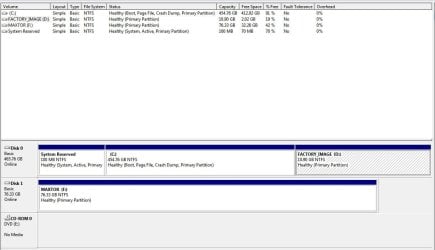
I went ahead and done a clean install of WIN7. I left the factory image in place. I also have the recovery discs from HP. I was just curious about it. I attached a picture and as you see with D. If I marked that as an active partition. Would it go through and recover? Not sure if it would since the MBR has been erased and replaced? Even though I have the recovery discs. I probably could have just deleted it. But decided just to leave it. The PC in question is a Compaq/HP CQ5210F. Also. When it boots. It says I can hit F11 for a recovery. But. I imagine that will not work any more since the fresh install of WIN7.
 

Attachments
  • Capture.JPG
    Capture.JPG
    73.6 KB · Views: 91

My Computer My Computer

At a glance

Windows 7 Home Premium 64 bitPNY 9800GT EE
Computer Manufacturer/Model Number
Compaq CQ5210F
OS
Windows 7 Home Premium 64 bit
Graphics Card(s)
PNY 9800GT EE
Monitor(s) Displays
HP 2009M
PSU
Antec EarthWatts 430w
Internet Speed
25mb/3mb
I went ahead and done a clean install of WIN7. I left the factory image in place. I also have the recovery discs from HP. I was just curious about it. I attached a picture and as you see with D. If I marked that as an active partition. Would it go through and recover? Not sure if it would since the MBR has been erased and replaced? Even though I have the recovery discs. I probably could have just deleted it. But decided just to leave it. The PC in question is a Compaq/HP CQ5210F. Also. When it boots. It says I can hit F11 for a recovery. But. I imagine that will not work any more since the fresh install of WIN7.

It's been a while since I've dug this deep into HP machines for something like this but from what I remember, as long as you have the small partition at the beginning of the drive [before C: ] and the FACTORY_IMAGE you can hit F11 and have fun. Beyond that, I have no clue what would happen if you marked the FACTORY_IMAGE as active. If I can remember right, FACTORY_IMAGE just contains what WOULD be on the computer if you restored it, not the actual restore software itself [where the micro partition comes into play]

Again it's been a while and my ADD was pretty bad when I was being told about how all of that worked. For all I know, there could be bacon involved.
 

My Computer My Computer

At a glance

Windows 7 Ultimate 64-bitAMD Phenom II X6 1090T 3.2GHZG.SKILL RipJaw 3x2GB DDR3-10662x HIS Radeon HD 6850 1 GB
OS
Windows 7 Ultimate 64-bit
CPU
AMD Phenom II X6 1090T 3.2GHZ
Motherboard
MSI 890FXA-GD70
Memory
G.SKILL RipJaw 3x2GB DDR3-1066
Graphics Card(s)
2x HIS Radeon HD 6850 1 GB
Sound Card
VIA 8-channel
Monitor(s) Displays
2x 20 inch Acer LCDs, 1x 32" Sony LCD TV
Screen Resolution
4480x900
Hard Drives
1x Crucial 64GB SSD
3x 1TB HDDs (WD, Seagate, Hitatchi)
1x 500GB Seagate External
PSU
Kingwin 1000W Modular
Case
Coolermaster HAF 932
Cooling
1x 120mm, 3x 200mm, CoolerMaster Hyper 212+
Keyboard
Microsoft Wireless Keyboard 1000
Mouse
Microsoft Wiresless Mouse 5000
Internet Speed
20mbps
Other Info
Samsung BD-ROM/DVD-RW
1) Always backup your data.

2) You can Reinstall with your HP Recovery DVD's.

3) F11 recovery method, would be hit & miss.
 

My Computer My Computer

At a glance

ME/XP/Vista/Win7
OS
ME/XP/Vista/Win7
Since you have the disks, you can delete that partition by wiping the HD for cleanest possible install: http://www.sevenforums.com/tutorials/52129-disk-clean-clean-all-diskpart-command.html

I'd do a booted clean reinstall using Win 7 installer for your version to avoid the bloatware built into the Recov disks - just save them for legacy in case you ever want to sell or return to factory condition.

You can actually extract any apps you want to keep from your Recov disks using this method: http://www.sevenforums.com/installa...are-after-clean-win-7-install.html#post488270
 
Last edited:
Your active partition is the small 100MB partition because that's where your MBR resides. You cannot set any of the other partitions as "active" - that would make it impossible to boot your system.
Restoring from the recovery partition is done via F11. Here is the HP link for more details.
 

My Computer My Computer

At a glance

Vista, Windows7, Mint Mate, Zorin, Windows 8from 1.6GHz Duo to i7
Computer Manufacturer/Model Number
HP, Dell, Gateway, Toshiba - 4 laptops and 2 desktops
OS
Vista, Windows7, Mint Mate, Zorin, Windows 8
CPU
from 1.6GHz Duo to i7
Monitor(s) Displays
2x HP w2207
Hard Drives
5x HDD, 7x SSD, 12x Externals
Keyboard
with trackball - no mices
Mouse
Trackball mice
Internet Speed
DSL 6000
Your active partition is the small 100MB partition because that's where your MBR resides. You cannot set any of the other partitions as "active" - that would make it impossible to boot your system.
Restoring from the recovery partition is done via F11. Here is the HP link for more details.

I knew I wasn't making EVERYTHING up.
 

My Computer My Computer

At a glance

Windows 7 Ultimate 64-bitAMD Phenom II X6 1090T 3.2GHZG.SKILL RipJaw 3x2GB DDR3-10662x HIS Radeon HD 6850 1 GB
OS
Windows 7 Ultimate 64-bit
CPU
AMD Phenom II X6 1090T 3.2GHZ
Motherboard
MSI 890FXA-GD70
Memory
G.SKILL RipJaw 3x2GB DDR3-1066
Graphics Card(s)
2x HIS Radeon HD 6850 1 GB
Sound Card
VIA 8-channel
Monitor(s) Displays
2x 20 inch Acer LCDs, 1x 32" Sony LCD TV
Screen Resolution
4480x900
Hard Drives
1x Crucial 64GB SSD
3x 1TB HDDs (WD, Seagate, Hitatchi)
1x 500GB Seagate External
PSU
Kingwin 1000W Modular
Case
Coolermaster HAF 932
Cooling
1x 120mm, 3x 200mm, CoolerMaster Hyper 212+
Keyboard
Microsoft Wireless Keyboard 1000
Mouse
Microsoft Wiresless Mouse 5000
Internet Speed
20mbps
Other Info
Samsung BD-ROM/DVD-RW
Thanks every one.
 

My Computer My Computer

At a glance

Windows 7 Home Premium 64 bitPNY 9800GT EE
Computer Manufacturer/Model Number
Compaq CQ5210F
OS
Windows 7 Home Premium 64 bit
Graphics Card(s)
PNY 9800GT EE
Monitor(s) Displays
HP 2009M
PSU
Antec EarthWatts 430w
Internet Speed
25mb/3mb
Back
Top