- Local time
- 11:42 PM
- Messages
- 759
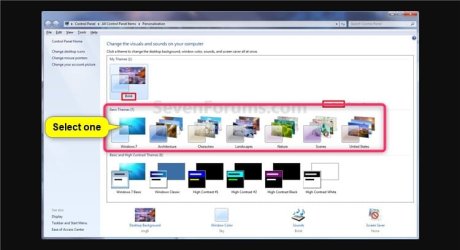
HI, i changed the theme, the dark with yellow letters found in the windows 7 and customize some items without knowing that it would affect.
But anyhow, the background changes to unwanted dark colour and the entire browsing becomes difficult afterwards.
Hence, i tried others as well , but i do not like it.
what i thought is just increasing the size of font, but it changes the other thing as well.
how to restore the theme to its default
Is there any tutorial here or please give me a fix , on how to restore everthing back to the original default themes
But anyhow, the background changes to unwanted dark colour and the entire browsing becomes difficult afterwards.
Hence, i tried others as well , but i do not like it.
what i thought is just increasing the size of font, but it changes the other thing as well.
how to restore the theme to its default
Is there any tutorial here or please give me a fix , on how to restore everthing back to the original default themes
My Computer
At a glance
Microsoft Windows 7 Ultimate 64-bit 7601 Mult...Intel(R) Core(TM)2 Duo CPU E7200 @ 2.53GHz4.00 GBNVIDIA GeForce 210
- Computer type
- PC/Desktop
- Computer Manufacturer/Model Number
- custom build
- OS
- Microsoft Windows 7 Ultimate 64-bit 7601 Multiprocessor Free Service Pack 1
- CPU
- Intel(R) Core(TM)2 Duo CPU E7200 @ 2.53GHz
- Motherboard
- To be filled by O.E.M. To be filled by O.E.M.
- Memory
- 4.00 GB
- Graphics Card(s)
- NVIDIA GeForce 210
- Sound Card
- (1) NVIDIA High Definition Audio (2) Realtek High Definiti
- Screen Resolution
- 1920 x 1080 x 32 bits (4294967296 colors) @ 60 Hz
- Hard Drives
- ST3500312CS ATA Device