How to retrieve an overwritten image

jiuulop

New member
Local time
3:33 AM
Messages
5
Hello,
I have been searching online for ways to get myself of a bad situation and I found this forum. I would like to know if there is any way for me to undo and image overwrite. Here is my situation (4 questions):
I did an image backup of my laptop which is win7. Then I immediately followed with an image backup of my desktop which is vista. Both on ext hard drive.
The next day I found myself needing the image of my laptop. But when I tried to restore my win7 laptop I got messages saying that I couldn’t restore without vista install cd’s. This leads me to believe my win7 laptop image was overwritten by the more recent vista image; also there is only one image backup file on the hdd even though I backed up two cpu’s.
Another tidbit is that my laptop and desktop have the same name (laptop=eagle and desktop=Eagle).
1. CAN I EVER RECOVER THIS OLD IMAGE? I haven’t used the ext hdd since the incident occurred.
2. I know windows tells of overwriting If space is compromised, but I have way more than enough space on the ext hdd. Why overwrite when there is 200gb of space available?
3. For future reference, would you recommend keeping two images on the same ext hdd?
4. Also, what is the best way to save multiple incremental images on the same ext hdd
win7 ultimate 64bit sp1

Thanks
 

My Computer My Computer

Computer type
PC/Desktop
OS
win
Hi ihsan125 and Welcome to Seven Forums.

1. I suspect you are correct and that the image has been overwritten. Unfortunately I can't see a way you can get the old image back.
2. It is probably because it uses the same folder name each time. WindowsImageBackup.
3. Not with Windows Backup. You could do it with a third party solution as they generally allow you to chose where the image is located in a separate folder.
4. Again a third party solution. Macrium Reflect is the solution of choice for many on this forum. Unfortunately the free version does not do incremental backups. I think Easus ToDo does. EaseUS Todo Backup Free - The First Fully-functional Free Backup Software for Home and Business Users
 

My Computer My Computer

Computer type
Laptop
Computer Manufacturer/Model Number
Hewlett-Packard/G62-107SA Notebook
OS
Microsoft Windows 7 Home Premium 64-bit Service Pack 1
CPU
Intel(R) Core(TM) i3 CPU M 330 @ 2.13GHz
Motherboard
Hewlett-Packard 1425
Memory
8 GB DDR3
Graphics Card(s)
Intel(R) HD Graphics
Sound Card
Realtek High Definition Audio
Monitor(s) Displays
Builtin
Screen Resolution
1366 x 768 x 32 bits (4294967296 colors) @ 60 Hz
Hard Drives
250 GB SATA Hard Disk Drive 7200 rpm
2TB Seagate GoFlex USB 2 Drive
1TB Iomega Prestige USB 2 Drive
1.5TB Iomega Prestige USB 2 Drive (Samsung)
2TB WD MyBook Live NAS.
Mouse
Logitech Anywhere MX
Internet Speed
152 Mbs download 10 Mbs upload
Antivirus
Norton 360
Browser
Chrome
not sure if this makes a difference but i checked the ext hdd and the only image is labeled "eagle" with a lowercase "e". IT IS THE ONE I NEED. Now i really dont understand why I cant restore.

in regards to multiple images could i just:
use another ext hdd and make a folder named "july5 image" then copy the image to that folder and reapeat for future dates.

not sure if this would mess up a restore.
 

My Computer My Computer

Computer type
PC/Desktop
OS
win
in regards to multiple images could i just:
use another ext hdd and make a folder named "july5 image" then copy the image to that folder and reapeat for future dates.

not sure if this would mess up a restore.
I do that all the time. Not one time has it messed up restoring from an image.

I keep 3 recent images just in case.

One visible and the other ones in there own folder.

I leave the most recent image visible(WindowsImageBackup)in case I need to restore from it.
Images.jpg
 
Last edited:

My Computer My Computer

Computer type
PC/Desktop
Computer Manufacturer/Model Number
Dell Inspiron 530
OS
Windows 7 Professional SP1 64-bit
CPU
Intel Core 2 Duo Processor E8300 @ 2.83GHz
Motherboard
Dell Inc. 0RY007 (Socket 775)
Memory
4.00 GB Dual-Channel DDR2 @ 332MHz (5-5-5-15)
Graphics Card(s)
Intel(R) G33/G31 Express Chipset Family
Sound Card
Integrated 7.1 Channel Audio
Monitor(s) Displays
Acer G245HQL 23.6" LED(1920x1080@60Hz)
Screen Resolution
1920 x 1080
Hard Drives
Disk 0 HITACHI 1TB OS Installed - Disk 1 HITACHI 1TB For Backups
Keyboard
Dell USB Keyboard
Mouse
Dell Optical USB Mouse
Internet Speed
DSL 10 meg
Antivirus
Symantec(SEP)
Browser
Pale Moon
im gonna have to give that a try once i exhaust all options on getting this old image back. im still not 100% sold on it being gone.

here is where i am now:

i just tried again to connect my ext hdd to my laptop and restore the image that i cant get.

i got the same message: cant be restored in this environment. to restore: use repair disk (gives me the choices of mentions xp/vista but not win7), boot from disk, try restore again.

even tho it didnt mention win7, what do u think about me trying to follow these above directions with the win7 disk.

im gonna do my current image on a seperate ext hdd then try this boot from cd process so that i dont make my situation worse and loose everything.

the reason im not sold is:
the only backup on the ext hdd is "eagle" the one i need.
just before i tried to make anothe image today, windows b&r says most recent backup is one dated right around the time for the image im trying to recover.
 

My Computer My Computer

Computer type
PC/Desktop
OS
win
I agree with kado897, that the image has been overwritten.

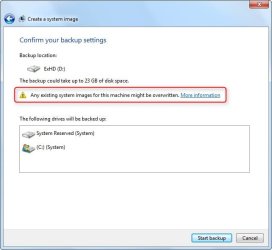
I just clicked on Create a system image and got this
System Image.jpg

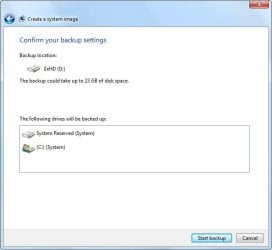
Then I moved my image into a different named folder and got this
System Image-2.jpg
 

My Computer My Computer

Computer type
PC/Desktop
Computer Manufacturer/Model Number
Dell Inspiron 530
OS
Windows 7 Professional SP1 64-bit
CPU
Intel Core 2 Duo Processor E8300 @ 2.83GHz
Motherboard
Dell Inc. 0RY007 (Socket 775)
Memory
4.00 GB Dual-Channel DDR2 @ 332MHz (5-5-5-15)
Graphics Card(s)
Intel(R) G33/G31 Express Chipset Family
Sound Card
Integrated 7.1 Channel Audio
Monitor(s) Displays
Acer G245HQL 23.6" LED(1920x1080@60Hz)
Screen Resolution
1920 x 1080
Hard Drives
Disk 0 HITACHI 1TB OS Installed - Disk 1 HITACHI 1TB For Backups
Keyboard
Dell USB Keyboard
Mouse
Dell Optical USB Mouse
Internet Speed
DSL 10 meg
Antivirus
Symantec(SEP)
Browser
Pale Moon
Windows 7 is capable of storing more than one image in the WindowsImageBackup folder. I guess the trouble here is because the other image backup is form a vista PC and not another Windows 7...

When you try to restore the image try not using the default option of restoring the most recent backup, instead choose another image backup.

I don't remember the options correctly when you boot from the Windows 7 DVD and choose Restore an Image Backup but I'm sure there are options to bypass the default which is to restore the most recent ( In your case the vista image backup).
 

My Computer My Computer

OS
Windows 7 64 bit Ultimate
The image will not be called eagle unless you have renamed it from WindowsImageBackup. If your PC is called eagle then this folder may be a Windows File and Folder backup. You can rename an image (not move it) but you must rename it back to WindowsImageBackup and be in the root of the drive before Restore will recognize it.
 

My Computer My Computer

Computer type
Laptop
Computer Manufacturer/Model Number
Hewlett-Packard/G62-107SA Notebook
OS
Microsoft Windows 7 Home Premium 64-bit Service Pack 1
CPU
Intel(R) Core(TM) i3 CPU M 330 @ 2.13GHz
Motherboard
Hewlett-Packard 1425
Memory
8 GB DDR3
Graphics Card(s)
Intel(R) HD Graphics
Sound Card
Realtek High Definition Audio
Monitor(s) Displays
Builtin
Screen Resolution
1366 x 768 x 32 bits (4294967296 colors) @ 60 Hz
Hard Drives
250 GB SATA Hard Disk Drive 7200 rpm
2TB Seagate GoFlex USB 2 Drive
1TB Iomega Prestige USB 2 Drive
1.5TB Iomega Prestige USB 2 Drive (Samsung)
2TB WD MyBook Live NAS.
Mouse
Logitech Anywhere MX
Internet Speed
152 Mbs download 10 Mbs upload
Antivirus
Norton 360
Browser
Chrome
Thanks everyone 4 the replies. I tried again with the win7 repair disk and it flopped. I got the same “cant retore in this environment” message.
From your replies Im getting the following:
OVERALL: Im fu----ed on getting that image back
Kado: I should consider an alternative backup software
Flatiron: I know what to do next time
Is it fair to say that I have exhausted all my options.
 

My Computer My Computer

Computer type
PC/Desktop
OS
win
I think so ihsan. Shame really because not many people think to make backups at all.

A warning about Flatirons reply. We have had cases where moving the image to another folder has caused problems, even if the image is moved back into the root before restore. Renaming the image seems problem free if you remember to rename it back before the restore and chose the single copy option in space management. Windows imaging can be tricky if you mess with it, which is why many prefer a third party solution.
 

My Computer My Computer

Computer type
Laptop
Computer Manufacturer/Model Number
Hewlett-Packard/G62-107SA Notebook
OS
Microsoft Windows 7 Home Premium 64-bit Service Pack 1
CPU
Intel(R) Core(TM) i3 CPU M 330 @ 2.13GHz
Motherboard
Hewlett-Packard 1425
Memory
8 GB DDR3
Graphics Card(s)
Intel(R) HD Graphics
Sound Card
Realtek High Definition Audio
Monitor(s) Displays
Builtin
Screen Resolution
1366 x 768 x 32 bits (4294967296 colors) @ 60 Hz
Hard Drives
250 GB SATA Hard Disk Drive 7200 rpm
2TB Seagate GoFlex USB 2 Drive
1TB Iomega Prestige USB 2 Drive
1.5TB Iomega Prestige USB 2 Drive (Samsung)
2TB WD MyBook Live NAS.
Mouse
Logitech Anywhere MX
Internet Speed
152 Mbs download 10 Mbs upload
Antivirus
Norton 360
Browser
Chrome
1. Why don't you mount the image you have and look what it is.

2. I wonder what you used to image Vista since the imaging facility a la Win7 does not exist.

3. You can put as many different images on a single HDD as long as you create seperate folders for the images. Unfortunately that is not possible with the native Win7 imaging which always images to the root.

4. The native Windows 7 imaging is completely useless. As recommended you should use free Macrium which is miles superior. Here is a tutorial to get you started: http://www.sevenforums.com/tutorials/73828-imaging-free-macrium.html?ltr=I

5. I would forget about incremental images. They are difficult to manage and you run a high risk of losing the whole image if you lose one increment in the chain. Full images are the preferred solution.
 

My Computer My Computer

Computer Manufacturer/Model Number
HP, Dell, Gateway, Toshiba - 4 laptops and 2 desktops
OS
Vista, Windows7, Mint Mate, Zorin, Windows 8
CPU
from 1.6GHz Duo to i7
Monitor(s) Displays
2x HP w2207
Hard Drives
5x HDD, 7x SSD, 12x Externals
Keyboard
with trackball - no mices
Mouse
Trackball mice
Internet Speed
DSL 6000
thanks guys. kado point taken

whs= i meant multiple full images not bits and pieces. i will be comparing acronis and macrium soon.
 

My Computer My Computer

Computer type
PC/Desktop
OS
win
Back
Top