How to return drive MBRs and FATs to their pre-Windows-7 states

leejosepho

New member
Member
Local time
6:46 AM
Messages
50
Location
200 miles south of Little Rock
I have two SATA hard drives that are confused about themselves and are causing confusion in my multi-boot system. One of them somehow convinces my BIOS it is the third drive (hd2) in my system even though it is now connected fourth (hd3), and the other variously shows up either as fourth (hd3) or fifth (hd4) even though it is actually (physically) connected as my third (hd2) drive. All of this began a few months ago following a regular Windows 7 update, and absolutely nothing I have tried so far has been successful in undoing whatever Windows 7 had done.

I can live with SATA #2 somehow convincing my BIOS it is actually SATA #1, but I need my SATA #1 to stop showing us as two different drives. Two examples:

In KillDisk, my physical SATA #1 still shows us as two different drives even after having been ZEROed, and now here is how its first two partitions are being accessed for their separate installations of XP (via boot.ini):

multi(0)disk(0)rdisk(4)partition(1)\WINDOWS="Windows XP Pro1"
multi(0)disk(0)rdisk(3)partition(2)\WINDOWS="Windows XP Pro2"

note: Both of the above installations are on the same hard drive that would actually be known as 'rdisk(2)' if I could get my actual #4 to stop somehow convincing my BIOS it is #2.

Question: Does anyone here know how to manually edit sectors so my #3 will again have only one FAT?

note: Its first FAT actually could be coming from the other SATA and I have not tried either drive in KillDisk without the other also being connected at the same time. So, maybe the challenge here is to fix the #3 drive that is somehow showing itself as #2. The two drives appear as physically connected prior to the actual start of an OS, but then #3 pushes itself in as #2 and leaves the real #2 with no option other than to be #3 or even #4 while an OS is actually running.
 
Last edited:

My Computer My Computer

At a glance

Win7 Ultimate x64
OS
Win7 Ultimate x64
Update: I might be getting closer, but I still need help here if anyone knows what to actually do! Somehow my pair of SATAs still shows up in KillDisk as a total of three (3) drives, and none of my drive utilities can identify/remove whatever is causing that. Then also, gParted in one of my Puppy installations cannot detect anything on one of my PATAs unless its first partition is active...and Acronis "Home Director" is somehow seeing that entire drive as a single-partition "Super Floppy". There must be a utility somewhere that can return those drives to their original states.
 

My Computer My Computer

At a glance

Win7 Ultimate x64
OS
Win7 Ultimate x64
Please forgive my ignorance. I have hard time understanding how an OS has the capability to alter BIOS settings. Any reading material about this? Also why should it matter regarding BIOS, how the disks are formatted? Is it a feature of UEFI or something?

I would remove all drives, clear CMOS and add the drives 1 by 1 to the appropriate SATA ports in order.

Deal with the OS issues after you sort BIOS.

Again sorry if I have been ignorant, and you have already tried what I suggest.
 

My Computer My Computer

At a glance

Windows 7 Ultimate x64 SP1AMD Phenom 2 1090T2x8GB Kingston HyperX Fury Black 1600Mhz Unga...MSI GTX 970 Gaming 4G
Computer type
PC/Desktop
Computer Manufacturer/Model Number
Custom Build
OS
Windows 7 Ultimate x64 SP1
CPU
AMD Phenom 2 1090T
Motherboard
Gigabyte GA-890FXA-UD5
Memory
2x8GB Kingston HyperX Fury Black 1600Mhz Unganged
Graphics Card(s)
MSI GTX 970 Gaming 4G
Sound Card
Realtek On-Board HD 7.1 Audio / Logitech G35
Monitor(s) Displays
3xAcer GD245HQ
Screen Resolution
1920x1080
Hard Drives
Samsung 850 Pro 512GB SSD - OS /
WD Caviar Black SATA 3 - 1 TBx2 - Dynamic RAID 0 /
WD Caviar Green SATA 2 - 640GBx2 - Dynamic RAID 0 /
WD Caviar Green SATA 2 - 640GB - Internal Backup /
Seagate Barracude SATA 3 - 3TB - External Backup/ Sync
PSU
HighPower 1000W
Case
Cooler Master HAF 932
Cooling
Noctua NH-D14
Keyboard
Logitech G19
Mouse
Logitech G500
Internet Speed
100/4 Mbit Cable (100GB quota)
Antivirus
ZoneAlarm Extreme Security / MBAM Pro / MBAE Free / SAS Free
Browser
IE 11 - Firefox - Chrome
Other Info
Logitech F710/ G27/ G940/ Z5500 // TrackIR 5 // Nvidia 3D Surround Vision
Please forgive my ignorance. I have hard time understanding how an OS has the capability to alter BIOS settings.
I thank you for trying to help think this through, and please forgive my own ignorance also.

The matter of Win7 altering my BIOS settings is not something I believe it is has actually written at CMOS level. Rather, it seems to be re-arranging my drive order during startup. For example: I can do a cold start (or re-boot) and set my drive order to whatever I might want it to be, but then that will have been changed the next time around (either cold or warm). So, it seems Win7 is somehow intervening from an MBR during startup and telling my BIOS what to report.

Any reading material about this?

I am not aware of any truly-comprehensive reading material related to all of this. There is plenty about how one boot loader or another actually works, of course, but not in relation to other boot loaders. Then, not all of them (not even all Windows loaders) see all drives in the same way or order. Overall, I have (so far) learned the very best I can possibly have in a mixed-platform, multi-boot system such as mine is to use Puppy Linux for installing Grub4Dos since that makes it possible to leave every loader in its native state while being able to select each independently (and/or even from within any other).

Also why should it matter regarding BIOS, how the disks are formatted? Is it a feature of UEFI or something?
Disk format does not matter, but having them partitioned prior to installing Win7 makes a *huge* difference since, yes, I believe Win7's introduction of UEFI (which I know nothing about) is the problem here. Unlike any Linux distro or any previous Windows OS, Win7 presumes to take a dominant position of complete control over an entire machine...and whoever wrote all of that is either ignorant or uncaring of the possible trouble that can cause (or is even outright malicious?).

I would remove all drives, clear CMOS and add the drives 1 by 1 to the appropriate SATA ports in order.

Deal with the OS issues after you sort BIOS.

Again sorry if I have been ignorant, and you have already tried what I suggest.
Oh yes, I have tried all of that and more, and your logic and approach there are perfect. However, I had recently fresh-installed Win7 without first remembering to partition the drive before ever putting the Win7 DVD in the drive and now whatever it has done to all four drives is beyond my ability to undo!
 

My Computer My Computer

At a glance

Win7 Ultimate x64
OS
Win7 Ultimate x64
Hey again, I really wonder how the experienced members will comment on this one.

I am still not convinced a BIOS being changed by whatever OS loaded. :) I suspect a somehow corrupted BIOS/ a faulty battery(?) or something wrong with motherboard itself.
Now, I remember some motherboards do have a software that you can run under an OS that can modify the BIOS but they were very few? Do you have such a board?

Question: When you say order, is it drive order or boot order? I.e., I cant change drive order unless I change SATA ports physically. So I assume it is boot order you are talking about? Still no idea how a single disk can report as 2 though.

Would you try something?
- Shut down power from PSU (unplug) and wait, say, 5 minutes
- Enter BIOS, set boot order
- Save changes and as it restarts shutdown, unplug, wait 5 minutes
- Restart, go into BIOS and see if order is the same as you set
 

My Computer My Computer

At a glance

Windows 7 Ultimate x64 SP1AMD Phenom 2 1090T2x8GB Kingston HyperX Fury Black 1600Mhz Unga...MSI GTX 970 Gaming 4G
Computer type
PC/Desktop
Computer Manufacturer/Model Number
Custom Build
OS
Windows 7 Ultimate x64 SP1
CPU
AMD Phenom 2 1090T
Motherboard
Gigabyte GA-890FXA-UD5
Memory
2x8GB Kingston HyperX Fury Black 1600Mhz Unganged
Graphics Card(s)
MSI GTX 970 Gaming 4G
Sound Card
Realtek On-Board HD 7.1 Audio / Logitech G35
Monitor(s) Displays
3xAcer GD245HQ
Screen Resolution
1920x1080
Hard Drives
Samsung 850 Pro 512GB SSD - OS /
WD Caviar Black SATA 3 - 1 TBx2 - Dynamic RAID 0 /
WD Caviar Green SATA 2 - 640GBx2 - Dynamic RAID 0 /
WD Caviar Green SATA 2 - 640GB - Internal Backup /
Seagate Barracude SATA 3 - 3TB - External Backup/ Sync
PSU
HighPower 1000W
Case
Cooler Master HAF 932
Cooling
Noctua NH-D14
Keyboard
Logitech G19
Mouse
Logitech G500
Internet Speed
100/4 Mbit Cable (100GB quota)
Antivirus
ZoneAlarm Extreme Security / MBAM Pro / MBAE Free / SAS Free
Browser
IE 11 - Firefox - Chrome
Other Info
Logitech F710/ G27/ G940/ Z5500 // TrackIR 5 // Nvidia 3D Surround Vision
Hey again, I really wonder how the experienced members will comment on this one.
Me too!

I am still not convinced a BIOS being changed by whatever OS loaded. :) I suspect a somehow corrupted BIOS/ a faulty battery(?) or something wrong with motherboard itself.
No, the actual problem I am actually experiencing is Win7's inability or unwillingness to passively sit wherever I want it to be...and maybe that statement will make more sense by the end of this post.

Now, I remember some motherboards do have a software that you can run under an OS that can modify the BIOS but they were very few? Do you have such a board?
Maybe that is my case, but that is the first I have heard of that. What I have is an older P4M800-7A:
P4M800-M7A :: Motherboard :: BIOSTAR

I actually have three of those with plans to purchase yet another since since they do well with everything from DOS all the way to Win7 and the latest Ubuntu.

Question: When you say order, is it drive order or boot order? I.e., I cant change drive order unless I change SATA ports physically. So I assume it is boot order you are talking about? Still no idea how a single disk can report as 2 though.
Yes, I mean to be talking about boot order, but get this: Switching ports at the MoBo makes no difference here since Win7 still somehow puts its own SATA ahead of the other.

Would you try something?
- Shut down power from PSU (unplug) and wait, say, 5 minutes
- Enter BIOS, set boot order
- Save changes and as it restarts shutdown, unplug, wait 5 minutes
- Restart, go into BIOS and see if order is the same as you set
I have done that even with the CMOS battery removed for an hour or so, and everything is fine until the offending Win7 SATA is again connected! By default, my board sets the PATAs first, then the SATAs:
PATA0: Master
PATA0: Slave
PATA1: Master
PATA1: Slave
SATA1
SATA2

I can change that boot order in BIOS, of course, but my board will restore its own defaults at the next cold start. So, I have no option for consistently booting from a SATA unless I hide the PATAs...and then XP will not boot since certain drive letters will have been missing during startup!

I actually have everything working right now, but only because I have learned how to isolate Win7 during startup and for booting. My problem, however, is that whatever it has done to my boot sectors has me hobbled quite a bit as to my options in actually doing that. I can use 'fdisk /mbr' to overwrite the Win7 boot code and disable it, but XP's 'fixboot' cannot write to the actual block or whatever is actually seen during startup.
 

My Computer My Computer

At a glance

Win7 Ultimate x64
OS
Win7 Ultimate x64
Regarding BIOS populating of the drives.

Yes mine also finds the IDE devices first.
(My board is AMD) Then there is a second screen called AMD RAID Option ROM where it lists the drives as they are connected to the SATA ports in ascending order. (I can create RAID sets from this screen)
I also have a 3rd screen which finds the drives that are connected to my other SATA controller.

Anyway, you say you have 3 of these boards.

1. Would you try pulling the hard disks from one machine and putting on the other and vice versa? A bit of a work though if you have screws and whatnot. You could absolutely make sure which hardware is acting up.
2.Try the battery from one of the normal machines.
3.Use the Save and Exit F-key, F-10 that is? (it should ask for a confirmation, Yes-No) I remember some settings not saving when using another method to save

If all fails, maybe you can use the one time boot from menu, should have an F-key assigned to it? (may be BIOS dependent though) I guess F-12, not sure

I guess you searched the net for a solution too? I will paste here regardless.
--------------
I have experienced this several times with Asus boards.

1. Make sure that the SSD is connected to the lowest numbered SATA port.
2. Boot to BIOS
3. Set all settings to default and save / exit
4. Boot back into BIOS and check that it "stuck"

I had previously changed and saved the boot order 40 times or so and next boot, it would still boot off the HD ..... dunno why the default thing works but it has on 4-5 boxes here I have run into this issue.
----------------
 

My Computer My Computer

At a glance

Windows 7 Ultimate x64 SP1AMD Phenom 2 1090T2x8GB Kingston HyperX Fury Black 1600Mhz Unga...MSI GTX 970 Gaming 4G
Computer type
PC/Desktop
Computer Manufacturer/Model Number
Custom Build
OS
Windows 7 Ultimate x64 SP1
CPU
AMD Phenom 2 1090T
Motherboard
Gigabyte GA-890FXA-UD5
Memory
2x8GB Kingston HyperX Fury Black 1600Mhz Unganged
Graphics Card(s)
MSI GTX 970 Gaming 4G
Sound Card
Realtek On-Board HD 7.1 Audio / Logitech G35
Monitor(s) Displays
3xAcer GD245HQ
Screen Resolution
1920x1080
Hard Drives
Samsung 850 Pro 512GB SSD - OS /
WD Caviar Black SATA 3 - 1 TBx2 - Dynamic RAID 0 /
WD Caviar Green SATA 2 - 640GBx2 - Dynamic RAID 0 /
WD Caviar Green SATA 2 - 640GB - Internal Backup /
Seagate Barracude SATA 3 - 3TB - External Backup/ Sync
PSU
HighPower 1000W
Case
Cooler Master HAF 932
Cooling
Noctua NH-D14
Keyboard
Logitech G19
Mouse
Logitech G500
Internet Speed
100/4 Mbit Cable (100GB quota)
Antivirus
ZoneAlarm Extreme Security / MBAM Pro / MBAE Free / SAS Free
Browser
IE 11 - Firefox - Chrome
Other Info
Logitech F710/ G27/ G940/ Z5500 // TrackIR 5 // Nvidia 3D Surround Vision
Would you try pulling the hard disks from one machine and putting on the other and vice versa? A bit of a work though if you have screws and whatnot. You could absolutely make sure which hardware is acting up.
You and I think quite alike, and yes, I have also done that! The two PATAs and one of the SATAs had been connected to other boards at different times, and now the only drive here in this latest assembly that acts and shows like a WD1600 should act in its native state is the new (previously unused) SATA recently removed from its sealed bag. What I need, possibly, is to learn how to use something like 'bootsect' or to somehow do a low-level format that does not destroy the drives. Also, and I suspect you might be able to see by now: I do not have a hardware problem. My problem is about how to somehow remove the problem Win7 somehow put on some of my hardware.
 

My Computer My Computer

At a glance

Win7 Ultimate x64
OS
Win7 Ultimate x64

My Computer My Computer

At a glance

Windows 7 Ultimate x64 SP1AMD Phenom 2 1090T2x8GB Kingston HyperX Fury Black 1600Mhz Unga...MSI GTX 970 Gaming 4G
Computer type
PC/Desktop
Computer Manufacturer/Model Number
Custom Build
OS
Windows 7 Ultimate x64 SP1
CPU
AMD Phenom 2 1090T
Motherboard
Gigabyte GA-890FXA-UD5
Memory
2x8GB Kingston HyperX Fury Black 1600Mhz Unganged
Graphics Card(s)
MSI GTX 970 Gaming 4G
Sound Card
Realtek On-Board HD 7.1 Audio / Logitech G35
Monitor(s) Displays
3xAcer GD245HQ
Screen Resolution
1920x1080
Hard Drives
Samsung 850 Pro 512GB SSD - OS /
WD Caviar Black SATA 3 - 1 TBx2 - Dynamic RAID 0 /
WD Caviar Green SATA 2 - 640GBx2 - Dynamic RAID 0 /
WD Caviar Green SATA 2 - 640GB - Internal Backup /
Seagate Barracude SATA 3 - 3TB - External Backup/ Sync
PSU
HighPower 1000W
Case
Cooler Master HAF 932
Cooling
Noctua NH-D14
Keyboard
Logitech G19
Mouse
Logitech G500
Internet Speed
100/4 Mbit Cable (100GB quota)
Antivirus
ZoneAlarm Extreme Security / MBAM Pro / MBAE Free / SAS Free
Browser
IE 11 - Firefox - Chrome
Other Info
Logitech F710/ G27/ G940/ Z5500 // TrackIR 5 // Nvidia 3D Surround Vision
When/if you decide to bow to the situation instead of fighting the BIOS, maybe (I don't know how it acts in multiboot systems) you can use EasyBCD to move the bootmgr.

Check http://www.sevenforums.com/tutorials/209885-bootmgr-move-c-easybcd.html if it would help you.
My BIOS is not the problem, and I have much experience with EasyBCD. I can use it to place the Win7 code wherever I wish, but it cannot (or will not) write the XP code over the Win7 code. From where I sit, it seems EasyBCD at least partly goes along with Win7's system-dominant demands. But then even after disconnecting the Win7 SATA/SATAs it is still unable to write the XP code over whatever Win7 (or EasyBCD) had done to the PATAs. So what we have here is a "bully OS" (as I see things) that will only play nicely up to a point and as long as it is (or at least believes it is) ultimately in charge. This is not the only instance of Win7 having done something troublesome without at least offering a caution or warning and/or documenting what has been done, and I can understand why nobody -- nobody who bows to Micro$oft anyway -- is likely to tell me how I can undo it!
 

My Computer My Computer

At a glance

Win7 Ultimate x64
OS
Win7 Ultimate x64
More info: I had forgotten about this error message that had popped up during system startup back when the worst of all of this had begun...

BPD hidden sectors should not be zero for a hard-disk partition boot sector.
Whatever that means and from wherever it had come had happened immediately following the initial part of a Win7 installation after I had failed to remember to not let Win7 do the partitioning. I had told Win7 to give itself a partition of a certain size, and then I goofed by not cancelling the installation and doing my own formatting first after it said it would be adding a small (UEFI?) partition at that same time. I know nothing about UEFI, but I have read about some older systems (such as mine?) not being compatible with it. In days past, some similar troubles came along for me during the Win7 Service Pack update for an older installation although that did not hurt me as badly since I did not have Win7 on my first drive at that time and it cannot do anything with its boot loader unless it is.
 

My Computer My Computer

At a glance

Win7 Ultimate x64
OS
Win7 Ultimate x64
Still looking for a solution here, and Windows 7 is still the culprit. Following another recent Win7 update, something has again been done to my boot drive and now my ntldr for XP only works every other time -- see more below* -- whenever I select XP either from the Win7 Menu or directly from boot.ini after using Grub4Dos from a stick to skip bootmgr and go there directly.

*The interesting thing here is that I get a "Disk Configuration Error" message every *first* time (such as from a cold start) when I try to boot into XP, but then a "Return" is all it takes to reboot and then XP comes up just fine. I did not have that problem again until after this most-recent Win7 update. Also, and for whatever bit of insight this might offer: Win7 even messed up my Win98 startup floppy in this same kind of way some time ago when I had forgotten the floppy was still in the drive. Fixing that was as simple as reformatting the floppy and making a fresh Win98 startup, but that same kind of effort does not work with a hard drive after Win7 has done whatever it has done to "take over" as "number one" or whatever.
 

My Computer My Computer

At a glance

Win7 Ultimate x64
OS
Win7 Ultimate x64
First off Windows 7 can not set boot order. That can only be done in the bios.
With a dual boot system Windows can give a option screen so you can choose what Operating System you boot into.

Install your drives and then do this tutorial by Golden.
It will give us some idea of what we are working with.
Also let us know what is installed on what partition. Could be very helpful.

http://www.sevenforums.com/tutorials/274797-disk-management-post-screen-capture-image.html
 

My Computer My Computer

At a glance

Windows 10 Pro. 64/ version 1709 Windows 7 Pr...Intel i7-6800K @ 4.3Corsair Platinum 16 gig @2400EVGA GTX 1070 OC
Computer type
PC/Desktop
Computer Manufacturer/Model Number
Home made Desktop
OS
Windows 10 Pro. 64/ version 1709 Windows 7 Pro/64
CPU
Intel i7-6800K @ 4.3
Motherboard
ASUS X-99 Deluxe II
Memory
Corsair Platinum 16 gig @2400
Graphics Card(s)
EVGA GTX 1070 OC
Monitor(s) Displays
Asus 27" LED LCD/VE278Q
Screen Resolution
1920-1080 or 1280-720 HDMI
Hard Drives
INTEL SSD 730-240 Gb Sata 3.0/
PSU
EVGA Platium 1200W
Case
Phanteks Luxe Tempered Glass 8 fans/ one radiator
Cooling
XSPC/ Water Cooled CPU
Keyboard
Das 4 Professional
Mouse
Logitech M705/MX Anywhere 2-S
Internet Speed
100 mbits
Antivirus
Microsoft Security Essentials/ Malwarebytes Premium 3.0/ SAS
Browser
I.E. 11 default/Firefox/ ISP Time Warner Cable/Spectrum
Other Info
LG BluRay Burner/
Sound system-KLipsch-THX/
Icy Dock ssd Hot Swap bays.
First off Windows 7 can not set boot order. That can only be done in the bios.
Understood, and the problem here is not about boot order. The problem here is that Win7 has somehow made it impossible to ignore, jump past or overwrite its MBR code pointing to bootmgr so I can go directly to ntldr and make it all the way to a running XP, if I wish. The result of my attempts to fix that have been varied, and you can see them beginning at the top of this page of this thread.

With a dual boot system Windows can give a option screen so you can choose what Operating System you boot into.
Understood, and that works just fine. But now that Win7 has done whatever it has done, its own link to ntldr for XP only actually results in XP being started every other time.

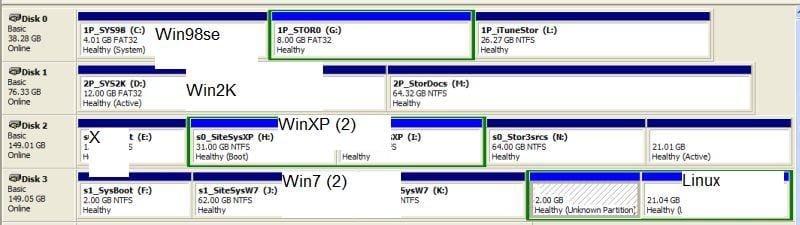
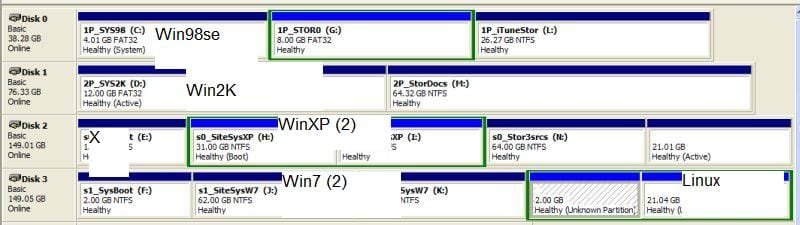
The first PATA ("C:") is where the first active partition appears and where ntldr is located along with bootmgr and io.sys. Then, the "X" on the first SATA (hd3) is where Win7 wrote something that is telling my machine it is to be the boot drive even though that drive has no active partition. I have managed to overwrite the initial Win7 MBR on "C:" so I can use MBR-to-ntldr there, but that only works the second time around (exactly as when trying from Win7's BCD) after my machine has apparently somehow figured out it actually should actually be booting from the first drive just as it had first been instructed by my BIOS boot order!
 

Attachments

  • SysMaxDrives.jpg
    SysMaxDrives.jpg
    32.4 KB · Views: 2

My Computer My Computer

At a glance

Win7 Ultimate x64
OS
Win7 Ultimate x64
Please post a picture exactly like the tutorial instructs you to.
 

My Computer My Computer

At a glance

Windows 10 Pro. 64/ version 1709 Windows 7 Pr...Intel i7-6800K @ 4.3Corsair Platinum 16 gig @2400EVGA GTX 1070 OC
Computer type
PC/Desktop
Computer Manufacturer/Model Number
Home made Desktop
OS
Windows 10 Pro. 64/ version 1709 Windows 7 Pro/64
CPU
Intel i7-6800K @ 4.3
Motherboard
ASUS X-99 Deluxe II
Memory
Corsair Platinum 16 gig @2400
Graphics Card(s)
EVGA GTX 1070 OC
Monitor(s) Displays
Asus 27" LED LCD/VE278Q
Screen Resolution
1920-1080 or 1280-720 HDMI
Hard Drives
INTEL SSD 730-240 Gb Sata 3.0/
PSU
EVGA Platium 1200W
Case
Phanteks Luxe Tempered Glass 8 fans/ one radiator
Cooling
XSPC/ Water Cooled CPU
Keyboard
Das 4 Professional
Mouse
Logitech M705/MX Anywhere 2-S
Internet Speed
100 mbits
Antivirus
Microsoft Security Essentials/ Malwarebytes Premium 3.0/ SAS
Browser
I.E. 11 default/Firefox/ ISP Time Warner Cable/Spectrum
Other Info
LG BluRay Burner/
Sound system-KLipsch-THX/
Icy Dock ssd Hot Swap bays.
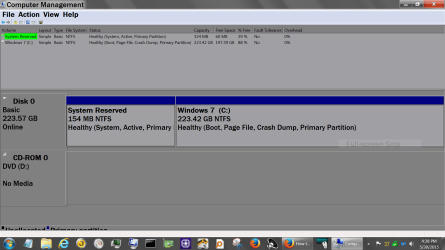
Lets try it again. This is what it should look like. This is from the tutorial.

308911d1393893161t-disk-management-post-screen-capture-image-capture.png


This is from the computer I'm on now.

NEW 2 Disc Managemt.PNG

Don't put any thing on the picture. Just type in below the picture the requested information. We need to see the unaltered pictures.

Take you time and follow the tutorial exactly.
 

My Computer My Computer

At a glance

Windows 10 Pro. 64/ version 1709 Windows 7 Pr...Intel i7-6800K @ 4.3Corsair Platinum 16 gig @2400EVGA GTX 1070 OC
Computer type
PC/Desktop
Computer Manufacturer/Model Number
Home made Desktop
OS
Windows 10 Pro. 64/ version 1709 Windows 7 Pro/64
CPU
Intel i7-6800K @ 4.3
Motherboard
ASUS X-99 Deluxe II
Memory
Corsair Platinum 16 gig @2400
Graphics Card(s)
EVGA GTX 1070 OC
Monitor(s) Displays
Asus 27" LED LCD/VE278Q
Screen Resolution
1920-1080 or 1280-720 HDMI
Hard Drives
INTEL SSD 730-240 Gb Sata 3.0/
PSU
EVGA Platium 1200W
Case
Phanteks Luxe Tempered Glass 8 fans/ one radiator
Cooling
XSPC/ Water Cooled CPU
Keyboard
Das 4 Professional
Mouse
Logitech M705/MX Anywhere 2-S
Internet Speed
100 mbits
Antivirus
Microsoft Security Essentials/ Malwarebytes Premium 3.0/ SAS
Browser
I.E. 11 default/Firefox/ ISP Time Warner Cable/Spectrum
Other Info
LG BluRay Burner/
Sound system-KLipsch-THX/
Icy Dock ssd Hot Swap bays.
This is what it should look like...
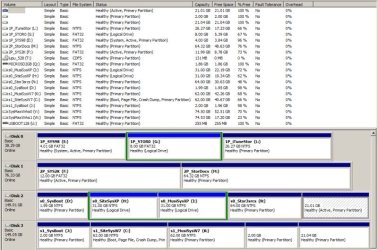
Ah, okay. I had not realized you were looking for the top part!

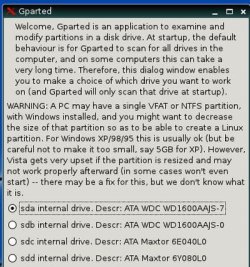
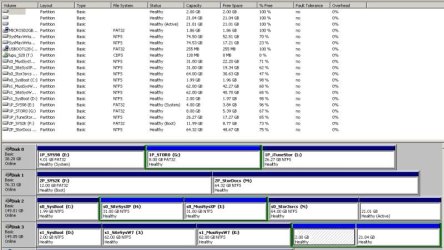
I have several screens shots to add some overall perspective on some of the challenges of multi-booting, and I will post the most-relevant one last (the corrected one from above) since we are dealing with trying to get XP to boot without having to go around through machine startup a second time in order for that to happen successfully every time. Overall, different Windows OSs see my drives in different orders, and I do understand that should not matter as far as BIOS boot order is concerned. Nevertheless, I was able to BIOS-boot from "C:" (first active partition) on the first PATA (using either bootmgr or ntldr) and get into XP every time I wanted to go there without having to reboot to finally get there on the second try until after another Win7 update about a week or so ago again did whatever Win7 had also previously done to break that.
 

Attachments

  • SysMaxDrives-gParted.jpg
    SysMaxDrives-gParted.jpg
    47.2 KB · Views: 7
  • SysMaxDrives-2K.jpg
    SysMaxDrives-2K.jpg
    57.2 KB · Views: 1
  • SysMaxDrives-W7.jpg
    SysMaxDrives-W7.jpg
    79.2 KB · Views: 0
  • SysMaxDrives-XP.jpg
    SysMaxDrives-XP.jpg
    60.3 KB · Views: 0

My Computer My Computer

At a glance

Win7 Ultimate x64
OS
Win7 Ultimate x64
The forum software re-arranged my order there, so here again is the most-relevant screen shot:
 

Attachments

  • SysMaxDrives-XP.jpg
    SysMaxDrives-XP.jpg
    60.3 KB · Views: 4

My Computer My Computer

At a glance

Win7 Ultimate x64
OS
Win7 Ultimate x64
I thought there were 4 Basic partitions limit? or am I confusing?

Guess I am confusing with primary partitions.
 

My Computer My Computer

At a glance

Windows 7 Ultimate x64 SP1AMD Phenom 2 1090T2x8GB Kingston HyperX Fury Black 1600Mhz Unga...MSI GTX 970 Gaming 4G
Computer type
PC/Desktop
Computer Manufacturer/Model Number
Custom Build
OS
Windows 7 Ultimate x64 SP1
CPU
AMD Phenom 2 1090T
Motherboard
Gigabyte GA-890FXA-UD5
Memory
2x8GB Kingston HyperX Fury Black 1600Mhz Unganged
Graphics Card(s)
MSI GTX 970 Gaming 4G
Sound Card
Realtek On-Board HD 7.1 Audio / Logitech G35
Monitor(s) Displays
3xAcer GD245HQ
Screen Resolution
1920x1080
Hard Drives
Samsung 850 Pro 512GB SSD - OS /
WD Caviar Black SATA 3 - 1 TBx2 - Dynamic RAID 0 /
WD Caviar Green SATA 2 - 640GBx2 - Dynamic RAID 0 /
WD Caviar Green SATA 2 - 640GB - Internal Backup /
Seagate Barracude SATA 3 - 3TB - External Backup/ Sync
PSU
HighPower 1000W
Case
Cooler Master HAF 932
Cooling
Noctua NH-D14
Keyboard
Logitech G19
Mouse
Logitech G500
Internet Speed
100/4 Mbit Cable (100GB quota)
Antivirus
ZoneAlarm Extreme Security / MBAM Pro / MBAE Free / SAS Free
Browser
IE 11 - Firefox - Chrome
Other Info
Logitech F710/ G27/ G940/ Z5500 // TrackIR 5 // Nvidia 3D Surround Vision
Back
Top