How to revoke my Win10 reservation

meebers

Multicomplacator
Power User
Local time
5:21 PM
Messages
327
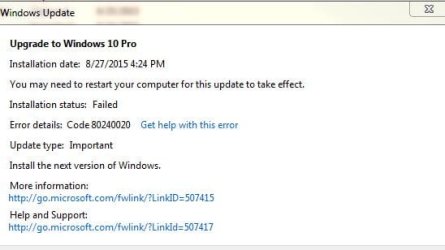
On a win7 machine, I did a reservation for W10. This was done at the first chance Win10 was (6/30) offered. Just about every day, W10 tries to install and it fail's. I have tried "all" the common suggestions to get it to install but ends up with failure. I was interested in letting it install automatically rather than do a manual install. (I have 2 other installs of W10 on other machines.)

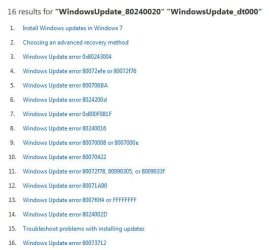
Notice the failures just today was 3. Error is 80240020. I selected get help with this error and 80240020 was not shown.

So how to remove the white windows flag from the task bar and to stop MS from trying to install it. Can I just uninstall KB3035583? or do I need to do some additional things. TX
 

Attachments

  • 8024 3.JPG
    8024 3.JPG
    35.5 KB · Views: 0
  • 8024 1.JPG
    8024 1.JPG
    35.5 KB · Views: 16
  • 8024 2.JPG
    8024 2.JPG
    25.9 KB · Views: 16

My Computer My Computer

At a glance

Windows 7 Professional X64 Service Pack 1AMD Phenom II X4 955 3.20GHz8GGX550 Ti
Computer type
PC/Desktop
Computer Manufacturer/Model Number
Self Build
OS
Windows 7 Professional X64 Service Pack 1
CPU
AMD Phenom II X4 955 3.20GHz
Motherboard
Gigabyte GA-MA790X-UD4P
Memory
8G
Graphics Card(s)
GX550 Ti
Sound Card
On board
Monitor(s) Displays
Asus VW246H & Syncmaster 2243swx
Screen Resolution
1920x1080 & 1920x1080
Hard Drives
M4-CT128 SSD2, Samsung 840 256GB, 1 WDC 1TB
PSU
Corsair TX750W-V2
Case
Antec
Cooling
2 120mm fan
Keyboard
Microsoft Wireless 3050
Mouse
Microsoft Wireless 5000
Internet Speed
72/6Mbs (Cable)
Other Info
Asus AC1900 router, 8 port Trendnet Switch - Logitech Webcam Pro 9000

My Computer My Computer

At a glance

Win-7-Pro64bit 7-H-Prem-64biti7-5930K 2nd i9-9940x both water blocked VRM'...Trident-z 3200C14 2nd Trident-z 3600C16EVGA 1080ti ftw3 2nd Titan Xp both water blocked
Computer type
PC/Desktop
Computer Manufacturer/Model Number
Custom assembled by me :}
OS
Win-7-Pro64bit 7-H-Prem-64bit
CPU
i7-5930K 2nd i9-9940x both water blocked VRM's too
Motherboard
ASUS SABERTOOTH X99 2nd ASUS x299 Apex
Memory
Trident-z 3200C14 2nd Trident-z 3600C16
Graphics Card(s)
EVGA 1080ti ftw3 2nd Titan Xp both water blocked
Sound Card
Built-in Realtek
Monitor(s) Displays
1-AOC G2460PG 24"G-Sync 144Hz/ 2nd 1-ASUS VG248QE 24" 144Hz
Screen Resolution
1920 x 1080 144Hz
Hard Drives
2-Samsung M.2 Evo & Evo Plus
2-Samsung 850 EVO 500GB SSD's/ 3-2.5 W.D. Black 1tb-&3-1tb/3-3.5 WD Black 1tb hdd's
PSU
EVGA SuperNOVA 1000-P2 2nd 1200-P2
Case
2-Corsair Obsidian Series 450D Black ATX Mid Tower
Cooling
Custom water loops
Keyboard
Logitech G710+/ 2nd Logitech G910
Mouse
2-RedDragon M901 Perdition 16400 dpi Gaming mouse = wired
Internet Speed
Comcast Ping 19ms 89.31mbps download speed 6.12mbps upload
Antivirus
Malwarebytes Pro/ Superantispyware Pro
Browser
FireFox & Pale moon
Other Info
2nd ASUS X299 Apex/Intel i9-9940x with Custom water loop/7H-Prem-x64/Corsair 450D case/Ram Trident-z 3600C16 4x8gb / Samsung970Evo plus 500gb SSD/Dual ssd EZ swap evo/PSU EVGA SuperNova 1200w-P2 80+Platinum/GPU Titan Xp /8-ML-140 on push-pull on 2-280GTX rads

My Computer My Computer

At a glance

Windows 7 Professional X64 Service Pack 1AMD Phenom II X4 955 3.20GHz8GGX550 Ti
Computer type
PC/Desktop
Computer Manufacturer/Model Number
Self Build
OS
Windows 7 Professional X64 Service Pack 1
CPU
AMD Phenom II X4 955 3.20GHz
Motherboard
Gigabyte GA-MA790X-UD4P
Memory
8G
Graphics Card(s)
GX550 Ti
Sound Card
On board
Monitor(s) Displays
Asus VW246H & Syncmaster 2243swx
Screen Resolution
1920x1080 & 1920x1080
Hard Drives
M4-CT128 SSD2, Samsung 840 256GB, 1 WDC 1TB
PSU
Corsair TX750W-V2
Case
Antec
Cooling
2 120mm fan
Keyboard
Microsoft Wireless 3050
Mouse
Microsoft Wireless 5000
Internet Speed
72/6Mbs (Cable)
Other Info
Asus AC1900 router, 8 port Trendnet Switch - Logitech Webcam Pro 9000
Hi,
Yep good idea,
M$ has been prepping for almost a year win-7 machines to upgrade
It's been a long process of weeding out windows updates for sure and I guess if anything is you/ everyone really needs to review each and every update before downloading and installing them
Otherwise you end up with a lot of updates you might not want :(
 

My Computer My Computer

At a glance

Win-7-Pro64bit 7-H-Prem-64biti7-5930K 2nd i9-9940x both water blocked VRM'...Trident-z 3200C14 2nd Trident-z 3600C16EVGA 1080ti ftw3 2nd Titan Xp both water blocked
Computer type
PC/Desktop
Computer Manufacturer/Model Number
Custom assembled by me :}
OS
Win-7-Pro64bit 7-H-Prem-64bit
CPU
i7-5930K 2nd i9-9940x both water blocked VRM's too
Motherboard
ASUS SABERTOOTH X99 2nd ASUS x299 Apex
Memory
Trident-z 3200C14 2nd Trident-z 3600C16
Graphics Card(s)
EVGA 1080ti ftw3 2nd Titan Xp both water blocked
Sound Card
Built-in Realtek
Monitor(s) Displays
1-AOC G2460PG 24"G-Sync 144Hz/ 2nd 1-ASUS VG248QE 24" 144Hz
Screen Resolution
1920 x 1080 144Hz
Hard Drives
2-Samsung M.2 Evo & Evo Plus
2-Samsung 850 EVO 500GB SSD's/ 3-2.5 W.D. Black 1tb-&3-1tb/3-3.5 WD Black 1tb hdd's
PSU
EVGA SuperNOVA 1000-P2 2nd 1200-P2
Case
2-Corsair Obsidian Series 450D Black ATX Mid Tower
Cooling
Custom water loops
Keyboard
Logitech G710+/ 2nd Logitech G910
Mouse
2-RedDragon M901 Perdition 16400 dpi Gaming mouse = wired
Internet Speed
Comcast Ping 19ms 89.31mbps download speed 6.12mbps upload
Antivirus
Malwarebytes Pro/ Superantispyware Pro
Browser
FireFox & Pale moon
Other Info
2nd ASUS X299 Apex/Intel i9-9940x with Custom water loop/7H-Prem-x64/Corsair 450D case/Ram Trident-z 3600C16 4x8gb / Samsung970Evo plus 500gb SSD/Dual ssd EZ swap evo/PSU EVGA SuperNova 1200w-P2 80+Platinum/GPU Titan Xp /8-ML-140 on push-pull on 2-280GTX rads
Back
Top