Solved How to Roll Back Windows Update (Office 2016)

Rincewindwiz

New member
Member
VIP
Local time
4:31 PM
Messages
192
Hi
It seems the Windows Update of Office 2016 (15/9.2017) trashed the advanced search feature in Outlook and I want to rollback this update - should be easy?
So I search installed updates but there are no updates listed for Office 2016
So I look at system restore. There is only one restore point (should be at least 3 or 4 - I have 55Gb spare space) which is entitled Office 2016 update. So I try to restore and eventually get a message
"Restore failed. Nothing has been changed. Restore point has been deleted"
(CBS Log attached)

So a couple of questions:
Is there anyway I can get back to Outlook 2016 before this update (other than reinstall)
If I reinstall, how do I get Office updates but not this one?

TFAI
 
Last edited:

My Computer My Computer

Computer type
Laptop
Computer Manufacturer/Model Number
HP ENVY DV6
OS
64 bit Win 7 Ultimate
Memory
12GB
Graphics Card(s)
NVIDIA 630M
Hard Drives
750GB

My Computer My Computer

Computer type
PC/Desktop
Computer Manufacturer/Model Number
medionl/Aspire 6930G/acer x55a
OS
W7 home premium 32bit/W7HP 64bit/w10 tp insider ring
CPU
E5300 dual core
Motherboard
medion MS7366
Memory
3gb
Graphics Card(s)
Nvidia Geforce 7100 Nforce 630i
Monitor(s) Displays
avixc
Internet Speed
n (isp resticted to 72)
Antivirus
mse/pands
Browser
palemoon
Other Info
Belkin Fd7050 n USB using Railink RT2870 drivers, more upto date
Hi
I have the stand-alone version installed on my hard drive. Is that what they now call click-to-run?

Anyway, I have the install files so I can reinstall I guess but KEY QUESTION how do I stop Windows Update screwing it up again?

If re-install doesn't work, I can restore from an image (but that messes up a bunch of other stuff)
 

My Computer My Computer

Computer type
Laptop
Computer Manufacturer/Model Number
HP ENVY DV6
OS
64 bit Win 7 Ultimate
Memory
12GB
Graphics Card(s)
NVIDIA 630M
Hard Drives
750GB
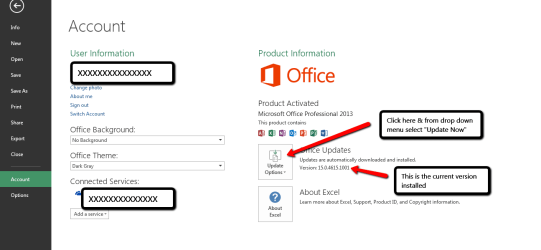
It certainly seems that you have Office 2016 Click to Run, so Updates do not come through the usual Windows Updates. Office is updated automatically & it is done in the background from time to time even if you are using Office. You can check if you have Office Updates set for automatic updates by click on File at the top of any Office application, then select Account. The screen shot below shows what to do. It is for Office 2103 but I am sure Office 2016 is the same.

Office_2013_Update_Check.png

You could try Repairing Office 2016, to do that, open Control Panel, select Programs & Features, scroll down to Microsoft Office 2016, Right Click on it & select Change & this should open a couple of Repair Options to run.

You can also Repair Outlook. To do that open Control Panel, click on Mail (Microsoft Outlook 2016), when that opens click on Email Accounts. When that open you will see a list of your email accounts, Right click on one of the accounts if you have more than one & then select Repair from the menu.
 

My Computer My Computer

Computer type
PC/Desktop
Computer Manufacturer/Model Number
Self built using existing case
OS
Windows 7 Home Premium 64 bit sp1
CPU
Intel i5 3570 3.4Ghz Ivy Bridge SKT 1155 quad core
Motherboard
Gigabyte Z77-HD3 SKT 1155 2xSata 3, 4x USB 3.0
Memory
G-Skill Rip Jaws 16Gb (8x2) DDR3 -1600 PC3 12800 CL 10 red
Graphics Card(s)
Gigabyte NVIDIA GT610 1Gb DDR3 810/1200 PCI-E 2.0 Silent
Sound Card
NVIDIA High Definition & Realtech High Definition Audio
Monitor(s) Displays
2 x Philips 226V4L 16:9 aspect ratio
Screen Resolution
1920 x 1080 HD
Hard Drives
Samsung 840 Pro 256gb SSD, SATA 3.
Hitachi Touro Portable 1tb, USB 3.0 HDD used for image b/ups.
PSU
Corsair VS450
Case
Codeng
Cooling
PSU fan & CPU fan
Keyboard
Logitech
Mouse
Logitech Wireless trackball M570
Internet Speed
Wireless 3G. 3mg down & 550kb up.
Antivirus
Bitdefender Internet Security 2020
Browser
Opera (Current Version) & Firefox
Other Info
MS Office 2013 Pro. Davis weather station software. MGE Nova 600 avr UPS.
Thanks for this

1. Looks like click to run. Office updates are set to install automatically. Anywhere I can uninstall them?

2. Repair Outlook doesn't seem to do much. I think it just repairs the connection to the mail server. Anyway it did its stuff, set a test mail and nothing else changed

3 I tried Repair Office. Cant imagine why this would work since it will (presumably) make sure it operates according to the latest updates (ie without Advanced Search)
Selected Quick Repair; took 5 - 10 minutes!; ended with error 30103-13. That suggests
low disk space (50Gb free) or
Latest Windows updates ( 3 currently failed - Office 2010 and .NET)
running sfc no problems

So I think I need to reinstall outlook 2016 from the disk,
If I do that, how do I get all updates before the current one?
 

My Computer My Computer

Computer type
Laptop
Computer Manufacturer/Model Number
HP ENVY DV6
OS
64 bit Win 7 Ultimate
Memory
12GB
Graphics Card(s)
NVIDIA 630M
Hard Drives
750GB
HOWEVER
https://support.microsoft.com/en-us/help/2770432/how-to-revert-to-an-earlier-version-of-office-2013-or-office-2016-clic
worked a treat and I managed to revert to 1706 (8229.2103) and advanced search is back. (Updates now disabled!)

NOTE: if you try this, it is far from clear (to me anyway) which numbers you put in place of xxxx.yyyy
If you get the wrong numbers, you will (probably) be told 'You already have the most up to date version' or something unhelpful like that.
Simply try a different numbers. You can find a list of version and builds here https://support.office.com/en-us/article/Version-and-build-numbers-of-update-channel-releases-ae942449-1fca-4484-898b-a933ea23def7?ui=en-US&rs=en-US&ad=US
or
https://support.office.com/en-us/article/Version-and-build-numbers-of-update-channel-releases-ae942449-1fca-4484-898b-a933ea23def7?ui=en-US&rs=en-US&ad=US#bkmk_bydate

8229.2103 worked for me
 

My Computer My Computer

Computer type
Laptop
Computer Manufacturer/Model Number
HP ENVY DV6
OS
64 bit Win 7 Ultimate
Memory
12GB
Graphics Card(s)
NVIDIA 630M
Hard Drives
750GB
Back
Top