How to run a command line utility?

win7use

New member
Local time
6:01 AM
Messages
26
Location
Maryland, Sir George Calvert founder
Hi,
I am trying to run a command line prompt utility from Microsoft on windows 7. Sure I am doing something wrong, after I click the downloaded .exe file the command prompt pops up briefly then disappears. Can someone explain the basics of running a command line utility on win7? Thanks!


This is the one I am trying to run....(this is just one of many on this site http://technet.microsoft.com/en-us/sysinternals/default.aspx)

Whois
 

My Computer

OS
win 7 home premium
Please explain in further detail. I can get to the sight, but don't know what you are after.
 

My Computer

Computer type
PC/Desktop
Computer Manufacturer/Model Number
Bruce ... somewhere in his 40's
OS
Windows 7 Ultimate 32bit SP1
CPU
Intel(R) Core(TM)2 Quad CPU @ 2.40GHz, 2400 MHz
Motherboard
INTEL/D975XBX2
Memory
4 GB
Graphics Card(s)
ATI Radeon HD 2600 Pro
Monitor(s) Displays
Samsung SyncMaster 914v
Screen Resolution
1280 x 1024
Hard Drives
2/500GB each ... ST3500630AS ATA Device.
One is not connected
PSU
Rocketfish 700 W
Case
G.Skill Gigabyte Chassis
Keyboard
Standard PS/2 Keyboard
Mouse
Microsoft PS/2 Mouse
Internet Speed
DSL
Antivirus
Avira Internet Security
Browser
IE 11
Other Info
ATI HDMI Audio
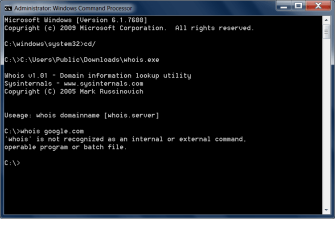
thanks for the reply. so this utility is supposed to allow you to run whois search from your command prompt. when I click the .exe file from a folder in windows the command prompt briefly appears then goes away. when i type in the path in cmd the publisher name appears, but it does not recognize the "whois" command. maybe you can try...its from miscrosoft and only 44kb ..it should be safe...its part of the sysinternals package.. thanks again if you get it to work pls let me know how you did
 

My Computer

OS
win 7 home premium
Right click, run as administrator.
 

My Computer

Computer Manufacturer/Model Number
Sony Vaio Z46GDU
OS
Windows 7 Ultimate x86-64
CPU
[email protected] 1066MHz FSB
Motherboard
Sony branded
Memory
6GB DDR3 1066MHz
Graphics Card(s)
9300M GS 256MB Dedicated (Speed) + Intel4500MHD (Stamina)
Sound Card
Realtek HD Audio
Monitor(s) Displays
13.1' WXGA
Screen Resolution
1600x900
Hard Drives
320GB 7200RPM w/ 16MB cache
Internet Speed
1MB/s
Yes, I tried that already did not work..here's a pic of what happens...did you try it? i could be doing something wrong in a very basic way
 

Attachments

  • cmdutil.png
    cmdutil.png
    14.8 KB · Views: 696

My Computer

OS
win 7 home premium

My Computer

Computer Manufacturer/Model Number
Sony Vaio Z46GDU
OS
Windows 7 Ultimate x86-64
CPU
[email protected] 1066MHz FSB
Motherboard
Sony branded
Memory
6GB DDR3 1066MHz
Graphics Card(s)
9300M GS 256MB Dedicated (Speed) + Intel4500MHD (Stamina)
Sound Card
Realtek HD Audio
Monitor(s) Displays
13.1' WXGA
Screen Resolution
1600x900
Hard Drives
320GB 7200RPM w/ 16MB cache
Internet Speed
1MB/s
I think this is the one you need for Windows 7.
 

Attachments

My Computer

Computer type
PC/Desktop
Computer Manufacturer/Model Number
Self build
OS
Windows 10 Home
CPU
Intel Core i5 3550
Motherboard
ASUS P8Z77-V LX (LGA1155)
Memory
Corsair Vengeance DDR3 16GB
Graphics Card(s)
Nvidia GEForce GTX 970 SSC
Monitor(s) Displays
Hanns-G 23.6", Acer 17"
Screen Resolution
1920x1080, 1440x900
Hard Drives
Sandisk SSD 256 GB
WD500GB
WD640GB
Seagage Ultra + 1TB ext.
BWD 800GB
WD 1TB ext
PSU
Antec 650w
Case
Cooler Master Centurion 534
Cooling
COOLER MASTER GeminII S524, 3 120 mm case fans.
Keyboard
Logitech MK300
Mouse
Logitech MK300
Internet Speed
Cable
Antivirus
MSSE, Malwarebytes
Browser
IE 10, Chrome
still not working..possible its too old-2005 ??? thanks again, they have a bunch of utilities the ones I downloaded that have an icon seem to work like the tcp viewer which is really cool, the ones that don't work have sort of a generic windows 7 icon...
 

My Computer

OS
win 7 home premium

My Computer

Computer Manufacturer/Model Number
Sony Vaio Z46GDU
OS
Windows 7 Ultimate x86-64
CPU
[email protected] 1066MHz FSB
Motherboard
Sony branded
Memory
6GB DDR3 1066MHz
Graphics Card(s)
9300M GS 256MB Dedicated (Speed) + Intel4500MHD (Stamina)
Sound Card
Realtek HD Audio
Monitor(s) Displays
13.1' WXGA
Screen Resolution
1600x900
Hard Drives
320GB 7200RPM w/ 16MB cache
Internet Speed
1MB/s
It won't run on it's own - you need to run it via the command prompt.

First, get the Whois.exe in the path of cmd.exe.

Easiest is to copy Whois.exe into your Windows\System32 folder.

Then open an elevated command prompt ( type cmd in start search box, when the black box pops up - rt click it and run as admin. )

It should open on C:\windows\system32>

so you are in the right place. Then type:

whois /?

[ If cmd doesn't open at system32, just type this at the prompt:

cd /d C:\windows\system32>

then press enter ]

Hope it helps.


Hi,
I am trying to run a command line prompt utility from Microsoft on windows 7. Sure I am doing something wrong, after I click the downloaded .exe file the command prompt pops up briefly then disappears. Can someone explain the basics of running a command line utility on win7? Thanks!


This is the one I am trying to run....(this is just one of many on this site Windows Sysinternals: Documentation, downloads and additional resources)

Whois
 

My Computers

System One System Two

  • Computer type
    PC/Desktop
    OS
    7 X64
    CPU
    i5 8400
    Motherboard
    gigabyte b365m ds3h
    Memory
    2x8gb 3200mhz
    Hard Drives
    various
    PSU
    pure power 11 400w cm
    Case
    Coolermaster
    Cooling
    cryorig m9i
  • Computer type
    PC/Desktop
    OS
    7x64
    CPU
    g5400
    Motherboard
    ga b365m ds3h
    Memory
    8gb ddr4 2400
    PSU
    xfx pro 450w
It works just fine. What you need to do is:
1) click on the file from the website
2) Save it someplace you will remember (or write down the folder where you save it to)
3) UNZIP the file! Remember where you unzip it to.
4) Open the command prompt you do NOT need to run as the administrator.
5) Chabge to the drive where you unzipped the file to.
6) Change to the directory, in the command prompt.
7) type: whois websitename where websitename is the site you want to run whois against.
 

My Computer

Computer Manufacturer/Model Number
HP Pavilion a1540n
OS
Windows 7 Ultimate 64bit
CPU
AMD X2 64bit
Memory
2GB
Graphics Card(s)
ATI 4350
Monitor(s) Displays
Samsung SyncMaster T260HD
Yes, that's the same thing. Easier to put it in system32 , than to cd to the directory it was d/led it to. Specially for frequent use.

You might find it easier still to use this :

Domain name search tool (Whois) for Windows
 

My Computers

System One System Two

  • Computer type
    PC/Desktop
    OS
    7 X64
    CPU
    i5 8400
    Motherboard
    gigabyte b365m ds3h
    Memory
    2x8gb 3200mhz
    Hard Drives
    various
    PSU
    pure power 11 400w cm
    Case
    Coolermaster
    Cooling
    cryorig m9i
  • Computer type
    PC/Desktop
    OS
    7x64
    CPU
    g5400
    Motherboard
    ga b365m ds3h
    Memory
    8gb ddr4 2400
    PSU
    xfx pro 450w
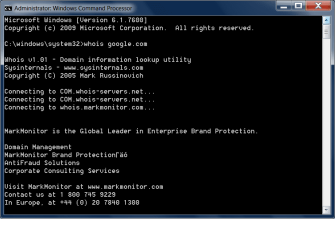
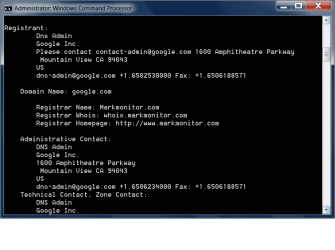
YES! :) Thank you SIW2 !!!! Pasted whois.exe into system32 folder It works.. thank you.. now this is a very cool utility I'll have to try the others..like I said I was sure I was doing something wrong in a a basic way.....what is markmonitor..is this some kind of marketing tool?? thanks again...update markmonitor is the host/agent i think, when i whois sevenforums.com i got godaddy instead nevermind thanks again
 

Attachments

  • whoiscmd.png
    whoiscmd.png
    15.9 KB · Views: 110
  • cmdwhois2.png
    cmdwhois2.png
    15.5 KB · Views: 69
Last edited:

My Computer

OS
win 7 home premium
Back
Top