How to set back the administrative access for my log on account

saranyan18

New member
Local time
11:22 AM
Messages
15
Hi,

I have disabled my Win7 log on prompt option, in order to run my "Auto Power on" application to log on automatically and schedule to start my torrent application.

I have achieved disabling the Win 7 from asking from log on user name and password by Go to Start and type netplwiz in the Start Search and hit Enter. The User Accounts dialogue box will be displayed.

netplwiz.jpg


Now uncheck Users must a enter username and password to use this computer option and pressOK. Thats all, now reboot your system and you will never see the login window any more.

But after now I want to set back to normal default prompt screen while logon.

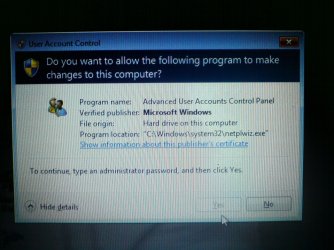
In order to do this the OS is asking for administrative password, but in that prompt dialogue box, it is not allowing me to go ahead and enter my administrative password by enabling "YES" button(the yes button is disabled).


run-as-admin.jpg


Pls kindly guide me in fixing my issue.
 

My Computer My Computer

At a glance

Windows 7 Home Premium 64bit
OS
Windows 7 Home Premium 64bit
Hi Saranyan, welcome to the Seven Forums.

The Yes button in your screenshot is not disabled, it's quite clearly clickable. The blue and grey colors of the No and Yes buttons does not mean they are Enabled (No) and Disabled (Yes), the colors just mean the No button is default selection.

Kari
 

My Computer My Computer

At a glance

Windows 10 Pro x64 EN-GB1.6 GHz Intel Core i7-720QM Processor6 GBATI Mobility Radeon HD 5850 Graphics
Computer type
Laptop
Computer Manufacturer/Model Number
HP ENVY 17-1150eg
OS
Windows 10 Pro x64 EN-GB
CPU
1.6 GHz Intel Core i7-720QM Processor
Memory
6 GB
Graphics Card(s)
ATI Mobility Radeon HD 5850 Graphics
Sound Card
Beats sound system with integrated subwoofer
Monitor(s) Displays
17" laptop display, 22" LED and 32" Full HD TV through HDMI
Screen Resolution
1600*900 (1), 1920*1080 (2&3)
Hard Drives
Internal: 2 x 500 GB SATA Hard Disk Drive 7200 rpm
External: 2TB for backups, 3TB USB3 network drive for media
Cooling
As Envy runs a bit warm, I have it on a Cooler Master pad
Keyboard
Logitech diNovo Media Desktop Laser (bluetooth)
Mouse
Logitech Performance Mouse MX
Internet Speed
50/10 Mbps VDSL
Antivirus
Windows Defender 4.3.9431.0
Browser
Maxthon 3.5.2., IE11
Hi Kari,

Thanks a lot for your kind reply doode!

The screen shot what I have posted above is not the actual image of the issue I am facing.

In order to make the readers understand my issue easily, I have just post a similar image(which contains the prompt dialogue box) for there reference.

The real issue is the same what I have described in my initial post.

So pls tell me a proper solution to fix my issue.

Thanks a lot for considering my request. :)
 

My Computer My Computer

At a glance

Windows 7 Home Premium 64bit
OS
Windows 7 Home Premium 64bit
A shot in the dark:

Go to Start and type netplwiz in the Start Search, but instead of hitting Enter, right click and select Run as Administrator.
 

My Computer My Computer

At a glance

Windows 7 Ultimate x64
OS
Windows 7 Ultimate x64
I don't see any new images. Please post the screenshot of the actual problem.
 

My Computer My Computer

At a glance

Windows 7 Ultimate x64 SP1Core i7-2670QM8GB DDR3 PC3-10600Intel HD Graphics 3000 + GeForce GT 540M
Computer Manufacturer/Model Number
Dell XPS 15 L502x
OS
Windows 7 Ultimate x64 SP1
CPU
Core i7-2670QM
Memory
8GB DDR3 PC3-10600
Graphics Card(s)
Intel HD Graphics 3000 + GeForce GT 540M
Screen Resolution
1920x1080
Hard Drives
1TB 5400RPM Seagate
Hi all,

I have taken a photo of the prompt message and attached it.(Since, I couldn't take the screen shot of it)

Pls find the attachment.

The actually problem is the dialogue box prompts and asking to enter the administrative password when ever I try installing software, but it is not showing any text input box to enter the password and also the "yes" button in the box is not enabled, only I can able to click "no" button.

Kindly pls help me...
 

Attachments

  • DSC01916.jpg
    DSC01916.jpg
    471.7 KB · Views: 20

My Computer My Computer

At a glance

Windows 7 Home Premium 64bit
OS
Windows 7 Home Premium 64bit

My Computer My Computer

At a glance

Windows 10 Pro x64 EN-GB1.6 GHz Intel Core i7-720QM Processor6 GBATI Mobility Radeon HD 5850 Graphics
Computer type
Laptop
Computer Manufacturer/Model Number
HP ENVY 17-1150eg
OS
Windows 10 Pro x64 EN-GB
CPU
1.6 GHz Intel Core i7-720QM Processor
Memory
6 GB
Graphics Card(s)
ATI Mobility Radeon HD 5850 Graphics
Sound Card
Beats sound system with integrated subwoofer
Monitor(s) Displays
17" laptop display, 22" LED and 32" Full HD TV through HDMI
Screen Resolution
1600*900 (1), 1920*1080 (2&3)
Hard Drives
Internal: 2 x 500 GB SATA Hard Disk Drive 7200 rpm
External: 2TB for backups, 3TB USB3 network drive for media
Cooling
As Envy runs a bit warm, I have it on a Cooler Master pad
Keyboard
Logitech diNovo Media Desktop Laser (bluetooth)
Mouse
Logitech Performance Mouse MX
Internet Speed
50/10 Mbps VDSL
Antivirus
Windows Defender 4.3.9431.0
Browser
Maxthon 3.5.2., IE11
Kari,

I couldn't able to do system restore also, because for doing that also I need to enter my administrative password.

Pls help me out.
 

My Computer My Computer

At a glance

Windows 7 Home Premium 64bit
OS
Windows 7 Home Premium 64bit
When I tried doing switch user, then I am getting the windows log on screen with asking for my password.

Once after entering into my account, the OS is not considering my current account as an administrative account.

In my machine I have created only one account from the time I brought my laptop and I was keep using that only, also it was acting as my administrative account.

When I did changes in the netplwiz in order to do Windows log on automatically without entering my password, this lead my account to lose the administrative rights.

So I think the issue should be my OS doesn't have any account with administrative rights.

pls correct me if I am wrong.
 

My Computer My Computer

At a glance

Windows 7 Home Premium 64bit
OS
Windows 7 Home Premium 64bit
Who is Alexander in your very first screenshot (first post)? Is that your account? If you look at that same dialog box now, is Alexander still listed as being a member of the administrators group?
 

My Computer My Computer

At a glance

Windows 7 Ultimate x64
OS
Windows 7 Ultimate x64
The screen shot what I have posted in my first post is not an actual one.

I have posted the image just for the sake of understanding my issue and it is an googled image.

I expecting a concrete solution in this form.
 

My Computer My Computer

At a glance

Windows 7 Home Premium 64bit
OS
Windows 7 Home Premium 64bit
Okay. So both screenshots in your first post are from other sources. I thought that only applied to the second screenshot.

Can you post yours?
 

My Computer My Computer

At a glance

Windows 7 Ultimate x64
OS
Windows 7 Ultimate x64
Kindly refer the screen shot which is in my second post.(which is asking me to enter my adminstrative password dialogue box)
 

My Computer My Computer

At a glance

Windows 7 Home Premium 64bit
OS
Windows 7 Home Premium 64bit
I am looking for a perfect solution :( but I feel like there are no good techies in this forum :confused:.
 

My Computer My Computer

At a glance

Windows 7 Home Premium 64bit
OS
Windows 7 Home Premium 64bit
Kindly refer the screen shot which is in my second post.(which is asking me to enter my adminstrative password dialogue box)

I see no screenshot in your second post, but I do see the one in your third. You'll get the best help if you describe your situation as accurately as you can (including letting us know from the beginning that your posted images aren't yours).

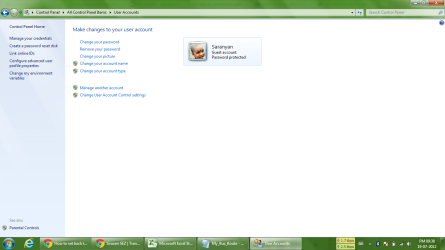
Can you get to this screen: Control Panel\All Control Panel Items\User Accounts?
 
Last edited:

My Computer My Computer

At a glance

Windows 7 Ultimate x64
OS
Windows 7 Ultimate x64
Pls refer the image
 

Attachments

  • Control Panel-All Control Panel Items-User Accounts.png
    Control Panel-All Control Panel Items-User Accounts.png
    56.5 KB · Views: 12

My Computer My Computer

At a glance

Windows 7 Home Premium 64bit
OS
Windows 7 Home Premium 64bit
You demoted yourself all the way down to Guest? No wonder the option to enter an admin account/password was unavailable.

I take it that clicking on Manage another account in your last screenshot won't get you anywhere either, right?

Do you have another account on it that you can log on to? Do others use this machine?

Can you detail the steps you took to demote the account to a guest user and the steps you took to allow autologin and starting of that application?
 

My Computer My Computer

At a glance

Windows 7 Ultimate x64
OS
Windows 7 Ultimate x64
I take it that clicking on Manage another account in your last screenshot won't get you anywhere either, right?

-Doode.. even if I try "Manage another account" also it is asking for administrative password.:(

-I have tried as many ways to fix this issue, but all end up in asking administrative password.. :(

Do you have another account on it that you can log on to? Do others use this machine?

-no other account is their in my machine and expect me no other is using my laptop.:geek:

Can you detail the steps you took to demote the account to a guest user and the steps you took to allow autologin and starting of that application?

-Doode pls dont mistake me,:o I am so tired of once again explaining my issue from the scratch:confused:. I request you to pls refer my first post in this thread.:)
 

My Computer My Computer

At a glance

Windows 7 Home Premium 64bit
OS
Windows 7 Home Premium 64bit
You demoted yourself. You are stuck. I suggest doing a repair install.
 

My Computer My Computer

At a glance

Windows 7 Ultimate x64 SP1Core i7-2670QM8GB DDR3 PC3-10600Intel HD Graphics 3000 + GeForce GT 540M
Computer Manufacturer/Model Number
Dell XPS 15 L502x
OS
Windows 7 Ultimate x64 SP1
CPU
Core i7-2670QM
Memory
8GB DDR3 PC3-10600
Graphics Card(s)
Intel HD Graphics 3000 + GeForce GT 540M
Screen Resolution
1920x1080
Hard Drives
1TB 5400RPM Seagate
Go to the start menu and enter sexpol.msc wait for the management console to appear with the 'security policy' snapin. On the folder list in the left hand pane expand 'local policies' folder then 'security options' beneath. Scroll down almost to the bottom of the list on the right side you will see 'behaviour of the elevation prompt for administrators in admin approval mode' from 'prompt for consent' to 'prompt for credentials' this should fix your issue although there are a couple of other policies there to customise your windows experience!
 

My Computer My Computer

At a glance

Windows 7 ult x64
OS
Windows 7 ult x64
Back
Top