How to share internet connection Securely on Office LAN?

bhvm

New member
Local time
12:27 PM
Messages
22
Dear all,
We have a small Office lan consisting of 6~7 Machines. The Machines are connected to a single modem (TP-LInk WDR 4300) Either via CAT 6 cable or WIFI. The Lan is currently being used to Share Files & Softwares across the machines.


Now, I would like to add in an Internet connection in this modem ( Modem has a WAN Port for that).
My doubts are-

1> How to share Internet connection Safely & Securely without leaking my shared files & Softwares on the Internet?
2> How to Restrict Internet to a select few Machines connected to his modem?

3> How to be overall safe and prevent any Attacks/Viruses/Loopholes as the Office machines have sensitive data.

EDIT-
I tried reading a few Links but could'nt understand it-
How to Share an Internet Connection in Windows 7 - For Dummies

There is no mention about how to prevent office files from leaking on the Internet.
 
Last edited:

My Computer My Computer

At a glance

Windows 7 Ultimate 64-bitAMD manchester 3800 x24 GB9800GT (Overclocked)
Computer Manufacturer/Model Number
Self Assembled and fully modded
OS
Windows 7 Ultimate 64-bit
CPU
AMD manchester 3800 x2
Motherboard
MSI K8nGM2-FID
Memory
4 GB
Graphics Card(s)
9800GT (Overclocked)
Sound Card
Realtek Onboard 7.1
Monitor(s) Displays
LG widescreen
Hard Drives
1 TB x 2 RAID 0, Gives easily 240 MB/s.
Seagate 7200.12
Case
Self Modded,Acrylic side pannel with etching, DVD window,LED
Cooling
Slef Casted aluminium heatsinks, P4 CPU Heatsink on OC'd GFX
Internet Speed
HSDPA 3G
Internet Connection Sharing is not the best way to go. Most home users and small businesses use a router. This will perform better and have more security and other features.

But if no one in your organization has the knowledge to set this up you would do well to obtain the services of a professional who does. You don't want to get this wrong, and there are plenty of ways that can happen. This cannot be adequately dealt with on a forum.
 

My Computer My Computer

At a glance

Windows 7 Pro 64 bitXeon W35208 GBNvidia Geforce 210
Computer type
PC/Desktop
Computer Manufacturer/Model Number
HP
OS
Windows 7 Pro 64 bit
CPU
Xeon W3520
Memory
8 GB
Graphics Card(s)
Nvidia Geforce 210
Thanks for putting things squarely. I Guess TP link WDR 4300 is a router itself, no?
Yes you're right that windows ICS won't do the trick. There is no controls to how or how not to mix Lan traffic with Internet. I need something a little more advanced.

My only simple option remains is to add a second router excursively for INTERNET, keeping the office lan undisturbed. but I will not be able to surf the Internet unless in unplug office lan & Plug in (dedicated) Internet lan cable. Seems cumbersome. any better ideas?
 

My Computer My Computer

At a glance

Windows 7 Ultimate 64-bitAMD manchester 3800 x24 GB9800GT (Overclocked)
Computer Manufacturer/Model Number
Self Assembled and fully modded
OS
Windows 7 Ultimate 64-bit
CPU
AMD manchester 3800 x2
Motherboard
MSI K8nGM2-FID
Memory
4 GB
Graphics Card(s)
9800GT (Overclocked)
Sound Card
Realtek Onboard 7.1
Monitor(s) Displays
LG widescreen
Hard Drives
1 TB x 2 RAID 0, Gives easily 240 MB/s.
Seagate 7200.12
Case
Self Modded,Acrylic side pannel with etching, DVD window,LED
Cooling
Slef Casted aluminium heatsinks, P4 CPU Heatsink on OC'd GFX
Internet Speed
HSDPA 3G
The only suggestion I will make is one have already done. I have a firm belief that business networks should be set up by a professional. There is an old saying that is very apt here "A little knowledge is a dangerous thing". Even with the very best of help from a forum, that is what you will have. There is a big gap between the knowledge you will obtain from asking questions on a forum and that needed to do this job right.
 

My Computer My Computer

At a glance

Windows 7 Pro 64 bitXeon W35208 GBNvidia Geforce 210
Computer type
PC/Desktop
Computer Manufacturer/Model Number
HP
OS
Windows 7 Pro 64 bit
CPU
Xeon W3520
Memory
8 GB
Graphics Card(s)
Nvidia Geforce 210
Thanks for Further Info.
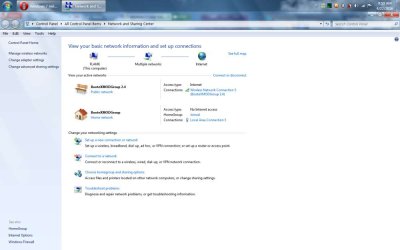
I did the next most logical thing. Added a second WIFI modem for Internet, Keeping Office lan Untouched.
The office lan is set as HOME, connected to machine via Ethernet
The Internet is set as PUBLIC, connected to SAME laptop, via WIFI adapter.

Please check the screenshots for details.
Does this still pose a risk?
 

Attachments

  • New Bitmap Image (3).jpg
    New Bitmap Image (3).jpg
    35.2 KB · Views: 1

My Computer My Computer

At a glance

Windows 7 Ultimate 64-bitAMD manchester 3800 x24 GB9800GT (Overclocked)
Computer Manufacturer/Model Number
Self Assembled and fully modded
OS
Windows 7 Ultimate 64-bit
CPU
AMD manchester 3800 x2
Motherboard
MSI K8nGM2-FID
Memory
4 GB
Graphics Card(s)
9800GT (Overclocked)
Sound Card
Realtek Onboard 7.1
Monitor(s) Displays
LG widescreen
Hard Drives
1 TB x 2 RAID 0, Gives easily 240 MB/s.
Seagate 7200.12
Case
Self Modded,Acrylic side pannel with etching, DVD window,LED
Cooling
Slef Casted aluminium heatsinks, P4 CPU Heatsink on OC'd GFX
Internet Speed
HSDPA 3G
Are you any more safer to outside like this?!

Just use access control of your router, and/or use static IPs with no gateway set for Internet-restricted PCs? 1 router should be enough. If not just get a small business firewall if you ask me.
 

My Computer My Computer

At a glance

Windows 7 Ultimate x64 SP1AMD Phenom 2 1090T2x8GB Kingston HyperX Fury Black 1600Mhz Unga...MSI GTX 970 Gaming 4G
Computer type
PC/Desktop
Computer Manufacturer/Model Number
Custom Build
OS
Windows 7 Ultimate x64 SP1
CPU
AMD Phenom 2 1090T
Motherboard
Gigabyte GA-890FXA-UD5
Memory
2x8GB Kingston HyperX Fury Black 1600Mhz Unganged
Graphics Card(s)
MSI GTX 970 Gaming 4G
Sound Card
Realtek On-Board HD 7.1 Audio / Logitech G35
Monitor(s) Displays
3xAcer GD245HQ
Screen Resolution
1920x1080
Hard Drives
Samsung 850 Pro 512GB SSD - OS /
WD Caviar Black SATA 3 - 1 TBx2 - Dynamic RAID 0 /
WD Caviar Green SATA 2 - 640GBx2 - Dynamic RAID 0 /
WD Caviar Green SATA 2 - 640GB - Internal Backup /
Seagate Barracude SATA 3 - 3TB - External Backup/ Sync
PSU
HighPower 1000W
Case
Cooler Master HAF 932
Cooling
Noctua NH-D14
Keyboard
Logitech G19
Mouse
Logitech G500
Internet Speed
100/4 Mbit Cable (100GB quota)
Antivirus
ZoneAlarm Extreme Security / MBAM Pro / MBAE Free / SAS Free
Browser
IE 11 - Firefox - Chrome
Other Info
Logitech F710/ G27/ G940/ Z5500 // TrackIR 5 // Nvidia 3D Surround Vision
Back
Top