How to solve serious problems with WLMail

NEJLIKA

New member
Local time
9:19 PM
Messages
5
Location
UK
Hi, I am new there, and I have the very serious problems with Windows Mail, which I have no idea how to get rid of.:cry:
My Mail program is exactly like a little child. I never know why, suddenly becoming tired and stop working, mostly restarts, but not always. It keeps doing this unexpectedly and I loos all my changes in stored emails. Other time it often freezes, and many times all computer become frozen, I even cannot to shut down because courser CANNOT GO TO THE START buton, is bouncing on the edge of start band! I must use Alt, Ctrl and Delete to go out of the situation. The program does not like my emails with notations about gardening and plants. When I only start notate something about plants in my garden or other plants, first does not take any changes in text or pasting a text or picture, is not possible to make anything, or freezes, and does not allow me to save anything, and after sometime a half hour 'stops working' and restarts, but not always restarts. But many times stops working when I only start to work with it. They are days that WLM is working almost properly, but after many hours mostly starts to be tired and stops working!
From time to time some folders, which I use and need most, simply DISAPPEAR! If I remember what messages were there, I can sometimes find them by searching, which is rather good - and lost messages coming in searching results from nowere, so I move them to the folders which I was compelled to make new. And sometims an open message is suddenly "sent", i.e. looks like a copy of the sent message, but it was not any reciepient on it, so could not be sent really. But you can not make then any changes, unless you 'forward' the message without sending it. All the time I have terribly and often unexpected problems, not all I even remember to describe. I NEVER in my computer life (since 1996) had alike problems in any other Windows and Mail Programs. I am sick from these problems, I'm doing my notations sometimes many times again and again and I am even physically tired of it. All my gardening, handcraft and gemstones (all my hobbies) notations are in Storage Folders. What is very strange, when I'm doing the same type of notations about jewellery making or gemstones info and copy orders connected with them, also with pictures in the messages, I can put in the message so many I want and all is OK. Why for God sake gardening and plants are banned by Windows Mail????:mad:
Please, maybe somebody has similar problems, is WLM completely worthless and nothing we can do?? My son electronic master of science advised me to buy Microsoft Outlook, but I am not bussinesman or student, maybe it is constructed in the same terribly way or too much complicated and I will pay £100 for having the same problems! Please, try to help somebody!


Anna
 

My Computer

OS
Windows 7 Home Premium 32 and 64bit
Hi Anna. It seems to me your system problems may be bigger than just with Windows Mail.
Do you have a good anti-virus and anti-malware package installed and running?

Not sure how old your system is but if the problems are fairly widespread ie. odd things happening elsewhere as well, maybe it is overdue for a total refresh.

As a minimum, do a total virus/malware scan of your system with something like MS Defender Offline scanner and resolve any issues found. Then suggest you uninstall and re-install WLM.

If that doesn't fix the issues you are having then a total system refresh - restore to factory settings if you are able or re-install the OS, your apps and data from scratch.

Sometimes it is far more expedient to go back to scratch and start again then spend hours trying to isolate and resolve problems like those you are having.

You will of course want to save all your data so it can be restored onto the refreshed system.

Hopefully you are capable of doing all that, otherwise look to a capable friend or drop it into your local PC Repair shop.

Best of luck for getting this sorted.
 

My Computer

Computer Manufacturer/Model Number
HP Pavilion p6040a
OS
Windows 7 Professional x64, SP1
CPU
Intel Core 2 Duo E7400 2.8GHz
Motherboard
FOXCONN Napa
Memory
4GB
Graphics Card(s)
ATI Radeon HD3540
The computer is brand new, only from some months, Hp i7 and at general super properties. I have excellent anti-all-malware program AVG installed, paid version. I am very affraid to uninstall WLM, I am rather convinced that all my messages will disappeare, what guarantee I have they will be restored after reinstalling? I think that WLM program is simply completely bad constructed, I've red many complains on internet, but nobody talked about problems like mines. If somebody knows how Microsoft Outlook works, is it possible to have there many stored messages with many pictures and text together? I have not any such problems with Outlook Express..They do everything only worse!
 

My Computer

OS
Windows 7 Home Premium 32 and 64bit
If the 'Repair Install' doesn't improve things then (I don't know what version you are running but) there is a new version 2012 of Windows Live Essentials (including WLM) recently released. That is an option you may wish to try.

Windows Essentials: Other Programs

I still would not discount malware being on your system given the behaviour you are experiencing. I know you have AVG installed but a second opinion would not hurt. Here is the link for instructions and download of Microsoft Offline Defender if you wish to check it out:

What is Windows Defender Offline?

Hope that helps some, otherwise I'm sure other members of this community will offer some additional advice.

Best regards.
 

My Computer

Computer Manufacturer/Model Number
HP Pavilion p6040a
OS
Windows 7 Professional x64, SP1
CPU
Intel Core 2 Duo E7400 2.8GHz
Motherboard
FOXCONN Napa
Memory
4GB
Graphics Card(s)
ATI Radeon HD3540
Your advices did not help :(

I installed a new version 2012 of WLMail like somebody recommended. Later I tried to Paste the new text on a message already with another text and pictures. One line of text appeared after about 10 min, but at least WLM did not stopped working. Just now I try to paste another line. It went already about 30 min and the text is not pasted, and WLM still "working", but is frozen.
I checked computer for malware - nothing, AVG is VERY effective.
What is very strange, WLM does not take copied text (even from another message) but I can write a text myself! But I have much a text and it takes too much time to write by hand, what for we have Copy and Paste functions? Unfortunately, those functions in WLM are very limited, you can paste a text only at the beginning, but on the longer message it is not any more possible. Any correcting or changes in text as well.
To reinstall whole OS is beyond me. It takes WEEKS to make all again how I want to have in computer and I am really afraid that most my important files disappeared, especially from WLM. I have there ALL important information, about my home site, travels, craft hobbies and many others. I can't in the same easy way store information anywhere only in post program, in Outlook Express it was NOT ANY PROBLEM to put text and pictures on the message and not to send it but store. Word is hopeless for that, too difficult rules to me and many things are impossible to do. This version 2010 is of coarse worse for ordinary people - f.ex. you can not 'Select All' if you want copy all page - at least I can't find the option. They do those programs for IT genius, I am not stupid, I use to manage most of problems in PC myself, many years (since 1996), but Windows 7 and Word 2010 I cannot cope. The programs in Windows 7 and even WLM have some small nice properties, but problems are much bigger than advantages. Thank you for advices. I am really curious if it is anybody who has alike problems with WLM? (my text is still not pasted on the message and all WLM is frozen, I must use Task Manager again!) No, I don't need it - just now WLM stopped working.. the message came and all disappeared not saved, as usual, again! When I started WLM again, the program and all computer was frozen, again I considered to shut down computer - but I would loose even this post! So I desperately pushed Ctrl, Fn and Windows key on keyboard and miraculous all started working! But I have got yellow marks in text on every n letter! Why I have no idea.. I cannot see what is to do more and in Windows 8 looks like that can be even worse
 

My Computer

OS
Windows 7 Home Premium 32 and 64bit
Perhaps one more suggestion you may wish to try..especially as you just mentioned you are getting sporadic yellow fonts throughout your text.

Turn OFF the option within AVG to scan emails - make sure you leave the main protection on within AVG, it's just the scanning of emails that you want to stop.

See if that improves things for you with WLM

Reason being, I found several references to anti-virus software corrupting emails when they are scanning them. AVG was one that was mentioned and specifically stated that font color and size were being messed up.

Please report back.
 

My Computer

Computer Manufacturer/Model Number
HP Pavilion p6040a
OS
Windows 7 Professional x64, SP1
CPU
Intel Core 2 Duo E7400 2.8GHz
Motherboard
FOXCONN Napa
Memory
4GB
Graphics Card(s)
ATI Radeon HD3540
I disabled scanning of emails by AVG, but I even do not much believe that it could be reason to WLM's problems, all wrong happens in emails under construction which[SIZE=+0] [/SIZE]have never been sent, and AVG scans only letters when sending.
One more symptom, which I forgot to tell about - when WLM get "tired", the emails on which I just try to put some content, loosing upper part with ‘Subject’ and [SIZE=+0]‘[/SIZE]Send’ options, or even all upper part, i.e. this part becoming BLACK, but not all letter. Also main window of the WLM becoming even more black, you can not se ANYTHING, only icons on the upper list. I have never in my life seen anything like that in any program. One more thing - "tired" WML try to make difficult for me to paste any pictures in the email - so when I click 'Insert single picture' I get the window from My Pictures with only file names under Thumbnails but thumbnails ARE EMPTY!! When I close the application and open again after longer time, all is NORMAL again!! But not always, many times I must restart computer to get WML normal again.
Maybe I should write to Microsoft (where??) and describe detailed all those strange things (it would be difficult to me, I have not so good language skills) and I wonder what they would say – probably would ignore my letter thinking that somebody make jokes! I do not think they know well their mail application really, otherwise maybe somebody would correct it. Greetings, Anna
:banghead:
 

My Computer

OS
Windows 7 Home Premium 32 and 64bit
I checked computer for malware - nothing, AVG is VERY effective.

There is no 100% effective antivirus.. please understand that you telling that AVG is VERY effective.. but what is "very".. and how can you tell that?
actually i had many problems with AVG.. in this forum many recommends free microsoft security essentials (because its free it doesnt mean its bad product)
I use WLM as my main mail client software and dont have any problems with it.
Its seems that problem lies somewhere deeper with your pc.. after you bought it did you remove bloatware? HP ussualy puts it with defualt install. or even better did a clean reinstal? this forum has good tutorial on it.
there is good specialists on this forum please follow their advice .. at least check your system with microsoft windows defender offline.
 

My Computer

Computer type
PC/Desktop
Computer Manufacturer/Model Number
Self Built PC
OS
Windows 7 pro 64bit. (SP1)
CPU
Intel core I5 2400
Motherboard
Gigabyte H61
Memory
8GB DDR3 Kingston
Graphics Card(s)
Gigabyte GF GTX650OC
Sound Card
Realtek HD audio
Monitor(s) Displays
LCD 20"
Screen Resolution
1600x900
Hard Drives
INTEL SSD 320 80GB +Seagate 7200.12 1TBx3
PSU
Coolermaster RX450W
Case
Coolermaster atx case
Cooling
stock cooler
Keyboard
logitech
Mouse
logitech
Internet Speed
FTTD 100mbps
I say AVG is very effective, because when I had in past other antivirus like f.ex. Norton, Panda and dont now remember more - so I often got some virus or even rootkit. I never get SPAM to WLM, possibly thanks to AVG. In Sweden (I live in 2 countries) my computer has Norton Internet.. installed and I am getting all the time massive SPAM! And from time to time I get also virus or other malware which I discover scanning on line with other programs, but often I use Norton on line to get rid of it, or doing it myself.
If you have not any problem with WLM, it is because you only sent short emails and receive alike, but you probably do not store rich informations from Internet in the application. But if WLM has Storage Folders, it means to me, that I should be able to store information there, which I always did on Outlook and previous post programs in older versions of Windows. Probably if I used the WLM only to sent emails, even with pictures but wouldn't store them and make changes, maybe it would not be problems. I wanted continue using mail application in the same way as before in previous versions of WINDOWS. Maybe WLM is constructed to not allow me for storing information, so why it has Storage Folders? To emailing I use Yahoo, I need Mail program almost only to store information, because it was always most easy and quick to do, and more - I can do many folders for my information (even bank data and transactions etc.) and it is VERY EASY to find quick any information I need. I copy as well my transactions when buying on Internet (which I do all the time, even food) and I have easy control on all my orders. If Mail program works properly, it is really the best for somebody like me, who wants copy from Internet information about many items, like plants, gemstones or knitting patterns and several more topics, because it was always easy to copy and paste text and even pictures on email and add more information later on the same topic, or make current notations about t.ex. gardening, illustrated with pictures - now I almost can not do it! Besides all problems I described, WLM also take away many (but not all!) pictures from emails and put them to speciall created its own folders, and I have got big problems with finding them! It exists s.c. Photo emails i WLM, but when I try to use it, it wants me to make Photo Album, which I absolutely do not want, because I want have every picture in a text, described, i.e. with text under, and their album make pictures in "block" and text can be only to whole a block.

Lately, since some days, Internet Explorer keeps stopping working as well, but only just after I start computer. When I'm try to click on many websites, even many times, they coming with big delay, but they are frozen and I can't get nothing what is to click on and soon I get message, very alike to WLM, that "Internet Explorer stopped working", "Windows tries to solve problem" "Do you want close the program?" so they give me options, to close program or wait. Waiting you could in infinity, so I close, many times, and after a while and many clicking all suddenly starts work normal! I do not know if it can be problem at provider or my all system is completely corrupted. I could maybe leave computer at Currys' workshop to check it (I purchase computer there), but when I did it once before, my bank informed me, that it was tries to hack my credit card! And the Bank changed the card. Also happened once, some years ago, that my hard disc crushed in workshop and I LOST ALL MY DATA! So I'm afraid to leave computer in any workshop..
 

My Computer

OS
Windows 7 Home Premium 32 and 64bit
Hi Anna, It is very difficult (at least for me) to help resolve the problems you describe via this forum.

You need to get a technical support person to sit along side you to:
1. Confirm you are using the WLM product correctly (for the purpose it was designed)
2. To confirm and understand the issues you are experiencing.

If you are not happy to leave your PC with a repair shop then get in touch with a service company that will send a support person to your home.

G.
 

My Computer

Computer Manufacturer/Model Number
HP Pavilion p6040a
OS
Windows 7 Professional x64, SP1
CPU
Intel Core 2 Duo E7400 2.8GHz
Motherboard
FOXCONN Napa
Memory
4GB
Graphics Card(s)
ATI Radeon HD3540
I have Win7, Mozilla Firefox and WLMail2011.

Hello and please pardon my intrusion but my problem is EXACTLY as Nejlika's. But the problem I want to solve right now is that my email is perpetually on offline since a few days ago, and it stops the incoming mail from coming in. I've tried several things and no results.

I went to the email options and clicked on connection but don't understand the resulting windows. In the 2 years of this email, I never had this "offline" thing before. I have AV avast! and often scan with Cclean, Malwarebytes anti malware, and other MS provided cleaners and anti virus and spies.

Hopefully I'll hear from a kind soul with help? Thanks ever so much! Adela

P.S. For Nejlika I send this great link: Free Email Tutorials & About Free Email Tutorials
 

My Computer

Computer Manufacturer/Model Number
Dell Inspiron 560 Desktop
OS
Windows 7 Home, 64 bit.
Monitor(s) Displays
LCD
If Firefox is your default browser make sure Internet Explorer is not checked to work offline.
 

My Computer

Computer Manufacturer/Model Number
Put together
OS
Win7 Pro-64 Bit
CPU
i7-2600-3.4GHz
Motherboard
ASRock Z68M
Memory
8 GIG DDR3
Graphics Card(s)
onboard
Sound Card
onboard
Hard Drives
Seagate 1TB 7200RPM
PSU
680 W
Case
black
Cooling
stock fans
Keyboard
Microsoft
Mouse
Microsoft optical
Thank you BrightBlessings, but what I don't know how to do, is bring back IE that came with the Win7 so that I can go in and uncheck that terrible offline thing.

When I tried finding it in >start >search, it gave these:

Internet Explorer (with add-ons)
Internet Explorer

When I chose the first one it only showed an explanation of IE function or something.

The second IE transformed itself in www.babylon.com and now I can't get rid of this Babylon.

Would you know how to get back my IE so I can uncheck that thing please?

Thanks so much again! Adela

P.S. Also....is it possible to change the background of this thread from black to white? Thanks.
 

My Computer

Computer Manufacturer/Model Number
Dell Inspiron 560 Desktop
OS
Windows 7 Home, 64 bit.
Monitor(s) Displays
LCD
have you tried doing the repair that roadrunner suggested to you? installing wlm 2012 probably would not fix this problem because 2012 has its own bugs. Try to do the repair and see what happens, you will not loose anything
 

My Computer

Computer type
PC/Desktop
Computer Manufacturer/Model Number
Dell Computers
OS
Windows 7 Pro 32/64 bit and Windows 10 Pro 32 Bit/64bit
Memory
4gigs
Graphics Card(s)
AMD Radeon HD and Nvidia
Monitor(s) Displays
Samsung 24". INC 19". Dell 22 ". Dell 17" & 19"
Thank you Robin, you mean the repair at Programs in Control Panel? Oh yes, I did this even before I wrote here. :) Adela
 

My Computer

Computer Manufacturer/Model Number
Dell Inspiron 560 Desktop
OS
Windows 7 Home, 64 bit.
Monitor(s) Displays
LCD
Thank you Robin, you mean the repair at Programs in Control Panel? Oh yes, I did this even before I wrote here. :) Adela
Did you click on windows live essentials and did the repair from there when it came up with the option to repair or uninstall?
 

My Computer

Computer type
PC/Desktop
Computer Manufacturer/Model Number
Dell Computers
OS
Windows 7 Pro 32/64 bit and Windows 10 Pro 32 Bit/64bit
Memory
4gigs
Graphics Card(s)
AMD Radeon HD and Nvidia
Monitor(s) Displays
Samsung 24". INC 19". Dell 22 ". Dell 17" & 19"
Yes I did Robin. I went to Control Panel, clicked on Programs Uninstall a Program, clicked on WLMail, and clicked on Repair and I immediately restarted the computer. Since I learned how to do this I do it each time I find a glitch but...it rarely works on all! :) Adela
 

My Computer

Computer Manufacturer/Model Number
Dell Inspiron 560 Desktop
OS
Windows 7 Home, 64 bit.
Monitor(s) Displays
LCD
And it did not fix the mail problem?
I suggest u do a backup of wlm, then uninstall the program completely, reboot and install 2012 and see if this fixes it you can look here for the pdf i posted on how to back it up. I am on my ipad so i cannot attach it here
http://www.eightforums.com/browsers-mail/32676-windows-live-mail-questions.html

Scroll down till you see my post with the pdf attachment
You might have to sign into windows 8 to get it
To restore you use import instead of export. In the tutorial session here there is also a tutorial on backing up windows live mail
 

My Computer

Computer type
PC/Desktop
Computer Manufacturer/Model Number
Dell Computers
OS
Windows 7 Pro 32/64 bit and Windows 10 Pro 32 Bit/64bit
Memory
4gigs
Graphics Card(s)
AMD Radeon HD and Nvidia
Monitor(s) Displays
Samsung 24". INC 19". Dell 22 ". Dell 17" & 19"
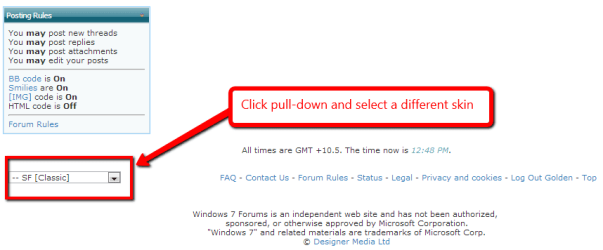
P.S. Also....is it possible to change the background of this thread from black to white? Thanks.
You need to choose a different forum skin....

Capture.PNG
 

My Computer

Computer type
PC/Desktop
Computer Manufacturer/Model Number
Golden Mk. I.4
OS
Windows 10 Pro x64 ; Xubuntu x64
CPU
Intel i7 860 @ 2.80 GHz O/C'ed to 4.0GHz
Motherboard
Gigabyte P55A-UD3R Rev.1. Award BIOS F13
Memory
16GB Corsair Vengance DDR3 @ 661 MHz Dual Channel (9-9-9-24)
Graphics Card(s)
EVGA NVidia GTX 560 1024MB
Sound Card
Realtek Integrated
Monitor(s) Displays
Dual Samsung SyncMaster 2494HS
Screen Resolution
1920*1080 and 1920*1080
Hard Drives
1*Samsung 840 EVO 120GB SSD;
1*OCZ Vertex 2 60GB SSD;
2*Samsung F3 SpinPoint 1TB in RAID0;
1*Samsung F1 SpinPoint 1TB;
2*Western Digital 1TB External USB 3.0
1*Western Digital 500GB External USB 3.0
1*Seagate 500GB External USB 2.0
PSU
Thermaltake ToughPower QFan 750W
Case
Thermaltake Element S VK60001W2Z
Cooling
Corsair H60 Water Cooling, 2*230mm and 2*80mm case fans
Keyboard
Logitech G110
Mouse
Logitech MX518
Back
Top