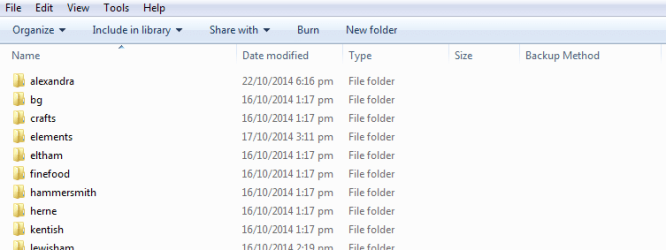
How to specify "Backup Method" in a folder window

hellopaul

New member
Member
Local time
9:12 PM
Messages
39
Hello,

I've been manually backing up a few large folders to DVDs, and I'd like a way to note (on the folders on my hard drives) that these folders have indeed been burnt to DVDs. There's a column header available called "Backup Method", but I can't type anything in the field. There's nowhere in an item's Properties where I can specify this. How can I get information into that field? I'd like to enter the name of the DVD containing the backup. Is this possible, or is this field reserved for the system to write values into?

Thanks,

Paul
 

My Computer My Computer

At a glance

Windows 7 Professional 64 bitIntel i7 3960X overclocked to 4.5GHz64GBQuadro 4000, GTX580
Computer type
PC/Desktop
Computer Manufacturer/Model Number
custom build
OS
Windows 7 Professional 64 bit
CPU
Intel i7 3960X overclocked to 4.5GHz
Motherboard
ASUS P9X79 WS
Memory
64GB
Graphics Card(s)
Quadro 4000, GTX580
Monitor(s) Displays
Dell U2713H 27" + a 23"ish Samsung
Screen Resolution
2560x1440 and 1680x1050
Hard Drives
SSD: 212GB (System)
SSD: 96GB (System cache)
SSD: 480GB OCZ Vector 180 (Cache drive)
Mechanical drive: 1.8TB (Data)
NAS: Synology Diskstation with 2x 3TB
Cooling
Water-cooled, with lots of fans to keep me nice and warm!
Mouse
Wacom
Internet Speed
76Mbps download (~60Mbps actual) ~16Mbps actual upload
Antivirus
AVG Free
Browser
Chrome mainly
Hello Paul mate can I ask why you are backing up to DVD's? as most use an image - back up setup.

Anyway if you prefer the DVD method then it is your choice but could you send a pic of what you are seeing because it is hard to visualize what you mean.
 

My Computer My Computer

At a glance

Desk1 7 Home Prem / Desk2 10 Pro / Main lap A...Desk1 i5 3750K / Laptop i7 GTX 860M / Desk2 i...Desk1 8GB (1866) / Desk2 16GB (1333) / Laptop...Desk 1& 2NVidia GTX 650 & Laptops on board Intel
Computer type
PC/Desktop
Computer Manufacturer/Model Number
Own build (new) Desk1 / Asus ROG Win 7 / Desk2 1st build
OS
Desk1 7 Home Prem / Desk2 10 Pro / Main lap Asus ROG 10 Pro 2 laptop Toshiba 7 Pro Asus P2520 7 & 10
CPU
Desk1 i5 3750K / Laptop i7 GTX 860M / Desk2 i5 2500
Motherboard
Desk1 Asus P877-V / Desk2 Gigabyte H67 UD3H / Laptop ?
Memory
Desk1 8GB (1866) / Desk2 16GB (1333) / Laptop 8Gb DDR3
Graphics Card(s)
Desk 1& 2NVidia GTX 650 & Laptops on board Intel
Sound Card
Desk 1 & 2 -XONAR DG Realtek High Def audio Laptop
Monitor(s) Displays
Desk 1 Benq HD 2450 / Desk2 Philips 24" / Laptop 17.5"
Screen Resolution
1920x1080 D1 & D2 & Laptop 1
Hard Drives
Desk1 Samsung 120GB 830 SSD
Asus ROG 256GB 850 Pro SSD
Desk2 Samsung 840 256 SSD
Toshiba 120GB EVO
PSU
Desk 1 Corsair HX 1050/ Laptop ? / Desk 2 Corsair HX 650
Case
Desk 1 Cooler HAF XM ? Toshiba laptop / Desk2 Coolermaster
Cooling
Fans on all Desk1 -2 Desk2 - all Coolermasters 5 Laptop ?
Keyboard
Desk 1 MS Sidewinder X6 Desk 2 MS Sidewinder X 4
Mouse
Desk 1&2 - Gigabyte MS 900 gamer - laptop - Logitec wireless
Internet Speed
ADSL2+
Other Info
One other Desktop (tester) and spare Toshba laptop both with SSD's
Running Kaspersky 2016 ISS on all machines config'd identically
Logitec audio stereo systems on each machine (x3)
Canon MG5250MFC
Router/modem TP-Link running WPA2SK
I would just add a (B) to the folder name.

And I agree with John - using DVDs in lieu of an external disk is kind of odd. If you want to keep your backups current, you may use a lot of DVDs.
 

My Computer My Computer

At a glance

Vista, Windows7, Mint Mate, Zorin, Windows 8from 1.6GHz Duo to i7
Computer Manufacturer/Model Number
HP, Dell, Gateway, Toshiba - 4 laptops and 2 desktops
OS
Vista, Windows7, Mint Mate, Zorin, Windows 8
CPU
from 1.6GHz Duo to i7
Monitor(s) Displays
2x HP w2207
Hard Drives
5x HDD, 7x SSD, 12x Externals
Keyboard
with trackball - no mices
Mouse
Trackball mice
Internet Speed
DSL 6000
This is the column I'm talking about...Backup Method on the right:

attachment.php


How do I modify it?

I'm not doing a whole-disk backup, just offloading individual jobs. I've also got a 2x3TB RAID1 NAS which is my main backup. But I've got a stack of blank DVDs which I might as well set burning as a secondary backup. But it would be nice to be able to register which things have been backed up (manually) so I know I can safely delete it in future, in the knowledge it's safely on the NAS and a DVD.
 

Attachments

  • BackupColumn.PNG
    BackupColumn.PNG
    6.6 KB · Views: 12

My Computer My Computer

At a glance

Windows 7 Professional 64 bitIntel i7 3960X overclocked to 4.5GHz64GBQuadro 4000, GTX580
Computer type
PC/Desktop
Computer Manufacturer/Model Number
custom build
OS
Windows 7 Professional 64 bit
CPU
Intel i7 3960X overclocked to 4.5GHz
Motherboard
ASUS P9X79 WS
Memory
64GB
Graphics Card(s)
Quadro 4000, GTX580
Monitor(s) Displays
Dell U2713H 27" + a 23"ish Samsung
Screen Resolution
2560x1440 and 1680x1050
Hard Drives
SSD: 212GB (System)
SSD: 96GB (System cache)
SSD: 480GB OCZ Vector 180 (Cache drive)
Mechanical drive: 1.8TB (Data)
NAS: Synology Diskstation with 2x 3TB
Cooling
Water-cooled, with lots of fans to keep me nice and warm!
Mouse
Wacom
Internet Speed
76Mbps download (~60Mbps actual) ~16Mbps actual upload
Antivirus
AVG Free
Browser
Chrome mainly
Oh - and another thing on the subject of backups. I've used Macrium Reflect (the free version) to create images of my system disk (onto another drive). But does this produce an accurate image, if the system is actually running? My concern is this: how can Macrium create an image of system files while those files are open and being used? Hopefully it just figures it out and creates accurate images!

I tried looking through the Macrium forum, and was going to post a question to this effect, but questions are limited to paid users.

- Paul
 

My Computer My Computer

At a glance

Windows 7 Professional 64 bitIntel i7 3960X overclocked to 4.5GHz64GBQuadro 4000, GTX580
Computer type
PC/Desktop
Computer Manufacturer/Model Number
custom build
OS
Windows 7 Professional 64 bit
CPU
Intel i7 3960X overclocked to 4.5GHz
Motherboard
ASUS P9X79 WS
Memory
64GB
Graphics Card(s)
Quadro 4000, GTX580
Monitor(s) Displays
Dell U2713H 27" + a 23"ish Samsung
Screen Resolution
2560x1440 and 1680x1050
Hard Drives
SSD: 212GB (System)
SSD: 96GB (System cache)
SSD: 480GB OCZ Vector 180 (Cache drive)
Mechanical drive: 1.8TB (Data)
NAS: Synology Diskstation with 2x 3TB
Cooling
Water-cooled, with lots of fans to keep me nice and warm!
Mouse
Wacom
Internet Speed
76Mbps download (~60Mbps actual) ~16Mbps actual upload
Antivirus
AVG Free
Browser
Chrome mainly
Oh - and another thing on the subject of backups. I've used Macrium Reflect (the free version) to create images of my system disk (onto another drive). But does this produce an accurate image, if the system is actually running? My concern is this: how can Macrium create an image of system files while those files are open and being used? Hopefully it just figures it out and creates accurate images!

I tried looking through the Macrium forum, and was going to post a question to this effect, but questions are limited to paid users.

- Paul
Yes it is a complete image. Macrium first freezes the image with the VSS service. That allows you to continue to work whilst the image is being written.
 

My Computer My Computer

At a glance

Vista, Windows7, Mint Mate, Zorin, Windows 8from 1.6GHz Duo to i7
Computer Manufacturer/Model Number
HP, Dell, Gateway, Toshiba - 4 laptops and 2 desktops
OS
Vista, Windows7, Mint Mate, Zorin, Windows 8
CPU
from 1.6GHz Duo to i7
Monitor(s) Displays
2x HP w2207
Hard Drives
5x HDD, 7x SSD, 12x Externals
Keyboard
with trackball - no mices
Mouse
Trackball mice
Internet Speed
DSL 6000
Thanks! I suspected it must do something along those lines, else it would be kinda pointless if the images don't work!
 

My Computer My Computer

At a glance

Windows 7 Professional 64 bitIntel i7 3960X overclocked to 4.5GHz64GBQuadro 4000, GTX580
Computer type
PC/Desktop
Computer Manufacturer/Model Number
custom build
OS
Windows 7 Professional 64 bit
CPU
Intel i7 3960X overclocked to 4.5GHz
Motherboard
ASUS P9X79 WS
Memory
64GB
Graphics Card(s)
Quadro 4000, GTX580
Monitor(s) Displays
Dell U2713H 27" + a 23"ish Samsung
Screen Resolution
2560x1440 and 1680x1050
Hard Drives
SSD: 212GB (System)
SSD: 96GB (System cache)
SSD: 480GB OCZ Vector 180 (Cache drive)
Mechanical drive: 1.8TB (Data)
NAS: Synology Diskstation with 2x 3TB
Cooling
Water-cooled, with lots of fans to keep me nice and warm!
Mouse
Wacom
Internet Speed
76Mbps download (~60Mbps actual) ~16Mbps actual upload
Antivirus
AVG Free
Browser
Chrome mainly
...so no suggestions on how to get any kind of data into that Backup Method column, anyone?
 

My Computer My Computer

At a glance

Windows 7 Professional 64 bitIntel i7 3960X overclocked to 4.5GHz64GBQuadro 4000, GTX580
Computer type
PC/Desktop
Computer Manufacturer/Model Number
custom build
OS
Windows 7 Professional 64 bit
CPU
Intel i7 3960X overclocked to 4.5GHz
Motherboard
ASUS P9X79 WS
Memory
64GB
Graphics Card(s)
Quadro 4000, GTX580
Monitor(s) Displays
Dell U2713H 27" + a 23"ish Samsung
Screen Resolution
2560x1440 and 1680x1050
Hard Drives
SSD: 212GB (System)
SSD: 96GB (System cache)
SSD: 480GB OCZ Vector 180 (Cache drive)
Mechanical drive: 1.8TB (Data)
NAS: Synology Diskstation with 2x 3TB
Cooling
Water-cooled, with lots of fans to keep me nice and warm!
Mouse
Wacom
Internet Speed
76Mbps download (~60Mbps actual) ~16Mbps actual upload
Antivirus
AVG Free
Browser
Chrome mainly
Back
Top