How to stop Outlook2003 re-sizing inserted images (if changed Win DPI)

ship691

New member
Member
VIP
Local time
7:03 AM
Messages
136
Hello

How do I stop Outlook 2003 from re-sizing my images when I insert them into an HTML email if I have changed the Window Text DPI size?

Background:
Attached images are fine. And of my Window text DPI is "100%" (96dpi) then no problem. BUT, I have a high resolution screen 1920x1200 and so I *must* resize the text (to at least 120% - I am currently using 125% DPI in fact). And when I change the Windows DPI size, then as soon as Outlook sends the email it re-sizes the image. In fact in the email in the Sent folder the images is already (25%) too large. And if I forward it, then it gets larger by a further 25%. Nightmare!

Mostly I am using JPG files (or PNG) and Photoshop or FSCapture or Xara to create my graphic images. I have tried changing the file's DPI setting by using IrfanView up to 120x120 DPI, but this failed to help.
I also tried using GIF images - which do not appear to even have any internal DPI setting but they get made larger in exactly the same way.

This has been problem for me for many years and I have tried various things over the years but so far NOTHING WORKS.

Any suggestions?

J

P.S. If not please supply the name of the person I need to shoot at Micro$oft.
 

My Computer My Computer

At a glance

Windows 7 x64 Professional (SP1)Intel Core i5 CPU 750 @2.67GHz8GBATI Radeon HD 5700 series
Computer type
PC/Desktop
Computer Manufacturer/Model Number
custom
OS
Windows 7 x64 Professional (SP1)
CPU
Intel Core i5 CPU 750 @2.67GHz
Motherboard
Intel
Memory
8GB
Graphics Card(s)
ATI Radeon HD 5700 series
Hard Drives
INTEL SSD ATA 256GB

My Computer My Computer

At a glance

Windows 7 Home Premium 64 bit sp1Intel i5 3570 3.4Ghz Ivy Bridge SKT 1155 quad...G-Skill Rip Jaws 16Gb (8x2) DDR3 -1600 PC3 12...Gigabyte NVIDIA GT610 1Gb DDR3 810/1200 PCI-E...
Computer type
PC/Desktop
Computer Manufacturer/Model Number
Self built using existing case
OS
Windows 7 Home Premium 64 bit sp1
CPU
Intel i5 3570 3.4Ghz Ivy Bridge SKT 1155 quad core
Motherboard
Gigabyte Z77-HD3 SKT 1155 2xSata 3, 4x USB 3.0
Memory
G-Skill Rip Jaws 16Gb (8x2) DDR3 -1600 PC3 12800 CL 10 red
Graphics Card(s)
Gigabyte NVIDIA GT610 1Gb DDR3 810/1200 PCI-E 2.0 Silent
Sound Card
NVIDIA High Definition & Realtech High Definition Audio
Monitor(s) Displays
2 x Philips 226V4L 16:9 aspect ratio
Screen Resolution
1920 x 1080 HD
Hard Drives
Samsung 840 Pro 256gb SSD, SATA 3.
Hitachi Touro Portable 1tb, USB 3.0 HDD used for image b/ups.
PSU
Corsair VS450
Case
Codeng
Cooling
PSU fan & CPU fan
Keyboard
Logitech
Mouse
Logitech Wireless trackball M570
Internet Speed
Wireless 3G. 3mg down & 550kb up.
Antivirus
Bitdefender Internet Security 2020
Browser
Opera (Current Version) & Firefox
Other Info
MS Office 2013 Pro. Davis weather station software. MGE Nova 600 avr UPS.
I have now upgraded to Outlook2010 through work. Can you believe it - it's STILL exactly the same problem.
And no, nothing on that pages works.

On that page it suggested that I use IrfanView to change the DPI of the file itself. I tried this but it didnt help. In fact I tried JPG files with both 96DPI and 120DPI. But both time my images got make larger by Outlook(2010).

What very NEARLY works is to make the image SMALLER before sending it, which very nearly cancels out the fact that Outlook make my image 125% large at the time of sending IRRESPECTIVE of their DPI setting. However the correct multiple of pixels simply isn't available. So all JPG images that are sent embedded in an email arrive either slightly too small or slightly too large.

And yes, I can sent my emails from say Gmail, and yes the embedded images that they contain arrive perfectly sized. However I don't want my clients replying to my personal email address (!) but when I *forward* the html that contains the image... guess what - ALL the images - including the GIF images are now 25% larger than they should be.

Total nightmare - in both Outlook2003 AND Outlook2010.
 

My Computer My Computer

At a glance

Windows 7 x64 Professional (SP1)Intel Core i5 CPU 750 @2.67GHz8GBATI Radeon HD 5700 series
Computer type
PC/Desktop
Computer Manufacturer/Model Number
custom
OS
Windows 7 x64 Professional (SP1)
CPU
Intel Core i5 CPU 750 @2.67GHz
Motherboard
Intel
Memory
8GB
Graphics Card(s)
ATI Radeon HD 5700 series
Hard Drives
INTEL SSD ATA 256GB
To recap, here's the current situation.

1. I have now (through work) upgraded from Outlook2003 to Outlook2010. But the exact same problem remains. [NIGHTMARE.]

2. my Windows text size DPI is set to "125%"
which it calls "Medium" and
which is "9 point Segoe UI at 120 Pixels per inch"
This allows me to:
a) Use readily view Xara at "1 pixel per pixel" by setting using the scroll wheel to zoom to 80%
b) Have text in my Window application at a half-comfortable viewing size

NEW TESTS
I have now re-run various experiments.
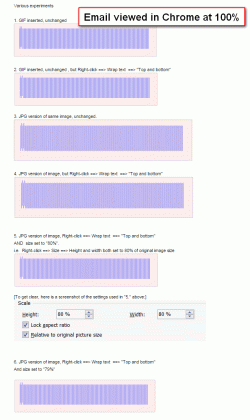
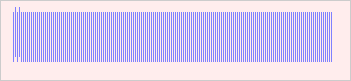
I have created a GIF of 351 x 80 pixels in size, with a series of vertical stripes which are exactly 1 pixel wide.
And I have created a JPG of exactly the same thing (at 100% quality).

I want the email that results contain embedded images that are 351 x 80 pixels, and have un-blurred vertical lines.

[ Btw, as you see I have set "Wrap text" in Outlook to "Top and bottom" in almost all instances. The only visible effect of this seems to be to cause the images to become indented by exactly 2 pixels. ]

Here is a shot of the email that is received in Gmail, with Chrome at a 100% zoom (and MSIE at 100% zoom renders in exactly the same way).

What happens is:

See "1." and "2."
The GIFs arrive at 100% of the correct image size: i.e. 351 x 80 pixels.
(And so have nice clean vertical lines on the images).

However, all the JPGs are a nightmare.

"3."
If I do nothing to the JPG it arrives at 439 x 101 pixels

"4."
Wrap text setting has not effect

"5."
80% size before being sent, creates an image 1 pixel too wide 352 instead of 351 pixels in Chrome and almost every pixel of the image is blurred as a result.

"6."
79% size before being sent creates an image of 346 pixels wide instead of 351, i.e. it is a full 5 pixels too small.

J
 

Attachments

  • RESULT_email_viewed_in_gmail_n_chrome.gif
    RESULT_email_viewed_in_gmail_n_chrome.gif
    57 KB · Views: 1
  • blurtest-JPG-resaved.jpg
    blurtest-JPG-resaved.jpg
    3.5 KB · Views: 3
  • blurtest-GIF.gif
    blurtest-GIF.gif
    1.5 KB · Views: 3

My Computer My Computer

At a glance

Windows 7 x64 Professional (SP1)Intel Core i5 CPU 750 @2.67GHz8GBATI Radeon HD 5700 series
Computer type
PC/Desktop
Computer Manufacturer/Model Number
custom
OS
Windows 7 x64 Professional (SP1)
CPU
Intel Core i5 CPU 750 @2.67GHz
Motherboard
Intel
Memory
8GB
Graphics Card(s)
ATI Radeon HD 5700 series
Hard Drives
INTEL SSD ATA 256GB
I've been irritated by this problem and compromising for over 15 years.

For now, the best I can do is seems to be to use GIFs not JPEGs in my emails - at least they arrive at the correct size (even though they get horribly enlarged when forwarded). GIFs work well for things like annotated screenshots.

For artwork transfer once can of course use attachments (or something completely different like FTP or DropBox) but for *visual* communication inside an email, using GIFs is the best I have found so far.

This works well for annotated screenshots and the like, but is horrible for photos. :^[

J


P.S. Is there nothing one can do to the Win 7 registry to stop Outlook2010 from misbehaving like this?
 

My Computer My Computer

At a glance

Windows 7 x64 Professional (SP1)Intel Core i5 CPU 750 @2.67GHz8GBATI Radeon HD 5700 series
Computer type
PC/Desktop
Computer Manufacturer/Model Number
custom
OS
Windows 7 x64 Professional (SP1)
CPU
Intel Core i5 CPU 750 @2.67GHz
Motherboard
Intel
Memory
8GB
Graphics Card(s)
ATI Radeon HD 5700 series
Hard Drives
INTEL SSD ATA 256GB
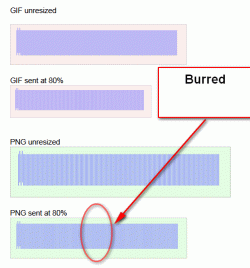
And btw, PNG images seem to be treated in exactly the same way by Outlook as JPGs. :^[
 

Attachments

  • delme105.gif
    delme105.gif
    22.6 KB · Views: 2

My Computer My Computer

At a glance

Windows 7 x64 Professional (SP1)Intel Core i5 CPU 750 @2.67GHz8GBATI Radeon HD 5700 series
Computer type
PC/Desktop
Computer Manufacturer/Model Number
custom
OS
Windows 7 x64 Professional (SP1)
CPU
Intel Core i5 CPU 750 @2.67GHz
Motherboard
Intel
Memory
8GB
Graphics Card(s)
ATI Radeon HD 5700 series
Hard Drives
INTEL SSD ATA 256GB
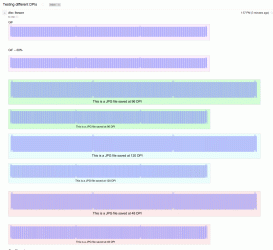
PS. I have done further tests with my Windows 7 text DPI size set to "125%" and setting the file's internal DPI setting for JPG files at different settings.

It turns out that contrary to various blogs & forums that Outlook2010 seems to be completely ignoring the file's DPI!

If you look closely at the attached screenshot (that was taking from Gmail, reading an email, with the browser set at 100% zoom, you will see that all the JPG images that have not been resized arrive at 1250pixels and that those image that I manually set to 80% zoom in Outlook are blurred because they arrive at 1001 pixels (instead of 1000 pixels).

Nightmare.

Any suggestions?
 

Attachments

  • delme_test02.gif
    delme_test02.gif
    108.6 KB · Views: 0

My Computer My Computer

At a glance

Windows 7 x64 Professional (SP1)Intel Core i5 CPU 750 @2.67GHz8GBATI Radeon HD 5700 series
Computer type
PC/Desktop
Computer Manufacturer/Model Number
custom
OS
Windows 7 x64 Professional (SP1)
CPU
Intel Core i5 CPU 750 @2.67GHz
Motherboard
Intel
Memory
8GB
Graphics Card(s)
ATI Radeon HD 5700 series
Hard Drives
INTEL SSD ATA 256GB
Back
Top