How to Stop Reboot on BSOD?

imacken

New member
Power User
VIP
Local time
12:19 AM
Messages
288
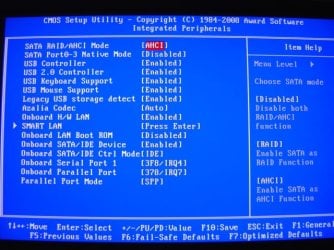
When I set my Onboard SATA Ctrl Mode to AHCI (from IDE) I get a BSOD that I can't see because the system immediately reboots.
How can I get it to hold on the BSOD error?
 

My Computer My Computer

At a glance

Windows 7 64-bitIntel i7 920 @ 4GHz6GbnVidia GTX 285
OS
Windows 7 64-bit
CPU
Intel i7 920 @ 4GHz
Motherboard
Asus P6T Deluxe V2
Memory
6Gb
Graphics Card(s)
nVidia GTX 285
Sound Card
X-Fi Extreme Audio PCIe
Screen Resolution
1900x1200
When I set my Onboard SATA Ctrl Mode to AHCI (from IDE) I get a BSOD that I can't see because the system immediately reboots.
How can I get it to hold on the BSOD error?

Why do you need to? if its bsod'ing you can go into c:\windows\minidump and look for a *.dmp file. thats the log file of what happened. zip it and up load it so we can analyse it for ya.

Let us know if you need help with either zipping or uploading

Ken

edit: if its not in minidump search for *.dmp
 

My Computer My Computer

At a glance

Win 8 Release candidate 8400[email protected]4 gigsNvidia 9600M
Computer Manufacturer/Model Number
HP Pavillion dv-7 1005 Tx
OS
Win 8 Release candidate 8400
CPU
[email protected]
Memory
4 gigs
Graphics Card(s)
Nvidia 9600M
Sound Card
HD built-in
Monitor(s) Displays
17" Wxga
Screen Resolution
1440x900
Cooling
none
Internet Speed
45Mb down 5Mb up
you could try:

control panel >> system and security >> system >> advanced system settings >> startup and recovery settings >> untick 'auto restart' box

(although there's probably a quicker way to get there :p)
 

My Computer My Computer

At a glance

ultimate 64 sp1i5 2500K [email protected]8 gigs GSkill Ripjaws 1600amd hd6950
Computer Manufacturer/Model Number
mickey megabyte 1234
OS
ultimate 64 sp1
CPU
i5 2500K [email protected]
Motherboard
MSI P67A-GD53
Memory
8 gigs GSkill Ripjaws 1600
Graphics Card(s)
amd hd6950
Sound Card
creative x-fi gamer
Monitor(s) Displays
samsung 24"
Screen Resolution
1920x1080
Hard Drives
ocz vertex 2e 60 gig, samsung f3 1tb, buffalo 2tb ext
PSU
antec 550
Case
antec three hundred
Cooling
i'm a cooling fan
Keyboard
saitek eclipse ii
Mouse
logitech g3
Internet Speed
about 4 Mbps
Other Info
i love win7
If you press f8 during startup there is menu there that has it too I think

I had the same problem with mine a while back I had to change my Bios settings back to IDE
 

My Computer My Computer

At a glance

,Windows 7-64.7600.16385 UltimateAMD Athlon(tm) 64 X2 Dual Core Processor 4800...Geil 4 Gig DDR2 800 PC2-6400 (400 MHz)ATI Onboard 3200
Computer Manufacturer/Model Number
Gigabyte Asus
OS
,Windows 7-64.7600.16385 Ultimate
CPU
AMD Athlon(tm) 64 X2 Dual Core Processor 4800+, 2500
Motherboard
GA-MA78G-DS3H
Memory
Geil 4 Gig DDR2 800 PC2-6400 (400 MHz)
Graphics Card(s)
ATI Onboard 3200
Sound Card
ATI High Definition Audio Device
Monitor(s) Displays
Acer 22"
Screen Resolution
1680x1050
Hard Drives
1 x120 Gig
1 X 80 Gig
PSU
550 watt
Case
Cooler Master
Keyboard
Wireless Microsoft
Mouse
Wireless Microsoft
Internet Speed
3 Meg down .5 up
Other Info
BIOS Version/Date Award Software International, Inc. F8, 12/08/2009
This is a known issue on some boards / BIOSs. If you don't have the "SATA/RAID" drivers installed, you will get a BSOD if you try to switch. I will post the workaround if I get time but I would go in this direction.

This may help

workaround
 

My Computer My Computer

At a glance

Windows 7 Professional x64Intel Core i7 8604GB DDR3 Mushkin 1600Mhz @ 7-8-7-20MSI GTS250 1GB DDR3 Twin Frozr
Computer Manufacturer/Model Number
Keeps changing - (Custom)
OS
Windows 7 Professional x64
CPU
Intel Core i7 860
Motherboard
Gigabyte GA-P55-UD4P
Memory
4GB DDR3 Mushkin 1600Mhz @ 7-8-7-20
Graphics Card(s)
MSI GTS250 1GB DDR3 Twin Frozr
Sound Card
Onboard realtek
Monitor(s) Displays
Samsung SyncMaster 24" P2450 + Samsung 20" 2033
Screen Resolution
1920 X 1080 and 1600 X 900 (#2 system 1440 X 900)
Hard Drives
Patriot Inferno 120GB SSD + 3 WD Blue 640GB drives
PSU
Corsair 750 HX Modular
Case
Lancool PC-K62
Cooling
Cooler Master TX3 CPU cooler and 4-140mm and 1-120mm case
Keyboard
Gigabyte USB keyboard
Mouse
Microsoft wireless laser mouse 5000
Internet Speed
7 Mb down 1.5 up
Other Info
System #2: AMD Phenom II X6 1055T (Freezer 7 Pro cooler) - Gigabyte 880GMA-UD2H - WD 500GB Black - 9500GT (1GB) 500W OCZ modular PSU - Antec 200 case. System #3 (LapTop) Core 2 Duo T6670 - 320GB 7200RPM HD - 4GB DDR3 RAM.
Thanks guys. I solved the BSOD restart with
"Change the value data in the AutoReboot value to 0 (zero), instead of 1, in the following key:
HKEY_LOCAL_MACHINE\SYSTEM\ControlSet001\Control\CrashControl".

The AHCI thing is weird though. My HDDs are AHCI enabled in BIOS and that's OK, but when I change 'Onboard SATA Ctrl Mode' to AHCI (from IDE) I get a BSOD. I thikn this affects the CD/DVD drives only - I might be wrong on that!

I've attached a BIOS screenshot. (My settings also have SATA mode set to Native - not as per image.)
 

Attachments

  • 21o6d68.jpg
    21o6d68.jpg
    66.2 KB · Views: 213

My Computer My Computer

At a glance

Windows 7 64-bitIntel i7 920 @ 4GHz6GbnVidia GTX 285
OS
Windows 7 64-bit
CPU
Intel i7 920 @ 4GHz
Motherboard
Asus P6T Deluxe V2
Memory
6Gb
Graphics Card(s)
nVidia GTX 285
Sound Card
X-Fi Extreme Audio PCIe
Screen Resolution
1900x1200
Glad you got it working. Have a good day!
 

My Computer My Computer

At a glance

Windows 7 Professional x64Intel Core i7 8604GB DDR3 Mushkin 1600Mhz @ 7-8-7-20MSI GTS250 1GB DDR3 Twin Frozr
Computer Manufacturer/Model Number
Keeps changing - (Custom)
OS
Windows 7 Professional x64
CPU
Intel Core i7 860
Motherboard
Gigabyte GA-P55-UD4P
Memory
4GB DDR3 Mushkin 1600Mhz @ 7-8-7-20
Graphics Card(s)
MSI GTS250 1GB DDR3 Twin Frozr
Sound Card
Onboard realtek
Monitor(s) Displays
Samsung SyncMaster 24" P2450 + Samsung 20" 2033
Screen Resolution
1920 X 1080 and 1600 X 900 (#2 system 1440 X 900)
Hard Drives
Patriot Inferno 120GB SSD + 3 WD Blue 640GB drives
PSU
Corsair 750 HX Modular
Case
Lancool PC-K62
Cooling
Cooler Master TX3 CPU cooler and 4-140mm and 1-120mm case
Keyboard
Gigabyte USB keyboard
Mouse
Microsoft wireless laser mouse 5000
Internet Speed
7 Mb down 1.5 up
Other Info
System #2: AMD Phenom II X6 1055T (Freezer 7 Pro cooler) - Gigabyte 880GMA-UD2H - WD 500GB Black - 9500GT (1GB) 500W OCZ modular PSU - Antec 200 case. System #3 (LapTop) Core 2 Duo T6670 - 320GB 7200RPM HD - 4GB DDR3 RAM.
Thanks.
I got the BSOD reboot issue working, but haven't got the 'why does W7 BSOD with it set to IDE' issue resolved.
 

My Computer My Computer

At a glance

Windows 7 64-bitIntel i7 920 @ 4GHz6GbnVidia GTX 285
OS
Windows 7 64-bit
CPU
Intel i7 920 @ 4GHz
Motherboard
Asus P6T Deluxe V2
Memory
6Gb
Graphics Card(s)
nVidia GTX 285
Sound Card
X-Fi Extreme Audio PCIe
Screen Resolution
1900x1200
IM

find and upload the minidump

Ken
 

My Computer My Computer

At a glance

Win 8 Release candidate 8400[email protected]4 gigsNvidia 9600M
Computer Manufacturer/Model Number
HP Pavillion dv-7 1005 Tx
OS
Win 8 Release candidate 8400
CPU
[email protected]
Memory
4 gigs
Graphics Card(s)
Nvidia 9600M
Sound Card
HD built-in
Monitor(s) Displays
17" Wxga
Screen Resolution
1440x900
Cooling
none
Internet Speed
45Mb down 5Mb up
Thanks Ken. I neither have a Minidump folder or any *.dmp files on my drive!
 

My Computer My Computer

At a glance

Windows 7 64-bitIntel i7 920 @ 4GHz6GbnVidia GTX 285
OS
Windows 7 64-bit
CPU
Intel i7 920 @ 4GHz
Motherboard
Asus P6T Deluxe V2
Memory
6Gb
Graphics Card(s)
nVidia GTX 285
Sound Card
X-Fi Extreme Audio PCIe
Screen Resolution
1900x1200
but you were getting blue screens right?
 

My Computer My Computer

At a glance

Win 8 Release candidate 8400[email protected]4 gigsNvidia 9600M
Computer Manufacturer/Model Number
HP Pavillion dv-7 1005 Tx
OS
Win 8 Release candidate 8400
CPU
[email protected]
Memory
4 gigs
Graphics Card(s)
Nvidia 9600M
Sound Card
HD built-in
Monitor(s) Displays
17" Wxga
Screen Resolution
1440x900
Cooling
none
Internet Speed
45Mb down 5Mb up
Yep, if I set the Onboard SATA/IDE Control Mode to AHCI then I get the blue screen.
 

My Computer My Computer

At a glance

Windows 7 64-bitIntel i7 920 @ 4GHz6GbnVidia GTX 285
OS
Windows 7 64-bit
CPU
Intel i7 920 @ 4GHz
Motherboard
Asus P6T Deluxe V2
Memory
6Gb
Graphics Card(s)
nVidia GTX 285
Sound Card
X-Fi Extreme Audio PCIe
Screen Resolution
1900x1200
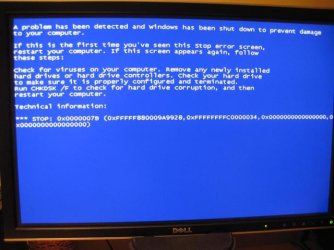
Here's a screen of the BSOD. (Totally useless message, of course!)
No sign of the usual 'dumping' message.
Any ideas?
 

Attachments

  • IMG_0430.jpg
    IMG_0430.jpg
    61.8 KB · Views: 100

My Computer My Computer

At a glance

Windows 7 64-bitIntel i7 920 @ 4GHz6GbnVidia GTX 285
OS
Windows 7 64-bit
CPU
Intel i7 920 @ 4GHz
Motherboard
Asus P6T Deluxe V2
Memory
6Gb
Graphics Card(s)
nVidia GTX 285
Sound Card
X-Fi Extreme Audio PCIe
Screen Resolution
1900x1200
I guess you guys have given up on my problem then!!!! Oh well....
 

My Computer My Computer

At a glance

Windows 7 64-bitIntel i7 920 @ 4GHz6GbnVidia GTX 285
OS
Windows 7 64-bit
CPU
Intel i7 920 @ 4GHz
Motherboard
Asus P6T Deluxe V2
Memory
6Gb
Graphics Card(s)
nVidia GTX 285
Sound Card
X-Fi Extreme Audio PCIe
Screen Resolution
1900x1200
bumpu.jpg
 

My Computer My Computer

At a glance

ultimate 64 sp1i5 2500K [email protected]8 gigs GSkill Ripjaws 1600amd hd6950
Computer Manufacturer/Model Number
mickey megabyte 1234
OS
ultimate 64 sp1
CPU
i5 2500K [email protected]
Motherboard
MSI P67A-GD53
Memory
8 gigs GSkill Ripjaws 1600
Graphics Card(s)
amd hd6950
Sound Card
creative x-fi gamer
Monitor(s) Displays
samsung 24"
Screen Resolution
1920x1080
Hard Drives
ocz vertex 2e 60 gig, samsung f3 1tb, buffalo 2tb ext
PSU
antec 550
Case
antec three hundred
Cooling
i'm a cooling fan
Keyboard
saitek eclipse ii
Mouse
logitech g3
Internet Speed
about 4 Mbps
Other Info
i love win7
I guess you guys have given up on my problem then!!!! Oh well....

Imacken

We never give up just have to get some sleep and a life sometimes. that stop code is a hard drive controller error and is one of the most comman. Are you running a raid, or external HD?

the info can be found here STOP 0x0000007B Blue Screen Errors

Ken
 

My Computer My Computer

At a glance

Win 8 Release candidate 8400[email protected]4 gigsNvidia 9600M
Computer Manufacturer/Model Number
HP Pavillion dv-7 1005 Tx
OS
Win 8 Release candidate 8400
CPU
[email protected]
Memory
4 gigs
Graphics Card(s)
Nvidia 9600M
Sound Card
HD built-in
Monitor(s) Displays
17" Wxga
Screen Resolution
1440x900
Cooling
none
Internet Speed
45Mb down 5Mb up
If you switch it to AHCI you are gonna have to reinstall windows again with it set to AHCI..

This is a known issue on some boards / BIOSs. If you don't have the "SATA/RAID" drivers installed, you will get a BSOD if you try to switch. I will post the workaround if I get time but I would go in this direction.

This may help

workaround
 

My Computer My Computer

At a glance

Windows 8.1 PRO3rd Generation Intel Core i7‐3612QM CPU @ 2.1...8GB DDR3NVIDIA GeForce GT 525M (128 bit), 1GB Grpahics
Computer type
PC/Desktop
Computer Manufacturer/Model Number
DELL VOSTRO 3650
OS
Windows 8.1 PRO
CPU
3rd Generation Intel Core i7‐3612QM CPU @ 2.10GHZ
Memory
8GB DDR3
Graphics Card(s)
NVIDIA GeForce GT 525M (128 bit), 1GB Grpahics
Screen Resolution
1920X1080
Hard Drives
750GB 5400RPM
Thanks again guys, but I'm obviously not explaining myself well here.
I am running with the HDDs on AHCI quite happily. The registry entry for AHCI is fine.
My GA-P35C-DS3R has 2 SATA controllers, one by Intel (4 port) and one by Gigabyte (2 port).
I have my 3 HDDs connected via SATA to the Intel controller and everything is fine.
Normally, I have the Gigabyte controller set to IDE, BUT whenever I change that to AHCI then Windows 7 produces the blue screen above.
The strange thing is that I need to have the Gigabyte Onboard Control set to AHCI to get a Mac OSX86 boot CD to work, and Mac OS works quite happily with either setting.
What is the problem with W7?
 

My Computer My Computer

At a glance

Windows 7 64-bitIntel i7 920 @ 4GHz6GbnVidia GTX 285
OS
Windows 7 64-bit
CPU
Intel i7 920 @ 4GHz
Motherboard
Asus P6T Deluxe V2
Memory
6Gb
Graphics Card(s)
nVidia GTX 285
Sound Card
X-Fi Extreme Audio PCIe
Screen Resolution
1900x1200
Please see post #18 above. It's not the system drive (or any HDD) that is the problem!
 

My Computer My Computer

At a glance

Windows 7 64-bitIntel i7 920 @ 4GHz6GbnVidia GTX 285
OS
Windows 7 64-bit
CPU
Intel i7 920 @ 4GHz
Motherboard
Asus P6T Deluxe V2
Memory
6Gb
Graphics Card(s)
nVidia GTX 285
Sound Card
X-Fi Extreme Audio PCIe
Screen Resolution
1900x1200
Back
Top