How to update Vista(x64) to Win7(x64) on dual-boot computer?

Andrew x64

New member
Local time
3:05 PM
Messages
9
Hi,

I need to upgrade my Windows OS on a dual-boot computer.

I was hoping that I could just purchase this

Microsoft Windows 7 Ultimate (32- or 64-bit) GLC-00184 B&H Photo=

and do the "upgrade install" option.

However, I don't know if it will be as simple as that since I am in a dual boot configuration. (System specs below.)

I also don't really know which boot loader the computer uses, and the company which built it is no longer in business.

Previously, I had to update to SP2. I couldn't get it to work, until I found advice on a Linux dual-boot forum which said to disconnect the power and SATA cables to the non Windows drives for the SP2 update to be able to take effect. This worked.

Would an upgrade install be as easy as unplugging the these drives and running the installer, or am I missing something?

Thanks in advance,

Andrew
 

My Computer My Computer

At a glance

Windows Vista Ultimate x64, SP2Intel Core2 Quad CPU Q6600 @2.40 GHz8 GBnvidia GeForce 9800 GTX+
Computer type
PC/Desktop
Computer Manufacturer/Model Number
PsyStar OpenPro
OS
Windows Vista Ultimate x64, SP2
CPU
Intel Core2 Quad CPU Q6600 @2.40 GHz
Motherboard
Gigabyte GA-EP45-UD3P
Memory
8 GB
Graphics Card(s)
nvidia GeForce 9800 GTX+
Hard Drives
Hitachi HDP725050GLA360 (Windows Vista x64)
Samsung HD103UJ (Mac OS X Leopard)
Samsung HD103UJ (partitioned between PC and Mac storage)
Antivirus
microsoft security essentials
Browser
IE 9
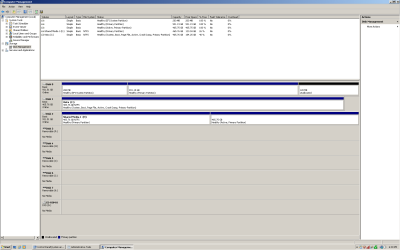
post screenshot of disk management in win7. All fields visible please
 

My Computer My Computer

At a glance

Microsoft Windows 7 Home Premium 64-bits 7601...Intel(R) Core(TM) i3 CPU M 370 @ 2.40GHz4,00 GBATI Mobility Radeon HD 5400 Series
Computer type
Laptop
Computer Manufacturer/Model Number
ACER ASPIRE 5742G
OS
Microsoft Windows 7 Home Premium 64-bits 7601 Multiprocessor Free Service Pack 1
CPU
Intel(R) Core(TM) i3 CPU M 370 @ 2.40GHz
Motherboard
Acer Aspire 5742G
Memory
4,00 GB
Graphics Card(s)
ATI Mobility Radeon HD 5400 Series
Sound Card
(1) AMD High Definition Audio Device (2) Realtek High Defi
Screen Resolution
1366 x 768 x 32 bits (4294967296 colors) @ 60 Hz
Hard Drives
WDC WD5000BEVT-22ZAT0
Does the first bootmenu you see look similar to this?

the Windows Boot Manager screen, select the OS you want to use the Advanced Boot Options for, then press F8. (see screenshot below)


My Computer My Computer

At a glance

Microsoft Windows 7 Home Premium 64-bits 7601...Intel(R) Core(TM) i3 CPU M 370 @ 2.40GHz4,00 GBATI Mobility Radeon HD 5400 Series
Computer type
Laptop
Computer Manufacturer/Model Number
ACER ASPIRE 5742G
OS
Microsoft Windows 7 Home Premium 64-bits 7601 Multiprocessor Free Service Pack 1
CPU
Intel(R) Core(TM) i3 CPU M 370 @ 2.40GHz
Motherboard
Acer Aspire 5742G
Memory
4,00 GB
Graphics Card(s)
ATI Mobility Radeon HD 5400 Series
Sound Card
(1) AMD High Definition Audio Device (2) Realtek High Defi
Screen Resolution
1366 x 768 x 32 bits (4294967296 colors) @ 60 Hz
Hard Drives
WDC WD5000BEVT-22ZAT0
Here is my disc management.
 

Attachments

  • disc management.png
    disc management.png
    28.7 KB · Views: 4

My Computer My Computer

At a glance

Windows Vista Ultimate x64, SP2Intel Core2 Quad CPU Q6600 @2.40 GHz8 GBnvidia GeForce 9800 GTX+
Computer type
PC/Desktop
Computer Manufacturer/Model Number
PsyStar OpenPro
OS
Windows Vista Ultimate x64, SP2
CPU
Intel Core2 Quad CPU Q6600 @2.40 GHz
Motherboard
Gigabyte GA-EP45-UD3P
Memory
8 GB
Graphics Card(s)
nvidia GeForce 9800 GTX+
Hard Drives
Hitachi HDP725050GLA360 (Windows Vista x64)
Samsung HD103UJ (Mac OS X Leopard)
Samsung HD103UJ (partitioned between PC and Mac storage)
Antivirus
microsoft security essentials
Browser
IE 9
There's no need to create a Windows Dual Boot menu if you have separate HD's. Just boot the preferred HD by setting it first to boot in BIOS setup. Then boot the other OS HD using the one-time BIOS Boot Menu key.

In that case you'd unplug all other HD's to run the Upgrade install from Vista. A simple guide to a successful in-place upgrade - Windows 7 Forums

Afterwards plug back in the other OS HD and choose the one to boot using the BIOS as explained.

In addition why are you running with the hideously ugly Windows 2000 graphics when your hardware more than supports the elegant Aero transparency theme for Win7? Turn it on in Control Panel>Personalization or type Aero in Start Search box to run the troubleshooter.
 

My Computer My Computer

At a glance

Windows Vista Ultimate x64, SP2Intel Core2 Quad CPU Q6600 @2.40 GHz8 GBnvidia GeForce 9800 GTX+
Computer type
PC/Desktop
Computer Manufacturer/Model Number
PsyStar OpenPro
OS
Windows Vista Ultimate x64, SP2
CPU
Intel Core2 Quad CPU Q6600 @2.40 GHz
Motherboard
Gigabyte GA-EP45-UD3P
Memory
8 GB
Graphics Card(s)
nvidia GeForce 9800 GTX+
Hard Drives
Hitachi HDP725050GLA360 (Windows Vista x64)
Samsung HD103UJ (Mac OS X Leopard)
Samsung HD103UJ (partitioned between PC and Mac storage)
Antivirus
microsoft security essentials
Browser
IE 9
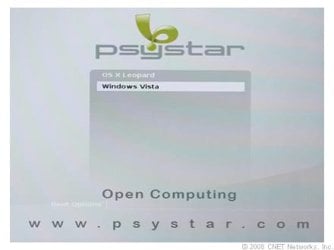
Image of boot menu.
 

Attachments

  • boot.jpg
    boot.jpg
    9.7 KB · Views: 0

My Computer My Computer

At a glance

Windows Vista Ultimate x64, SP2Intel Core2 Quad CPU Q6600 @2.40 GHz8 GBnvidia GeForce 9800 GTX+
Computer type
PC/Desktop
Computer Manufacturer/Model Number
PsyStar OpenPro
OS
Windows Vista Ultimate x64, SP2
CPU
Intel Core2 Quad CPU Q6600 @2.40 GHz
Motherboard
Gigabyte GA-EP45-UD3P
Memory
8 GB
Graphics Card(s)
nvidia GeForce 9800 GTX+
Hard Drives
Hitachi HDP725050GLA360 (Windows Vista x64)
Samsung HD103UJ (Mac OS X Leopard)
Samsung HD103UJ (partitioned between PC and Mac storage)
Antivirus
microsoft security essentials
Browser
IE 9
The link indicates you have a specially built PC meant to Dual Boot Apple OSX and Windows Vista. Your screenshot also depicts a UEFI System partition on OSX which adds additional complication.

Before proceeding I'd read the Manual for your PC on its Support Downloads webpage. I'd also contact their Support to see how Vista is Upgraded while maintaining the Dual Boot, and if there's a way to Dual Boot via the BIOS bypassing their Boot Menu.

In this case unless you want to try to turn off the Dual Boot in BIOS, you might be better off sticking with it since it looks like its built into the OEM at factory.

I would still unplug the Apple HD, set the Vista HD to boot first to see if it will start on its own. In this case you should be able to Upgrade to Win7 without it interfering with the Dual Boot. If you plug back in OS X HD and the Dual Boot is gone, then you can boot via the BIOS BOot Priority and BOot menu which is preferable anyway.

Normally when you install Win7 last, even upgrading Vista, with another WIndows OS onboard and still plugged in it will configure a Multi-Boot menu, however there's no way this will happen with an Apple product which requires special software to use with Windows, normally Boot Camp. Do you know if that's what's on the PC?
 
There's no need to create a Windows Dual Boot menu if you have separate HD's. Just boot the preferred HD by setting it first to boot in BIOS setup. Then boot the other OS HD using the one-time BIOS Boot Menu key.
I'm not creating it. It's already there. I just don't want to screw up being able to boot either choice because of any installatiion mistakes.
In that case you'd unplug all other HD's to run the Upgrade install from Vista. A simple guide to a successful in-place upgrade - Windows 7 Forums
Is it just the power, just the SATA, or both that need to be disconnected?
Afterwards plug back in the other OS HD and choose the one to boot using the BIOS as explained.

In addition why are you running with the hideously ugly Windows 2000 graphics when your hardware more than supports the elegant Aero transparency theme for Win7? Turn it on in Control Panel>Personalization or type Aero in Start Search box to run the troubleshooter.

Sorry you don't like my theme, as it is set for performance with video editing software.


My Computer My Computer

At a glance

Windows Vista Ultimate x64, SP2Intel Core2 Quad CPU Q6600 @2.40 GHz8 GBnvidia GeForce 9800 GTX+
Computer type
PC/Desktop
Computer Manufacturer/Model Number
PsyStar OpenPro
OS
Windows Vista Ultimate x64, SP2
CPU
Intel Core2 Quad CPU Q6600 @2.40 GHz
Motherboard
Gigabyte GA-EP45-UD3P
Memory
8 GB
Graphics Card(s)
nvidia GeForce 9800 GTX+
Hard Drives
Hitachi HDP725050GLA360 (Windows Vista x64)
Samsung HD103UJ (Mac OS X Leopard)
Samsung HD103UJ (partitioned between PC and Mac storage)
Antivirus
microsoft security essentials
Browser
IE 9
The link indicates you have a specially built PC meant to Dual Boot Apple OSX and Windows Vista. Your screenshot also depicts a UEFI System partition on OSX which adds additional complication.

Before proceeding I'd read the Manual for your PC on its Support Downloads webpage. I'd also contact their Support to see how Vista is Upgraded while maintaining the Dual Boot, and if there's a way to Dual Boot via the BIOS bypassing their Boot Menu.

Psystar is out of business, and the "manual" it came withh is three pages long.

I would still unplug the Apple HD, set the Vista HD to boot first to see if it will start on its own. In this case you should be able to Upgrade to Win7 without it interfering with the Dual Boot. If you plug back in OS X HD and the Dual Boot is gone, then you can boot via the BIOS BOot Priority and BOot menu which is preferable anyway.

As I mentioned in the original post, the computer boots straight to Vista when I disconnected the OSX HD.

...Boot Camp. Do you know if that's what's on the PC?

I don't know, but I think it was something the system builder made themselves.
 

My Computer My Computer

At a glance

Windows Vista Ultimate x64, SP2Intel Core2 Quad CPU Q6600 @2.40 GHz8 GBnvidia GeForce 9800 GTX+
Computer type
PC/Desktop
Computer Manufacturer/Model Number
PsyStar OpenPro
OS
Windows Vista Ultimate x64, SP2
CPU
Intel Core2 Quad CPU Q6600 @2.40 GHz
Motherboard
Gigabyte GA-EP45-UD3P
Memory
8 GB
Graphics Card(s)
nvidia GeForce 9800 GTX+
Hard Drives
Hitachi HDP725050GLA360 (Windows Vista x64)
Samsung HD103UJ (Mac OS X Leopard)
Samsung HD103UJ (partitioned between PC and Mac storage)
Antivirus
microsoft security essentials
Browser
IE 9
There's no performance to be gained by turning off transparency when you have Core 2 Duo with 8 gb RAM. Even if the Display device was too old to support it you would still get a tolerable Basic theme that doesn't look like government filing cabinets. Be sure to turn on Win7 Aero to see for yourself.

Since it boots into Vista when you unplug the OSX drive then I think you can safely save a backup image of your current Vista install, then run the Win7 upgrade from Vista Desktop and it shouldn't change anything about the boot menu.

Macrium - Image your system is good imaging freeware with flexibilty. If you have a WD or Seagate HD in the mix the free premium version of Acronis is preferable.

Have you come across the settings for the OEM Dual Boot menu, either in BIOS setup or in either OS? Some camera snaps might be revealing.
 
Yes, do what greg tells you. Unplug the OSX disk (disk2), boot directly to vista, upgraded to win7. If working.... plug disk2 to system again.
The machines bootmanager has an entry called VISTA. It just chainloads to the partition where vista is. (now win7)
 

My Computer My Computer

At a glance

Microsoft Windows 7 Home Premium 64-bits 7601...Intel(R) Core(TM) i3 CPU M 370 @ 2.40GHz4,00 GBATI Mobility Radeon HD 5400 Series
Computer type
Laptop
Computer Manufacturer/Model Number
ACER ASPIRE 5742G
OS
Microsoft Windows 7 Home Premium 64-bits 7601 Multiprocessor Free Service Pack 1
CPU
Intel(R) Core(TM) i3 CPU M 370 @ 2.40GHz
Motherboard
Acer Aspire 5742G
Memory
4,00 GB
Graphics Card(s)
ATI Mobility Radeon HD 5400 Series
Sound Card
(1) AMD High Definition Audio Device (2) Realtek High Defi
Screen Resolution
1366 x 768 x 32 bits (4294967296 colors) @ 60 Hz
Hard Drives
WDC WD5000BEVT-22ZAT0
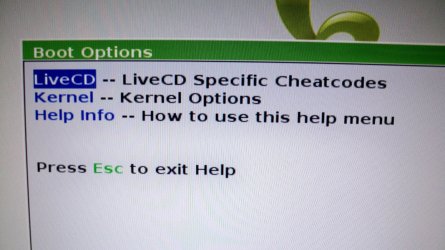
When I press "help" during boot menu, this pops up.

I don't know if this is what Greg was asking for?
 

Attachments

  • 100_4190.JPG
    100_4190.JPG
    486.2 KB · Views: 3

My Computer My Computer

At a glance

Windows Vista Ultimate x64, SP2Intel Core2 Quad CPU Q6600 @2.40 GHz8 GBnvidia GeForce 9800 GTX+
Computer type
PC/Desktop
Computer Manufacturer/Model Number
PsyStar OpenPro
OS
Windows Vista Ultimate x64, SP2
CPU
Intel Core2 Quad CPU Q6600 @2.40 GHz
Motherboard
Gigabyte GA-EP45-UD3P
Memory
8 GB
Graphics Card(s)
nvidia GeForce 9800 GTX+
Hard Drives
Hitachi HDP725050GLA360 (Windows Vista x64)
Samsung HD103UJ (Mac OS X Leopard)
Samsung HD103UJ (partitioned between PC and Mac storage)
Antivirus
microsoft security essentials
Browser
IE 9
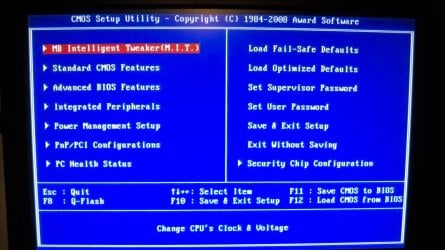
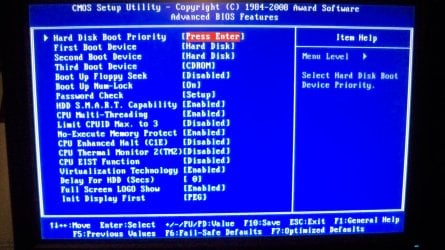
There will be another Fkey at boot (or ESC, DEL) to boot into BIOS setup to look at the various settings organized under tabs. See if you can find Boot menu options.
 
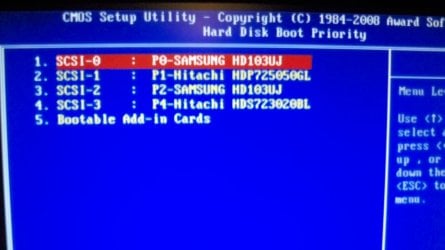
Bios pix.

[You might notice a fourth drive (external) that I had just turned on.]

1.=Leopard
2.=Vista
 

Attachments

  • 100_4195.JPG
    100_4195.JPG
    222.4 KB · Views: 4
  • 100_4196.JPG
    100_4196.JPG
    287.1 KB · Views: 4
  • 100_4197.JPG
    100_4197.JPG
    157.2 KB · Views: 4

My Computer My Computer

At a glance

Windows Vista Ultimate x64, SP2Intel Core2 Quad CPU Q6600 @2.40 GHz8 GBnvidia GeForce 9800 GTX+
Computer type
PC/Desktop
Computer Manufacturer/Model Number
PsyStar OpenPro
OS
Windows Vista Ultimate x64, SP2
CPU
Intel Core2 Quad CPU Q6600 @2.40 GHz
Motherboard
Gigabyte GA-EP45-UD3P
Memory
8 GB
Graphics Card(s)
nvidia GeForce 9800 GTX+
Hard Drives
Hitachi HDP725050GLA360 (Windows Vista x64)
Samsung HD103UJ (Mac OS X Leopard)
Samsung HD103UJ (partitioned between PC and Mac storage)
Antivirus
microsoft security essentials
Browser
IE 9
See if you can boot the HD's independently by choosing them from the BIOS Boot menu key. If so and that method suits you, you don't even need the OEM Boot Menu and can ignore or disable it if a way can be found - or you can keep using it.

Could you install EasyBCD to Vista and post back the boot menu information shown on View Settings tab? EasyBCD (click Download - no Name or Email required)

If it is using a standard BCD edit Boot Menu then you can change the name to Win7 on the Edit OS tab under Rename.

4782814638_8e066556f4.jpg


But more likely because OSX is involved it is using something special installed by your OEM either via the BIOS or BCD. It may be safest until this can be discovered to just leave Boot Menu as it is and Upgrade Vista to Win7 with OSX temporarily unplugged. It will probably still show the Windows as Vista if Easy won't Rename it for you.
 
Thanks for all of the info.

Just wondering if the Psystar boot-loader menu is launching from a partition on the OS X hard drive, and then when I choose Vista in the Psystar boot-loader menu it's handing off to the Windows booter, and if I upgrade the Windows OS to Win7, will the Psystar boot-loader be looking for something that isn't there on the Windows side anymore due to the upgrade? (Will updating Windows from Vista to 7 update my BIOS and/or Windsows boot-loader?)

Or am I still not understanding this process correctly?
 

My Computer My Computer

At a glance

Windows Vista Ultimate x64, SP2Intel Core2 Quad CPU Q6600 @2.40 GHz8 GBnvidia GeForce 9800 GTX+
Computer type
PC/Desktop
Computer Manufacturer/Model Number
PsyStar OpenPro
OS
Windows Vista Ultimate x64, SP2
CPU
Intel Core2 Quad CPU Q6600 @2.40 GHz
Motherboard
Gigabyte GA-EP45-UD3P
Memory
8 GB
Graphics Card(s)
nvidia GeForce 9800 GTX+
Hard Drives
Hitachi HDP725050GLA360 (Windows Vista x64)
Samsung HD103UJ (Mac OS X Leopard)
Samsung HD103UJ (partitioned between PC and Mac storage)
Antivirus
microsoft security essentials
Browser
IE 9
Back
Top