How Win 7 computer can access Win XP without password ?

inwell

New member
Member
Local time
6:52 PM
Messages
53
I have a network of two PCs connected with 8port Switch. Simple File Sharing on Win Xp is turned off.

Still my Win 7 machine can access my win xp machine without any password and login id.

why
 

My Computer My Computer

OS
Windows 7 Pro x64 ,Windows 8 Ent x64 and Windows Xp SP2
CPU
AMD FX-8150
Motherboard
ASUS M5A97 R2.0
Memory
32Gb
Hard Drives
500Gb Seagate 7200 rpm
PSU
Coolermaster 600Watt 80+
Case
Coolermaster 690 ii
Keyboard
Logitech
Mouse
Logitech
Welcome to Windows Seven Forums.

I'm not 100% certain, but I would imagine it's due to the fact that whenever Windows XP is installed on a system, it creates a default account called "Administrator" and by default this account is not password protected.

If I'm wrong, one of our more knowledgeable helpers will be along shortly.
 

My Computer My Computer

Computer Manufacturer/Model Number
HP Pavilion Elite 495UK
OS
Windows 7 Ultimate SP1 64-Bit
CPU
Intel Core i7 870 @ 2.93GHz
Motherboard
MSI 2A9C (CPU1)
Memory
8Gb Dual-Channel DDR3 @ 664MHz
Graphics Card(s)
nVidia GeForce GTX 460 1024MB dedicated RAM
Sound Card
Realtek HD Audio
Monitor(s) Displays
HP2310i
Screen Resolution
1920 x 1080
Hard Drives
1x1954GB Hitachi HDS22020ALA 330 (RAID), 1x1954GB Hitachi External for backup and storage
PSU
460W
Case
HP Elite
Cooling
Air cooled
Keyboard
Logitech K750 solar-powered keyboard
Mouse
Logitech Wireless M180 mouse
Internet Speed
2Mb
Other Info
Pure Avanti Flow Internet Radio with iPod Dock, 64Gb iPod, HP USB Speakers, Sony MDR-V500 Headphones, Sony Vaio F-Series Laptop
I have a network of two PCs connected with 8port Switch. Simple File Sharing on Win Xp is turned off.

Still my Win 7 machine can access my win xp machine without any password and login id.

why

There would have been an initial logon request, after that the system may remember the credentials and will not ask you again. this is the same as accessing shares on the network.

The autologon option

Registry Settings
System Key: [HKEY_LOCAL_MACHINE\SOFTWARE\Microsoft\Windows NT\CurrentVersion\Winlogon]
Value Name: AutoAdminLogon
Data Type: REG_SZ (String Value)
Value Data: (0=disable, 1=enable)
 

My Computer My Computer

Computer Manufacturer/Model Number
Lenovo ThinkPad T60
OS
Windows 7 Ultimate 64Bit
CPU
GenuineIntel Intel(R) Core(TM) DuoCore T2400 @ 1.83GHz
Motherboard
Intel(R) 82801G (ICH7 Family)
Memory
2.00 GB
Graphics Card(s)
Mobile Intel(R) 945 Express Chipset
Sound Card
SoundMAX Integrated Digital HD Audio
Monitor(s) Displays
ThinkPad Display
Screen Resolution
1400x1050
Hard Drives
100Gb SATA
Keyboard
Standard Keyboard
Mouse
HID-compliant Mouse
Internet Speed
Cable Broadband - 54Mbps
Other Info
Intel(R) PRO/1000 PL Network Connection
11a/b/g Wireless LAN Mini PCI Express Adapter
@ aem

As per your reg settings, my VALUE DATA is set to 0

and second thing, Win 7 pc is accessing win XP for very first time.
 

My Computer My Computer

OS
Windows 7 Pro x64 ,Windows 8 Ent x64 and Windows Xp SP2
CPU
AMD FX-8150
Motherboard
ASUS M5A97 R2.0
Memory
32Gb
Hard Drives
500Gb Seagate 7200 rpm
PSU
Coolermaster 600Watt 80+
Case
Coolermaster 690 ii
Keyboard
Logitech
Mouse
Logitech
Is it only for Windows 7 accessing XP or from XP to XP as well? I'm thinking it might have to do with the permission of the share, what groups have been granted what type of access?
 

My Computer My Computer

Computer Manufacturer/Model Number
Lenovo ThinkPad T60
OS
Windows 7 Ultimate 64Bit
CPU
GenuineIntel Intel(R) Core(TM) DuoCore T2400 @ 1.83GHz
Motherboard
Intel(R) 82801G (ICH7 Family)
Memory
2.00 GB
Graphics Card(s)
Mobile Intel(R) 945 Express Chipset
Sound Card
SoundMAX Integrated Digital HD Audio
Monitor(s) Displays
ThinkPad Display
Screen Resolution
1400x1050
Hard Drives
100Gb SATA
Keyboard
Standard Keyboard
Mouse
HID-compliant Mouse
Internet Speed
Cable Broadband - 54Mbps
Other Info
Intel(R) PRO/1000 PL Network Connection
11a/b/g Wireless LAN Mini PCI Express Adapter
By just disabling Simple File Sharing on your XP computer, you can not prevent other networked windows computers from accessing it.

Please read this article on Simple File Sharing which gives you more information on file sharing.

Simple File Sharing (SFS) when enabled allows one to share a file/folder with two kinds of permissions.

1. Read Only
2. Full Control

The NTFS Security permissions tab is hidden from the users.

When SFS is disabled, Sharing is still permitted but the NTFS Security permissions tab will appear allowing greater control on the File/Folder sharing.

If your XP computer has an administrator account without a password, then the Windows 7 computer with administrator credentials can directly access the XP computer. (To make this happen either XP's firewall should be off or an exception is created for Win 7 machine).

But Win 7 machine will not see any files or folders on XP machine unless shares are setup.

To see complete unshared drives on XP, you have to use administrative shares.

For example, type "\\John\d$ in the address bar of window 7 to access D: drive of XP machine (John is the XP computer's name)

How to prevent sharing over network

Network sharing is possible only when you have enabled File and Printer Sharing for Microsoft Networks on your network adapter's Properties which is connected to the network.

When the driver for this network adapter is installed either by Windows or manually by you, the above feature along with Client for Microsoft Networks is automatically enabled.

To stop one from accessing the computer over network, these two features should be turned off by removing the check marks in the TCP/IP properties.

Any adapter connected to internet will have these two features switched off for security.

 

My Computer My Computer

Computer Manufacturer/Model Number
Toshiba Satellite P775-S7232
OS
MS Windows 7 Ultimate 64-bit SP1
CPU
i5-2410M 2.3GHz (2.9GHz Turbo-Boost) Sandy Bridge 32nm
Motherboard
Toshiba PHRAA ver. PSBY1U-00F003
Memory
4GB+4GB Samsung DDR3 PC3-10700 (1333 MHz)
Graphics Card(s)
Video Intel(R) HD Graphics Family, 1696MB available memory
Sound Card
Realtek High Definition Audio version=6.0.1.6323
Monitor(s) Displays
17.3 " Trubrite TFT LCD, LED Backlit
Screen Resolution
1600x900 32 bit, Native support for 720P content
Hard Drives
TOSHIBA MK6476GSXN
580.614 [GB] partitioned C: 80GB and D: 500GB with hidden recovery partitons.

Spare bay for 2nd HDD but no SATA connector :-(
PSU
Toshiba AC/DC Adapter
Case
Notebook
Cooling
Built-in Fan
Keyboard
Premium Raised Tile keyboard
Mouse
Logitech M215 wireless mouse
Internet Speed
Not fast enough
Other Info
Built-in Harman Kardon speakers with Dolby Advanced Audio, Waves MaxxAudio® 3. HDMI, 1xUSB3+3xUSB2 ports, WebCam, Battery life 4hrs 11mins, 4GB Readyboost SDHC card, WD My Book Essential Ext HDDs 2 TB, 2x1TB, My Passport SE 1TB and WDTV 1st Gen for Multimedia playing on a Sony Wega 32" LCD.
Recent addition to my toys are Asus Transformer Pad TF300T with 32GB onboard sd card + 32GB microsd card.
"If your XP computer has an administrator account without a password, then the Windows 7 computer with administrator credentials can directly access the XP computer. (To make this happen either XP's firewall should be off or an exception is created for Win 7 machine)"

No. I do not have admin account without password on my XP machine. Other XP machine always come up with Login ID and Password window when shared folder is accessed .

I have enabled File Sharing in Adapter Settings.

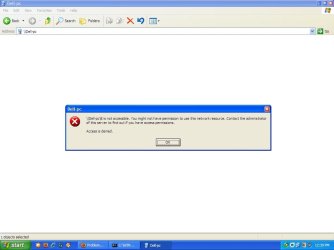
When i try to access Win 7 PC from Win XP it gives error \\ DELL PC not accessible.Contact admin of this Server.

The Network Path Was Not Found.

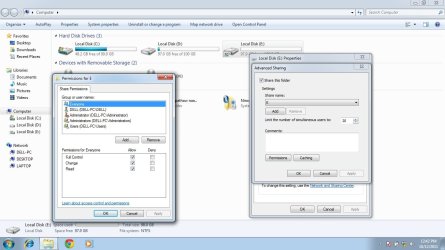
On Win 7 machine i have shared whole Drive (E:) with full access granted to EVERYONE.
I tried changing the option Enable/Disable Password protection in Win 7 . When i enable the Password Protection My XP machine cant even access the workgroup ( other XP machine also gets access denied) and When i disable Password protection on Win 7 my XP machines cannot access the E drive (that i shared with EVERYONE) but XP machines can access Users\Public folder
 
Last edited:

My Computer My Computer

OS
Windows 7 Pro x64 ,Windows 8 Ent x64 and Windows Xp SP2
CPU
AMD FX-8150
Motherboard
ASUS M5A97 R2.0
Memory
32Gb
Hard Drives
500Gb Seagate 7200 rpm
PSU
Coolermaster 600Watt 80+
Case
Coolermaster 690 ii
Keyboard
Logitech
Mouse
Logitech
Can you type this in the run field

\\computername\c$

Replace the computername of the pc you are connecting to

See what comes up.

Also, what permission (users or groups) have you given to the shares?
 

My Computer My Computer

Computer Manufacturer/Model Number
Lenovo ThinkPad T60
OS
Windows 7 Ultimate 64Bit
CPU
GenuineIntel Intel(R) Core(TM) DuoCore T2400 @ 1.83GHz
Motherboard
Intel(R) 82801G (ICH7 Family)
Memory
2.00 GB
Graphics Card(s)
Mobile Intel(R) 945 Express Chipset
Sound Card
SoundMAX Integrated Digital HD Audio
Monitor(s) Displays
ThinkPad Display
Screen Resolution
1400x1050
Hard Drives
100Gb SATA
Keyboard
Standard Keyboard
Mouse
HID-compliant Mouse
Internet Speed
Cable Broadband - 54Mbps
Other Info
Intel(R) PRO/1000 PL Network Connection
11a/b/g Wireless LAN Mini PCI Express Adapter
After entering \\Dell-pc\C$
the Conect to DellPC windows appears with user name and password.

but as i enter the username and password (the one i use for logging on to the DELL -PC) it does not proceed but the Password field remains highlighted.
 

Attachments

  • 6.jpg
    6.jpg
    100.6 KB · Views: 51
  • 4.JPG
    4.JPG
    36.6 KB · Views: 34

My Computer My Computer

OS
Windows 7 Pro x64 ,Windows 8 Ent x64 and Windows Xp SP2
CPU
AMD FX-8150
Motherboard
ASUS M5A97 R2.0
Memory
32Gb
Hard Drives
500Gb Seagate 7200 rpm
PSU
Coolermaster 600Watt 80+
Case
Coolermaster 690 ii
Keyboard
Logitech
Mouse
Logitech
Have you tried putting in "Dell-Pc\username" as apposed to just username in the id field?
 

My Computer My Computer

Computer Manufacturer/Model Number
Lenovo ThinkPad T60
OS
Windows 7 Ultimate 64Bit
CPU
GenuineIntel Intel(R) Core(TM) DuoCore T2400 @ 1.83GHz
Motherboard
Intel(R) 82801G (ICH7 Family)
Memory
2.00 GB
Graphics Card(s)
Mobile Intel(R) 945 Express Chipset
Sound Card
SoundMAX Integrated Digital HD Audio
Monitor(s) Displays
ThinkPad Display
Screen Resolution
1400x1050
Hard Drives
100Gb SATA
Keyboard
Standard Keyboard
Mouse
HID-compliant Mouse
Internet Speed
Cable Broadband - 54Mbps
Other Info
Intel(R) PRO/1000 PL Network Connection
11a/b/g Wireless LAN Mini PCI Express Adapter
As i typed \\Dell-pc\C$..... it came up with a id and password prompt...

but when the DOLLAR ($) sign is removed ..it directly access the shared drive without any password/login id window.

the same way.. in Win7 Explorer, all the shared drives are visible(below CD-DVD drive icons) and are accessible without any protection.
 

My Computer My Computer

OS
Windows 7 Pro x64 ,Windows 8 Ent x64 and Windows Xp SP2
CPU
AMD FX-8150
Motherboard
ASUS M5A97 R2.0
Memory
32Gb
Hard Drives
500Gb Seagate 7200 rpm
PSU
Coolermaster 600Watt 80+
Case
Coolermaster 690 ii
Keyboard
Logitech
Mouse
Logitech
use a batch file to set up a share with the user name password in it then kill the share after
or just map a drive
 

My Computer My Computer

OS
Windows 7 Ultimate 32bit
Back
Top