
How would you secure windows 7 without windows updates patches?

groze

Tester
Power User
VIP
Local time
5:49 AM
Messages
1,162
How would you secure windows 7 without windows updates patches?

I notice a lot of people include me are not able to install the current updates. Some were able to install after waiting a very long time.

I just want some ideas on what protection software people can install on windows 7 to make it more secure, since people can't depend on Microsoft unless you upgrade to 10 or 8.x
 

My Computer My Computer

At a glance

W10 32 bit, XUbuntu 18.xx 64 bitIntel(R) Celeron(R) CPU G1620T @ 2.40GHz, 240...4GBIntel HD graphics
Computer type
PC/Desktop
Computer Manufacturer/Model Number
Dell All in one Inspiron 2020
OS
W10 32 bit, XUbuntu 18.xx 64 bit
CPU
Intel(R) Celeron(R) CPU G1620T @ 2.40GHz, 2400 Mhz
Motherboard
Dell
Memory
4GB
Graphics Card(s)
Intel HD graphics
Sound Card
High Definition Audio Device
Monitor(s) Displays
20 inch Screen
Screen Resolution
W7=1280 x 720 & Linux Mint Xfce=1360 x 768
Hard Drives
500 GB hard drive
Keyboard
Usb
Mouse
Usb
Internet Speed
High-Speed
Antivirus
MSE
Browser
Main Browser Firefox
Other Info
I have done a clean install of Windows 7 using Dell re-installation disk (Dell sent me one). I also use Free Macrium reflect backup and restore.

My Computer My Computer

At a glance

Vista, Windows7, Mint Mate, Zorin, Windows 8from 1.6GHz Duo to i7
Computer Manufacturer/Model Number
HP, Dell, Gateway, Toshiba - 4 laptops and 2 desktops
OS
Vista, Windows7, Mint Mate, Zorin, Windows 8
CPU
from 1.6GHz Duo to i7
Monitor(s) Displays
2x HP w2207
Hard Drives
5x HDD, 7x SSD, 12x Externals
Keyboard
with trackball - no mices
Mouse
Trackball mice
Internet Speed
DSL 6000
A great misconception is that security comes from what software you install. That's completely false. Antiviruses exploit that and use fear to promote sales, but in fact deliver little real security, the same as most other similar tools.
Security is greatly influenced by your practices and discipline in following them. There are a number of widely known good practices to improve security (almost always ignored, and Windows disastrous defaults don't help at all). A few from memory:

- Always run without administrator access. Only elevate those processes that have a legitimate reason to have full control and that you really trust.
- Use separate user accounts for you daily activities and your administrative chores. UAC is a great help here. Additional accounts may help for further isolating troublesome programs (like browsers and torrent clients).
- Disable the known vulnerable services (WER, SSDP, UPNP, etc).
- Use a firewall with a fine grained access control. Windows includes one (of course disabled by default :p), just configure it according to your particular usage. Don't allow anything strictly outside of what you know.
- While not always possible, only give permission to run to that software you know, and nothing else. AppLocker and Software Restriction policies are of great help here.
- It's far better to put your computer behind a NAT router for internet access. Having a Windows computer in the DMZ is a disaster waiting to happen, specially if its a clean install without any hardening.
- Software updates are certainly a somewhat important part of security, when those fix a vulnerability that affects you. If you can't patch, at least make sure to understand the risk and take other measures to mitigate it.
- Always have backups of your data and any software installers you use. In case of problems you can always reinstall everything then place your data where it was.
- Antiviruses and other similar things might help somewhat, but don't put too much faith into them. Some older viruses can be detected with them. But once you're infected, the only safe path is a clean install.
- Disable the known broken Windows functions, like administrative shares, show extensions for files, autorun and the like.

Sure I'm forgetting a lot of things, but that's a good place to start. Of course, nothing of those things and many others are mutually exclusive, you can do some steps and skip others if you understand the implications. In practice, most Windows updates, while mostly useful, rarely affect home users and those with a reasonable understanding of security (they're important in servers though). A good thing of avoiding updates is that you also avoid the Windows 10 adware that MS tries to sneak within updates :p
 

My Computer My Computer

At a glance

Windows 7 Ultimate x64Intel Core i7-740QM8 GB DDR3NVIDIA GeForce 330GT
Computer type
Laptop
Computer Manufacturer/Model Number
Toshiba Sattelite A665-S6092
OS
Windows 7 Ultimate x64
CPU
Intel Core i7-740QM
Memory
8 GB DDR3
Graphics Card(s)
NVIDIA GeForce 330GT
Screen Resolution
1366x768
Hard Drives
Samsung 840 SSD 500GB
1TB USB3 external HD
Cooling
Coolermaster Notepal U3 notebook cooling pad
Internet Speed
3mbps ASDL
Antivirus
ClamWin 0.98.7
Browser
Opera 12.17 x86 (main), Firefox 38 (sec), IE11 (last resort)
That is good advice Alejandro85.

Here is some of my opinions & comments though.

A great misconception is that security comes from what software you install.
Actually it is a combo of software & configurations.

It's far better to put your computer behind a NAT router for internet access. Having a Windows computer in the DMZ is a disaster waiting to happen, specially if its a clean install without any hardening.

Most cable companies have a combo router & modem and includes a firewall.

Antiviruses and other similar things might help somewhat, but don't put too much faith into them. Some older viruses can be detected with them. But once you're infected, the only safe path is a clean install.

Or a good backup. A clean install may not even work in some cases.

Use a firewall with a fine grained access control. Windows includes one (of course disabled by default
tongue.gif
), just configure it according to your particular usage. Don't allow anything strictly outside of what you know.

My windows 7 sp1 firewall is enabled when I first did a clean install. Maybe some versions of Windows 7 don't enable the firewall.
 

My Computer My Computer

At a glance

W10 32 bit, XUbuntu 18.xx 64 bitIntel(R) Celeron(R) CPU G1620T @ 2.40GHz, 240...4GBIntel HD graphics
Computer type
PC/Desktop
Computer Manufacturer/Model Number
Dell All in one Inspiron 2020
OS
W10 32 bit, XUbuntu 18.xx 64 bit
CPU
Intel(R) Celeron(R) CPU G1620T @ 2.40GHz, 2400 Mhz
Motherboard
Dell
Memory
4GB
Graphics Card(s)
Intel HD graphics
Sound Card
High Definition Audio Device
Monitor(s) Displays
20 inch Screen
Screen Resolution
W7=1280 x 720 & Linux Mint Xfce=1360 x 768
Hard Drives
500 GB hard drive
Keyboard
Usb
Mouse
Usb
Internet Speed
High-Speed
Antivirus
MSE
Browser
Main Browser Firefox
Other Info
I have done a clean install of Windows 7 using Dell re-installation disk (Dell sent me one). I also use Free Macrium reflect backup and restore.
A few more comments on yours, made me thinking and remembered some things I forgot :p

Most cable companies have a combo router & modem and includes a firewall.

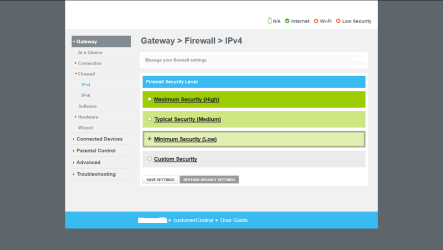
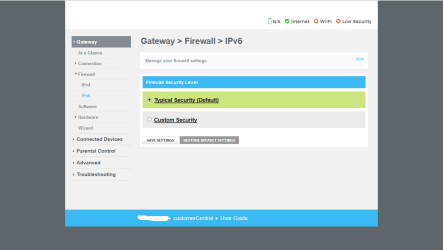
I still have to see a modem/router that includes a firewall. Almost none of them that are home-oriented for sure. NAT is a powerful protection indeed, but it's not a firewall at all. And even then, for those that do have a firewall, you need to configure them, just in the same way a software one. Typically it's left disabled.

Or a good backup. A clean install may not even work in some cases.

Problem with backups is that you can't know for sure if the backup itself is also infected. Typically you notice the problem when an antivirus cries or when it creates severe problems, but you don't know when the infection was actually entered the system, for that reason I'm prudent in using some backups liberally and instead consider them "suspect" too if they're too recent.

In those cases that a clean install doesn't works is when the virus/attacker managed to infect the BIOS or some other firmware, so that the infection reappears from there after a reinstall. We're really screwed if that's the case, there is no other way but to replace the hardware altogether.


My windows 7 sp1 firewall is enabled when I first did a clean install. Maybe some versions of Windows 7 don't enable the firewall.

Yes and no. Strictly speaking you're right, Windows firewall is enabled by default, as long as I know in every version since Vista at least, if not in XP too.
What I'm talking about is that its configuration makes it utterly useless. Outgoing connections are all allowed, and incoming are filtered, but the default rule set enables pretty much every Windows function to listen, effectively blocking nothing. To be more precise, it's enabled, but blocks nothing, with a useless net result.
 

My Computer My Computer

At a glance

Windows 7 Ultimate x64Intel Core i7-740QM8 GB DDR3NVIDIA GeForce 330GT
Computer type
Laptop
Computer Manufacturer/Model Number
Toshiba Sattelite A665-S6092
OS
Windows 7 Ultimate x64
CPU
Intel Core i7-740QM
Memory
8 GB DDR3
Graphics Card(s)
NVIDIA GeForce 330GT
Screen Resolution
1366x768
Hard Drives
Samsung 840 SSD 500GB
1TB USB3 external HD
Cooling
Coolermaster Notepal U3 notebook cooling pad
Internet Speed
3mbps ASDL
Antivirus
ClamWin 0.98.7
Browser
Opera 12.17 x86 (main), Firefox 38 (sec), IE11 (last resort)
Alejandro85

Remember, we are in different countries. I can't show you a pic of the modem/router combo because of its location. However, I can show you screenshots of my modem/router log-in showing the firewall settings. I haven't changed the settings or customize the settings, I think I might mess things up. I do have wifi disabled.
 

Attachments

  • firewall1.png
    firewall1.png
    15.3 KB · Views: 0
  • firewall2.png
    firewall2.png
    13.9 KB · Views: 0

My Computer My Computer

At a glance

W10 32 bit, XUbuntu 18.xx 64 bitIntel(R) Celeron(R) CPU G1620T @ 2.40GHz, 240...4GBIntel HD graphics
Computer type
PC/Desktop
Computer Manufacturer/Model Number
Dell All in one Inspiron 2020
OS
W10 32 bit, XUbuntu 18.xx 64 bit
CPU
Intel(R) Celeron(R) CPU G1620T @ 2.40GHz, 2400 Mhz
Motherboard
Dell
Memory
4GB
Graphics Card(s)
Intel HD graphics
Sound Card
High Definition Audio Device
Monitor(s) Displays
20 inch Screen
Screen Resolution
W7=1280 x 720 & Linux Mint Xfce=1360 x 768
Hard Drives
500 GB hard drive
Keyboard
Usb
Mouse
Usb
Internet Speed
High-Speed
Antivirus
MSE
Browser
Main Browser Firefox
Other Info
I have done a clean install of Windows 7 using Dell re-installation disk (Dell sent me one). I also use Free Macrium reflect backup and restore.
Back
Top