Yes that's the choice to boot the disk in some cases
The freeze you describe is common when the UEFI settings are not correct in BIOS. You want to be sure that Legacy BIOS or CSM is enabled. It should be in one of those collapsible settings you didn't expand as I asked.
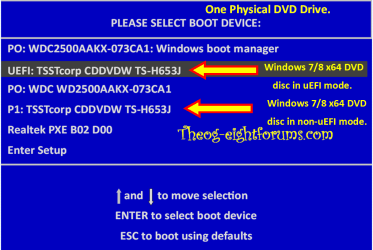
Now, when I put a W7 64 disk in the tray, boot. and hit <esc> for the Startup Menu, the Boot Menu (F9) now has an item underneath the heading 'UEFI Boot Sources'. It is UEFI: hp DVD A DS8A8SH, and since it has the arrow next to it, I assume that's the first boot device.
In the BIOS
File
System Information
Contains Product Name - 120-1123w, SKU Number, Processor Type, Speed, Stepping, Cache Size, Memory Size, System BIOS - ARM_703.rom v7.03, Chassis Serial No
About - Only contains address and phone info fro HP and American Megatrends
Set Time and Date - Self Explanatory
And then the Apply Defaults and Exit, Ignore Changes and Exit, Save Changes and Exit
Storage
Device Configuration - numbers for Hard Disk and CD-ROM
Storage Options - SATA Emulation - AHCI (this item is the default) or IDE
DPS Self Test
Boot Order - We've been over that
Security
Setup Password
Power-On Password
Device Security - System Audio, Network Controller, Onboard Card Reader, SATA0, SATA1 - All have 'Device Available' next to them
USB Security - Lots of USB Ports listed - all enabled
Slot Security - Mini Card Slot - Enabled
Network Boot - Enabled
System IDs - Product Name, Serial #, SKU, UUID, Family Name, Feature Byte, Build ID - Lots of numbers
System Security - Data Execution Prevention-Enabled, Virtualization Technology-Disabled
Power
Hardware Power Management - SATA Power Management-Enabled
- S5 Maximum Power Savings-Disabled
- S5 Wake On LAN-Disabled
Thermal - Displays CPU Fan Speed (hovering about 2400 RPM)
Advanced
Power-On Options - Post Messages-Disabled, After Power Loss-Off, Post Delay(in seconds)-None
BIOS Power-On - Lists all the days of the week - all say Disabled, Lists a Time of 00:00
BUS Options - PCI SERR#-Enabled, PCI VGA Palette Snooping-Disabled
Device Options - Num Lock State at Power-On is set to On
- NIC PXE Option ROM Download - Enabled
And that's it. I'm sure the infomatio you need is in there somewhere. If you need any of the numbers, let me know.
You can also try booting the DVD as UEFI device since that might be how its installed now.
Yes, it's automatically using whatever disk I put in the tray as a UEFI device
Another way to tell this is to boot
Partition Wizard Boot CD to look at the drive map,
or run Diskpart from Command Line to see if there is an EFI Boot partition. Commands are:
DISKPART
LIST DISK
SEL DISK 0 (Win7 disk)
LIST PART
Post back a camera snap or write out the partition details.
Downloaded the bootable version of Partition Wizard. Got the iso, but when I tried to burn it to a CD (or DVD - I tried both) using ImgBurn, I got a
Verify Failed. Layouts do not match. I just used ImgBurn last week to create the BitDefender disk. When it rains it pours.
And I seem to have no way of getting to a command prompt. Tapping F8 never gives me the
Repair your Computer option - just the usual Safe Mode, SM w/N, SM w/CP, Last Good, etc...



 , assuming that all I'd have to do would be select the drive. Instead it opens folders on the D: drive - boot, efi, sources, support and upgrade. All of those folders have folders.
