Another option would be to boot to a Linux Mint DVD (or the like). Don't install that OS, just surf the Internet for a few hours while the laptop is in your lap. Perhaps you have some weird hardware issue that only shows itself when you flex/twist/lift the laptop a certain way.
I have a few live CD's/DVD's of Linux and/or Windows Operating Systems.
I did not use them to test that way (use the laptop like that) because I can't carry out my daily tasks using them.
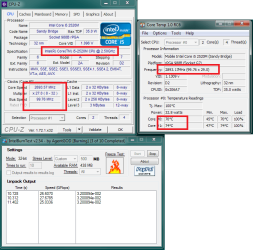
Hi, most CPU's will throttle if they don't get enough power or when they get to hot, please use CPU-Z and Core temp (or Speccy) to monitor CPU usage and temperature. Please note Windows task manager only shows % usage of CPU, if CPU is throttled it will only work at a fraction of it's full capacity. (you don't have system specs filled out you can use Speccy to update them) If you have *for example* I5 2520M capable of running @ 2.50 GHz and it overheats protection will throttle it to run @ *1GHz or less. Windows task manager will only report on % usage not clock speed of CPU or temperature, so in actual fact it's 40% usage not 100%.
This makes sense, will see if this is the case.
My point was that when you installed Norton immediately after a clean reinstall, you ruined the reinstall. So it cannot be said that you have done a Clean reinstall if you immediately reinstalled the worst bloatware possible on it.
What about stress testing the processor? Do not skip any steps which you are given in such a complicated troubleshooting if you want continued help. When steps are ignored we have no idea if it means you are doing them, Unsure how to do them, Or ignoring them. And later we read back through the thread and see every fifth step ignored. When this happens the fix often happens to be the ignored step.
I've been using Norton for about 10 years (I've also used different AV's) and did not have major issues with it. Therefore, I don't consider it as ruining a reinstall and I don't mind having such bloatware on my system anyways. -- You just don't seem to like Norton at all.
Intel® Processor Diagnostic Tool was used for testing (120mins). Other tests (memory, hard drive etc) were carried out with the laptop placed on a desk, and it always passed all sort of tests. I don't see any reason to test the system any more. [I also ran HP diagnostic tools and tested every component cpu, hdd, memory... even the cd writer, usb ports etc -- everything is running fine]
As I wrote earlier, I believe to have a great deal of knowledge in this area as well and am not an amateur.
I don't see how 'every fifth step' is supposed to help me, if I see the system is having high cpu issues even at the early stages.
An example: The clone system has all drives and I am clearly telling you that it had no issues last year, when it was cloned, yet you insist on installing missing drivers on the fresh Win7 drive or not installing Norton [note that the clone had Norton too] -- which does not make any sense. Because I can tell it's not even the issue here.
I have enough evidence that some of the steps are not even related therefore I skip them.
If I see a step that I decide is a pure waste of time (an obvious example: 'install your programs' and 'copy back your personal files' step -- how is that going to help me? It's a pure waste of time to re-do everything over and over again).
But if somebody tells me to remove the battery, unplug the power cable etc. this may sound irrelevant/unrelated but I have no evidence that the problem is not caused by them -- maybe it's really caused by corrupt battery or power cable or bluray reader who knows?, so I give it a try, hope this makes sense.
Even the fresh Win7 with only ethernet adapter and some updates and programs etc. installed, the laptop did have 100% cpu. So there is no point in installing anything else to that system, if I see this is happening.
-----------------
I am currently on my original system with SSD + HDD, and still no issues. Laptop on a desk.