HP ENVY 17 Laptop Windows7 - CPU Usage goes 99-100% Randomly 1-2 mins

Did you get all of those drivers from Windows Update? Only the network driver should be installed by the user to get online to get the updates. These steps are important enough that they are printed in red.

Now you have a lot of driver bloatware installed already, defeating the purpose of a clean reinstall. Did you even read the tutorial? Clean Reinstall Windows 7
 
Last edited:
Hi,

It might be an infection, can you please try Norton Power Eraser (norton.com/npe) and see if that helps.
Thank you!

Praveen
Norton Support!
 

My Computer My Computer

At a glance

Windows 7 Ultimate x64
Computer type
PC/Desktop
OS
Windows 7 Ultimate x64
Did you get all of those drivers from Windows Update? Only the network driver should be installed by the user to get online to get the updates. These steps are important enough that they are printed in red.

Have a lot of driver bloatware installed already, defeating the purpose of a clean reinstall. Did you even read the tutorial?
Will response shortly! -- Preparing things to post.
edit/ may take a bit longer due to updates not finishing.

Hi,

It might be an infection, can you please try Norton Power Eraser (norton.com/npe) and see if that helps.
Thank you!

Praveen
Norton Support!
Added to my TO-DO list.
Once I execute gregrocker's step as requested, will swap back to the second hard drive (clone of my original system) and try Norton Power Eraser.
Will let you know later in the day/soon!
 

My Computer My Computer

At a glance

64b w7
Computer type
Laptop
OS
64b w7
Did you get all of those drivers from Windows Update? Only the network driver should be installed by the user to get online to get the updates. These steps are important enough that they are printed in red.

Have a lot of driver bloatware installed already, defeating the purpose of a clean reinstall. Did you even read the tutorial?

Tired of repeating this way too many times along with other tests, and as these 'good old' drivers and software with bloatware served me for 4 years (since 2011 -- purchase date) with NO issues, didn't follow these steps EXACTLY.
I get your point, apologies. Here is a new install (not related to the previous one), hopefully...

By the way, the step of installing the AV/Firewall AFTER installing the ethernet drivers and having an internet connection is NOT correct in my opinion.
The AV/Firewall should be installed before the computer is connected to the internet, via an offline/stand-alone installer.
(This requires pre downloads of the files from a safe source etc using a safe computer..)
Anyways, here is a fresh start and steps:


1) Another new and clean version (and installed Ethernet drivers by me):
2ir1648.png


2) Disk management:
ru1u2t.png


3) Then installed AV/Firewall followed by a lightweight AV, Micrsoft Security Essentials (MSE):
24euo3p.png

Updated Norton followed by MSE. During MSE's update, the laptop's fan started acting weird but no high CPU so far.
(Downloaded Process Monitor during that weird fan acting and started monitoring as well).
Not going to install Panda Cloud at this moment and going with Norton 360 + MSE.


4) After enabling hardware driver auto-updating and setting up Windows Update:
9i4cwm.png


xmmomd.png


fndd2v.png


5) Computer Management - Device Manager after Updates, reboots etc:
aud1ys.png


6) Update until no more updates are avaialable...:
2sblqpt.png


15p0bus.png


7) Last Status of Installed Software and Drivers:
Software:
dd28fc.png


Drivers:
vnf47s.png


End of step 6, I believe. I am not bothered by the missing driver at the moment. I have the setups for some/all but not going to install them for now.
I am skipping rest of Step 7 and Steps 8,9,10,11 for the time being. Waste of time, if the high CPU problem occurs any time soon after doing all that work. The machine must prove itself to be 'safe and good' for me to install software and transfer files etc.

Now I am going to install Firefox, MPC-HC, Codecs and use the Laptop until something random happens...

Step 12 - Regarding Special notes for HP owners at the bottom:
This install removed all HP related stuff from the SSD completely. There is a single partition C: with the size of 931GB (1TB SSD drive) which contains the Operating System (OS) and the 100MB system reserved partition..
I don't care about the volume control lighting and HP Quick Launch buttons at this stage, something that can be solved later, if it comes out this build actually does not have a high CPU issue.


Let me know if I forgot something/a lot or should do something else for the time being.
 

My Computer My Computer

At a glance

64b w7
Computer type
Laptop
OS
64b w7
Norton 360 is the worst possible bloatware AV after McAfee that you could install. It's only mention here for the entire six years has been problems caused by it which were solved by uninstalling Norton. You also never want two AV's. Please uninstall Norton now using its removal tool.

Install the latest drivers for your chipset and USB controllers from the PCs support downloads webpage.

Then Google or trace Hardware Identification for the other drivers. Again the driver steps are important enough they are printed in red so you can't miss them.

Be sure to allow plenty of use to test performance after each driver and program install, with a reboot after each as well.
 
Norton Power Eraser

Did you get all of those drivers from Windows Update? Only the network driver should be installed by the user to get online to get the updates. These steps are important enough that they are printed in red.

Have a lot of driver bloatware installed already, defeating the purpose of a clean reinstall. Did you even read the tutorial?
Will response shortly! -- Preparing things to post.
edit/ may take a bit longer due to updates not finishing.

Hi,

It might be an infection, can you please try Norton Power Eraser (norton.com/npe) and see if that helps.
Thank you!

Praveen
Norton Support!
Added to my TO-DO list.
Once I execute gregrocker's step as requested, will swap back to the second hard drive (clone of my original system) and try Norton Power Eraser.
Will let you know later in the day/soon!

Thank you and please do update us! :)

Praveen
Norton Support.
 

My Computer My Computer

At a glance

Windows 7 Ultimate x64
Computer type
PC/Desktop
OS
Windows 7 Ultimate x64
Sorry for the late response, I was trying out different things.
Firstly I am going to respond to both of you and then at the very bottom write what I've detected.


Norton 360 is the worst possible bloatware AV after McAfee that you could install. It's only mention here for the entire six years has been problems caused by it which were solved by uninstalling Norton. You also never want two AV's. Please uninstall Norton now using its removal tool.

Install the latest drivers for your chipset and USB controllers from the PCs support downloads webpage.

Then Google or trace Hardware Identification for the other drivers. Again the driver steps are important enough they are printed in red so you can't miss them.

Be sure to allow plenty of use to test performance after each driver and program install, with a reboot after each as well.
- Uninstalled Norton 360
- Installed latest drivers of my chipset and USB controllers along with any missing ones in the previous posted screenshot. (Only One PCI.. remained, after which I swapped hard drives to test the other things on the other drive)

The 100% still happened when I was trying to watch some videos with Firefox on youtube.


Did you get all of those drivers from Windows Update? Only the network driver should be installed by the user to get online to get the updates. These steps are important enough that they are printed in red.

Have a lot of driver bloatware installed already, defeating the purpose of a clean reinstall. Did you even read the tutorial?
Will response shortly! -- Preparing things to post.
edit/ may take a bit longer due to updates not finishing.

Hi,

It might be an infection, can you please try Norton Power Eraser (norton.com/npe) and see if that helps.
Thank you!

Praveen
Norton Support!
Added to my TO-DO list.
Once I execute gregrocker's step as requested, will swap back to the second hard drive (clone of my original system) and try Norton Power Eraser.
Will let you know later in the day/soon!

Thank you and please do update us! :)

Praveen
Norton Support.
Norton Power Eraser found only one registry issue which then offered a 'repair' option (and NOT some 'removal'). This however did not solve the 100% CPU issue.


---------------------------------------------------------------------
What I've detected/realized:

In both hard drives, the high CPU (and associated freezing of the whole laptop) did NOT cease.
One thing I have realized and noticed is:
I have been using this laptop always with it being placed on a desk -- fixed and not moving, but I have started using it on my lap before this problem started like:
Lap-2.jpg
, so I put it on a desk again...

Since Sunday 21.06.2015 it did not go high CPU even once in 7200rpm clone HDD but if I put it back on my lap, it eventually goes 100% randomly at some point in time (and keeps doing that randomly).

I think this will describe how I looked after finding this out:
facepalm.jpg


I was suspecting some hardware issue and after all this trouble, comes out it's a very strange [hardware] problem [?].
Does anyone have an idea what the hell this is?
 

My Computer My Computer

At a glance

64b w7
Computer type
Laptop
OS
64b w7
When you say you put it on your lap, are you blocking any air vents which is the only way that could affect it that I know of.

How does this differ from how the problem occurred in the previous install?

Have you stress tested the CPU with Prime 95?

Did you reinstall after removing Norton? I would.

I would try to isolate exactly when the problem begins after install, each group of updates, each setting change, each program install - with reboots in between each.
 
The first thing I thought of when seeing the use on lap comment was overheating due to vents being closed as Greg mentioned. But you did check temps before, didn't you?
 

My Computer My Computer

At a glance

Windows 7 Ultimate x64 SP1AMD Phenom 2 1090T2x8GB Kingston HyperX Fury Black 1600Mhz Unga...MSI GTX 970 Gaming 4G
Computer type
PC/Desktop
Computer Manufacturer/Model Number
Custom Build
OS
Windows 7 Ultimate x64 SP1
CPU
AMD Phenom 2 1090T
Motherboard
Gigabyte GA-890FXA-UD5
Memory
2x8GB Kingston HyperX Fury Black 1600Mhz Unganged
Graphics Card(s)
MSI GTX 970 Gaming 4G
Sound Card
Realtek On-Board HD 7.1 Audio / Logitech G35
Monitor(s) Displays
3xAcer GD245HQ
Screen Resolution
1920x1080
Hard Drives
Samsung 850 Pro 512GB SSD - OS /
WD Caviar Black SATA 3 - 1 TBx2 - Dynamic RAID 0 /
WD Caviar Green SATA 2 - 640GBx2 - Dynamic RAID 0 /
WD Caviar Green SATA 2 - 640GB - Internal Backup /
Seagate Barracude SATA 3 - 3TB - External Backup/ Sync
PSU
HighPower 1000W
Case
Cooler Master HAF 932
Cooling
Noctua NH-D14
Keyboard
Logitech G19
Mouse
Logitech G500
Internet Speed
100/4 Mbit Cable (100GB quota)
Antivirus
ZoneAlarm Extreme Security / MBAM Pro / MBAE Free / SAS Free
Browser
IE 11 - Firefox - Chrome
Other Info
Logitech F710/ G27/ G940/ Z5500 // TrackIR 5 // Nvidia 3D Surround Vision
I know that you have tried Process Explorer and Process Monitor, but have you tried using the settings mentioned in post #17? Process Monitor should not crash if you set it up that way.
 

My Computer My Computer

At a glance

W7 Pro SP1 64biti78GBIntel HD Graphics
Computer type
Laptop
Computer Manufacturer/Model Number
Employer provided Dell Latitude
OS
W7 Pro SP1 64bit
CPU
i7
Memory
8GB
Graphics Card(s)
Intel HD Graphics
Hard Drives
crappy SSD
Antivirus
Employer mandated Symantec Endpoint Protection
Browser
Pale Moon 64bit, IE11 64bit & Chrome 64bit
When you say you put it on your lap, are you blocking any air vents which is the only way that could affect it that I know of.

How does this differ from how the problem occurred in the previous install?

Have you stress tested the CPU with Prime 95?

Did you reinstall after removing Norton? I would.

I would try to isolate exactly when the problem begins after install, each group of updates, each setting change, each program install - with reboots in between each.
No, it's impossible to block any air vents because I have a hard plastic platform (base) [laptop stand] as in this image below (something similar to that below) -- this gives it the same ground as on a table/desk:

Also, when I place it on a desk, the laptop is still located this laptop stand. The only difference is me moving all/most the time while using the laptop and the laptop is not moving at all on the desk.

Lap-2.jpg


I did install/uninstall Norton 360 two times. There was even a case when it froze on my lap while/right after installing Norton, which made me suspect Norton immediately -- but I have Norton for the past 3-4 days now and CPU does not go 100% on a stable platform.

On the fresh Win7, that's what I did (I did not install much anyways) MPC-HC and Codec packs to watch local videos and youtube with internet explorer which was the default browser on the machine.

On the clone 7200rpm, the system is a backup -- I just updated that to the current day and also now cloned it to the SSD. I currently have my original SSD system and still there is no high CPU iussue. (Laptop stable on desk).

The first thing I thought of when seeing the use on lap comment was overheating due to vents being closed as Greg mentioned. But you did check temps before, didn't you?
Overheating is not possible due to what I've explained above.

and yes, I have checked the temperatures -- Core temps are around 5x-6x while using the machine normally etc. They would go to 9x during high cpu's and the fan would slow down at some point while having 100% (which is very strange), after which the high cpu would end and I would be able to do some more work.

I know that you have tried Process Explorer and Process Monitor, but have you tried using the settings mentioned in post #17? Process Monitor should not crash if you set it up that way.
This is the only thing that I have not tried.
But from my previous uses of Process Explorer and Monitor, I could tell that the system was sort of 'blaming' the current active application and/or not showing anything that is using the CPU.
I should probably further test with the method you've mentioned in post #17 with the laptop on my lap. (This is so annoying because it's very random. Sometimes can take up to 2 hours for a high CPU -- depending on my movements I guess? who knows..)
 
Last edited:

My Computer My Computer

At a glance

64b w7
Computer type
Laptop
OS
64b w7
Another option would be to boot to a Linux Mint DVD (or the like). Don't install that OS, just surf the Internet for a few hours while the laptop is in your lap. Perhaps you have some weird hardware issue that only shows itself when you flex/twist/lift the laptop a certain way.
 

My Computer My Computer

At a glance

W7 Pro SP1 64biti78GBIntel HD Graphics
Computer type
Laptop
Computer Manufacturer/Model Number
Employer provided Dell Latitude
OS
W7 Pro SP1 64bit
CPU
i7
Memory
8GB
Graphics Card(s)
Intel HD Graphics
Hard Drives
crappy SSD
Antivirus
Employer mandated Symantec Endpoint Protection
Browser
Pale Moon 64bit, IE11 64bit & Chrome 64bit
Hi, most CPU's will throttle if they don't get enough power or when they get to hot, please use CPU-Z and Core temp (or Speccy) to monitor CPU usage and temperature. Please note Windows task manager only shows % usage of CPU, if CPU is throttled it will only work at a fraction of it's full capacity. (you don't have system specs filled out you can use Speccy to update them) If you have *for example* I5 2520M capable of running @ 2.50 GHz and it overheats protection will throttle it to run @ *1GHz or less. Windows task manager will only report on % usage not clock speed of CPU or temperature, so in actual fact it's 40% usage not 100%.
 

My Computer My Computer

At a glance

w7 ultimate 64-bit sp1i5 2500K @4.52x4GB G.Skill Ripjaws-X 2,133 CL9GTX 560Ti
Computer type
PC/Desktop
Computer Manufacturer/Model Number
custom build
OS
w7 ultimate 64-bit sp1
CPU
i5 2500K @4.5
Motherboard
MSI P67A-GD65 rev2
Memory
2x4GB G.Skill Ripjaws-X 2,133 CL9
Graphics Card(s)
GTX 560Ti
Sound Card
on board
Monitor(s) Displays
BenQ G2410HD
Screen Resolution
1920x1080
Hard Drives
Samsung 2.5-Inch 250 GB 850 EVO
PSU
BeQuiet 600W
Keyboard
K65
Mouse
Razer Deathadder Ergonomic Gaming Mouse
Internet Speed
35Mbps
My point was that when you installed Norton immediately after a clean reinstall, you ruined the reinstall. So it cannot be said that you have done a Clean reinstall if you immediately reinstalled the worst bloatware possible on it.

What about stress testing the processor? Do not skip any steps which you are given in such a complicated troubleshooting if you want continued help. When steps are ignored we have no idea if it means you are doing them, Unsure how to do them, Or ignoring them. And later we read back through the thread and see every fifth step ignored. When this happens the fix often happens to be the ignored step.
 
Another option would be to boot to a Linux Mint DVD (or the like). Don't install that OS, just surf the Internet for a few hours while the laptop is in your lap. Perhaps you have some weird hardware issue that only shows itself when you flex/twist/lift the laptop a certain way.
I have a few live CD's/DVD's of Linux and/or Windows Operating Systems.
I did not use them to test that way (use the laptop like that) because I can't carry out my daily tasks using them.

Hi, most CPU's will throttle if they don't get enough power or when they get to hot, please use CPU-Z and Core temp (or Speccy) to monitor CPU usage and temperature. Please note Windows task manager only shows % usage of CPU, if CPU is throttled it will only work at a fraction of it's full capacity. (you don't have system specs filled out you can use Speccy to update them) If you have *for example* I5 2520M capable of running @ 2.50 GHz and it overheats protection will throttle it to run @ *1GHz or less. Windows task manager will only report on % usage not clock speed of CPU or temperature, so in actual fact it's 40% usage not 100%.
This makes sense, will see if this is the case.

My point was that when you installed Norton immediately after a clean reinstall, you ruined the reinstall. So it cannot be said that you have done a Clean reinstall if you immediately reinstalled the worst bloatware possible on it.

What about stress testing the processor? Do not skip any steps which you are given in such a complicated troubleshooting if you want continued help. When steps are ignored we have no idea if it means you are doing them, Unsure how to do them, Or ignoring them. And later we read back through the thread and see every fifth step ignored. When this happens the fix often happens to be the ignored step.
I've been using Norton for about 10 years (I've also used different AV's) and did not have major issues with it. Therefore, I don't consider it as ruining a reinstall and I don't mind having such bloatware on my system anyways. -- You just don't seem to like Norton at all.

Intel® Processor Diagnostic Tool was used for testing (120mins). Other tests (memory, hard drive etc) were carried out with the laptop placed on a desk, and it always passed all sort of tests. I don't see any reason to test the system any more. [I also ran HP diagnostic tools and tested every component cpu, hdd, memory... even the cd writer, usb ports etc -- everything is running fine]

As I wrote earlier, I believe to have a great deal of knowledge in this area as well and am not an amateur.
I don't see how 'every fifth step' is supposed to help me, if I see the system is having high cpu issues even at the early stages.

An example: The clone system has all drives and I am clearly telling you that it had no issues last year, when it was cloned, yet you insist on installing missing drivers on the fresh Win7 drive or not installing Norton [note that the clone had Norton too] -- which does not make any sense. Because I can tell it's not even the issue here.
I have enough evidence that some of the steps are not even related therefore I skip them.
If I see a step that I decide is a pure waste of time (an obvious example: 'install your programs' and 'copy back your personal files' step -- how is that going to help me? It's a pure waste of time to re-do everything over and over again).

But if somebody tells me to remove the battery, unplug the power cable etc. this may sound irrelevant/unrelated but I have no evidence that the problem is not caused by them -- maybe it's really caused by corrupt battery or power cable or bluray reader who knows?, so I give it a try, hope this makes sense.

Even the fresh Win7 with only ethernet adapter and some updates and programs etc. installed, the laptop did have 100% cpu. So there is no point in installing anything else to that system, if I see this is happening.


-----------------
I am currently on my original system with SSD + HDD, and still no issues. Laptop on a desk.

 

My Computer My Computer

At a glance

64b w7
Computer type
Laptop
OS
64b w7
I've seen at least 100 cases here where removing Norton solved the problems involved. Nothing else was needed. That's all.

We do not ignore missing drivers in Device Manager, at least not without tracing exactly what they are. Are you seriously arguing to leave a bunch of drivers uninstalled in Device Manager? :huh: That is a first.

This is the top tech forums in web history. We don't negotiate what works best, we observe and report it. I have been here every day since before Win7 was released.

Unsubscribed.
 
Last edited:
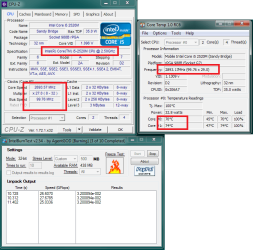
Hi, 100% of 0 is still 0.
CPU-Z will tell you make model of your CPU and speeds it's capable of (+more).
Core Temp will show temperatures reported by the sensor on the CPU.
IntelBurnTest will let you stress test CPU(if you have other means of doing this that's fine also as this one is quite intense)

if temperature is not an issue then test replace power/battery
 

Attachments

  • test.png
    test.png
    42.5 KB · Views: 0

My Computer My Computer

At a glance

w7 ultimate 64-bit sp1i5 2500K @4.52x4GB G.Skill Ripjaws-X 2,133 CL9GTX 560Ti
Computer type
PC/Desktop
Computer Manufacturer/Model Number
custom build
OS
w7 ultimate 64-bit sp1
CPU
i5 2500K @4.5
Motherboard
MSI P67A-GD65 rev2
Memory
2x4GB G.Skill Ripjaws-X 2,133 CL9
Graphics Card(s)
GTX 560Ti
Sound Card
on board
Monitor(s) Displays
BenQ G2410HD
Screen Resolution
1920x1080
Hard Drives
Samsung 2.5-Inch 250 GB 850 EVO
PSU
BeQuiet 600W
Keyboard
K65
Mouse
Razer Deathadder Ergonomic Gaming Mouse
Internet Speed
35Mbps
Back
Top