

Chigurh
New member
Howdy parts,
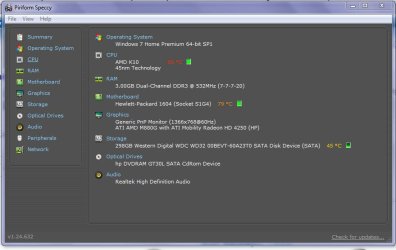
i have a HP compaq g56
AMD Dual core processor
windows7 (obviously im here lol) home premium
64 bit
300GB
im my problem is
that my computer will turn off for reason,
ive noticed that it usually cuts off quicker if im doing something
like surfing the web, or i have multiple programs open,
also i say it turns off for no reason because for example i can just
have itunes open listening to music and it will cut off.
and also as a result of my computer cutting off for no reason i usually leave a background running
program open so my computer cant go in a sleep or a hibernated mode (the mode when the screen savers start going and then the screen goes black)
so for example if i dont open a program that runs in the background and wont allow my computer to
hibernate or sleep or watever thats called.. the screen will just go black.. but i'll still be able to
see the screen backlit LEDs on.
and not to mention when im surfing the web and the computer shuts off
the same backlit black screen happens.
so whens the happens i have to do a hard reset of course.
so i turn the computer off (hard reset) and attempt to turn it back on but it wont come on.
when i push the power button you ca hear the fan start strong but then its like it dies down
and runs low or something, and the caps lock button blinks and the WIFI signal on the computer stays orange.
so wat i do is i suffocate the fan so it cant breathe,
then it will usually cut off its self because its geting to hot,
so then is wat i do is i take the power adapter out of the computer
wait about 5 seconds and then put it back in.
and turn on my laptop and it will come on
BUT not all the time does doing that whole process does it turn on.
other info that could help is my battery has been needing to be replaced
for quite a while now, but i havent i just leave it plugged up.
so what i did today is take the battery from my moms computer
(same G series computer)
and so far so good ive been browsing the web, i've opened
multiple programs. and wat usually would make my computer turn off hasnt.
so is wat im wondering is something wrong with my computer, fan, motherboard ETC.
or was it just my battery the whole time.
it looks like that way for now?
not sure if its going to stay not turning off and not wanting to come back on.
so any help on this headache would be great.
i have a HP compaq g56
AMD Dual core processor
windows7 (obviously im here lol) home premium
64 bit
300GB
im my problem is
that my computer will turn off for reason,
ive noticed that it usually cuts off quicker if im doing something
like surfing the web, or i have multiple programs open,
also i say it turns off for no reason because for example i can just
have itunes open listening to music and it will cut off.
and also as a result of my computer cutting off for no reason i usually leave a background running
program open so my computer cant go in a sleep or a hibernated mode (the mode when the screen savers start going and then the screen goes black)
so for example if i dont open a program that runs in the background and wont allow my computer to
hibernate or sleep or watever thats called.. the screen will just go black.. but i'll still be able to
see the screen backlit LEDs on.
and not to mention when im surfing the web and the computer shuts off
the same backlit black screen happens.
so whens the happens i have to do a hard reset of course.
so i turn the computer off (hard reset) and attempt to turn it back on but it wont come on.
when i push the power button you ca hear the fan start strong but then its like it dies down
and runs low or something, and the caps lock button blinks and the WIFI signal on the computer stays orange.
so wat i do is i suffocate the fan so it cant breathe,
then it will usually cut off its self because its geting to hot,
so then is wat i do is i take the power adapter out of the computer
wait about 5 seconds and then put it back in.
and turn on my laptop and it will come on
BUT not all the time does doing that whole process does it turn on.
other info that could help is my battery has been needing to be replaced
for quite a while now, but i havent i just leave it plugged up.
so what i did today is take the battery from my moms computer
(same G series computer)
and so far so good ive been browsing the web, i've opened
multiple programs. and wat usually would make my computer turn off hasnt.
so is wat im wondering is something wrong with my computer, fan, motherboard ETC.
or was it just my battery the whole time.
it looks like that way for now?
not sure if its going to stay not turning off and not wanting to come back on.
so any help on this headache would be great.
My Computer
At a glance
Windows7 Home Premium 64bit.AMD K10
- Computer type
- Laptop
- Computer Manufacturer/Model Number
- HP
- OS
- Windows7 Home Premium 64bit.
- CPU
- AMD K10
- Motherboard
- Hewlett-Packard 1604 (Socket S1G4)
- Monitor(s) Displays
- HP G-56 16:9
- Screen Resolution
- 1366x768
- Keyboard
- Wireless Logictech K360
- Mouse
- Wireless Logitech M310
- Antivirus
- Malwarebytes, Windows Defender
- Browser
- Safari

 rb: type the word snipping-click snipping tool.

 ,
,

