HP laptop no sound from speaker but there is sound through headphone

imek

New member
Local time
3:19 PM
Messages
3
I have hp dv1738od and have upgraded to Windows 7, previously Windows XP. Everything seem to be working ok except, for the sound. Window 7 automatically installed the driver, and said the sound card was working properly. But there was no sound through speaker.

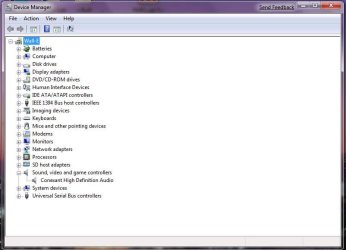
I removed the driver and reinstall the driver that I got from HP website that work for Window Vista. Installation went through with no problem and Device manager indicated no isssue on sound driver. However there was still no sound coming out from the speaker, only through headphone jack.

I read tons of forums, and some has suggested that it may be the jack connection. I tried plugging in and out numerous time, and that did not solve the issue. Sound could be heard for like a sec, when headphone was being plugged out but it goes away quickly. To determine if it was hardware or software issue, i reinstalled Window XP and there was sound through speaker. So for sure it is not the speaker issue.
If anybody can help me out, I greatly appreciated.
 

My Computer My Computer

At a glance

windows 7
OS
windows 7
Hi imek and welcome to the forum!

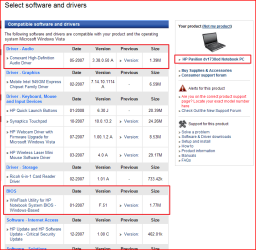
I would assume that you are running the 32-bit version of Windows 7. If you are, you're in luck. Please download the latest BIOS and software for your HP Pavilion dv1738od, here.

I would suggest that you try using the audio driver found in this page to check if that resolves your issue. If it doesn't, it is highly recommended that you update your BIOS, found in the link provided, that might correct the issue you're having.

Let us know how it turns out ;)
 

My Computer My Computer

At a glance

Windows 7 Build 7048 x64Athlon 64 X2 Dual Core 4600+4 x 1GB Kingston 400MHz 6-6-6-18 (800MHz)ATI Radeon 3650
Computer Manufacturer/Model Number
Custom Build
OS
Windows 7 Build 7048 x64
CPU
Athlon 64 X2 Dual Core 4600+
Motherboard
EMX-AMD750G-PRO
Memory
4 x 1GB Kingston 400MHz 6-6-6-18 (800MHz)
Graphics Card(s)
ATI Radeon 3650
Sound Card
Realtek HD Audio
Monitor(s) Displays
22" AOC 2216Vw
Screen Resolution
1680x1050
Cooling
Arctic Cooling Freezer 64 Pro PWM
Keyboard
Generic Enhanced Natural Keyboard
Mouse
Logitech VX Nano
Other Info
Edifier M1550
thank you for taking your time helping me. I forgot to mention, that yes it is 32bit operating system and I have upgraded my bios through HP website. And that did not solve the sound issue.
You had mention that downloading the driver that was provided through this site, would you happen to know which one?
Thanks again,
 

My Computer My Computer

At a glance

windows 7
OS
windows 7
Please download the latest BIOS and software for your HP Pavilion dv1738od, here.

If you notice that the word "here" is colored differently, it contains the direct link to your exact model in HP support site, please click on it. Please refer to the attachment as it shows the suggested possible downloads for your system.

Note: Although the downloads are a bit old, they are vista certified drivers and should work.

Another option is to try the Windows 7 Driver Solution, here.

You're most welcome ;)
 

Attachments

  • Capture.PNG
    Capture.PNG
    33.3 KB · Views: 575

My Computer My Computer

At a glance

Windows 7 Build 7048 x64Athlon 64 X2 Dual Core 4600+4 x 1GB Kingston 400MHz 6-6-6-18 (800MHz)ATI Radeon 3650
Computer Manufacturer/Model Number
Custom Build
OS
Windows 7 Build 7048 x64
CPU
Athlon 64 X2 Dual Core 4600+
Motherboard
EMX-AMD750G-PRO
Memory
4 x 1GB Kingston 400MHz 6-6-6-18 (800MHz)
Graphics Card(s)
ATI Radeon 3650
Sound Card
Realtek HD Audio
Monitor(s) Displays
22" AOC 2216Vw
Screen Resolution
1680x1050
Cooling
Arctic Cooling Freezer 64 Pro PWM
Keyboard
Generic Enhanced Natural Keyboard
Mouse
Logitech VX Nano
Other Info
Edifier M1550
Capture.PNG
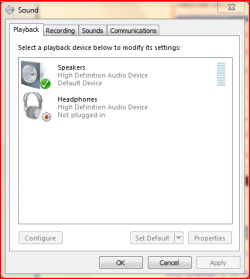
On my HP laptop I have to chose between Speakers and Head Phones. It is found one the Sound Volume Icon on the right side of the taskbar. I have to chose one or the other. At least on my machine I cannot chose both.
 

Attachments

  • Capture.PNG
    Capture.PNG
    13.4 KB · Views: 7,301

My Computer My Computer

At a glance

windows 7Q93008 Gig
OS
windows 7
CPU
Q9300
Memory
8 Gig
Screen Resolution
1920x1200
Hard Drives
1st 500 gig 2nd 1 TB SATAs
Internet Speed
20 mb FIOS
i have already installed both the sound driver and bios upgrade to version f.51 on hp website for window Vista, and I'm still having this same issue.
jtoolman- under sound volume control, there is only speaker icon shown.
Do you guys think there are other ways? This is driving me crazy.
thanks again for helping
 

Attachments

  • sound.jpg
    sound.jpg
    41.9 KB · Views: 132
  • devicemanager.jpg
    devicemanager.jpg
    55.4 KB · Views: 181

My Computer My Computer

At a glance

windows 7
OS
windows 7
Please check out the complete troubleshooting guide for your laptop model, here

If those steps don't do you any good, please try to download and install the latest sound driver. The latest version available is Conexant High Definition Audio Driver 4.19.0.52 for Vista (x32/x64). Unfortunately, I could not post any link to the download link as the source could not be verified. You can of course google it ;)

Now if all else fail, you can always try the Windows 7 Driver Solution, here.

Please keep us posted on your progress ;)
 

My Computer My Computer

At a glance

Windows 7 Build 7048 x64Athlon 64 X2 Dual Core 4600+4 x 1GB Kingston 400MHz 6-6-6-18 (800MHz)ATI Radeon 3650
Computer Manufacturer/Model Number
Custom Build
OS
Windows 7 Build 7048 x64
CPU
Athlon 64 X2 Dual Core 4600+
Motherboard
EMX-AMD750G-PRO
Memory
4 x 1GB Kingston 400MHz 6-6-6-18 (800MHz)
Graphics Card(s)
ATI Radeon 3650
Sound Card
Realtek HD Audio
Monitor(s) Displays
22" AOC 2216Vw
Screen Resolution
1680x1050
Cooling
Arctic Cooling Freezer 64 Pro PWM
Keyboard
Generic Enhanced Natural Keyboard
Mouse
Logitech VX Nano
Other Info
Edifier M1550
I was able to get sound working on the dv1783od using the driver posted here.

The trick was to do the install via Device Manager, using the following steps:

1) Uninstall the device from Device Manager (via rt. click on the device).
2) Reboot.
3) Unpack the driver, but don't use the softpaq installer. Instead, go to Device Manager, and right-click the device, and select "Update Driver Software..."
4) Select "Browse my computer for driver software" and on the next page, point it at the unpack location (probably in %systemdrive%\swsetup\SP32864). Click Next and let it install the driver.
5) viola! sound!

Hope this helps!
 

My Computer My Computer

At a glance

Win 7
OS
Win 7
Back
Top