HP Laptop upgrade from Vista - 4 frustrating failures!!

jecook

New member
Member
Local time
7:34 PM
Messages
75
I am trying to install on an HP DV6-1063TX laptop computer.

I have runs upgrade adviser it reports 1 issue although I am not sure what it is,

In the System report I get two notices one about MS Mail & Web filtering and one suggesting a visit to HP website, everything else is green ticked so I don't think there are any serious problems here.

In the Devices section there is a ? againnst the HP DVB-T/Analog TV-Tuner but again all else is green ticked.

In the Software section I get a 'Yellow Triangle !' against Adobe Shockwave Player version 10.2.0.023, everything else has green ticks. The problem is that as far as I can see there should not be Adobe Shockwave version 10 as I have uninstalled not only this program but all the other Adobe software as well. I have tried updating to version 11.5, I have used Adobe's standalone uninstall tool for Shockwave but W7 UGA insists it is still on the computer. I have run CCLeaner but all to no avail. Is this the problem?

On the first attempt I had a problem with HPs Keyboard Filter which I understand is related to the HP Quick Launch Button software, I have uninstalled the software and have upgraded to the latest version.

I have tried the installation 3 or 4 times now with the HP software upgraded or fully installed. Each time the installation goes through all the on-line checks, system checks, file expansion etc... only to find that it fails during the final stage. During the last attempt I had the upgraded Keyboard Filters installed and this again caused a problem so I am going to uninstall the upgraded software and try another install although I hold little hope for success.

The fact that the W7 UGA reports a phantom Adobe Installation leads me to think the problem may be there but I have no idea how to solve this as it is not on the machine.

I would prefer to do the upgrade installation if possible as it will save many hours of software installation (after hours of time already wasted on W7 installation), and I am worried that being a laptop W7 may fail with some of the drivers it does not help that I cannot find this laptop on HPs website even though it was bought just over 12 months ago.

I really want to get rid of this Vista installation and hope that someone here can be of assistance, in the meantime I will be trying one more attempt to upgrade after uninstalling the HP Quick Launch Bitton software.

Happy Xmas and a Prosperous New Year to all
 

My Computer My Computer

At a glance

Windows 7
Computer Manufacturer/Model Number
HP DV6-1063TX Entertainment PC
OS
Windows 7
Hello, Welcome to the Forums!

I believe the general concensus here is that upgrades are not recommended. Although some time may be saved, more problems may arise later. Plus the time it takes to upgrade versus a clean install shortens the time difference.

I am sorry I cannot help you upgrade. You can use Windows Easy Transfer to help you backup before doing a clean install, if you want to go that route.

Hope this helps,
~Jonathan
 

My Computer My Computer

At a glance

Windows 7 Professional x64Intel i7 2600K OC'd @ 4620 MHz16GB GSkill Sniper 2133 Mhz (4x4GB)EVGA GeForce GTX 480 SuperClocked+
Computer Manufacturer/Model Number
Custom
OS
Windows 7 Professional x64
CPU
Intel i7 2600K OC'd @ 4620 MHz
Motherboard
Asus P8Z68-V Pro
Memory
16GB GSkill Sniper 2133 Mhz (4x4GB)
Graphics Card(s)
EVGA GeForce GTX 480 SuperClocked+
Sound Card
Realtek High Definition Audio
Monitor(s) Displays
2x Acer S273HLbmii 27"
Screen Resolution
2 x 1920x1080
Hard Drives
64GB Crucial M4 SSD

Storage: Hitachi 1TB 5400RPM, Samsung 1.5TB 5400RPM
PSU
Corsair HW Series 750w (modular)
Case
Cooler Master HAF 932 Advanced Blue Edition
Cooling
CM Hyper 212+ CPU cooler, 3x 230mm + 1x 140mm case fans
Keyboard
Logitech MK320 (wireless)
Mouse
Logitech MK320 (wireless)
Internet Speed
30 Mb/s : 2 Mb/s
+1

If there was ever a time to clean install, it is when changing from the worst OS ever to the best OS ever. Why follow a corruption path into Win7?

The Win7 installer is driver-complete, with more added to the installer during install if you plug ethernet and select "connect to internet during install." You will want to boot the DVD to get the cleanest possible install, Custom with Drive tools to delete all, create new partition(s) as you wish, then format before installing Win7 to the first partition.

Afterwards more drivers will arrive via Windows Updates. Any missing in Device Manager can be found on the support Downloads page for your computer model, along with favorite apps.

Take your time installing programs to gauge performance after each install. This will clue you better to how they run in Win7.

We are here to help you at any time.
 
Thanks Jonathan,
I have to say I am pretty annoyed with MS since the Upgrade option appears to not be an option at all, especially as this is a laptop which I am sure will have some 'special' HP drivers. Hardly the way for MS to win friends back after the disaster that is Vista!

I am reluctantly coming to the conclusion that I will have to do a clean install but was wondering whether it would be better to first try to install Win 7 on a separate partition as a dual boot to Vista and if that install is 100% successful I could then either re-install all the software to the Win 7 Partition and delete then Vista partition or once happy that wll was working OK I could go the Easy Transfer Route, install Win 7 on my C drive over Vista and then remove the 'temporary' Win 7 partition.

This would at least save the existing Vista setup if there are insurmountable driver issues. Unfortunately the HP software to create a recovery disk does not work and the only recovery software is on a special recovery partition created by HP.

This really should not be that hard, shame on MS for making such a mess of the upgrade process with their last few OS's. I am begiinning to think that my normal policy of never upgrading MS Os's is the best option, normally I only get new OS's pre-installed on new machines.

The latest attempt at upgrade installation just failed after getting over 60% of the way through the transferral of settings stage!!!

If I use Easy transfer will it allow me to back up the existing HP drivers?
 

My Computer My Computer

At a glance

Windows 7
Computer Manufacturer/Model Number
HP DV6-1063TX Entertainment PC
OS
Windows 7
Here is the tutorial for doing a dual boot Vista/Win7: http://www.sevenforums.com/tutorials/5166-dual-boot-installation-windows-7-vista.html

The great thing about a dual boot is you don't have to back up files or drivers, because you can browse from your new Win7 installation to transfer your files via explorer, or even install drivers missing in the Device Manager by browsing from the Update Driver tab on the Device to your Vista windows/system32/drivers or /driverstore files where all the drivers live.

But the Win7 installer is mostly driver-complete, with newer ones inserted into the installer during install if you keep ethernet plugged and select "connect to internet during install". More drivers will arrive in Windows Updates. You can find missing apps/drivers on the Support Downloads page for your computer model.

When the time comes to remove Vista from your dual boot, we can help here - we've helped do over 100 dual boot extractions since WIn7 release.
 
Thanks Greg,
After failure 5, as my daughter said it's time for drastic measures!!! I think we are now at the clean install stage. I think most drivers will not be a problem the only one that may be a problem is TV card. I don't think that the loss of the HP 'Utilities (?)' will much of a loss but it would be nice to have all the hardware working.

I am thinking dual boot may be the safe option.
 

My Computer My Computer

At a glance

Windows 7
Computer Manufacturer/Model Number
HP DV6-1063TX Entertainment PC
OS
Windows 7
To summarize what has been said and add my own ideas here goes:

Do a clean install, this is a free gift given to you by MS, you paid for an upgrade but you can get the clean install feature. Remove all externals, speakers, printers etc. Have just modem, monitor and keyboard. Go to Bios (you have to read your comp manual to see which f key to push) push the f key repeatedly during boot and when you get the BIOS screen, select boot from DVD. Put DVD in drive and boot up again. While installing select the advanced option and format, then select custom. You should then be ready to begin using your new OS. After you install, give your key number, do not give it when first asked. As far as drivers, you can try to install any new drivers, now. You will probably just need the HP.

Once you are installed, check out MSE, Microsoft Security Essetntials, a great Anti Virus, made for windows, and free.

Best of luck
 

My Computer My Computer

At a glance

Windows 10, Home Clean InstallIntel Core2 processsor Q8200(2.33Ghz 1333FSB)...6 gbATI Radeon 256MB HD3650
Computer type
PC/Desktop
Computer Manufacturer/Model Number
Dell XPS 420
OS
Windows 10, Home Clean Install
CPU
Intel Core2 processsor Q8200(2.33Ghz 1333FSB) Quad Core Tech
Motherboard
Dell
Memory
6 gb
Graphics Card(s)
ATI Radeon 256MB HD3650
Sound Card
Intergrated 7.1 Channel Audio
Monitor(s) Displays
Dell SP2009W 20"
Hard Drives
640 GB Serial ATA Hard drive
Cooling
Fan
Keyboard
Dell USB Keyboard
Mouse
Dell Premium Optical USB
Internet Speed
DSL 2.85
I consider HP utilities bloatware but you can find favorite apps and any drivers missing in Device Manager on the HP Support Downloads page for your model.

For example, a webcam driver may be delivered by installer or Windows Updates but more software sometimes still needs to be installed. You find it on the HP model Downloads page, or by googling the exact Device name from Device manager.

If you decide against dual boot, just back up C:windows/system32/drivers along with your files so you can browse there for any drivers not installed or delivered by Windows Updates.

Had you uninstalled your anti-virus when trying the in-place Upgrade? We really like MSE and Avast free versions here, completely unobtrusive and effective without the bloat of the paid programs.
 
Successful dual boot install

Thanks for all the advice, I have now gt a dual boot system which has no driver issues as far as I can tell. I agree with Greg about the OEM software (described recently in my favourit mag as 'c**pware' a complete waste of hard disk space!

The drivers from the old System32 folder solved the problems with all the hardware that system manager flagged with errors and everything now looks fine. The only problem being of course that I don't currently have AV software (Vista OS has a new install of Kaspersky Internet Security 2010) and the MS Office software is also on Vista OS.

I think what I would like to do is to back up some directories from the Vista Partition (including System32) and then remove the Vista Partition or re-install Win7 as a clean install on the C: drive. I will then need to re-install Office and Kaspersky do you think there will be any issues with licences when I re-install these and other software.

Many thanks
Jon
 

My Computer My Computer

At a glance

Windows 7
Computer Manufacturer/Model Number
HP DV6-1063TX Entertainment PC
OS
Windows 7
Hi Jon -

Use Belarc Advisor to audit your keys if you dont' have them, a good hardware/software audit to keep on hand.

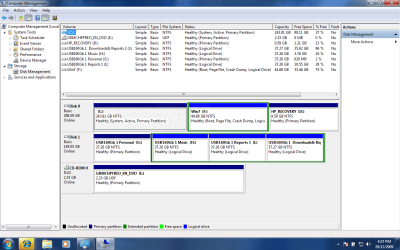
If you will post back a screenshot of your full Disk Management map, we can advise you the exact steps to remove the Vista installation and resize Win7 into its space. We do this all the time here with about a 95% success rate.

Back up your files externally and maybe a Win7 backup image depending upon how attached you are to that installation.

Consider the much lighter-weight free Avast Home or Microsoft Security Essentials for your finished job.
 
Hi je,

Before you go any further, go to folder options and make sure Hidden files and protected o/s files are showing.

Browse the HD - including the recovery partition ( post screenies of partition contents).

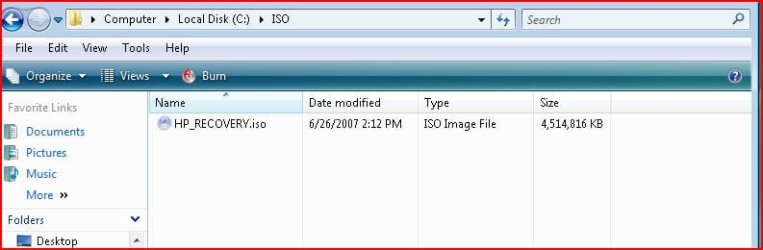
Someone found this on his HP machine - burned it as an image to dvd - reinstalled perfectly.

If you can find something similar, or even the installation files - we should be able to get a bootable .iso .

You can keep that safe in case you want it in the future.

HP-ISO-FOUND-2009-12-28_042346.jpg

HP-530 Notebook-ISOfound.jpg
 

My Computers My Computers

  • At a glance

    7 X64i5 84002x8gb 3200mhz
    Computer type
    PC/Desktop
    OS
    7 X64
    CPU
    i5 8400
    Motherboard
    gigabyte b365m ds3h
    Memory
    2x8gb 3200mhz
    Hard Drives
    various
    PSU
    pure power 11 400w cm
    Case
    Coolermaster
    Cooling
    cryorig m9i
  • At a glance

    7x64g54008gb ddr4 2400
    Computer type
    PC/Desktop
    OS
    7x64
    CPU
    g5400
    Motherboard
    ga b365m ds3h
    Memory
    8gb ddr4 2400
    PSU
    xfx pro 450w
Belarc Advisor is great, what a useful piece of software. I am going to backup files to an external USB drive including the Windows/System32/Drivers folder. Attached is the Disk Management Map.

I will have a look and see if I can find an ISO image.

So far so good :)
 

Attachments

  • SuYinLaptopDMMap.PNG
    SuYinLaptopDMMap.PNG
    53.2 KB · Views: 59

My Computer My Computer

At a glance

Windows 7
Computer Manufacturer/Model Number
HP DV6-1063TX Entertainment PC
OS
Windows 7
This is pretty straightforward with no surprises.

Back up your files to another HD along with a Win7 backup image so you can start over, as Resizing operations can fail. Make Vista recovery disks if you can as a backup to factory condition.

You'll need to use Partition Wizard bootable CD and your Win7 install DVD or Repair CD.

Boot into PW and rightclick Modify>Set active Win7 partition. OK each step but wait til last to Apply.

Now rightclick Modify>Set inactive Vista partition, then rightclick Delete Vista partition (ignore warnings).

Now rightclick Resize Windows 7 partition, dragging the left border all the way over against the left side of the HD. Apply all steps.

Now boot into Win7 DVD Repair console or Repair CD, click through to Recovery Tools and run Startup Repair 3 separate times as it needs to test, attempt to repair and then rewrite the MBR to Win7.

You can later test if the Vista Recovery partition is still functioning by tapping the key given for Recovery on the first bootup screen. If not, I'd delete it.

If you have any further questions or need help with this, I will be back at noon PST Monday.
 
Getting ready to remove the Vista installation

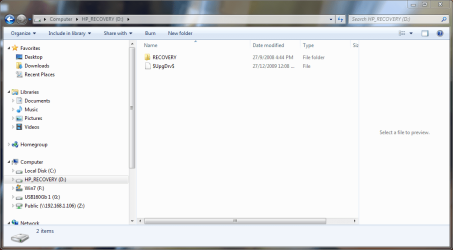
Following SIW2's advice I have looked to see if there was an HP ISO image but do not see one. The computer has a Recovery Partition which contains a special folder which could be an ISO image but I cannot see the actual contents, right clicking offers to expand it!). I have tried making the HP recovery disks several times but as usual this is another useless bit of OEM software which gives up, its says it will restart next time but never does. So the recovery drive is the only one which has the original HP installation Pack including the OS. Perhaps I could clone this recovery partition?

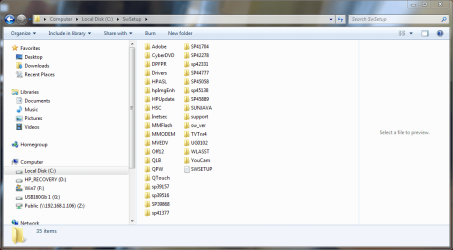
On the C: Drive there is a folder called SwSetup which appears to mainly contain the HP bloatware it appears to contain drivers as well.

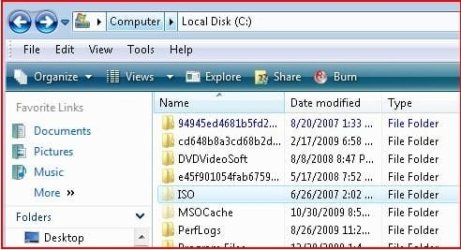
I have attached images of the C drive, the SwSetup folder and the D drive (Recovery).

I wanted to make a backup of the Win7 drive to an external USB disk, Can I just back up the entire Win7 partition (currently the F drive) as I only need to backup parts of the C drive.

The installation of W7 went fine the only intervention being after the install when I used the original Vista drivers to fix a few hardware issues revealed by System Hardware Manager. I figure that before removing the Vista installation what I need to do is:

1) Backup all the personal data on the C drive, plus the Windows System32 folder and the SwSetup folder.

2) Backup or clone the Recovery partition for Vista

3) Backup the existing Win7 installation partition.

At that point I think I should be ready to follow Greg's advice to remove the Vista installation and dual boot.

At present everything seems to be working fine but I may need some HP software although nothing like as many as they installed, but I think this would be best done from the HP site once Win 7 is installed.

Many thanks for all the advice, learnt a few things today and picked up some useful utilities. (BTW I used a free program called Easeus to create the Win7 partition as Vista's disk management software would not perform.)

Tomorrow will hopefully bring me to the point where we have only Win7 and can start re-installing all the software.

To those who have suggested alternatives to Kaspersky, thanks I am inclined to agree as the new upgrade to the 2010 program is giving me a real hard time on my network. Both the Kaspersky 2010 equipped systems fail to connect to the Workgroup properly since installation, pity I went for a 2 year licence!!! :confused:

Jon
 

Attachments

  • Vista C Drive.PNG
    Vista C Drive.PNG
    52.8 KB · Views: 27
  • HP Vista C Drive SwSetup directory.PNG
    HP Vista C Drive SwSetup directory.PNG
    46 KB · Views: 38
  • HP Vista Recovery Partition D.PNG
    HP Vista Recovery Partition D.PNG
    42 KB · Views: 48
  • HP Vista C Drive SwSetup-Drivers directory.PNG
    HP Vista C Drive SwSetup-Drivers directory.PNG
    47.4 KB · Views: 37

My Computer My Computer

At a glance

Windows 7
Computer Manufacturer/Model Number
HP DV6-1063TX Entertainment PC
OS
Windows 7
Have a look in the C:\HP folder (in the first screenshot)

Also look in HpImgEnh in the second screenshot.
 

My Computers My Computers

  • At a glance

    7 X64i5 84002x8gb 3200mhz
    Computer type
    PC/Desktop
    OS
    7 X64
    CPU
    i5 8400
    Motherboard
    gigabyte b365m ds3h
    Memory
    2x8gb 3200mhz
    Hard Drives
    various
    PSU
    pure power 11 400w cm
    Case
    Coolermaster
    Cooling
    cryorig m9i
  • At a glance

    7x64g54008gb ddr4 2400
    Computer type
    PC/Desktop
    OS
    7x64
    CPU
    g5400
    Motherboard
    ga b365m ds3h
    Memory
    8gb ddr4 2400
    PSU
    xfx pro 450w
SW setup looks quite complete but remember those are Vista drivers so only use as last resort since Win7 installer/Updates are newer. Read the text file there.

The Recovery partition is good for only making your recov disks or recover to factory condition. But it won't make the disks, will lose the ability to recover from the OS once you remove Vista, so would only possibly be needed if you can still trigger Recovery by tapping the key given on the first bootup screen. This is why I suggested you wait to delete it until you test this after Vista deletion. But you can also test it now to see if it is worth keeping even that long.

You might well find a recov ISO in one of those HP folders as SIW2 wisely suggests.

Easeus is not the tool you need now, btw, use Partition Wizard bootable CD for this job.

Remember to save a Win7 Back up image externally so you can start over if necessary. Test it by booting the Win7 DVD>Repair>Recover Using Image to autodetect, cue up image in root of external or a primary formatted partition internal HD.
 
Last edited:
Usually you can mark the Recovery partition Active and boot straight into the oem recovery program.

Even if there is no .iso , often the installation files are on there and can be made into a bootable .iso with vlite, or similar.
 

My Computers My Computers

  • At a glance

    7 X64i5 84002x8gb 3200mhz
    Computer type
    PC/Desktop
    OS
    7 X64
    CPU
    i5 8400
    Motherboard
    gigabyte b365m ds3h
    Memory
    2x8gb 3200mhz
    Hard Drives
    various
    PSU
    pure power 11 400w cm
    Case
    Coolermaster
    Cooling
    cryorig m9i
  • At a glance

    7x64g54008gb ddr4 2400
    Computer type
    PC/Desktop
    OS
    7x64
    CPU
    g5400
    Motherboard
    ga b365m ds3h
    Memory
    8gb ddr4 2400
    PSU
    xfx pro 450w
Usually you can mark the Recovery partition Active and boot straight into the oem recovery program.

Even if there is no .iso , often the installation files are on there and can be made into a bootable .iso with vlite, or similar.

Is there a way to test marking Active to know if it will work if Recov partition is kept? If so, can you bail out of the process after testing it so far?

Could marking recov active derail the boot?

The install files you refer to: full recov or just Win7? How would they be recognizable to OP if recov?
 
Noted the Partition Wizard advice and downloaded the iso image last night.

One quick question for Greg, you said,

"Remember to save a Windows 7 Back up image externally so you can start over if necessary. Test it by booting the Windows 7 DVD>Repair>Recover Using Image to autodetect, cue up image in root of external or a primary formatted partition internal HD.

This makes complete sense of course and I have a 160Gb External USB drive to do this but when I run Win7 Backup it wants to backup both the Vista drive C:\ and the Win7 F:\ drives and since C is pretty full it won't fit on the 160Gb ext USB. I could go for the manual selection but here is my question, if I manually just backup the Win 7 partition will this provide me with the Win7 Image I would need for a recovery?

The Recovery partition is protected by HP and will not show the contents. To use this it is necessary to press F11 when requested during the boot process, according to HP instructions.

The HpImgEnh folder noted by SIW2 contains aome HP image enhancement software, I also looked in the HP folder and as far as I can see there is no iso image and it is primarily the folder that provides instructions and commands for some HP utilities, there is s folder called recovery but it only contains links which all point to the CD/DVD reader.

The way I see it is that we have managed to install Win 7 and it works fine, I needed a few drivers from the old Vista installation and will have to look for some Win7 compatible HP Utilities e.g the special quick launch keys that launch media player, but these are largely not essential. So, if worst came to the worst, as long as I have backed up the drivers and all the personal data, I could re-install Win 7 from the DVD again.

Am going to start backing up the personal docs, drivers etc

Many thanks for all your assistance,

Jon
 

My Computer My Computer

At a glance

Windows 7
Computer Manufacturer/Model Number
HP DV6-1063TX Entertainment PC
OS
Windows 7
Are you saying the Backup program will allow you to save just the Win7 image?

Because if it will then that is all you need to reimage Win7 along back to the HD, which is your goal.

You only need your files backed up from Vista since it's leaving the building. No need for image.

Do you want to test tapping F11 at bootup to see if the recov partition still works, which is doubtful since it wouldn't make your same ISO recov disks? Then you'd know for sure it can be deleted. Otherwise you can wait til Win7 install to see if it still works, even more doubtful.
 
Back
Top