HP Laserjet 6L

goldooneh

New member
Local time
9:55 AM
Messages
1
I have a Laserjet 6L printer , when i install it in windows 7 it have problems and not work properly.
please help me for installing it or for downloading new drivers for download?

Erorre code : 0x80070057
soucer : Engine


thanks
 
Last edited:

My Computer

OS
7
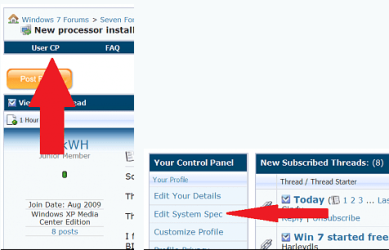
it always helps to know 32 or 64 bit seven and system specs. Thanks Fabe usercp 1.png
 

My Computer

Computer Manufacturer/Model Number
Self Built
OS
Windows 7 ultimate 64 bit / XP Home sp3
CPU
intel Core 2 Duo E8400 3.0ghz
Motherboard
Asus P5ND bios 1401
Memory
8 gigs 1066 OCZ Fata1ty
Graphics Card(s)
EVGA GTX 580 Call of Duty Black Ops Edition
Sound Card
Creative Soundblaster Audigy 2zs
Monitor(s) Displays
Asus 24in LCD's 2MS X2
Screen Resolution
1920x1080p @60Hz
Hard Drives
WD Caviar 500 Black/ WD Caviar 200 Blue
PSU
OCZ 700W GameXtreme
Case
NZXT Apollo
Cooling
Corsair H50 CPU/120mm x3 /60mm x2 /Corsair Dominator Ram
Keyboard
Logitech Bluetooth Wireless MX5000
Mouse
Logitech Bluetooth Wireless MX1000
Internet Speed
Download 19.83 Upload 0.97
Other Info
Logitech Z2300 Speakers/ Bose Noise Cancelling Headphones/Avermedia PCI-e Hybrid TV Bravo/Epson NX415 all in one/ 4 Port Powered USB Hub/ LG 10x Bluray Burner /TSST Corp DVDRW External
Like thefabe stated, filling in your system specs will help us help you better. Anyway the driver page for your printer is right here. Select your 32 or 64 bit and install them and get back to us to see if they work because it may be an issue with setting(s) in windows, though having updated drivers is recommended either way.
 

My Computer

OS
Windows 7 Ultimate X64
CPU
Q6600 @3.6
Motherboard
DFI X38-T2R
Memory
2X2 Mushkin
Graphics Card(s)
XFX 4870X2
Monitor(s) Displays
Philips 240PW
Hard Drives
Intel X25-M 80GB
PSU
PCP&C 750W
Case
Antec 900
Cooling
TRUE 120
Like thefabe stated, filling in your system specs will help us help you better. Anyway the driver page for your printer is right here. Select your 32 or 64 bit and install them and get back to us to see if they work because it may be an issue with setting(s) in windows, though having updated drivers is recommended either way.

Thank you very much for your attempted help.

I am having the same problem as the original poster.
I am running Windows 7 - 32 bit
I have been to the link provided. It says:

~~~~~~~~~~~~~~~~~~~~~~~~~~~~~~~~~~~~~~~~~
LaserJet 6L:
Category 3 - Windows 7 print driver available
LaserJet model specific printer drivers are currently available within the Windows 7 operating system. Installation of these drivers can be performed via Devices and Printers , formerly known as the Add Printer Wizard .
NOTE: If the model specific driver that you are looking for does not appear in the list of available printers, clicking the Windows Update button underneath the list of available printers may provide additional drivers to choose from. Requires opt-in to Microsoft Windows Update and internet connection.
~~~~~~~~~~~~~~~~~~~~~~~~~~~~~~~~~~~~~~~~~~~~~~~~~~~~~~~~

THIS IS NOT TRUE FOR ME. There is NO LaserJet 6L driver in the list. And clicking on "check for recent updates" yields nothing useful. Everyone wants to say "Just run the "Add Printer Wizard" and follow the instructions and everything will work fine. Not true in this case.

We're asking for the LaserJet 6L printer driver for Windows 7 - 32 bit because it's NOT in the list under "select your printer"

I'm asking for the 32 bit driver because I'm running Open Office Suite, which I know runs only under 32 bit mode at this time.

There is no LaserJet 6L driver at the link provided and NO LaserJet 6Ldriver in Windows 7

I hope I'm not overdoing this. But sometimes people just don't seem to clearly understand the question.

 
Last edited:

My Computer

Computer Manufacturer/Model Number
E MACHINE
OS
WINDOWS 7
CPU
AMD
Motherboard
ASUS
Memory
6 GIABYTES
Graphics Card(s)
?
Sound Card
?
Monitor(s) Displays
ACER 19" LCD
Hard Drives
750 GIGABYTE INTERNAL, 1 TERABYTE EXTERNAL
PSU
?
Case
DESKTOP
Cooling
QUIET
Keyboard
STANDARD
Mouse
LASER MOUSE
Internet Speed
DSL 3 MPS
Other Info
IT IS, OF COURSE, A 64 BIT MACHINE. BUT MOST ALL SOFTWARE I HAVE INSTALLED RUNS UNDER 32 BITS.
Microsoft Update Catalog

This is the link to the MS driver site. I have searched it and found a laserjet 6L driver for W7. You will need to use IE to access this site as it installs an activex control to utilize.
 

My Computer

Computer Manufacturer/Model Number
Home Built
OS
Windows 7 SP1 x64
CPU
AMD 9850 X4
Motherboard
ASUS
Memory
Corsair
Graphics Card(s)
ATI Radeon
Sound Card
Sigmatel
Monitor(s) Displays
Dell
Screen Resolution
1600X900
Hard Drives
(1) WD 1TB
Cooling
Corsair H60
Internet Speed
UVerse 12MB
Microsoft Update Catalog

This is the link to the MS driver site. I have searched it and found a laserjet 6L driver for W7. You will need to use IE to access this site as it installs an activex control to utilize.

Thanks, I followed the link and did all the stuff MS wanted. What I download is a .CAB file I found the hp6l.gpd file amoung the 517 files. Windows say's it does not know how to open it (after "checking on the internet") I don't think this really qualifies as a standalone driver. But thanks for the help.http://www.sevenforums.com/images/smilies/biggrin.gif
 

My Computer

Computer Manufacturer/Model Number
E MACHINE
OS
WINDOWS 7
CPU
AMD
Motherboard
ASUS
Memory
6 GIABYTES
Graphics Card(s)
?
Sound Card
?
Monitor(s) Displays
ACER 19" LCD
Hard Drives
750 GIGABYTE INTERNAL, 1 TERABYTE EXTERNAL
PSU
?
Case
DESKTOP
Cooling
QUIET
Keyboard
STANDARD
Mouse
LASER MOUSE
Internet Speed
DSL 3 MPS
Other Info
IT IS, OF COURSE, A 64 BIT MACHINE. BUT MOST ALL SOFTWARE I HAVE INSTALLED RUNS UNDER 32 BITS.
HP LaserJet 6L Works in Windows XP and Windows 7

From: San Jose, Costa Rica.

Yes. You can print with the HP LaserJet 6L in Windows XP and Windows 7.
I cannot get credit for this tip, since I obtained it from someone that kindly posted the answer somewhere else. I did plenty of research to solve this problem.

The solution is simple and works 100%:

1. Install the LaserJet Printer driver for your operating system. If you have Windows XP, the driver will appear in the Add Printer Driver option. If you have Windows 7, the driver will not be available until you perform the Search for Drivers (online) Option. It may take a while for the installation to finish, but it will be installed.
2. Although your computer may not have a Parallel Printer Port, select Parallel Printer Port as a default setting while installing the HP LaserJet 6L Driver. DO NOT change the configuration setting of the HP LaserJet 6L Printer Driver to USB even though you will be using a USB Port in the end.
3. Once the driver has fully installed, go to Devices & Printers in Windows XP or Windows 7, and Right Click on the Printer Driver Icon. Select Printer Properties; Click on the Ports Tab; Click a CheckMark in any of the USB Port boxes that are available in your computer.
4. Click the Apply Button.
Your printer will print from here on in Windows XP or Windows 7. I have tried this myself on both of these operating systems. One on a Desktop Computer with Windows XP. The other on an HP Mini 110-1125nr.
 

My Computer

Computer Manufacturer/Model Number
HP Mini 110-1125nr
OS
Windows 7
CPU
Intel Atom
Memory
1GB
i got mine to load off of the driver on windows update, printer is connected to a linux computer and is shared out.

i clicked, add printer, add a network, wireless or bluetooth printer, click the printer that i want isn't listed, select add a printer using a tcp/ip address or hostname and then next, type host name in second box and uncheck query the printer and automatically select the driver to use, i selected hewlett packard jet direct as device and next, then click windows update and then find the printer.

now you can add the printer the normal way and delete the one that was loaded.
 

My Computer

OS
Windows 7 64 bit
Motherboard
Intel D5400x
Back
Top