

Chaim613
New member
- Local time
- 7:33 PM
- Messages
- 50
Hello,
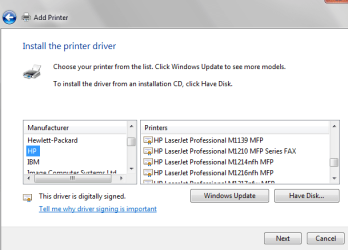
I'm trying to install a HP Laserjet M1212nf MFP, and when the HP printer options are displayed after being updated this printer is not listed as an HP option. Does any one know why? Or a work around? I've attached a screen capture showing the list of HP printers with the printer in question omitted.
Thank you
I'm trying to install a HP Laserjet M1212nf MFP, and when the HP printer options are displayed after being updated this printer is not listed as an HP option. Does any one know why? Or a work around? I've attached a screen capture showing the list of HP printers with the printer in question omitted.
Thank you
Attachments
My Computer
At a glance
Windows 7 Pro 64 bit
- OS
- Windows 7 Pro 64 bit

