Solved hp OfficeJet 8610 can't print using Standard User

hehe001

New member
Local time
3:15 AM
Messages
9
Dear Experts,


Please correct me if I'm posting in incorrect room.


I have brand new HP Officejet Pro 8610, connect over wired network as follow : Printer ---> Switch ---> Laptop1, Laptop2, etc.
All laptops and PCs using Windows 7 Pro x64 and I installed the printer driver using original CD driver installer. The issue is User with administrator priviledge can print but the standard user cannot do print.
I already tried the scann doctor :

http://support.hp.com/us-en/product/HP-Officejet-Pro-8610-e-All-in-One-Printer-series/5367603/model/...

but no luck. From scan doctor it can print the test page,
but when I tried to do Print test page :

301isra.jpg


tried to print from outlook :
ek57a0.jpg


I tried to print some word, pdf, image document, it sent to print queue but eventually occured error.


I tried to uninstall the driver and reinstall using either administrators or standard user didn't luck.

Please help.
 

My Computer My Computer

At a glance

Windiws 7 Pro x64i5
Computer type
Laptop
Computer Manufacturer/Model Number
Lenovo
OS
Windiws 7 Pro x64
CPU
i5
Not sure but might help to log in as a User with administrative rights then give the Standard user permission to print. Or maybe reinstall allowing it for all Users?
 

My Computer My Computer

At a glance

Windows 7 Ultimate 64-bit, Windows 8.1 64-bit...
Computer type
PC/Desktop
Computer Manufacturer/Model Number
Customs, Dell, Gateway, HP, Toshiba, Acer, ASUS
OS
Windows 7 Ultimate 64-bit, Windows 8.1 64-bit, Mac OS X 10.10, Linux Mint 17, Windows 10 Pro TP
Keyboard
Microsoft
Mouse
Microsoft
Hi:

I have an HP 8600 Premium connected locally to my desktop and via wifi to my laptop, but I am not an expert at networking.
Properly configuring the software/drivers for an All-In-One can sometimes be a bit tricky, especially if you use a fax, answering machine, shared phone line, etc.
The install wizard is generally quite good, but it's possible to make the wrong choices on some of the menus...

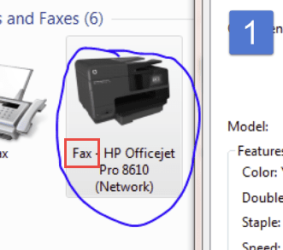
#1 ***Your first screenshot shows that you are trying to print the test page from the FAX, not the printer - that's probably why it's not working (see my snippet from your image).:(

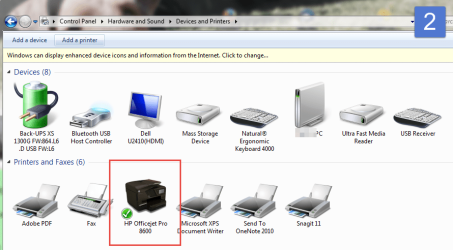
#2 The middle attachment is a screenshot from my control panel, showing the printer properly installed.

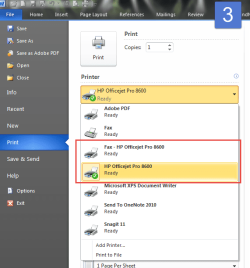
#3 The bottom attachment shows the proper menu of devices/printers in MS Word 2010, including both the 8600 Fax AND the 8600 Printer.

I have a feeling that the printer software/drivers are not properly configured for the printer and fax, even though you said you have reinstalled a few times.:(

This may sound like a cop-out, but, over the years I have found HP support to be quite decent.
If the printer is under warranty, I suggest contacting them, preferably by phone, and they will probably be able to walk you through a proper reinstall and configuration.

Hope this helps,
 

Attachments

  • 2015-06-30_0-07-50.png
    2015-06-30_0-07-50.png
    16.4 KB · Views: 15
  • 2015-06-30_0-09-02.png
    2015-06-30_0-09-02.png
    54.1 KB · Views: 1
  • 2015-06-30_0-19-21.png
    2015-06-30_0-19-21.png
    27.2 KB · Views: 15

My Computer My Computer

At a glance

OEM Windows 7 Ult (x64) SP1Intel Core-i7 3770 @ 3.4 GHz16 GB DDR3 SDRAM @ 1333 MHzNVidia GeForce GT620 1 GB
Computer type
PC/Desktop
Computer Manufacturer/Model Number
Dell Studio XPS 8500
OS
OEM Windows 7 Ult (x64) SP1
CPU
Intel Core-i7 3770 @ 3.4 GHz
Motherboard
"Dell" branded
Memory
16 GB DDR3 SDRAM @ 1333 MHz
Graphics Card(s)
NVidia GeForce GT620 1 GB
Sound Card
THX TruStudio PC
Monitor(s) Displays
Dell U2410 Full HD
Hard Drives
2.0 TB SATA2 @ 7200 RPM
PSU
350W
Keyboard
MS 4000 Ergon - Wired
Mouse
Logitech Anywhere MX
Internet Speed
Cable HSI w/Turbo (router)
Antivirus
KIS-MBAM Premium-MBAE Premium
Browser
Fx (current version); IE
Other Info
And a Win7/64 Pro laptop; And a Win10/64 Pro desktop.
You may want to configure the network of your printer,
Set the IP Address as STATIC.
Then configure the printer port on each laptop manually.
 

My Computer My Computer

At a glance

Windows 7 Pro 32bitDual Core
Computer type
PC/Desktop
Computer Manufacturer/Model Number
HP
OS
Windows 7 Pro 32bit
CPU
Dual Core
Antivirus
Trend Micro
You may want to configure the network of your printer,
Set the IP Address as STATIC.
Then configure the printer port on each laptop manually.

I've never had to do that with any of a long series of HP All-In-Ones.

But it's a very reasonable idea and it seems worth a try.
 

My Computer My Computer

At a glance

OEM Windows 7 Ult (x64) SP1Intel Core-i7 3770 @ 3.4 GHz16 GB DDR3 SDRAM @ 1333 MHzNVidia GeForce GT620 1 GB
Computer type
PC/Desktop
Computer Manufacturer/Model Number
Dell Studio XPS 8500
OS
OEM Windows 7 Ult (x64) SP1
CPU
Intel Core-i7 3770 @ 3.4 GHz
Motherboard
"Dell" branded
Memory
16 GB DDR3 SDRAM @ 1333 MHz
Graphics Card(s)
NVidia GeForce GT620 1 GB
Sound Card
THX TruStudio PC
Monitor(s) Displays
Dell U2410 Full HD
Hard Drives
2.0 TB SATA2 @ 7200 RPM
PSU
350W
Keyboard
MS 4000 Ergon - Wired
Mouse
Logitech Anywhere MX
Internet Speed
Cable HSI w/Turbo (router)
Antivirus
KIS-MBAM Premium-MBAE Premium
Browser
Fx (current version); IE
Other Info
And a Win7/64 Pro laptop; And a Win10/64 Pro desktop.
I could have said I also use an HP Officejet 8600 and have it and an HP Laserjet M1212 connected to my Router via Ethernet cables. I can install the software on any computer regardless of its connection to the Router but have to choose the Network process. I do have to be careful on both printers that I don't set the Fax icon as Default then any program can print to which ever is set as Default in the computer being used. They also work on Mac OS X and Linux Mint. With the Network choice there may be another choice to use a standard Network or the printer's built-in Wi-Fi. I find in most instances the Wi-Fi can be somewhat problematic while the wired connection is quite reliable. The 8600 also has the ePrint feature, seems quite slow and I don't care to send a critical document 'out there' in the wild wild ether.
 

My Computer My Computer

At a glance

Windows 7 Ultimate 64-bit, Windows 8.1 64-bit...
Computer type
PC/Desktop
Computer Manufacturer/Model Number
Customs, Dell, Gateway, HP, Toshiba, Acer, ASUS
OS
Windows 7 Ultimate 64-bit, Windows 8.1 64-bit, Mac OS X 10.10, Linux Mint 17, Windows 10 Pro TP
Keyboard
Microsoft
Mouse
Microsoft
All, thank you for your response. I ask my question in here too and definitely solved my problem.
 

My Computer My Computer

At a glance

Windiws 7 Pro x64i5
Computer type
Laptop
Computer Manufacturer/Model Number
Lenovo
OS
Windiws 7 Pro x64
CPU
i5
Hi:

So it was a wonky driver, and replacing the 8610 driver with the 8600 driver solved the problem?

Thanks,
 

My Computer My Computer

At a glance

OEM Windows 7 Ult (x64) SP1Intel Core-i7 3770 @ 3.4 GHz16 GB DDR3 SDRAM @ 1333 MHzNVidia GeForce GT620 1 GB
Computer type
PC/Desktop
Computer Manufacturer/Model Number
Dell Studio XPS 8500
OS
OEM Windows 7 Ult (x64) SP1
CPU
Intel Core-i7 3770 @ 3.4 GHz
Motherboard
"Dell" branded
Memory
16 GB DDR3 SDRAM @ 1333 MHz
Graphics Card(s)
NVidia GeForce GT620 1 GB
Sound Card
THX TruStudio PC
Monitor(s) Displays
Dell U2410 Full HD
Hard Drives
2.0 TB SATA2 @ 7200 RPM
PSU
350W
Keyboard
MS 4000 Ergon - Wired
Mouse
Logitech Anywhere MX
Internet Speed
Cable HSI w/Turbo (router)
Antivirus
KIS-MBAM Premium-MBAE Premium
Browser
Fx (current version); IE
Other Info
And a Win7/64 Pro laptop; And a Win10/64 Pro desktop.
Back
Top