

RacingSOUL
New member
Hello everyone!
I have problem installing driver for my HP Photosmart 7550 printer.
I do everything that is told on the official HP website - Installing and Configuring an Alternate Driver in Windows Vista HP Photosmart 7550 Printer - HP Customer Care (United States - English)
I can't do the following that is told in this guide in step 2:
"9. After a message appears on the computer that the product was added successfully, connect the USB cable to the product and to the computer.
10. On the Found New Hardware screen, click Cancel".
In other words this found new hardware pop-up appears but there is no way to cancel it in windows 7... It always installs drivers by its own and I can't interrupt this process!
However I have no problem actually getting the printer to work and even print the test page.
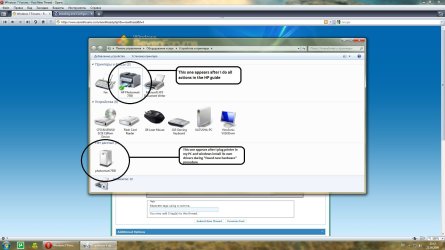
But I have this thing in the Control Panel -> Printers section (screenshot).
I tried many times to remove all drivers for my printer and printer itself, but every time I plug it to my PC found new hardware appears and installs its own drivers... How can I stop it from doing this because actually this printer is already installed in my system and works flawlessly.
I have problem installing driver for my HP Photosmart 7550 printer.
I do everything that is told on the official HP website - Installing and Configuring an Alternate Driver in Windows Vista HP Photosmart 7550 Printer - HP Customer Care (United States - English)
I can't do the following that is told in this guide in step 2:
"9. After a message appears on the computer that the product was added successfully, connect the USB cable to the product and to the computer.
10. On the Found New Hardware screen, click Cancel".
In other words this found new hardware pop-up appears but there is no way to cancel it in windows 7... It always installs drivers by its own and I can't interrupt this process!
However I have no problem actually getting the printer to work and even print the test page.
But I have this thing in the Control Panel -> Printers section (screenshot).
I tried many times to remove all drivers for my printer and printer itself, but every time I plug it to my PC found new hardware appears and installs its own drivers... How can I stop it from doing this because actually this printer is already installed in my system and works flawlessly.
Attachments
My Computer
- Computer Manufacturer/Model Number
- Custom
- OS
- Windows 7 x64 build 7600 Final
- CPU
- Intel Quad Core Q9550 @ 2.83 GHz
- Motherboard
- Asus P5Q SE
- Memory
- 2 x 2GB Kingston 800 MHz
- Graphics Card(s)
- ASUS nvidia 260GTX 216sp
- Sound Card
- Realtek HD audio
- Monitor(s) Displays
- Viewsonic VX2433wm
- Screen Resolution
- 1920x1080
- Hard Drives
- 500GB SATA
- PSU
- 600 Watt
- Case
- Custom case
- Cooling
- Air
- Keyboard
- Logitech G15 version 2
- Mouse
- Logitech G9
- Internet Speed
- 10/10 Mbits/sec


