HP Photosmart C5550 Driver issue

darkcyber

New member
Local time
4:03 AM
Messages
21
I have a new HP Photosmart C5550 AIO printer that works great in Vista x64, but the drivers/software will not install in Windows 7 x64 build 7000. The software immediately comes up and says the OS is not recognized.
 

My Computer My Computer

OS
Windows 7 beta
Have you tried to install with compatibility mode for Vista to see if that helps.
 

My Computer My Computer

Computer Manufacturer/Model Number
Home Brew
OS
Windows 7 Ultimate Vista Ultimate x64
CPU
Core 2 Duo E8500 3.16Ghz @ 3.8Ghz
Motherboard
eVGA 750i FTW
Memory
2x2Gigs Patriot PC2-6400 LL
Graphics Card(s)
Inno3D GeForce GTX260 216 SP
Monitor(s) Displays
ASUS VW222U 22" 2ms Response time
Screen Resolution
1680x1050
Hard Drives
SATA 150GB
SATA II 250GB
USB IDE 750GB Ext.
PSU
HYTEC 600W & Thermaltake 650W Toughpower Power Exp
Case
Thermaltake Armor LCS (Liquid Cooling System)
Cooling
Liquid Cooling System
Keyboard
Logitech G15 Gaming Keyboard
Mouse
Logitech G9 Gaming Mouse
Ok, now this is strange. I had already tried the compatibility mode for Vista and XP SP2 and got the same error. I got up this morning and tried Vista again and the dang this is working. Go Figure? :sarc:

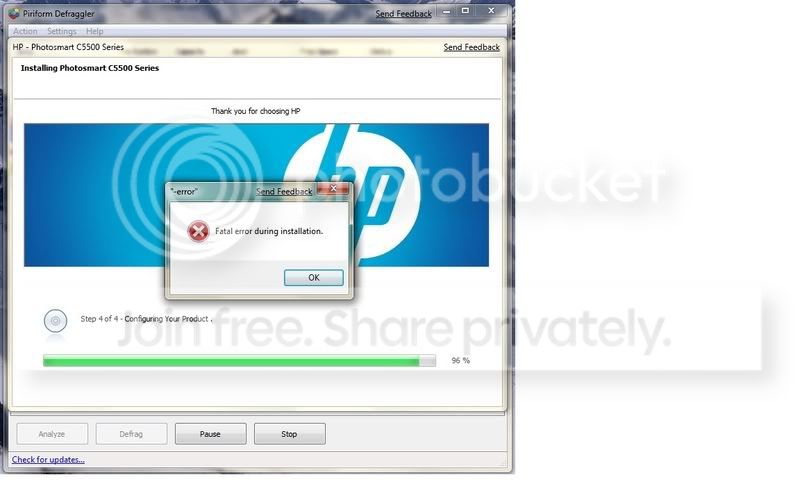
UPDATE: well, spoke to soon. I got almost finished installing the software and then I got this error:

-error -wStub 721298
Fatal Error during installation.

On the HP screen it is showing that it is at step 4 of 4 - configuring your product. But the good news is the printer does work and print. Must have just been some of the bloatware that screwed up.
 
Last edited:

My Computer My Computer

OS
Windows 7 beta
Very strange, but I am glad you got it sorted, was there anything else that you installed yesterday before you tried that install, maybe it just need a restart because of something else unrelated.
 

My Computer My Computer

Computer Manufacturer/Model Number
Home Brew
OS
Windows 7 Ultimate Vista Ultimate x64
CPU
Core 2 Duo E8500 3.16Ghz @ 3.8Ghz
Motherboard
eVGA 750i FTW
Memory
2x2Gigs Patriot PC2-6400 LL
Graphics Card(s)
Inno3D GeForce GTX260 216 SP
Monitor(s) Displays
ASUS VW222U 22" 2ms Response time
Screen Resolution
1680x1050
Hard Drives
SATA 150GB
SATA II 250GB
USB IDE 750GB Ext.
PSU
HYTEC 600W & Thermaltake 650W Toughpower Power Exp
Case
Thermaltake Armor LCS (Liquid Cooling System)
Cooling
Liquid Cooling System
Keyboard
Logitech G15 Gaming Keyboard
Mouse
Logitech G9 Gaming Mouse
Nope, nothing else. The HP Printer was the last thing I was working on last night. I still didn't get some of the stuff installed, like when I print it cannot tell me the ink levels in the cartridges, but eveything else seems to be working.

I can live with it, maybe I can get longer life out of my ink cartridges :D
 

My Computer My Computer

OS
Windows 7 beta
The x86 W7 version has a driver for that printer. Did you check the x64 version for one?

In my case of an HP Color Laserjet 4500, the W7 print drivers worked better than the Universal ones from HP. But I found that isn't always the case, because when I tried to install the x64 Deskjet 820Cse W7 drives in my x64 install, it locked up my system and kept the Print Spooler from starting.
 

My Computer My Computer

Computer Manufacturer/Model Number
Homebuilt
OS
Windows 7 x64
CPU
i7-2600K
Motherboard
Asus P8Z77-v Pro
Memory
8 G
Graphics Card(s)
GTX 480
Sound Card
Onboard
Monitor(s) Displays
LG W2753V
Screen Resolution
1920x1080
Hard Drives
Crucial M4 128 G SSD
Saltgrass,

Well, I didn't know W7 had drivers for my printer built in, because when I installed Windows 7 I had my HP C5550 hooked up to the pc and it never said it was installing the drivers or anything like that. I could have, but I really did not even check it. I tried to install the HP software because it has the program in there that allows me to print onto my cd & dvd discs. Don't know if the W7 drivers would have done that.

I got everything working, but everytime I boot up my pc I keep getting that HP popup box showing 96% complete and then another popup about a fatal error. I haven't figured out which part of the HP software is causing or doing that :confused:

Here is the error message popup I keep getting:

HPERROR.jpg
 
Last edited:

My Computer My Computer

OS
Windows 7 beta
If you are just trying to get the Lightscribe software to work, there are alternatives.

My DVD drive came with Nero Lite which has a labeling program. I never tried to install it, but it would probably work.

Check this thread about downloading the software directly.
http://www.sevenforums.com/drivers/915-installing-lightscribe-support-3.html

Search this forum for other Lightscribe threads. Search the internet for it also. The installer checks the Operating System version, so since W7 has a higher number, it doesn't want to install. That may be what is happening with your 98% situation.
 

My Computer My Computer

Computer Manufacturer/Model Number
Homebuilt
OS
Windows 7 x64
CPU
i7-2600K
Motherboard
Asus P8Z77-v Pro
Memory
8 G
Graphics Card(s)
GTX 480
Sound Card
Onboard
Monitor(s) Displays
LG W2753V
Screen Resolution
1920x1080
Hard Drives
Crucial M4 128 G SSD
Well, I was actually just trying to get the printing on my C5550 to work printing onto the dvd/cd discs.

I have everything working fine, just when I first boot up or come out of sleep mode I keep getting that 96% HP popup and then that error while configuring hardware.

I do have a new lightscribe drive, I just may put it in there and play with it some.
 

My Computer My Computer

OS
Windows 7 beta
I have noticed everytime I plug/unplug any usb device (mainly my flash drives) I get that crazy HP screen saying step 4 or 4 - configuring your product, then the fatal error during installation popup So, it leaves me to believe it is something to do with the USB. :sarc:
 

My Computer My Computer

OS
Windows 7 beta
Oh, btw, here is a picture of that error message I keep getting over and over.

HPERROR.jpg
 

My Computer My Computer

OS
Windows 7 beta
HP C5550 AIO Printer

I'm having the same problem, I think it is a scanner issue. If you go to HP Solutions and try to "Scan to Printer" you will probably get another error. I am using Vista Ultimate 32bit. I have contacted Microsoft and they even got on my computer remotely but could not solve this issue. I also had HP do the same with NO help at all. :cry: I have tried many things. I will probably return this printer. If you find a solution please let everyone know. If I find one I'll do the same.
 

My Computer My Computer

OS
Vista Ultimate 32
Oldies53

I was having so much trouble installing my hp photosmart c5550, that i was ready to take it back, until my tech support ask if i was using a hub.
Believe it or not that's all it was . I unplugged it from my hub and plugged it to the USB port and everything worked perfect.
 

My Computer My Computer

OS
xp
Any new solution to the problem guys. I have the fatal error w-stub when adding device for my HP deskjet F2280. This is a scanner problem I believe.
 

My Computer My Computer

Computer Manufacturer/Model Number
1.Custom PC 2.Acer laptop
OS
1.Windows7 32bit 2. Win7 64 bit
CPU
INTEL Core 2 Quad Q6600 2.4Ghz
Motherboard
GIGABYTE GA-EP45-DS3R
Memory
RAM=2X2GB DDR2 667MHz kingston
Graphics Card(s)
GIGABYTE Nvidia GEFORCE 9500GT 512MB (Twin DVI)
Sound Card
Realtek on Board + M-Audio delta 1010
Monitor(s) Displays
ViewSonic VA2226w
Screen Resolution
1680x1050
Hard Drives
Hitachi 160 GB
Seagate 500 GB
Keyboard
Logitech
Mouse
Logitech
Internet Speed
2048 MB
Other Info
Technisat Skystar 2 DVB PCI driver 4.5.1
Back
Top