Hp Probook 4510s boot problem... please help...

7tech

New member
Local time
1:48 PM
Messages
46
Hello,
I have a Hp Probook 4510s laptop and when i turn it on it goes to the HP Welcome screen (before the win 7 boot image) and in the corner of the screen i get a message saying "Invalid Serial Number" and then it just goes to a black screen and does not boot.

I have tried reinstalling but it does not boot in to the install process...
How do i fix this???
The docs on it are backed up so that is not a prob i just need to get it going asap...
help me fix this please...
how do i fix it?
Thanks
 

My Computer

OS
Windows 7
Hello 7tech.


Have a look at the info below.

   Information


HP Recovery Center

Be advised: that this will take the machine back to the point when you first took it of the box.

The "HP Recovery Center" will give you the option to send to backup anything you
don't want to lose, so have backup media available to use if you choose this option.

With the machine off press the power button, as soon as you do that start tapping the F11 key.
It may take several attempts to do this, if the first attempt fails, try again.

That should take you to the HP Recovery Center. When there just follow the prompts.

It is pretty much self explanatory. From the time you boot into F11 (not counting
any backups you choose to make) you should be back on a working desktop in about
30 minutes. After it restarts just follow the prompts again to finish the process.

If your first option is system restore select no, which should take you to system recovery.
You want to try system recovery not system restore, unless you have good restore points!


My Computer

Computer Manufacturer/Model Number
* BFK Customs *
OS
W 7 64-bit Ultimate
CPU
Intel Q9550 Yorkfield
Motherboard
ASUS P5Q Pro
Memory
8GB Dominator 8500C5D
Graphics Card(s)
ATI : XFX 5870
Sound Card
Realtek HD Audio 7-1
Monitor(s) Displays
1x 47" LCD HDMI & 3x 26" LCD HDMI
Screen Resolution
1920x1080P & 1920x1200
Hard Drives
1x 80GB Intel X25-M G2 SSD : 1x 500GB & 1x 640GB WD Caviar Black(s)
PSU
Corsair 620HX
Case
Cooler Master RC-690
Cooling
Tuniq Tower 120, 2x 140mm and 3x 120mm case fans
Keyboard
Microsoft 500
Mouse
Razer Diamondback 3G
Internet Speed
14 Mb/s
Other Info
1x Koutech 3Gb/s SATA HDD Hot Swap Rack
i have tried that and nothing... do i need some cd in it or something in order to do that because it does not load the recovery centre...
thanks
 

My Computer

OS
Windows 7
Did you move, rearrange or delete any of the factory partitions that were there when you got the PC?
 

My Computer

Computer Manufacturer/Model Number
* BFK Customs *
OS
W 7 64-bit Ultimate
CPU
Intel Q9550 Yorkfield
Motherboard
ASUS P5Q Pro
Memory
8GB Dominator 8500C5D
Graphics Card(s)
ATI : XFX 5870
Sound Card
Realtek HD Audio 7-1
Monitor(s) Displays
1x 47" LCD HDMI & 3x 26" LCD HDMI
Screen Resolution
1920x1080P & 1920x1200
Hard Drives
1x 80GB Intel X25-M G2 SSD : 1x 500GB & 1x 640GB WD Caviar Black(s)
PSU
Corsair 620HX
Case
Cooler Master RC-690
Cooling
Tuniq Tower 120, 2x 140mm and 3x 120mm case fans
Keyboard
Microsoft 500
Mouse
Razer Diamondback 3G
Internet Speed
14 Mb/s
Other Info
1x Koutech 3Gb/s SATA HDD Hot Swap Rack
about 2 months ago i reinstalled windows and formatted the whole disk...
 

My Computer

OS
Windows 7
i have a spare hdd i can install to the laptop if i need to, and if i can find out how to get the back off the laprop as there is a lot of hidden screws i think...
 

My Computer

OS
Windows 7
Well if that's the case, the factory recovery partition is gone forever and you will never get it to reinstall the factory load again.


Do you have a Windows full installer DVD to use?
 

My Computer

Computer Manufacturer/Model Number
* BFK Customs *
OS
W 7 64-bit Ultimate
CPU
Intel Q9550 Yorkfield
Motherboard
ASUS P5Q Pro
Memory
8GB Dominator 8500C5D
Graphics Card(s)
ATI : XFX 5870
Sound Card
Realtek HD Audio 7-1
Monitor(s) Displays
1x 47" LCD HDMI & 3x 26" LCD HDMI
Screen Resolution
1920x1080P & 1920x1200
Hard Drives
1x 80GB Intel X25-M G2 SSD : 1x 500GB & 1x 640GB WD Caviar Black(s)
PSU
Corsair 620HX
Case
Cooler Master RC-690
Cooling
Tuniq Tower 120, 2x 140mm and 3x 120mm case fans
Keyboard
Microsoft 500
Mouse
Razer Diamondback 3G
Internet Speed
14 Mb/s
Other Info
1x Koutech 3Gb/s SATA HDD Hot Swap Rack
re:

i have the full install disk that came with the laptop but the pc will not boot in to the cd...
do i need to put the spare hdd in? if so then how do i do it on the probook 4510s?
Thanks
 

My Computer

OS
Windows 7
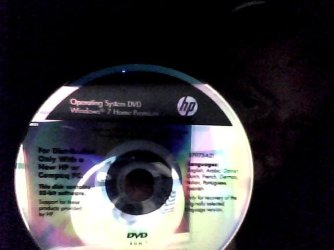
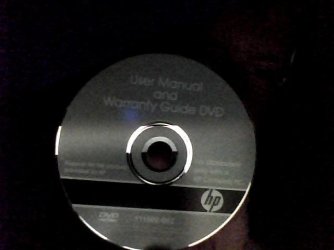
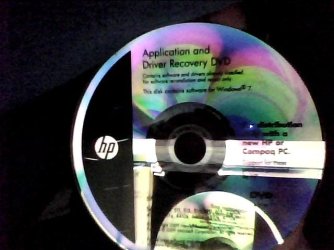
What does the install DVD say on it exactly, or post back a snap.


It is rare for HP to provide an Install DVD instead of or without the Recovery Disks. Did any other disks come with it?

Try booting it again by tapping the ESC BIOS Boot Menu key. Then wipe the HD before trying reinstall with this fantastic tutorial written at great effort by our own Barefooted-one: http://www.sevenforums.com/tutorials/91339-ssd-hdd-optimize-windows-reinstallation.html
 
Sorry for the poor quality of the images...
Will try reinstalling again...
 

Attachments

  • Photo_00002.jpg
    Photo_00002.jpg
    27.6 KB · Views: 80
  • Photo_00003.jpg
    Photo_00003.jpg
    19.1 KB · Views: 40
  • Photo_00004.jpg
    Photo_00004.jpg
    37.4 KB · Views: 39

My Computer

OS
Windows 7
thanks for your help, i have tried reinstalling and pressing esc when booting and after a couple of attemptes it has let me in to the install wizzard and is now installing, lets hope it completes with out errors.
 

My Computer

OS
Windows 7
reinstall with esc worked and it is now installing...
thanks for your help
 

My Computer

OS
Windows 7
Good to see you have it going and thanks for the update.
 

My Computer

Computer Manufacturer/Model Number
* BFK Customs *
OS
W 7 64-bit Ultimate
CPU
Intel Q9550 Yorkfield
Motherboard
ASUS P5Q Pro
Memory
8GB Dominator 8500C5D
Graphics Card(s)
ATI : XFX 5870
Sound Card
Realtek HD Audio 7-1
Monitor(s) Displays
1x 47" LCD HDMI & 3x 26" LCD HDMI
Screen Resolution
1920x1080P & 1920x1200
Hard Drives
1x 80GB Intel X25-M G2 SSD : 1x 500GB & 1x 640GB WD Caviar Black(s)
PSU
Corsair 620HX
Case
Cooler Master RC-690
Cooling
Tuniq Tower 120, 2x 140mm and 3x 120mm case fans
Keyboard
Microsoft 500
Mouse
Razer Diamondback 3G
Internet Speed
14 Mb/s
Other Info
1x Koutech 3Gb/s SATA HDD Hot Swap Rack
Wow, you hit the HP jackpot! That Install DVD is valuable, and if apps you need/want are indeed on the apps disk then you're all set. Hasta la vista, bloatware! :p

But I would browse for drivers if any are missing after install on the HP Support Downloads webpage for your model as they're likely to be newer. The installer is mostly driver-complete, with newer arriving quickly via optional Windows Updates.

Install updates and then programs slowly over time to gauge performance after each. Don't let any programs write themselves into msconfig>Startup as they become freeloaders on your RAM/CPU and can spy on you. I only allow AV and gadgets. http://www.sevenforums.com/crashes-debugging/70248-troubleshooting-msconfig.html

Use a lightweight free AV like MS Security Essentials which works perfectly with Windows 7 Firewall. http://www.microsoft.com/security_essentials/

When it is finished, clean and order the HD perfectly using state-of-the-art free CCleaner then Auslogics Disk and Registry defraggers monthly. CCleaner - Free software downloads and software reviews - CNET Download.com
Auslogics Disk Defrag - Reviews and free Auslogics Disk Defrag downloads at Download.com
Auslogics Registry Defrag - Free software downloads and software reviews - CNET Download.com

Then save a Win7 Backup image externally so you never have to reinstall again, just reimage the HD or replacement using DVD or Repair CD. http://www.sevenforums.com/tutorials/663-backup-complete-computer-create-image-backup.html
 
problem, big big problem.. install restarted the system and it went back to the invalid serial screen and then to a black screen again.. it is now shutdown, it did not work,,, what can i do help me with this please...
thanks
 

My Computer

OS
Windows 7
Did you wipe the HD first using tutorial I linked? This is important to overwrite boot sector code.

Clear the CMOS in BIOS: Clear CMOS - 3 Ways to Clear the CMOS - Reset BIOS

Set SATA controller in BIOS setup to AHCI.

Remove all but 2gb of RAM to try install.

If these fail, then contact HP Tech Support to find out what type of BIOS block they have that is blocking use of the provided Install DVD.
 
If you know someone with an actual Windows installer DVD that is the same version as what you had, that will let you use it to do the install that will work and you can use the factory activation key listed on the COA sticker attached to the PC by the manufacturer to do the activation.

If you can't find the exact version as yours, any version will do, you can use the info in this tutorial at the link below so you can create an "all-versions" installer that can be used to install the same version you had.

Windows 7 Universal Installation Disc - Create


Though it may take a robo-call to MS to sort the activation after the install.

Activate Windows 7 by Phone
 

My Computer

Computer Manufacturer/Model Number
* BFK Customs *
OS
W 7 64-bit Ultimate
CPU
Intel Q9550 Yorkfield
Motherboard
ASUS P5Q Pro
Memory
8GB Dominator 8500C5D
Graphics Card(s)
ATI : XFX 5870
Sound Card
Realtek HD Audio 7-1
Monitor(s) Displays
1x 47" LCD HDMI & 3x 26" LCD HDMI
Screen Resolution
1920x1080P & 1920x1200
Hard Drives
1x 80GB Intel X25-M G2 SSD : 1x 500GB & 1x 640GB WD Caviar Black(s)
PSU
Corsair 620HX
Case
Cooler Master RC-690
Cooling
Tuniq Tower 120, 2x 140mm and 3x 120mm case fans
Keyboard
Microsoft 500
Mouse
Razer Diamondback 3G
Internet Speed
14 Mb/s
Other Info
1x Koutech 3Gb/s SATA HDD Hot Swap Rack
ok, the only cd i have is the install dvd pictured...
how can i boot in to the install wizard to format the system and install windows, and also u say down ram to 2gb for the install, it has 4gb how do i remove 2gb of it as there is no ram cover on the computer, the back is one big cover.
 

My Computer

OS
Windows 7
ok i have managed to get it to boot in to the install
 

My Computer

OS
Windows 7
right i have managed to boot it in to the last install wizard from the install that failed in the post earlia and is not completing installation, lets hpe it works
 

My Computer

OS
Windows 7
Back
Top