HP quick launch mute button

madisonsexy86

New member
Local time
6:04 AM
Messages
8
My friend puts Windows 7 Ultimate on my computer and when I got it back, I noticed the my mute button was not turning orange when used, then I noticed my QuickPlay buttons didnt work at all. I read almost all the threads and was able to get my QuickPlay working again but for some reason cannot seem to find the right thread for my non orange mute button. I installed drivers from HP for vista and 7 and changed the compatibility to vista service pack 2 but light is still blue. Could somebody please help me? Bugs me that its not working. Oh yea, I have an HP Pavillion DV6000 series special edition. HP Pavilion dv6000 (GA449UA#ABA) Thats my product number.
 
Last edited:

My Computer

Computer Manufacturer/Model Number
HP Pavilion dv6000 (GA449UA#ABA
OS
Windows 7 Ultimate
Graphics Card(s)
NVIDIA GeoForce Go 6150

My Computer

Computer type
PC/Desktop
OS
Windows 10 Home x64
CPU
INTEL Core i5-750 Quad-Core 3.37GHz
Motherboard
ASUS P7P55D
Memory
HyperX Fury Black Series 8GB (2 x 4GB) 1866Mhz
Graphics Card(s)
EVGA GeForce GTX 750 Superclocked 1GB 128-Bit GDDR5
Monitor(s) Displays
LG 32MA68HY 32" IPS
Screen Resolution
1920 x 1080
Hard Drives
Samsung 840 Evo 120GB, SEAGATE 500GB Barracuda® 7200.12, SATA 3 Gb/s, 7200 RPM, 16MB cache
PSU
ANTEC TruePower New TP-550, 80 PLUS, 550W
Case
ANTEC Three Hundred Illusion
Cooling
COOLER MASTER Hyper 212 Plus, 4 x 120mm 1 x 140mm Noctua's
Internet Speed
85 + Mbps
Antivirus
Avast
Browser
Vivaldi
My friend puts Windows 7 Ultimate on my computer and when I got it back, I noticed the my mute button was not turning orange when used, then I noticed my QuickPlay buttons didnt work at all. I read almost all the threads and was able to get my QuickPlay working again but for some reason cannot seem to find the right thread for my non orange mute button. I installed drivers from HP for vista and 7 and changed the compatibility to vista service pack 2 but light is still blue. Could somebody please help me? Bugs me that its not working. Oh yea, I have an HP Pavillion DV6000 series special edition. HP Pavilion dv6000 (GA449UA#ABA) Thats my product number.
You need the latest Realtek audio drivers for that colour scheme to work. I have an HP and this problem mystified me when I first bought it. Just go to the realtek website and download the latest driver. In Win7 updating via the device manager also does the trick.
 

My Computer

Computer Manufacturer/Model Number
Too many to describe...
OS
Windows 7 x64 pro/ Windows 7 x86 Pro/ XP SP3 x86
Welcome to Seven Forums madisonsexy86. Have a look here and see if it helps:

Get HP Quick Launch Buttons in Windows 7

A Guy

Thank you for the welcome and response. I looked at the website you referred me to but it was specific if it was pertaining to the actual buttons you press with your finger or the the quick lauch for your toolbar to replace the pinning menu. I already got the toolbar quick launch buttons back correctly, but am having a problem with my button at the top of the computer.
 

My Computer

Computer Manufacturer/Model Number
HP Pavilion dv6000 (GA449UA#ABA
OS
Windows 7 Ultimate
Graphics Card(s)
NVIDIA GeoForce Go 6150
QUOTE]
You need the latest Realtek audio drivers for that colour scheme to work. I have an HP and this problem mystified me when I first bought it. Just go to the realtek website and download the latest driver. In Win7 updating via the device manager also does the trick.[/QUOTE]

Thank you for your help, and upon reading this I realized I did go to that website and was a litte confused on where to go, so I pressed on the hd audio codecs and downloaded the first one. Its still in my computer right now. I dont know if thats the right one or not. Could you explain the differences or something please? All other buttons that are supposed to turn colors work like caps lock still turns blue and my mouse pad deactivate button turns orange when I press it so I am really confused as to why the mute button wont. I tried calling technical support but I do not have an extended warranty so as usual it was......"however this, and however that." Thank you. Oh yea, I also tried the whole device manager thing like you suggested but I could not find any driver from realtek so I pressed the update button and it only had the three im missing under other devices but I cant find the correct one for that anyways. But my point is I dont think its there so I cannot update it through that unless its called something different.
 

My Computer

Computer Manufacturer/Model Number
HP Pavilion dv6000 (GA449UA#ABA
OS
Windows 7 Ultimate
Graphics Card(s)
NVIDIA GeoForce Go 6150
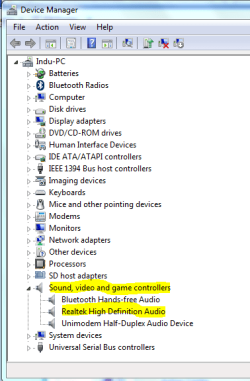
OK, first try the easy way. Go into device manager and update the audio driver there. Heres a walkthrough.

How To Update Device Drivers In Windows 7

You need to update the sound driver- realtek in this case.

Capture.PNG
 

My Computer

Computer Manufacturer/Model Number
Too many to describe...
OS
Windows 7 x64 pro/ Windows 7 x86 Pro/ XP SP3 x86
OK, first try the easy way. Go into device manager and update the audio driver there. Heres a walkthrough.

How To Update Device Drivers In Windows 7

You need to update the sound driver- realtek in this case.

View attachment 140362

Okay, so I went back to device managar and looked under sounds again. First time I was only looking for realtek and didnt read anything else. The only listed under that tab is something called Conexant High Definition Audio, so I updated it and it totally worked and you are super awesome. I am super stoked right now! Thank you so very very much. Its one less thing I gotta worry about
 

My Computer

Computer Manufacturer/Model Number
HP Pavilion dv6000 (GA449UA#ABA
OS
Windows 7 Ultimate
Graphics Card(s)
NVIDIA GeoForce Go 6150
Good one Bill :) Glad you got it sorted madisonsexy86. A Guy
 

My Computer

Computer type
PC/Desktop
OS
Windows 10 Home x64
CPU
INTEL Core i5-750 Quad-Core 3.37GHz
Motherboard
ASUS P7P55D
Memory
HyperX Fury Black Series 8GB (2 x 4GB) 1866Mhz
Graphics Card(s)
EVGA GeForce GTX 750 Superclocked 1GB 128-Bit GDDR5
Monitor(s) Displays
LG 32MA68HY 32" IPS
Screen Resolution
1920 x 1080
Hard Drives
Samsung 840 Evo 120GB, SEAGATE 500GB Barracuda® 7200.12, SATA 3 Gb/s, 7200 RPM, 16MB cache
PSU
ANTEC TruePower New TP-550, 80 PLUS, 550W
Case
ANTEC Three Hundred Illusion
Cooling
COOLER MASTER Hyper 212 Plus, 4 x 120mm 1 x 140mm Noctua's
Internet Speed
85 + Mbps
Antivirus
Avast
Browser
Vivaldi
Back
Top