HP Recovery CD fails! (help!)

joseph10444

New member
Member
VIP
Local time
7:56 AM
Messages
175
my laptop recently just started to fail with failure in the video card (l4d2 vertical bar crash and same iwth youtube)

and now i'm trying to recover by using HP Recovery discs, but it's not working!!!

It installs and then when it says "Customizing software" it just freezes and hard-resets itself.

then when i turn it back on, it says "Setup is preparing computer for first use" then the Welcome screen then an error message/sound -> "Windows could not complete the installation. TO install windows on this computer, restart the installation"

and then it shuts down and restarts itself. What is happening??

Is it possibly a hardware error? before the recovery i had video issues with computer constantly failing to load 3d games or even youtube at times.

if i tried with a downloaded Windows 7 installation would it work? Man i hoped it wouldnt end out like this
 

My Computer My Computer

Computer type
Laptop
Computer Manufacturer/Model Number
Y580
OS
Win7 Pro 64
CPU
i7-3610QM
Memory
8GB DDR3
Graphics Card(s)
GTX 660M
Screen Resolution
1920x1080
Mouse
G500s
Browser
Chrome
If your video card has failed what will a factory restore /recovery achieve?

Does your HP have a recovery partition with function key access at boot?
 

My Computer My Computer

Computer type
PC/Desktop
Computer Manufacturer/Model Number
Own build
OS
Windows 7x64 Home Premium SP1
CPU
Intel i7 2600k
Motherboard
ASUS P8Z68 Deluxe
Memory
G.Skill Ripjaws (DDR3-1600) 2x4GB
Graphics Card(s)
Nvidia GeForce GTS 450; Intel HD Graphics 3000(GT2+)
Monitor(s) Displays
Dell Ultrasharp IPS panel U2311H, Samsung SyncMaster P2350
Screen Resolution
1920x1080
Hard Drives
Samsung 850 Pro SSD 256GB, Samsung SSD 840 120GB, Seagates 1TB Barracuda ST31000528AS x2
PSU
Seasonic M12II 520W
Case
Lian Li Lancool PC-K60
Cooling
Case: 1x120mm, 3x140mm CPU: Hyper 212+
Keyboard
Logitech MK520 (wireless)
Mouse
Logitech MK520
Internet Speed
6-7 Mbps
Antivirus
Norton Security Premium, Malwarebytes on 2 (MSE on 3rd PC)
Browser
FireFox
Other Info
Audio: Logitech Z523 2.1
sorry i am not sure if it has failed, it just looks like it because it used to play L4D2 fine. one day it decides not to play.

yes it does have the function and before i tried that i tried the startup repair.
after that i tried changing the unattend.xml file (didnt change anything in the end)
and then someone recommended opening task mgr and closing the audit.exe

this time, i just closed the audit.exe and now Windows loads with a new problem.

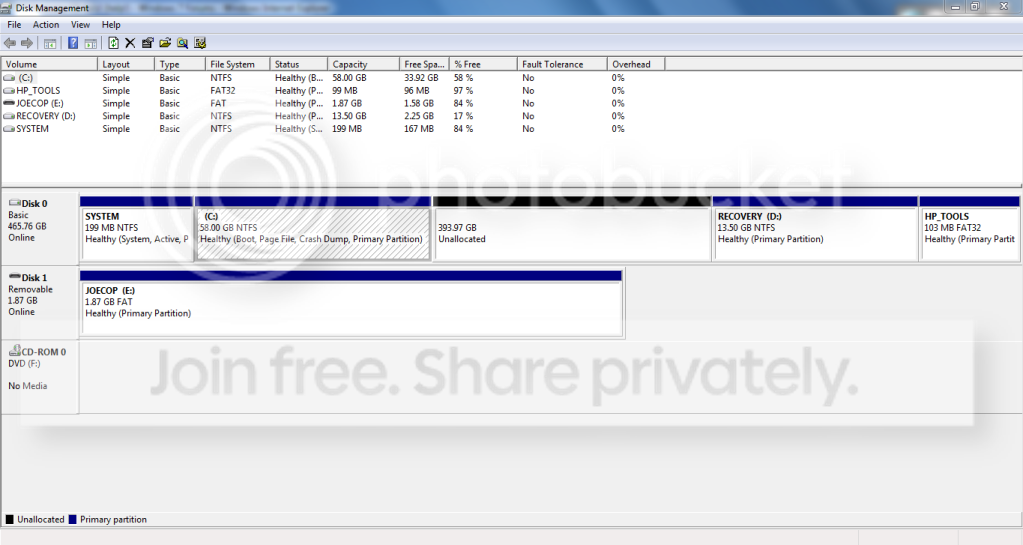
my c:\ partition is only 58 GB?? (it should be 451 GB) should i just extend the volume to the 394 GB that is unallocated right beside the c drive?

and what else should i look after to be safe? (from the error it seems that this is an incomplete OS as whenever i restart, the audit error comes up again (windows installation error ))
 

My Computer My Computer

Computer type
Laptop
Computer Manufacturer/Model Number
Y580
OS
Win7 Pro 64
CPU
i7-3610QM
Memory
8GB DDR3
Graphics Card(s)
GTX 660M
Screen Resolution
1920x1080
Mouse
G500s
Browser
Chrome
Assuming you can still access your PC.
Go to Diskmanagement
Use the snipping tool post a (full) screenshot of your HDD.
I don't recommend you do anything to your disk unless you feel very confident in what you're doing.
 

My Computer My Computer

Computer type
PC/Desktop
Computer Manufacturer/Model Number
Own build
OS
Windows 7x64 Home Premium SP1
CPU
Intel i7 2600k
Motherboard
ASUS P8Z68 Deluxe
Memory
G.Skill Ripjaws (DDR3-1600) 2x4GB
Graphics Card(s)
Nvidia GeForce GTS 450; Intel HD Graphics 3000(GT2+)
Monitor(s) Displays
Dell Ultrasharp IPS panel U2311H, Samsung SyncMaster P2350
Screen Resolution
1920x1080
Hard Drives
Samsung 850 Pro SSD 256GB, Samsung SSD 840 120GB, Seagates 1TB Barracuda ST31000528AS x2
PSU
Seasonic M12II 520W
Case
Lian Li Lancool PC-K60
Cooling
Case: 1x120mm, 3x140mm CPU: Hyper 212+
Keyboard
Logitech MK520 (wireless)
Mouse
Logitech MK520
Internet Speed
6-7 Mbps
Antivirus
Norton Security Premium, Malwarebytes on 2 (MSE on 3rd PC)
Browser
FireFox
Other Info
Audio: Logitech Z523 2.1
here is the photo

btw here's what's happening. the administrator account is mine now (although i would like to rename it :(.. )

and whenever the system starts, it keeps saying "Setup is preparing for first use" and then the error message of windows not being able to be installed comes up. i always have to close audit.exe. how can i fix this??

i also changed the admin's password so the computer assuming that the password is still "" tries to enter with that and it says "Password incorrect" and i ahve to enter mine. how can i prevent the computer from logging it in on its own as if it's its own account?

Capture.png
 

My Computer My Computer

Computer type
Laptop
Computer Manufacturer/Model Number
Y580
OS
Win7 Pro 64
CPU
i7-3610QM
Memory
8GB DDR3
Graphics Card(s)
GTX 660M
Screen Resolution
1920x1080
Mouse
G500s
Browser
Chrome
Somehow a large region of unallocated space has been created on your HDD.
Do you know how this happened?
Basically you can only have 4 primary partitions. Your HP was configured that way so you only have one decent size partition for your operating system, programs and data.
Now what you must not do is attempt to do create another partition with that unallocated space. That will turn your disk into a "dynamic" disk which is a pain in the neck to deal with.
Your C: partition needs to be extended back to the right into the unallocated space.

You should start by simply backing up all your data (personal files, photos etc.). Make an image if you know how to onto an external HDD of you current c: partition.
Deactivate any paid programs which allow you to reactivate later.


Your HDD has a recovery partition which you should be able to use to do a Factory restore/recovery which ideally puts the PC back in the condition when bought. Find out what the F (function key) for factory restore for your PC.

I am assuming that you never bought a retail operating system, just the one that came loaded on the PC.
 

My Computer My Computer

Computer type
PC/Desktop
Computer Manufacturer/Model Number
Own build
OS
Windows 7x64 Home Premium SP1
CPU
Intel i7 2600k
Motherboard
ASUS P8Z68 Deluxe
Memory
G.Skill Ripjaws (DDR3-1600) 2x4GB
Graphics Card(s)
Nvidia GeForce GTS 450; Intel HD Graphics 3000(GT2+)
Monitor(s) Displays
Dell Ultrasharp IPS panel U2311H, Samsung SyncMaster P2350
Screen Resolution
1920x1080
Hard Drives
Samsung 850 Pro SSD 256GB, Samsung SSD 840 120GB, Seagates 1TB Barracuda ST31000528AS x2
PSU
Seasonic M12II 520W
Case
Lian Li Lancool PC-K60
Cooling
Case: 1x120mm, 3x140mm CPU: Hyper 212+
Keyboard
Logitech MK520 (wireless)
Mouse
Logitech MK520
Internet Speed
6-7 Mbps
Antivirus
Norton Security Premium, Malwarebytes on 2 (MSE on 3rd PC)
Browser
FireFox
Other Info
Audio: Logitech Z523 2.1
Hello Joseph, have a look at this info below.


   Information

HP Recovery Center

Be advised that this will take the machine back to the point when you first took it of the box.
The "HP Recovery Center" will give you the option to send to backup anything you
don't want to lose, so have backup media available to use if you choose this option.

With the machine off press the power button, as soon as you do that start tapping the F11 key.

It may take several attempts to do this, if the first attempt fails, try again.

That should take you to the HP Recovery Center. When there just follow the prompts.

It is pretty much self explanatory. From the time you boot into F11 (not counting
any backups you choose to make) you should be back on a working desktop in about 30 minutes.

After it restarts just follow the prompts again to finish the process.

If your first option is system restore select no, which should take you to system recovery.

Here's some interesting info you may find useful and be sure to post back with any further questions you may have and to keep us informed.

After you have copied out or made back-ups of the data you need to save; if you can find an exact Windows version that the PC shipped with you can do a clean install using the activation key on the COA sticker attached to the PC though it may require a robo-call to MS to sort the OEM batch-key.

How to Activate Windows 7 by Phone


If you can't find an exact same version, you could use the info in this tutorial to create an "all Versions" installer of any version Windows installer, to install using the same method I posted above.

Windows 7 Universal Installation Disc - Create


After you have made backups of everything you care to save, the best method is to do a complete wipe (secure erase) of the entire Hard Disk Drive first, it over-writes everything, all the old Windows code including all the old drivers/programs, giving you the best possible space to install Windows to.

SSD / HDD : Optimize for Windows Reinstallation
 

My Computer My Computer

Computer Manufacturer/Model Number
* BFK Customs *
OS
W 7 64-bit Ultimate
CPU
Intel Q9550 Yorkfield
Motherboard
ASUS P5Q Pro
Memory
8GB Dominator 8500C5D
Graphics Card(s)
ATI : XFX 5870
Sound Card
Realtek HD Audio 7-1
Monitor(s) Displays
1x 47" LCD HDMI & 3x 26" LCD HDMI
Screen Resolution
1920x1080P & 1920x1200
Hard Drives
1x 80GB Intel X25-M G2 SSD : 1x 500GB & 1x 640GB WD Caviar Black(s)
PSU
Corsair 620HX
Case
Cooler Master RC-690
Cooling
Tuniq Tower 120, 2x 140mm and 3x 120mm case fans
Keyboard
Microsoft 500
Mouse
Razer Diamondback 3G
Internet Speed
14 Mb/s
Other Info
1x Koutech 3Gb/s SATA HDD Hot Swap Rack
sorry i am not sure if it has failed, it just looks like it because it used to play L4D2 fine. one day it decides not to play.

yes it does have the function and before i tried that i tried the startup repair.
after that i tried changing the unattend.xml file (didnt change anything in the end)
and then someone recommended opening task mgr and closing the audit.exe

this time, i just closed the audit.exe and now Windows loads with a new problem.

my c:\ partition is only 58 GB?? (it should be 451 GB) should i just extend the volume to the 394 GB that is unallocated right beside the c drive?

and what else should i look after to be safe? (from the error it seems that this is an incomplete OS as whenever i restart, the audit error comes up again (windows installation error ))

First BACKUP, BACKUP.

When you reload Windows with HP recovery, you were asked what size partition, you said 58 gb.

What type of HP Recovery are you using, Recovery Partition or Recovery DVD's?
 

My Computer My Computer

OS
ME/XP/Vista/Win7
Read my Post #6 again - I've stressed the importance of backup.

Then Disk management will give you the easy option to extend C: into the unallocated region (right click on C: from Disk management). Remember you can only have 4 primary partitions. Also, the factory restore may want the partitions back in the state they were in originally.

I strongly recommend against attempting the so called Clean Install at this stage. That is getting install disks from somewhere and using your COA sticker.
You are complicating your problem and it may not work.
(There is a gregrocker link to cleaning up HP bloatware which I can't find at the moment. You can do this later).
 

My Computer My Computer

Computer type
PC/Desktop
Computer Manufacturer/Model Number
Own build
OS
Windows 7x64 Home Premium SP1
CPU
Intel i7 2600k
Motherboard
ASUS P8Z68 Deluxe
Memory
G.Skill Ripjaws (DDR3-1600) 2x4GB
Graphics Card(s)
Nvidia GeForce GTS 450; Intel HD Graphics 3000(GT2+)
Monitor(s) Displays
Dell Ultrasharp IPS panel U2311H, Samsung SyncMaster P2350
Screen Resolution
1920x1080
Hard Drives
Samsung 850 Pro SSD 256GB, Samsung SSD 840 120GB, Seagates 1TB Barracuda ST31000528AS x2
PSU
Seasonic M12II 520W
Case
Lian Li Lancool PC-K60
Cooling
Case: 1x120mm, 3x140mm CPU: Hyper 212+
Keyboard
Logitech MK520 (wireless)
Mouse
Logitech MK520
Internet Speed
6-7 Mbps
Antivirus
Norton Security Premium, Malwarebytes on 2 (MSE on 3rd PC)
Browser
FireFox
Other Info
Audio: Logitech Z523 2.1
i did Backup all my personal files and everything to redownload when i reinstall windows.
it's just that windows isn't reinstalling... and it never gave me an option to set my C:\ drive size. i had a recovery cd process previously and it automatically partitioned my c to be 451 GB

this morning i activated windows through the phone and the sticker under the laptop and had a quick look at this thread on the newly installed computer itself and then i went to sleep mode. upon returning from sleep mode right now, i used the password i set on the administrator and it said "account has been disabled please contact administrator". i was surprised... so i shut it down

and now a worse problem, when i hit the powerbutton, the screen stays off. no hp logo, no bios access, screen is off. but the screen was working perfectly a few seconds ago! no cd access or anything. fan works, hp laptop light works, keyboard light works, cd drive opens but nothihng.
WTh is happening?

it doesnt matter if i do a recovery partition/cd or clean install, i need windows 7 back.
now i cant do that because of this retarded screen.
 

My Computer My Computer

Computer type
Laptop
Computer Manufacturer/Model Number
Y580
OS
Win7 Pro 64
CPU
i7-3610QM
Memory
8GB DDR3
Graphics Card(s)
GTX 660M
Screen Resolution
1920x1080
Mouse
G500s
Browser
Chrome
Unplug PC, press power button and hold to drain residual power, replug and Power On.

See if Win7 will startup. If not, tap F8 key repeatedly to access Repair console. Accept any offered Repair; if necessary boot back in to try Startup Repair from the Recovery Tools list repeatedly. SysRestore should be offered - if not try running it from list. http://www.sevenforums.com/tutorials/668-system-recovery-options.html

If not, reboot and press F11 key repeatedly to trigger Factory Recovery. Choose a full format destructive recovery which will wipe and reinstall all but the Recov partition (only Roadrunner can erase himself).
 
You should start by simply backing up all your data (personal files, photos etc.). Make an image if you know how to onto an external HDD of you current c: partition.
Deactivate any paid programs which allow you to reactivate later.

Your HDD has a recovery partition which you should be able to use to do a Factory restore/recovery which ideally puts the PC back in the condition when bought. Find out what the F (function key) for factory restore for your PC.
If it's F11 go for it. But remember to back up!

If it still balks extend your C: partition and try again.
 

My Computer My Computer

Computer type
PC/Desktop
Computer Manufacturer/Model Number
Own build
OS
Windows 7x64 Home Premium SP1
CPU
Intel i7 2600k
Motherboard
ASUS P8Z68 Deluxe
Memory
G.Skill Ripjaws (DDR3-1600) 2x4GB
Graphics Card(s)
Nvidia GeForce GTS 450; Intel HD Graphics 3000(GT2+)
Monitor(s) Displays
Dell Ultrasharp IPS panel U2311H, Samsung SyncMaster P2350
Screen Resolution
1920x1080
Hard Drives
Samsung 850 Pro SSD 256GB, Samsung SSD 840 120GB, Seagates 1TB Barracuda ST31000528AS x2
PSU
Seasonic M12II 520W
Case
Lian Li Lancool PC-K60
Cooling
Case: 1x120mm, 3x140mm CPU: Hyper 212+
Keyboard
Logitech MK520 (wireless)
Mouse
Logitech MK520
Internet Speed
6-7 Mbps
Antivirus
Norton Security Premium, Malwarebytes on 2 (MSE on 3rd PC)
Browser
FireFox
Other Info
Audio: Logitech Z523 2.1
i've tried the draining step over and over with no results :(
and i've tried tapping F8 (repeatedly) and F11 with no luck.
i also tried hitting ESC, then tapping F11 (when the hp boots up, u have to hit ESC to access options) but the screen just doesn't turn on!!

how can this be triggered by a software event? omg

btw i tried pluggin in an external monitor, but the monitor's screen just stays black. it shows that it's connected, but it's black.

i think it's the motherboard's fault. it was working one time, and it's not working any more after just a few seconds?
 
Last edited:

My Computer My Computer

Computer type
Laptop
Computer Manufacturer/Model Number
Y580
OS
Win7 Pro 64
CPU
i7-3610QM
Memory
8GB DDR3
Graphics Card(s)
GTX 660M
Screen Resolution
1920x1080
Mouse
G500s
Browser
Chrome
Do you have HD or CPU LED at all? Are fans turning?

Is it within a year of purchase as if so you are still covered by parts replacement warranty and tech support.
 
fans are turning, emitting medium-hot air from it.

i have no cpu led, but all i have is a power led, recharging led, and a harddrive led which fails to blink or even light up whenever i power on the computer

and my warranty ended just over a month ago. how lame is that... if the graphics card is fried, then since it's integrated, the motherboard has to go ... with a service fee and a parts fee.
 

My Computer My Computer

Computer type
Laptop
Computer Manufacturer/Model Number
Y580
OS
Win7 Pro 64
CPU
i7-3610QM
Memory
8GB DDR3
Graphics Card(s)
GTX 660M
Screen Resolution
1920x1080
Mouse
G500s
Browser
Chrome
EDIT!: graphics card isnt dead... i tried powering on countless times, and now when i removed the battery, the screen decided to turn on..

is teh battery screwed? anyway
I need to install a full version of windows fast!! then i can reactivate with my sticker product key

should i do a recovery from F11? but wouldnt this produce the same output as before with the cds? (where it didnt manage to finish with the OOBE audit.exe problme)
 

My Computer My Computer

Computer type
Laptop
Computer Manufacturer/Model Number
Y580
OS
Win7 Pro 64
CPU
i7-3610QM
Memory
8GB DDR3
Graphics Card(s)
GTX 660M
Screen Resolution
1920x1080
Mouse
G500s
Browser
Chrome
Thanks! Some of these posts helped me with my problem. Good luck, man!
 

My Computer My Computer

OS
Windows 7 Ultimate 32-bit
yeah im gonna try that the next time my laptop decides to show its screen again. shortly after the screen went on successfully, i opened an hd video (1280 x 720) and it decided to show the vertical bars.

the graphics card and motherbard is truely messed up and another 400$ to repair it isnt going to help at all.
now that the computer barely starts i am officially screwed
 

My Computer My Computer

Computer type
Laptop
Computer Manufacturer/Model Number
Y580
OS
Win7 Pro 64
CPU
i7-3610QM
Memory
8GB DDR3
Graphics Card(s)
GTX 660M
Screen Resolution
1920x1080
Mouse
G500s
Browser
Chrome
Have you tried the F11 or doesn't it work?
I would consider contacting HP and explaining that you are just out of warranty but that this sort of failure is a bit unfair for a relatively new HP product etc. etc.....
They may be sympathetic. In this country there is a consumer protection law which over rides the manufacturers warranty.

There is a non destructive way to attempt to boot directly into the recovery partition using Hiren's boot CD. Let me know if you want to try it.
 

My Computer My Computer

Computer type
PC/Desktop
Computer Manufacturer/Model Number
Own build
OS
Windows 7x64 Home Premium SP1
CPU
Intel i7 2600k
Motherboard
ASUS P8Z68 Deluxe
Memory
G.Skill Ripjaws (DDR3-1600) 2x4GB
Graphics Card(s)
Nvidia GeForce GTS 450; Intel HD Graphics 3000(GT2+)
Monitor(s) Displays
Dell Ultrasharp IPS panel U2311H, Samsung SyncMaster P2350
Screen Resolution
1920x1080
Hard Drives
Samsung 850 Pro SSD 256GB, Samsung SSD 840 120GB, Seagates 1TB Barracuda ST31000528AS x2
PSU
Seasonic M12II 520W
Case
Lian Li Lancool PC-K60
Cooling
Case: 1x120mm, 3x140mm CPU: Hyper 212+
Keyboard
Logitech MK520 (wireless)
Mouse
Logitech MK520
Internet Speed
6-7 Mbps
Antivirus
Norton Security Premium, Malwarebytes on 2 (MSE on 3rd PC)
Browser
FireFox
Other Info
Audio: Logitech Z523 2.1
Back
Top