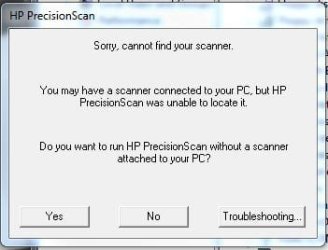
HP 5300C instructions for Windows 7 64
I looked for the instructions on
planetamd64.com to find their server down. I found a cached copy on google which I am posting below in case the condition is terminal (apologies for cross-posting if planetamd64.com recovers)
The first post is for 32bit systems (credit to J0lx). Scroll down for 64bit instructions (credit to golfslicer).
Make the HP Scanjet 5300C work with Vista RC2 32-bit Build 5744!!!!
1) Go to this link and download the official Hp 5300C WinXP 32-bit drivers
ftp://ftp.hp.com/pub/scanners/software/sj664en.exe
2) Run the .EXE
This extracts the files to the directory c:\sj664en
3) Edit the hp53sti.inf file
Find this line:
%HPSJ5300C%=SJ5300C.Par_NT,LPTENUM\VID_04E6PID_800000402ED4
Insert this line above it:
%HPSJ5300C%=SJ5300C.Usb.NT,USB\VID_03f0&PID_0701
The section should look like:
; Win2k Models
%HPSJ5300C%=SJ5300C.Usb.NT,USB\VID_03f0&PID_0701
%HPSJ5300C%=SJ5300C.Par_NT,LPTENUM\VID_04E6PID_800000402ED4
%HPSJ5300C%=SJ5300C.Par_NT,LPTENUM\Hewlett-PackardHewle76A2
4) save the file and exit
5) delete HP53STI.CAT
6) Install the driver
Open Device Manager
Find the HP Scanjet device in teh device tree (yellow exclamation mark no doubt)
Right click it
Select Properties
Select Update
Driver
Select Browse my comptuer
Select 'Let me pick'
Select 'Have disk'
In the dialog, type c:\sj664
Two unsigned HP Scanjet
5300c drivers will appear
Click on the top one
click next
it will tell you to reboot
7) reboot your PC
8) after rebooting, try it out!
I found this worked for me in PrecisionScan 3.03 TWAIN mode only. The HP-WIA part is broken in this scenario and does not appear in the WIA manager GUI at all.
Regards
j0lx
XP X64 Instructions
This is modified from a vista post, so most of the credit goes to that post that helped me make it work on xp x64.
Go to this link and download the official Hp
5300C WinXP 32-
bit drivers to use with x64, the one posted on hp's site does not work.
ftp://ftp.hp.com/pub/scanners/software/sj664en.exe
2) Run the .EXE and then cancel the install, don't install the
software, haven't been able to get it to work.
This extracts the files to the directory c:\sj664en
3) Edit the hp53sti.inf file
4. Find this line:
[Manufacturer]
%Mfg%=Models
5. Change it to all of the following, all 6 lines:
[Manufacturer]
%Mfg%=Models,NT.5.1, NTamd64
[Models.NTamd64]
%HPSJ5300C%=SJ5300C.Usb.NT,USB\VID_03f0&PID_0701
%HPSJ5300C%=SJ5300C.Par_NT,LPTENUM\VID_04E6PID_800000402ED4
%HPSJ5300C%=SJ5300C.Par_NT,LPTENUM\Hewlett-PackardHewle76A2
Don't change anything else.
Save.
6. delete HP53STI.CAT
Go to device manager and update
driver or add new hardware
select the directory these files are in
and it will install or select the scanner from the list.
now install a second party scanner program and it will work the one that comes with the installer for hp doesn't work.
so any second part scanner program should now work with the drive that this installs.